Color by Number for Adults
- 2.61K
- 4.4
- Installs
- 1.00M
- Price
- Free

Screenshots
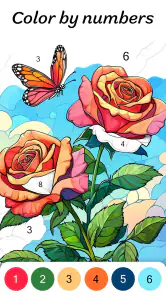

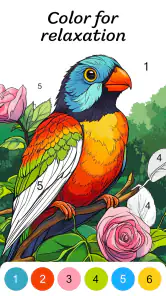
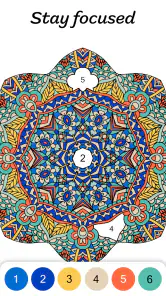
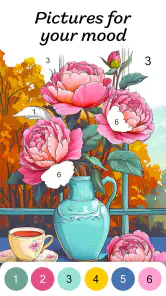


Analysis by Reviewed
For a short break that feels more focused than scrolling, I like having a simple coloring task to return to. Color by Number for Adults is a digital coloring app from Veraxen Ltd. that suits that sort of pause: you choose an image, match numbered areas to colors, and work through the picture at your own pace. It is free to install, though some in-app purchases range from $0.99 to $164.99 per item, so I would check purchase prompts before treating every option as included.
A comfortable first session
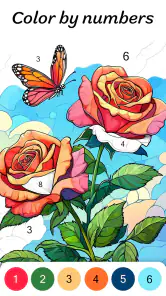
The basic routine is easy to understand, which matters when I want to relax rather than learn a complicated creative tool. I pick an image, tap the matching color, then fill the marked sections. The number system takes away the pressure of choosing a palette or drawing clean outlines, so the satisfaction comes from gradually seeing the picture emerge. That makes it a better fit for a few quiet minutes than an app built around making art from a blank canvas.
For an everyday example, I might open it while waiting for an appointment or settle into a short session after dinner. I can stop when I need to and return when I have another spare moment; the numbered structure gives me a clear next step instead of asking me to remember a complicated process. If I want to make the habit stick, I choose a manageable picture for a quick break and save more detailed work for a longer, less distracted stretch.
Choosing a session that fits your day
The choice of picture shapes the whole session more than it might seem at first. If I have only a brief wait, I look for something that feels manageable rather than choosing the most detailed image simply because it catches my eye. A picture with many small regions can turn a five-minute pause into a task I feel I ought to finish. When I have a longer, quieter window, that same detail can be the appeal: it gives me a steady sequence of small decisions without requiring me to invent the image myself.
This also answers a practical question: does the app work if I cannot finish a picture in one sitting? Its numbered format makes returning to an unfinished image feel straightforward, because the remaining areas are still part of the same clear task. I would not treat every session as a completion challenge. Stopping at a natural point helps keep the activity relaxing instead of turning it into another item on a to-do list.
Where it sits among coloring apps
Compared with freehand drawing apps, this is deliberately guided: it is not the place I would go to sketch an original character, experiment with brushes, or learn color theory. Compared with paper coloring books, it avoids needing pencils and a table, but it also loses the feel of physical materials. The trade-off is the point. If matching colors and watching a finished image take shape sounds calming, the format works; if you want complete creative control, a drawing app or a real coloring book may be more rewarding.
The app is in the Art & Design category, has a Teen content rating, and runs on devices using OS version 9 or later. Its current version is 3.2.2. It has a 4.4 average from around 23,000 ratings, with over 1 million installs, which suggests the format has found a substantial audience without making it the right choice for everyone.
More From Our News Desk

Clash of Clans Is Won Between the Battles

Android Auto Makes the Case for Quieter Car Software

MobiOffice: Transforming Mobile Productivity with Seamless Integration

EA SPORTS FC™ Mobile Soccer: Redefining Mobile Sports Gaming

How Microsoft OneDrive Became a Mobile Productivity Giant

How Google Translate Breaks Language Barriers Effortlessly
Discovering the Joy of Coloring
When I first stumbled upon Color by Number for Adults, I was skeptical. Could an app really replicate the tactile satisfaction of coloring on paper? Spoiler alert: it does, and then some! The app offers a vast array of images, from intricate mandalas to serene landscapes, all waiting to be brought to life with your choice of colors.
Getting Started
Diving into the app is a breeze. Upon opening, you're greeted with a gallery of stunning artwork, each image tagged with a difficulty level. This feature is a game-changer for those days when you need a quick coloring fix or when you’re ready to tackle a more intricate masterpiece. Plus, the app's user interface is super intuitive, making navigation a piece of cake.
The Coloring Experience
What truly sets this app apart is the actual coloring experience. Remember those paint-by-number kits? This is the digital version on steroids! Each section of the image is marked with a number, and your task is to match it with the corresponding color from the palette. It’s simple yet incredibly satisfying. And here's the kicker: the app provides a relaxing soundtrack that plays in the background, enhancing the zen-like atmosphere.
Making sound and screen choices
The soundtrack can help make a session feel more settled, but I would not assume it suits every place or mood. If I am coloring in a waiting room or beside someone who is resting, I prefer to keep the experience quiet and let the numbered task provide the focus. At home, the music may be welcome; in a shared space, silence is the more considerate choice. This is a small adjustment, but it changes whether the app feels like a private wind-down or something I can use unobtrusively in public.
Screen-based coloring is convenient, yet it asks for a different kind of attention from paper. A phone is easy to carry, but the display and tapping can feel less comfortable than pencils for someone who wants a long, hands-on activity. I see this app as a useful companion for short gaps rather than a universal replacement for a coloring book. If I know I want to spend a long evening making marks freely, physical supplies or a drawing tool give me a different sort of control.
Features that Stand Out
One of my favorite features is the daily free images. Every day, you get new artwork to explore without spending a dime. It's like opening a present each morning! Moreover, the app allows you to save your completed masterpieces or share them directly to your social media platforms, so you can show off your skills to friends and family.
Making a Repeatable Routine
I get more from the app when I treat it as a low-pressure routine rather than a project I must finish. A useful pattern is to start with a simpler picture when I have only a few minutes, then pick a more detailed one when I can give it sustained attention. Difficulty labels help with that choice, but they are a guide, not a promise that every image will take the same effort. I also find it sensible to pause before beginning a complex picture if I am likely to be interrupted; returning to a clear numbered task is easy, but frequent interruptions can make a relaxing session feel fragmented.
For experienced users, the best “shortcut” is usually a habit, not a hidden tool: settle in, choose one color, and work through its marked areas before switching to the next. That keeps the task orderly and reduces the feeling of jumping around the image. If a section is hard to spot, I slow down and scan the picture rather than tapping randomly. This is less flashy than a clever feature, but it protects the calm rhythm that makes number coloring appealing in the first place.
Small habits that make coloring smoother
I also find it useful to decide what I want from a session before opening an image. If the goal is to settle my attention, I choose a picture and stay with it rather than browsing repeatedly for a supposedly perfect one. If I am short on time, I accept that I may only color a portion. This avoids turning the gallery into a distraction of its own and makes the activity feel more intentional.
Working color by color can be a tidy approach, but it is not a rule I would force on every image. If I notice myself losing the thread, I return to one color and clear its visible sections; if that starts to feel monotonous, I shift attention to another part of the picture. The useful point is to keep a simple rhythm, not to optimize every tap. That is the kind of repeatable habit that experienced users can build without needing extra controls or complicated techniques.
Settings, purchases, and practical limits
I would check the available settings at the start of a session, especially if I prefer coloring quietly or want to adjust the app’s presentation to suit a particular moment. The soundtrack can add atmosphere, but it will not suit every setting: on a commute, in a waiting room, or beside someone who is sleeping, silence may be more considerate. I would also look over purchase choices before exploring paid content. The app is free, but its in-app purchases span from $0.99 to $164.99 per item, a wide enough range that I would avoid tapping through checkout screens casually.
One practical question is whether this can replace a conventional coloring book. For convenience, yes: it gives me a portable, ready-to-use activity without carrying supplies. For texture, freedom, or a sense of making something entirely my own, no. Another is whether it suits beginners; the numbered method is approachable, while people who already enjoy drawing may find the guided choices restrictive. It is also not my pick when I want a game with strategic decisions or a creative app with precise control over every mark.
Who will enjoy it—and who may not
I would recommend it to someone who wants a guided creative break, especially if choosing colors from scratch feels like work rather than fun. It is also a reasonable choice for a person who likes visible progress: each filled region contributes to an image that gradually becomes complete. The structure can be reassuring when I have low energy and want an activity with a clear next move.
I would steer away from it if the main appeal of coloring for you is making unusual color choices, changing outlines, or creating something that does not follow a template. The same numbered guidance that lowers the barrier to starting also narrows the artistic freedom. Someone seeking a demanding puzzle may find the task too repetitive, while someone looking to learn drawing techniques will get more from an app built around sketching and tools. The right comparison depends on whether you value ease and completion or control and experimentation.
Why You Should Try It
If you're looking for a way to unwind and tap into your creative side, Color by Number for Adults is a must-try. It's more than just an app; it's a therapeutic escape from the hustle and bustle of daily life. Whether you're an art enthusiast or just someone seeking a new hobby, this app caters to all. Plus, the sense of accomplishment you feel upon completing a piece is second to none.
In conclusion, Color by Number for Adults is a delightful blend of nostalgia and innovation. It's perfect for those moments when you need a digital detox or just some "me-time." So, grab your phone, download the app, and let your inner artist shine! Trust me, you won't regret it.
My verdict after settling into it
With a 4.4 average and around 2,600 written reviews, the app has plenty of visible feedback from other users, but I would still judge it by the kind of activity I actually want. It is best for someone who likes guided, bite-sized coloring, appreciates a growing sense of completion, and does not mind repeating a simple tap-and-match action. Someone who wants open-ended drawing, tactile supplies, or a more challenging puzzle should look elsewhere. For me, its strongest quality is how little effort it takes to begin; its main limitation is that the same structure that makes it soothing can become repetitive. Used in short sessions, that balance works well.
Color by Number for Adults Frequently Asked Questions
Does Color by Number for Adults offer a relaxing experience?
Color by Number for Adults is presented as a relaxing oil-painting coloring game, with a guided process that lets you focus on filling in sections rather than planning an image from scratch. It can suit a quiet break or a casual creative session, though how calming it feels depends on your personal preferences and the designs you choose.
Is Color by Number for Adults appropriate for teens?
The app is rated Teen, so it may be worth checking that age guidance when deciding whether it is suitable for someone in your household. Its central activity is coloring images by number, and the guided format is designed for casual creative use. Families can consider the rating alongside their own preferences before downloading.
Is Color by Number for Adults suitable for beginners?
Yes. The number-guided format makes the app approachable even if you have little or no coloring experience. Each page is split into numbered areas, and the palette helps you match colors to those sections, so you can focus on filling in the picture rather than choosing every color yourself. Designs vary in complexity, giving users different styles and levels of detail to explore.
What is Color by Number for Adults?
Color by Number for Adults is a mobile app designed for stress relief and relaxation through coloring. It provides a wide variety of intricate designs and patterns that users can color by following a simple number system. This app is tailored for adults looking for a creative outlet and a way to unwind after a long day. Its store description presents it as a relaxing oil-painting coloring game, making it a good fit for casual creative breaks.
How does Color by Number for Adults work?
The app features a simple interface where each coloring page is divided into numbered sections. Users can select a color from the palette, which corresponds to a number, and fill in the sections. The app provides a satisfying way to complete beautiful artworks without needing advanced artistic skills, making it accessible to everyone. The process is guided, so you can work through a picture one color at a time.
Pros
- Relaxing and therapeutic coloring experience.
- Wide variety of images to choose from.
- Intuitive and user-friendly interface.
- Offline mode available for coloring anywhere.
- Regular updates with new pictures.
Cons
- Can become repetitive over time.
- Ads can be intrusive during use.
- Limited features without premium version.
- Requires frequent internet connection for updates.
- Some images may be too simple for advanced users.
- Category
- Art & Design
- Version
- 3.2.2