

Collect - Settlement Finder
- 302.00
- 4.7
- Installs
- 100.00K
- Price
- Free

Screenshots


Analysis by Reviewed
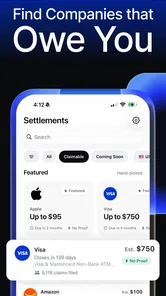
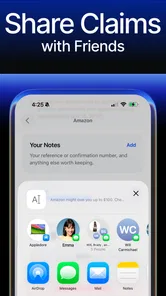
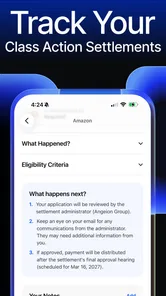
When I first opened Collect - Settlement Finder, I immediately understood its appeal: it is a finance app built around finding class action settlement money that may be available to you. Instead of treating legal notices as something to ignore, the app gives that process a more approachable starting point. Its store summary says users can file claims in minutes, but my interest is less about the speed of that promise and more about whether the app makes an unfamiliar financial task easier to manage.
This is a free app from Ferrix Labs, rated for Everyone, and it has already attracted a 4.7 average from around 8,600 ratings. It is available for Android devices running version 9 or later, with version 2.7.4 listed as the current release. Those details make it accessible to a broad range of phone users, although the presence of in-app purchases means “free” should be understood as free access rather than a guarantee that every part of the experience costs nothing.
How Collect - Settlement Finder fits into the claims process
The app’s central job is to help people discover settlement opportunities and submit claims. That sounds simple, but the real difficulty with class action settlements is usually not finding a button marked “claim.” It is recognizing which notices apply to your own history, understanding the eligibility wording, locating the required information, and keeping track of what you submitted. A focused tool can be useful here because it puts attention on a task most people rarely perform.
I would not think of it as a replacement for legal advice or as a promise of payment. A settlement claim still depends on the rules of the individual case, the deadline, the information requested, and the administrator handling that matter. The app can make the discovery and filing journey more convenient, but it cannot turn an ineligible person into an eligible claimant. That distinction is important before you spend time reviewing opportunities.
The short description, “Collect,” is deliberately brief, while the fuller summary explains the settlement-finding purpose. In practice, that means a new user should approach the app with a clear question: “Could one of these claims apply to me?” rather than expecting a general personal-finance dashboard, budgeting system, investment tool, or credit-monitoring service. Its value is narrow, and that narrowness is also what makes it easier to understand.
What the free entry point means
The app is listed as free, so you can begin without paying an upfront purchase price. That matters for this category because many people will be curious but uncertain whether any settlement will be relevant to them. A free starting point lowers the risk of exploring the service, especially when there is no guarantee that a submitted claim will result in money.
There are also in-app purchases priced from $12.99 to $34.99 per item. I would treat those purchases carefully rather than assuming they are automatically worthwhile. The existence of a paid option does not establish that a user needs it to file every claim, nor does it establish that paying improves eligibility or guarantees a larger settlement. Before purchasing anything, I would read the exact description shown inside the app and compare that cost with the realistic value of the claim being considered.
More From Our News Desk

 Instagram
Instagram’s Power Comes From Its Place in Your Phone
A close look at how Instagram turns Meta’s reach, recommendation systems and everyday camera habits into durable platform power—and what that costs users.

 Gmail
GmailGmail in a Busy Inbox: Who Benefits Most?
From first account to crowded workday, Gmail earns its place through dependable search and flexible sorting—but its best fit depends on how much inbox maintenance you can tolerate.

 Prime Video
Switching to Prime Video: What Changes in Your Viewing Routine
Prime Video can make a compelling second home for streaming, but switching means learning a different catalog, rental layer, and route from browsing to playback.

 Universal TV Remote Control
Universal TV Remote Control Works Best as a Reliable Backup
A phone remote earns its place through quick setup and reliable habits. Here is how to get more from Universal TV Remote Control—and where its limits show.

 Weather - By Xiaomi
Weather by Xiaomi Review: Clear at a Glance, Less Clear Up Close
Xiaomi’s weather app makes everyday forecasts quick to scan, but its calm surface can leave useful details and recovery paths harder to find than they should be.

 X
XX Under Pressure: Can It Recover When Posting Goes Wrong?
A resilience-focused review of X, examining setup, mistaken posts, interruptions, weak connections, and the gaps that matter when recovery needs to be dependable.
Latest News



This creates an important difference between free access and paid value. Free access can be useful for checking whether the app fits your needs and for reviewing the opportunities it presents. Paid value only makes sense if the purchase provides a clearly explained convenience or service that saves you meaningful effort. If the benefit is vague, I would stay with the free route and avoid paying simply because the app presents an upgrade at the moment I am eager to complete a claim.
What you should prepare before filing
One practical way to use the app is to gather likely claim information before starting. Think about old accounts, purchases, subscriptions, devices, or services that may relate to a notice. You do not need to guess your eligibility perfectly in advance, but having a rough timeline can make the screening process less frustrating. I would also keep relevant email confirmations, invoices, account records, and addresses available if the claim instructions request them.
A useful habit is to separate “this sounds familiar” from “I can support this with a record.” Settlement notices often use specific eligibility periods and definitions. Recognizing a company’s name is not enough. If a claim asks for dates or proof, a quick search through your own records before submitting can reduce mistakes and prevent you from relying on memory alone.
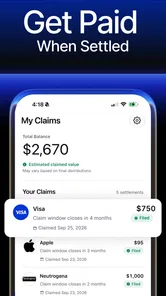
Another non-obvious tip is to keep a simple personal log of claims you submit. Record the settlement name, the date you filed, the email address used, and any confirmation information the app or claim page provides. This is especially helpful when several opportunities look similar. It also gives you a way to distinguish a completed submission from one that was only reviewed or started.
A realistic everyday use case
Imagine that I am clearing old email after switching phones and notice several messages about consumer settlements. Normally, I might delete them because the language is dense and the deadlines are easy to overlook. With Collect - Settlement Finder, I could use the app as a screening point, compare the listed opportunity with my own records, and decide whether the claim appears relevant before investing more time.
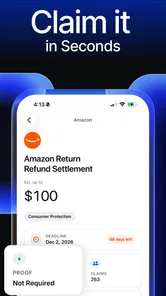
If the opportunity seems applicable, I would read every eligibility condition rather than submitting automatically. I would check whether the dates match my experience, whether the requested details are available, and whether the payment method or claim requirements are acceptable to me. After filing, I would save the confirmation and note the expected next step if one is shown. The app is most useful in this scenario as an organizer and discovery aid, not as a shortcut around the settlement’s rules.
Where the app can save effort
The strongest potential benefit is attention. Settlement information is scattered across notices, websites, emails, and legal language that many people do not routinely follow. A dedicated finance app can bring that subject into one place and encourage a regular check rather than relying on chance. For someone who has never filed a claim, a guided mobile workflow may feel less intimidating than searching the web for every possible case independently.
It can also help users who are comfortable with phones but not with legal terminology. A focused interface may make the first step feel manageable, especially when the alternative is opening several pages and trying to decide whether they are official, relevant, or already closed. Still, I would verify important details against the settlement instructions before submitting personal information or making a payment.
The app’s audience size is another sign that the concept has found interest: it has more than 50,000 installs and 290 written reviews. I would not interpret those figures as proof that every claim experience is smooth, but they do suggest that the app is not an obscure experiment with no visible user adoption. The 4.7 average is encouraging, while the relatively smaller number of written reviews means I would still judge the app by its actual workflow and the clarity of its purchase prompts.
Tradeoffs compared with doing everything yourself
The usual alternative is manual searching. You can look for settlement notices through search engines, email alerts, consumer websites, or official case pages. That approach may give you more control over the source information and may reduce dependence on one app’s selection process. The downside is time: you must identify relevant cases, check whether they are active, read eligibility rules, and track deadlines yourself.
Collect - Settlement Finder is more convenient when your main problem is discovery and organization. Manual research may be better when you want to inspect the original legal notices directly or when a claim involves an unusual situation that requires careful interpretation. I would use the app to surface possibilities, then use the official instructions for the final decision. That two-step approach balances convenience with caution.
There is also a privacy and trust consideration whenever a finance app is involved in claims connected to your consumer history. I would avoid entering information that is not required for the specific claim, and I would be especially cautious about sharing sensitive details before understanding why they are needed. The app’s purpose makes personal information relevant, but relevance does not mean every requested detail should be supplied without thought.
The paid layer is the clearest value tradeoff. Someone with plenty of time may prefer to research and file claims independently, making a purchase difficult to justify. Someone who regularly misses deadlines or finds settlement language confusing may value convenience more highly. The right choice depends on the service described at the purchase screen, not on the hope that paying will change the outcome of a claim.
Who is likely to get the most from it
I see the best fit as a person who wants a simple way to look for settlement opportunities but does not want to monitor scattered sources manually. It may also suit users who are comfortable completing forms on a phone and who are willing to read eligibility conditions carefully. The Everyone rating and support for Android version 9 or later make the basic audience broad, so this is not limited to specialist finance users.
It is particularly useful for people who tend to overlook legal notices in email or who remember that they bought a product but cannot recall whether a related settlement exists. The app gives that curiosity a practical destination. It can also be helpful for households where one person manages digital paperwork and wants a repeatable way to review possible claims.
I would skip it if you expect guaranteed payouts, instant money, or a complete financial-management system. It is not the right tool for budgeting, investing, debt planning, or tax preparation. I would also skip paid features if their explanation does not clearly show what extra work they handle and why that work is worth the stated price. A free discovery tool is easy to try; an unclear purchase is easy to regret.
How I would use it without wasting time
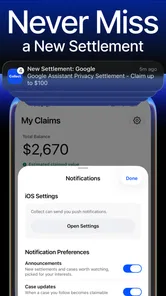
My workflow would begin with a short review session rather than opening the app whenever I receive a notification. I would examine each opportunity, remove anything that clearly does not match my history, and create a small shortlist. For each remaining item, I would check the official eligibility wording, gather supporting records, and file only when the details are accurate.
I would never submit multiple claims for the same matter just because a notice appears in more than one place. Duplicate submissions can create confusion and may conflict with the claim’s instructions. I would also avoid rushing through a form simply because the app emphasizes speed. “Minutes” can describe the act of completing fields, but the responsible part is deciding whether those fields are truthful and whether the case actually applies.
Finally, I would review the purchase screen with the same care as the claim screen. If a paid item costs from $12.99 to $34.99, I would ask what concrete task it covers, whether that task is optional, and whether I could complete it myself using the official claim instructions. That simple pause protects the app’s free-access advantage while keeping paid value tied to a real need.
My verdict on the value
After looking at the app as a practical finance tool, I think its appeal comes from focus rather than breadth. It takes a neglected corner of personal finance—finding and filing settlement claims—and makes it the center of the experience. That is useful for people who want help discovering opportunities, but it does not remove the need for judgment, record-keeping, or careful reading.
The free price makes trying it reasonable, while the in-app purchases require a more individual decision. I would not pay based only on the possibility of receiving settlement money. I would pay only if the specific purchase offers a clearly stated convenience that saves me enough time to justify the cost, and only after checking that it is not required merely to explore or submit a claim.
My recommendation is to try the free access first, use it as a discovery and organization aid, and verify the final details through the relevant settlement instructions. For a busy user who routinely misses these opportunities, that can be worthwhile. For someone who prefers complete control, already tracks settlements independently, or wants broader financial tools, manual research or a different finance app may be the better choice.
Ferrix Labs has positioned this as a specialized, approachable app rather than an all-purpose money manager. In my view, that specialization works as long as expectations stay realistic. Collect - Settlement Finder can help you notice and act on possible claims, but the real value comes from using it thoughtfully: screen carefully, protect your information, document what you submit, and treat every paid option as a separate value decision.
Collect - Settlement Finder Frequently Asked Questions
Is Collect - Settlement Finder free to download, and are there optional purchases?
Collect - Settlement Finder is free to download, so you can explore its settlement-finding features without paying for the initial download. The app also offers in-app purchases priced from $12.99 to $34.99 per item. Check the purchase details in the app before confirming anything, and distinguish optional app purchases from any terms or fees described in an individual settlement’s official claim process.
Who makes Collect - Settlement Finder, and which devices can run it?
Collect - Settlement Finder is a finance app from Ferrix Labs. It is rated for Everyone and requires Android 9 or later to install. Before downloading, check that your device meets that minimum software requirement and that you are getting the app through a trusted app store. Keeping your device and operating system updated is also a sensible step when using an app to organize financial or claim-related information.
What is Collect - Settlement Finder, and how does it work?
Collect - Settlement Finder is designed to help users discover consumer settlement opportunities that may apply to them. After opening the app, you can browse available cases, review basic eligibility information, and examine filing deadlines and claim instructions. It is primarily an information and organization tool, so you should read each settlement’s official terms carefully before submitting any personal information or claim.
Can Collect - Settlement Finder guarantee that I will receive settlement money?
No. The app cannot guarantee that you qualify for a settlement or that your claim will be approved. Eligibility depends on the official case requirements, the information you provide, and the final review conducted by the settlement administrator. Even when a claim is accepted, payment amounts can vary depending on the number of valid claims, available funds, and the settlement agreement.
Is Collect - Settlement Finder safe to use?
The app can be useful for finding and tracking settlement information, but users should still take normal privacy precautions. Before entering sensitive details, confirm that the claim website and settlement administrator are legitimate, review the app’s privacy policy, and avoid sharing passwords, banking credentials, or unnecessary identity documents. Official settlement notices should always be checked independently when possible.
Pros
- Quickly locates nearby settlements using map-based search.
- Useful filters help narrow results by region
- era
- or settlement type.
- Detailed entries can support travel planning and historical research.
- Simple interface makes browsing locations easy on mobile devices.
- May reveal lesser-known archaeological and historical sites.
Cons
- Coverage and accuracy may vary between countries and regions.
- Some entries may lack photos
- dates
- or detailed historical context.
- Map features can be less useful with weak internet connectivity.
- Remote sites may have limited access or incomplete visitor information.
- Frequent travelers may find the app’s niche focus too narrow.











