

Collaboration Center
- 5.00
- 3.8
- Installs
- 10.00K
- Price
- Free

Screenshots
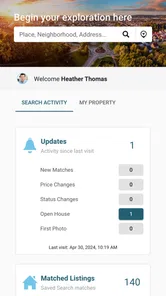
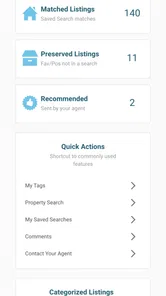

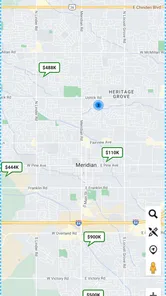
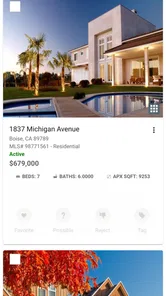

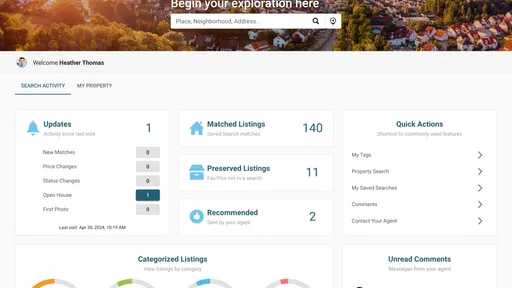
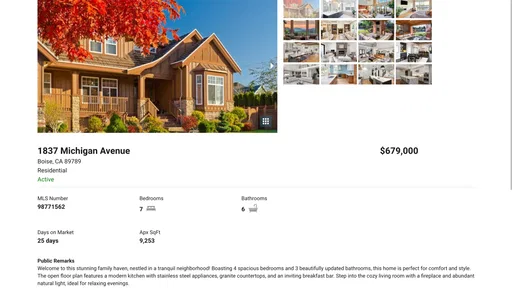
Analysis by Reviewed
Finding a home is rarely a one-person task. Even when one person handles the search, another may need to compare options, check details, share feedback, or help decide which listing deserves a closer look. Collaboration Center is a free House & Home app from IntercontinentalExchange, Inc that approaches the process from that shared-work angle. I found its main appeal in the idea of keeping home-search conversations and decisions together instead of scattering them across messages, notes, screenshots, and separate property-search tools.
The app is built around collaboration rather than presenting itself as a complete replacement for every property platform. That distinction matters. If you want a simple way to browse homes alone, a conventional real-estate search service may feel more immediately familiar. If you are comparing homes with a partner, family member, roommate, or another person involved in the decision, Collaboration Center has a more focused reason to exist. My overall impression is that it is most interesting when the home search has become a shared project and the usual back-and-forth is starting to feel disorganized.
How Collaboration Center fits into a home search
I find Collaboration Center most useful once a home search has become a shared decision rather than a solo browsing session. In this section, I’d focus on the practical handoff between discovering a possible home and getting everyone’s perspective, since that is where a collaboration tool can reduce confusion. A simple rule—use the shared space only for candidates the group is genuinely willing to discuss—can keep the process focused.
A free starting point with a clear purpose
There is no purchase price attached to the app: Collaboration Center is free to download and use as an entry point. That makes it easy to try without turning the decision into a financial commitment. I appreciate that distinction because a collaboration tool should prove its usefulness through smoother coordination, not through a paid upgrade that users must justify before they understand the workflow.
The free access does not automatically make the app valuable for everyone. Its usefulness depends on whether you actually need to work with other people while looking for a home. Someone casually browsing listings may not gain much from adding another app to the routine. A couple narrowing down neighborhoods, however, can benefit from having a dedicated place for the shared process rather than relying on a long chat thread.
The app carries an Everyone content rating, so it is positioned as a broadly accessible household tool rather than something aimed at a restricted audience. It was released on June 21, 2024, and the current version is 1.9.0. Those details suggest a relatively recent product that is still developing, so I would approach it as a focused collaboration utility rather than a mature, all-purpose home-buying system.
What the app does well in practice
The strongest idea here is separation of roles. A home search often involves one person who notices listings first, another who cares about commute or layout, and someone else who remembers practical questions. A shared workspace can make those different perspectives easier to handle. Instead of asking, “Which house was that?” several times a day, the group can work from a common context.
More From Our News Desk

 Gmail
GmailGmail in a Busy Inbox: Who Benefits Most?
From first account to crowded workday, Gmail earns its place through dependable search and flexible sorting—but its best fit depends on how much inbox maintenance you can tolerate.

 Prime Video
Switching to Prime Video: What Changes in Your Viewing Routine
Prime Video can make a compelling second home for streaming, but switching means learning a different catalog, rental layer, and route from browsing to playback.

 Universal TV Remote Control
Universal TV Remote Control Works Best as a Reliable Backup
A phone remote earns its place through quick setup and reliable habits. Here is how to get more from Universal TV Remote Control—and where its limits show.

 Weather - By Xiaomi
Weather by Xiaomi Review: Clear at a Glance, Less Clear Up Close
Xiaomi’s weather app makes everyday forecasts quick to scan, but its calm surface can leave useful details and recovery paths harder to find than they should be.

 X
XX Under Pressure: Can It Recover When Posting Goes Wrong?
A resilience-focused review of X, examining setup, mistaken posts, interruptions, weak connections, and the gaps that matter when recovery needs to be dependable.

 Clash of Clans
Clash of Clans Is Won Between the Battles
Its raids are quick; its community is a long-term project of coordination, teaching, rivalry, and shared responsibility—with all the friction that entails.
Latest News



That common context is especially useful when the search extends over several weekends. Early enthusiasm tends to produce a pile of saved links and screenshots. Later, the differences between properties become harder to remember. A collaboration-focused app can help turn that pile into a decision process: identify the homes worth discussing, record reactions while they are fresh, and return to the shortlist when everyone is available.
One of my favorite practical uses is the “second opinion” workflow. I can imagine one person doing the initial search during a lunch break, then bringing the most promising options to the group for review. The other participants do not need to repeat the entire search from the beginning. They can concentrate on comparing the selected homes and explaining what matters to them. That reduces duplicated effort, which is often the hidden cost of a shared home search.
Why it can be better than ordinary messaging
Messaging apps are convenient, but they are not designed for property decisions. A chat may contain useful comments, yet those comments quickly disappear beneath unrelated conversations. A photo sent one day can be difficult to connect with the address or the reason it was interesting. Collaboration Center’s appeal is that it treats the search as a distinct activity rather than another conversation thread.
Notes apps have the opposite problem. They can be tidy, but they often require one person to maintain the structure manually. That creates a bottleneck: the person who owns the note becomes responsible for collecting everyone’s opinions. A dedicated collaboration space has a better chance of making participation feel shared, provided everyone involved actually uses it.
Traditional real-estate apps are usually stronger for discovery because searching homes is their central purpose. Collaboration Center makes more sense beside those services than instead of them. I would use a conventional property platform to explore the market, then use a shared workspace to organize the human part of the decision. That combination is more realistic than expecting one app to do every job equally well.
A realistic everyday scenario
Imagine two people searching for a home while living in different parts of town. One has a flexible schedule and checks listings during the day. The other works longer hours and can only review options in the evening. Without a shared process, the first person may send several links, the second may respond hours later, and both may forget which property had the larger kitchen or the better location.
With Collaboration Center, the first person can bring the day’s strongest candidates into the shared search and explain why each one stood out. The second person can review them later and respond according to personal priorities. During a joint discussion, they can focus on the differences that actually affect the decision instead of reconstructing the search history from messages.
The same pattern works for a family helping a relative, roommates looking for a place together, or a buyer who wants input from someone with more experience. The app does not remove the need for conversation, but it can give that conversation a more useful starting point. That is an important distinction: the value is not just storing information, but helping people discuss the same homes with fewer misunderstandings.
Three habits that make the app more useful
First, I would keep the shared space selective. Adding every vaguely interesting home may feel productive at first, but it makes comparison harder. A better approach is to bring in only listings that meet a basic personal filter, then use the collaboration area for serious candidates. This keeps the group’s attention on decisions rather than endless accumulation.
Second, I would add opinions while they are specific. “Looks good” is not very helpful a week later. A short explanation such as “good location, but the layout may not work for working from home” gives the group something concrete to revisit. The app’s collaborative purpose becomes much stronger when comments explain a trade-off instead of simply expressing enthusiasm.
Third, I would agree on a small set of priorities before inviting too many options into the process. If one person is focused on space, another on travel time, and another on monthly affordability, the group can easily talk past itself. A shared tool cannot solve unclear priorities, but it can expose them earlier. If the participants use the app to compare the same criteria, the discussion becomes more constructive.
Where the experience may create friction
The first limitation is that collaboration only works when the people involved participate. If one person continues sending links through text messages while another uses the app, the group ends up with two competing records. That can be more confusing than using one simple method consistently. Before adopting it for a serious search, I would make sure everyone agrees that Collaboration Center will be the central place for shared decisions.
The second trade-off is focus. A dedicated collaboration tool can improve organization, but it also adds another step to the routine. Someone has to decide what belongs in the shared space, keep discussions understandable, and return to older options when priorities change. Users who prefer an informal, low-maintenance search may see that structure as unnecessary work.
There is also a difference between coordinating a search and completing a property transaction. I would not treat the app as a substitute for professional advice, direct communication with a listing representative, document review, financial planning, or an in-person inspection. Collaboration can help a group choose what to investigate, but it does not turn an early shortlist into a verified purchase decision.
Another practical consideration is the app’s relatively small public footprint. It has an average rating of 3.8 from 19 ratings and five written reviews, with over 10K installs. Those figures show that people are using it, but they do not provide the same depth of community feedback available for long-established real-estate services. I would try it with a low-stakes search first and judge whether it fits the group’s habits before making it central to a major move.
Who is likely to get the most value
Collaboration Center is a good match for people who are already searching with someone else. Couples can use it to make sure both voices are represented. Roommates can compare homes without forcing one person to act as the permanent organizer. Families can help a relative review possibilities while keeping the conversation focused on the homes under consideration.
It may also suit users who are easily overwhelmed by an unstructured search. If your current method involves browser tabs, screenshots, forwarded links, and half-remembered opinions, a dedicated collaboration space could bring welcome order. The benefit is not necessarily finding more homes; it is making the homes you already found easier to discuss and eliminate.
The app is less compelling for a person who wants a fast solo search with minimal setup. If you already have a reliable system using a real-estate search app and a short private note, Collaboration Center may feel like an extra layer. It is also not the right choice for someone expecting detailed transaction management or a complete professional property workflow. Its value is tied to shared organization, not to replacing every service involved in moving.
How I would use it alongside other tools
I would begin with a familiar property-search service because those platforms are generally built for discovering listings and narrowing a market. Once I had a manageable group of candidates, I would move the collaborative part into Collaboration Center. The goal would be to prevent the shared workspace from becoming a second search engine full of duplicates and distractions.
For a couple, I would suggest separate first impressions before discussing each property in detail. Each person could identify what stood out and what caused concern, then compare those reactions together. This reduces the chance that the first opinion dominates the entire conversation. It also reveals where the disagreement is genuine and where both people are reacting to the same issue.
For roommates, I would use the app to distinguish non-negotiable requirements from preferences. A home that is perfect for one person but impossible for another should be removed early, rather than kept alive because it looks attractive in isolation. That kind of filtering is a concrete advantage of collaboration: the group can evaluate suitability, not just appearance.
For family support, I would keep the decision-maker in control. Relatives can offer useful observations, but too many opinions can make a search feel like a committee. The app works best when it helps the person who will live in the home make a clearer decision, rather than turning the shared space into a voting contest.
What to expect from the current release
The current version is 1.9.0, and the app requires Android 7.0 or newer. That makes compatibility worth checking before planning a group workflow, especially if participants use older phones. Since everyone needs a practical way to participate, one incompatible device can push the group back toward scattered messages and links.
I would also give the app a short trial period before using it for a time-sensitive search. Create a small shared shortlist, invite the people who will actually contribute, and see whether the workflow feels clearer after several discussions. Pay attention to whether everyone can find the same information again, whether comments remain understandable, and whether the group is saving time rather than simply creating another inbox.
That trial is particularly important because a collaboration product succeeds through habit. A promising concept is not enough if the group forgets to open it. The right question is not only whether the app can organize a search, but whether it is simple enough for everyone involved to keep using when the search becomes stressful.
My final recommendation
I see Collaboration Center as a useful companion for a shared home search, not as a universal replacement for real-estate platforms or professional buying support. Its free access removes the main financial barrier to testing it, and its purpose is easy to understand: help people coordinate around homes they are considering. That is a meaningful problem, especially when several people have different schedules, priorities, and levels of involvement.
I would recommend giving it a try if your current search is spread across group chats, screenshots, and forgotten links. Start with a limited shortlist, agree that the app will be the shared record, and use comments to explain trade-offs rather than merely marking favorites. Those habits are likely to reveal its value more quickly than filling it with every listing you encounter.
I would skip it if you are searching alone, already have a simple system that works, or expect a complete property transaction platform. In those cases, a conventional home-search service or a lightweight notes workflow may be more efficient. For everyone else, the real value of Collaboration Center is not discovering a home by itself, but making a shared decision less scattered. That focused role makes it worth trying, particularly because there is no purchase cost standing between curiosity and a practical test.
With an Everyone rating, a recent release history, and a modest but growing user presence, it feels like an app to evaluate through actual use rather than reputation alone. My recommendation is cautiously positive: use it when the home search belongs to more than one person, keep expectations centered on collaboration, and let the group’s day-to-day experience decide whether it earns a permanent place in the process.
Collaboration Center Frequently Asked Questions
Is Collaboration Center intended for home buyers, real-estate professionals, or another audience?
Collaboration Center is listed in the House & Home category, with the short description “Collaboration Center” and the tagline “Easily Find Your Perfect Home.” That makes it relevant to people exploring home-related services, though the experience may depend on how the app is used by its organization or service provider. Before downloading, consider whether its home-focused purpose matches what you want from an app.
What is Collaboration Center and what can I use it for?
Collaboration Center is designed to help teams organize communication, share information, and work together from one place. Depending on the version and services connected to it, users may be able to access shared documents, follow tasks, exchange messages, review updates, and coordinate projects. It is most useful for workplaces, study groups, or organizations that need a central space for collaboration rather than relying on several separate apps.
Is Collaboration Center free to download and use?
The application is free to download, but some features can depend on an organization’s subscription, account type, or administrator settings. Before installing it, check with your employer or institution for possible fees, premium tools, storage limits, or service requirements. In some cases, the app is intended only for members of a specific company, school, or community.
Do I need an account or an invitation to use Collaboration Center?
Most collaboration platforms require users to sign in with an existing account, and access may be controlled by an administrator. You might need an invitation, a company email address, a workspace code, or approval from the organization managing the service. If you install the app without valid credentials, you may only reach the login screen and be unable to view projects, files, messages, or other shared content.
What permissions and privacy considerations should I know about?
Collaboration Center may request permissions related to notifications, files, camera, microphone, contacts, or calendar, depending on the features enabled by your organization. These permissions can support document sharing, meetings, alerts, and team communication, but you should review them carefully before granting access. Also check the app’s privacy policy to understand what account, device, usage, and workplace information may be collected or shared.
Pros
- Centralizes team files
- tasks
- and updates in one workspace.
- Supports faster communication between project members.
- Helps organize collaboration across multiple teams or departments.
- Shared access can reduce duplicate files and repeated work.
- Useful for tracking project progress and responsibilities.
Cons
- Some features may require an account or organizational invitation.
- The interface can feel overwhelming for first-time users.
- Notifications may become distracting in busy workspaces.
- Performance can depend on your internet connection.
- Advanced collaboration tools may be limited on smaller plans.







