Coin Value Checker
- 308.00
- 4.5
- Installs
- 100.00K
- Price
- Free
Screenshots
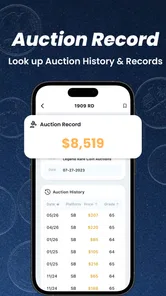
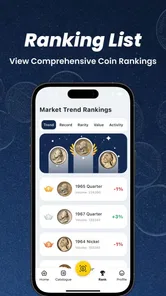
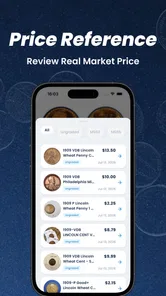
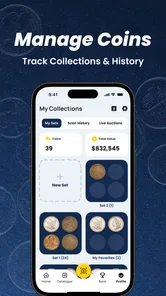
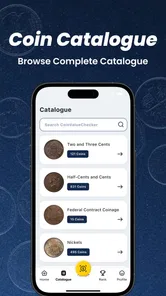
Analysis by Reviewed
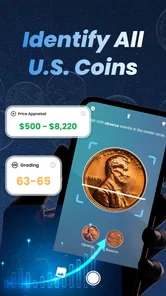
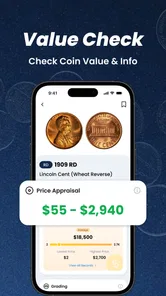
Coin collecting often starts with a simple question: “What is this worth?” Coin Value Checker is built for that first moment of curiosity, using a photo to help identify a coin and offer an initial value-oriented assessment. I found it most useful as a quick research companion rather than a replacement for a specialist appraisal. That distinction matters, especially when a coin may be rare, damaged, altered, or valuable enough to justify a professional opinion.
This is a free business app from VISIGEN PTE. LTD., and its focus is unusually specific for a mobile tool: identifying coins, estimating their value, supporting appraisal and grading decisions, and looking for possible errors. Its store summary also points to photo-based scanning, which makes the experience feel closer to a visual reference tool than a traditional catalog. The app is rated for Everyone, so it is approachable for families, beginners, and casual users who want to examine coins without learning a complicated collecting system first.
How the photo-based coin check fits into real collecting
My first impression is that the app makes the opening step easy. Instead of searching through long lists of countries, years, mint marks, and denominations, you begin with the object in front of you. That is valuable when you inherit a mixed jar of coins or discover an unfamiliar piece in an old drawer. A clear image gives the app something practical to work with, while the surrounding context—what the coin looks like on both sides, where it came from, and whether it has visible damage—still belongs to the user.
The best way to use it is as a funnel. Start broad with the photograph, then narrow your attention by checking the date, denomination, lettering, mint mark, and unusual details yourself. If the app suggests an identity or a possible error, treat that result as a reason to inspect the coin more closely, not as a final certificate. In my experience, this approach avoids the most common mistake with image-based coin tools: accepting the first plausible match without comparing the physical details.
A practical household scenario shows where it earns its place. Imagine sorting a relative’s old collection after finding several foreign coins, commemorative pieces, and ordinary change mixed together. Coin Value Checker can help separate items that deserve further research from coins that are probably common. Photographing the front and back in good light, recording the visible year, and keeping similar-looking coins together creates a much more useful working process than taking random pictures and relying on memory.
The app is also handy for a beginner who wants to learn the vocabulary of collecting through observation. A possible match can prompt questions about condition, minting errors, varieties, and historical context. That learning loop is more engaging than reading a glossary first. Still, the app cannot remove the need for careful inspection. A scratched surface, weak strike, cleaning, discoloration, or altered date can change the conversation completely.
What I would do before taking a photo
Lighting makes a bigger difference than many new users expect. I would place the coin on a plain, non-reflective surface and use even light rather than a harsh flash. Reflections can hide lettering and create marks that look like errors. I would also photograph both sides, keep the camera parallel to the coin, and avoid placing fingers over the edge. A second image from a slightly different angle can help reveal raised details, but excessive angles may make the design harder to compare.
More From Our News Desk

Weather by Xiaomi Review: Clear at a Glance, Less Clear Up Close

X Under Pressure: Can It Recover When Posting Goes Wrong?

Clash of Clans Is Won Between the Battles

Android Auto Makes the Case for Quieter Car Software

MobiOffice: Transforming Mobile Productivity with Seamless Integration

EA SPORTS FC™ Mobile Soccer: Redefining Mobile Sports Gaming
Cleaning is another important trap. I would not polish or scrub a coin before scanning it. A bright, shiny surface may look more attractive, but cleaning can reduce collector interest and remove evidence that helps determine authenticity and condition. The safer workflow is to photograph the coin as found, note any visible residue or wear, and only then decide whether additional research is worthwhile.
One non-obvious advantage of this workflow is that it turns the app into a sorting assistant rather than a one-click valuation machine. I would create small groups such as “needs closer inspection,” “likely common,” and “possible error.” That prevents an exciting result from getting mixed with ordinary pieces and makes it easier to revisit the coins later. The app becomes more useful when paired with a simple notebook or phone note containing the coin’s year, country, denomination, and physical observations.
Trust begins with what the app actually lets you control
Because this tool deals with photographs of personal possessions, I pay attention to the points where a user makes an active choice. The important question is not only whether a scan is convenient, but also whether I understand when I am taking a picture, what I am submitting, and whether I can decide which coin images to use. I would avoid photographing a full collection spread across a table if the image also reveals names, addresses, receipts, or other private items.
The app’s free entry point lowers the barrier to trying it, but the presence of in-app purchases means I would still review any purchase prompt carefully before continuing. The available purchase range runs from $0.99 to $39.99 per item, so the difference between casual use and paid use can be meaningful. I would not assume that a result becomes authoritative simply because a payment option appears. A purchase may improve access or convenience, but it should not replace independent verification for a valuable coin.
That is also where the developer matters. VISIGEN PTE. LTD. is clearly identified as the developer, giving users a name to associate with the app and its support responsibility. I would still read the permission prompts and any in-app explanations in my own installation rather than relying on assumptions. Permissions are most trustworthy when they appear at the moment they are needed and when the user can make an informed choice instead of approving everything automatically.
The app has reached over one hundred thousand installs and holds a 4.5 average from around three thousand ratings, with more than three hundred written reviews. Those figures suggest that many people have tried it and found enough value to rate it, but popularity is not proof that every identification is correct. I would use the reviews to look for patterns in user experience—such as ease of photographing, clarity of results, or frustration around paid access—while keeping the actual coin assessment grounded in physical evidence.
Where data-sensitive moments can appear
A coin photo may seem harmless, yet the surrounding image can reveal more than intended. A collection photographed at home might show a shipping label, a family document, or a distinctive room. A coin received from an estate may be placed beside paperwork containing names or dates. My recommendation is simple: crop the scene mentally before taking the picture. Use a clean background, keep unrelated objects out of frame, and inspect the image before submitting it.
I would also avoid using the camera casually in a public place when the coin is expensive or the background could identify where I am. A close-up on a plain surface is safer and produces a better scan anyway. If the app offers any choice about selecting an existing photo versus taking a new one, I would choose deliberately. User agency is strongest when the image is prepared for this specific purpose rather than pulled automatically from a broad personal library.
Another useful habit is to keep the app’s role narrow. I would not upload a photograph of an entire album when only one coin needs checking. Smaller, focused submissions reduce accidental exposure and make the visual task clearer. This is especially important for family collections, where ownership and location may be sensitive even if the coins themselves are not rare.
For anyone concerned about account control, I would look for visible settings related to sign-in, saved results, notifications, and deletion inside the installed app. I would not create an account merely because a scan is available unless the benefit is clear. If the app allows use without an account, that may suit occasional users better; if an account is required for a particular function, I would read the explanation and decide whether the convenience justifies it. The right choice depends on how often you use the service and how much collection history you want to keep together.
I also recommend checking the operating system’s permission manager after installation. The app supports Android seven point zero and later, so users on older compatible devices should be especially attentive to how their phone presents camera and storage choices. If a permission does not make sense for the action I am taking, I would pause rather than approving it automatically. A coin scanner should be used with the minimum access that still allows its intended workflow.
Identification, grading, and value are different questions
The wording around appraisal, grading, and error scanning can sound like one complete service, but these are separate stages. Identification asks what the coin appears to be. Grading asks how well preserved it is. Valuation asks what someone might pay under particular market conditions. An error assessment asks whether an unusual feature is a genuine minting mistake rather than damage, wear, or post-production alteration.
Coin Value Checker is most convincing at the beginning of that chain. A photo can help point me toward a likely identity, but a camera cannot reliably capture every factor that affects price. Surface hairlines, edge damage, luster, cleaning, counterfeit indicators, and subtle varieties may be difficult to judge from a normal phone image. I would never use a quick scan alone to sell a scarce coin, insure a collection, or make a purchase decision involving serious money.
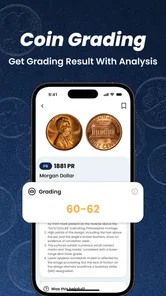
Grading is where I would be most cautious. A coin can appear attractive in a photograph while having problems that only become clear under magnification or controlled lighting. Conversely, a worn coin may be more historically interesting than its condition suggests. The app can encourage closer inspection, but a recognized grading service or experienced dealer is the better route when the grade affects a substantial price difference.
Error scanning also benefits from skepticism. A doubled design, off-center strike, clipped edge, or unusual mark can be exciting, but damage from circulation, tools, heat, or cleaning often creates similar-looking features. I would compare the suspected error with reliable reference images and inspect whether the feature affects the design in a consistent way. If the result could change the coin’s value significantly, I would seek an independent opinion before paying for authentication or listing it for sale.
One of the strongest practical tips is to separate the app’s suggestion from your own evidence. I would write down the visible facts first: country, denomination, year, mint mark, diameter if known, and the exact location of any unusual detail. Only after that would I compare the app’s result. This reduces confirmation bias, especially when the suggested value sounds exciting.
How it compares with familiar alternatives
The usual alternative is a web search, and that remains better when I already know the coin’s country and year. Search results can lead to specialist catalogs, auction archives, museum references, and collector discussions. The downside is that searching begins with accurate text, while a beginner may not know which inscription or mint mark matters. The photo-first approach is more welcoming at that early stage.
Printed catalogs and dedicated numismatic references are stronger for systematic research. They encourage comparison between similar varieties and often explain terminology more carefully than a quick mobile result. They are less convenient when I am standing over a box of mixed coins, though. I see Coin Value Checker as a fast triage layer before opening a catalog, not as a substitute for one.
A local coin dealer or experienced collector offers something the app cannot: physical inspection, questions, and professional context. A person can turn the coin, examine its edge, feel its weight, and notice signs that a photograph misses. That route may be slower and opinions can differ, but it is preferable for a potentially valuable piece. The app is better for deciding which items deserve that extra attention.
Specialist grading and authentication services are the right comparison at the high end. They exist for situations where identity, condition, and authenticity need formal treatment. Coin Value Checker is far more convenient and accessible, but convenience is exactly why I would keep its conclusions provisional. The two tools serve different purposes rather than competing directly.
Who will appreciate it, and who should skip it
I would recommend this app to beginners, families sorting inherited coins, casual collectors, and anyone who regularly encounters unfamiliar currency. It is particularly useful when the first challenge is recognition rather than precise pricing. The free starting point makes experimentation easy, and the Everyone rating keeps the app approachable for a broad audience.
I would be more reserved for dealers, advanced collectors, and users managing expensive holdings. Those users usually need repeatable documentation, detailed variety references, reliable condition analysis, and stronger evidence before assigning a value. A photo scanner may save time during initial sorting, but it should not become the only record behind a sale or inventory decision.
I would also skip it if I wanted a full collection-management system, a formal appraisal document, or a guaranteed market price. The app’s appeal is the quick visual starting point. People who prefer slow, source-heavy research may get more from a catalog, specialist database, or human expert. That is not a weakness so much as a boundary worth understanding before installation.
Everyday usability and the paid decision
The current version is 1.6.0, and I would keep the app updated through the official store so that the installed experience remains aligned with the developer’s current release. Since the app is free to install but includes paid items, I would test the basic workflow first: prepare a coin, take a careful image, read the result, and decide whether the information is genuinely useful before considering any purchase.
I would also avoid scanning in a rush. The fastest photo is rarely the most informative one. Taking a moment to clean the background—not the coin—capture both faces, and record the visible details makes the result easier to evaluate. If a paid feature is presented, I would ask whether it answers a question that I cannot reasonably answer through a reference book, reputable search, or local expert.
For a small household collection, this may be all the structure needed. For a larger one, I would use the app in batches and keep a separate note for each item. That creates a useful audit trail: the original observation, the app’s suggestion, and the later conclusion. It also makes it easier to spot when several coins are being confused because they share a similar design.
My cautious verdict is that Coin Value Checker is a convenient first-pass tool with a clear audience. I like the way a photograph can turn an unfamiliar coin into a concrete research task, and I think the app is most valuable when it helps users decide what deserves closer attention. Its free availability, broad age rating, and focused business category make it easy to try, while the visible developer identity and purchase choices give users sensible points at which to pause and review their decisions.
The key is to treat the result as a lead, not a verdict. Photograph privately, verify the details, be skeptical of dramatic error or value suggestions, and use a dealer or formal service when the financial stakes rise. With that mindset, Coin Value Checker can save time during sorting and make coin collecting less intimidating. Without that mindset, any photo-based estimate can create false confidence, particularly when condition and authenticity matter more than simple identification.
Coin Value Checker Frequently Asked Questions
Is Coin Value Checker suitable for beginners?
Yes. Coin Value Checker is intended to make coin identification and value research approachable, including for people who are just starting a collection. Its photo-based identification and appraisal focus can offer a convenient first step, while learning about coin terminology and checking important details yourself can help you interpret results more confidently.
Who develops Coin Value Checker, and what devices can run it?
Coin Value Checker is developed by VISIGEN PTE. LTD. It is listed for Android devices running version 7.0 or later, making it an option for users with compatible phones and tablets. The app is also described as suitable for everyone, though the available features and performance may vary depending on your device.
What is Coin Value Checker used for?
Coin Value Checker is designed to help users identify coins and estimate their potential market value. You can usually enter details such as the country, year, denomination, mint mark, and condition, or use the camera to inspect a coin. It is useful for beginners who want a quick reference before researching a collection more thoroughly.
Can Coin Value Checker identify coins from a photograph?
The app may allow you to photograph or upload an image of a coin for identification, depending on the device and available features. Results can be affected by poor lighting, reflections, blurry images, or worn designs. For the best outcome, photograph both sides clearly and include close-ups of important details such as dates, mint marks, and unusual symbols.
Are the coin values provided by the app accurate?
Coin Value Checker should be treated as an estimation and research tool rather than a professional appraisal service. Values can vary considerably according to rarity, grade, authenticity, demand, metal prices, and current auction results. A displayed price may not represent the amount a dealer or collector will actually pay, so valuable coins should be checked by an expert.
Pros
- Quickly identifies coin values using image recognition.
- Supports a broad range of coin types and currencies.
- Useful for beginners building a basic coin collection.
- Simple interface makes searches easy to start.
- Can help spot potentially valuable coins before selling or trading.
Cons
- Recognition may fail with worn
- dirty
- or poorly lit coins.
- Estimated values can differ from current market prices.
- Rare coins may require expert authentication.
- Some features or results may be limited without internet access.
- Ads or premium options may interrupt the checking process.











