CloudEye 365
- 96.00
- 3.6
- Installs
- 50.00K
- Price
- Free

Screenshots

Analysis by Reviewed
I would approach CloudEye 365 with one practical question in mind: does it help me make a decision I would otherwise struggle to make? Monitoring apps can feel compelling during the first few sessions, when every chart and notification is new. Their lasting value is harder to judge. For me, the difference between a useful tool and another icon on the phone is whether I have a clear reason to return to it after the novelty fades.
What to test during the first week
The appeal of a monitoring app is strongest at the start: you want a quick picture of what is happening and a reason to check again. I would treat the first few days with CloudEye 365 as a trial of fit, not proof that it will become a lasting habit. Decide what you actually want to keep track of before setting up a routine; otherwise, a busy screen can feel informative without helping you make a decision.
A practical test is to open the app only when you have a question, such as whether a particular change needs attention. If the information helps you answer it quickly, that is a stronger sign of value than simply enjoying the novelty of graphs. If you cannot connect what you see to an action, keep your checks occasional rather than turning them into another daily chore.
That test also helps answer a common first-use concern: should I check it constantly to get value? I would not. A monitoring view is most useful when something has changed or when a reading gives you a reason to follow up. Starting with a question, rather than browsing every available figure, makes it easier to tell whether the app belongs in your routine.
How CloudEye 365 fits into a lasting routine
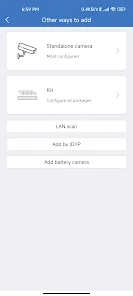
First things first, downloading and installing CloudEye 365 is a breeze. It's available on both Android and iOS platforms, making it accessible for a wide range of users. Once installed, the app greets you with a sleek and intuitive interface that makes navigation a walk in the park.
Understanding the monitoring appeal
The app is packed with features that cater to both casual users and tech enthusiasts. One of the standout functionalities is its real-time data monitoring. Whether you're tracking cloud storage, applications, or network activities, CloudEye 365 offers a comprehensive overview. I found the data visualization tools particularly impressive, providing clear graphs and stats that make it easy to understand what's going on under the hood.
That broad view can be useful when a question crosses the boundaries between separate services. Instead of hopping between several individual control panels, you may prefer to begin with a single place to inspect what is being monitored. The trade-off is that a broad overview does not automatically tell you what to do next. I would use it to spot something worth investigating, then rely on the relevant service or system controls when I need to make a specific change.
More From Our News Desk

Clash of Clans Is Won Between the Battles

Android Auto Makes the Case for Quieter Car Software

MobiOffice: Transforming Mobile Productivity with Seamless Integration

EA SPORTS FC™ Mobile Soccer: Redefining Mobile Sports Gaming

How Microsoft OneDrive Became a Mobile Productivity Giant

How Google Translate Breaks Language Barriers Effortlessly
This is also where expectations matter. A chart can make a reading easier to scan, but it is not a substitute for knowing what the metric represents in your own setup. If you are comparing a change over time, try to keep the question consistent: what changed, when did it change, and does that difference call for action? That small discipline makes visual summaries more useful than checking them simply because they are available.
Making alerts useful instead of noisy
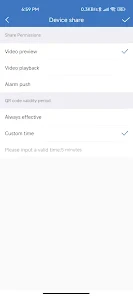
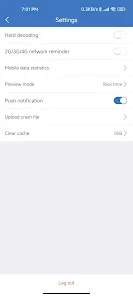
Another feature that caught my attention is the customizable alerts. You can set thresholds for different metrics, and the app will notify you if anything goes awry. This proactive approach is a game-changer, especially for those of us who tend to forget about routine checks.
Alerts are most valuable when each one points to something you would genuinely investigate. I would start with only the thresholds tied to a real concern, then see whether the notifications help you respond sooner. If every small fluctuation triggers a message, the signal gets buried and it becomes tempting to ignore all of them. That is a common trade-off with monitoring tools: more visibility is not automatically better if it creates more interruptions than decisions.
For a realistic routine, imagine checking in after a change to your setup, then using an alert to decide whether anything needs follow-up while you are away. That is a more useful role than repeatedly opening the app without a specific reason. I would also review the alert choices after a week or two; removing thresholds that do not lead to action can make the remaining ones easier to trust.
A useful refinement is to treat each alert as a prompt to investigate, not as a complete diagnosis. If one arrives, check the relevant reading and consider what else changed before deciding what it means. This avoids reacting to every notification as if it were an emergency, and it gives you a clearer sense of whether that threshold deserves to stay enabled.
What daily use feels like
Using CloudEye 365 is a delight, thanks to its responsive design. Whether you're on a smartphone or tablet, the app runs smoothly without any hiccups. I did notice that some features are a bit technical, which might be overwhelming for beginners. However, the app includes helpful tooltips and a comprehensive FAQ section to guide you through any complexities.
For a concrete everyday example, imagine making a change to a setup before leaving home and wanting to check later whether anything needs attention. I would open the app for that specific follow-up, look at the relevant readings, and use an alert only if it points to a threshold I already consider meaningful. This keeps the check short and purposeful. If the information leaves me unsure what to do, I would go to the service’s own controls rather than repeatedly refreshing the monitoring view.
That workflow suits someone who prefers a quick overview on a phone, but it is not ideal for every kind of monitoring. If your work depends on detailed diagnosis or a sustained view of technical information, a dedicated tool for the particular service may offer a more focused place to investigate. CloudEye 365 is easier to justify as a convenient overview than as the only tool for every question.
One thing I particularly appreciate is the app's security measures. In a world where data breaches are all too common, CloudEye 365 implements robust encryption protocols to keep your information safe. It's reassuring to know that your data is in good hands.
Who is likely to keep using it?
I see the best fit for someone who already has a clear reason to monitor a digital setup and is comfortable learning technical terms as they appear. The app is free, is rated for Everyone, and comes from jeemak; its library-and-demo classification also makes it feel more specialized than an all-purpose phone utility. It has an average rating of 3.6 from around 360 ratings, with over 50,000 installs, so it has found an audience without being a universal recommendation.
If you only want a simple overview once in a while, the built-in controls of the service you are monitoring may be enough. Those are often the more direct option when you need just one source of information. CloudEye 365 makes more sense when having a broader monitoring view is useful to you; it is less compelling if you have no recurring question to answer or do not want to interpret technical readings.
I would also steer away from it if you expect a monitoring app to explain every reading in plain language or make decisions for you. Its useful audience is narrower: people willing to connect a reading with their own setup and take the next step themselves. Someone managing only one straightforward service may get a cleaner experience by using that service’s own interface, while a curious user who checks several areas may appreciate starting from a broader view.
For Android users, the minimum supported operating system is 6.0, which helps establish whether an older device is eligible. The app is also available on iOS. Before installing, I would check that the device you plan to use is the one where a monitoring overview will actually be convenient; a tool you rarely open because it lives on the wrong device is unlikely to become part of a useful habit.
Month-to-month value and upkeep
The lasting value comes down to whether the app stays connected to a real routine. A brief check after a meaningful change, followed by occasional review of the readings and thresholds, is more sustainable than trying to inspect everything every day. I would keep a small note of what an alert meant and what I did about it. That simple habit helps distinguish a useful warning from a number that merely looks urgent.
There is still some maintenance involved: you need to understand what you chose to monitor and revisit whether those choices remain relevant. That is not a major burden for a technically curious user, but it can feel like needless administration if you only wanted a quick answer. The app’s interface may ease navigation, yet it cannot remove the need to interpret what the figures mean for your own setup.
A practical upkeep check is to ask, every so often, whether each monitored item still answers a question you care about. If a reading has not influenced a decision and does not provide reassurance you genuinely value, consider whether it deserves space in your routine. This is less about constantly adjusting settings and more about preventing old choices from turning into background noise.
The app is free, so the decision is not about weighing a purchase against its benefits. The real cost is attention: setup, interpretation, and the occasional review of what you are tracking. That makes a small, deliberate routine a better fit than treating the app as something that must be opened every day to justify keeping it.
Where fatigue can set in
My main reservation is that monitoring can turn into a stream of information without a clear payoff. Technical controls may also ask more of a newcomer than the friendly first impression suggests. If you find yourself dismissing alerts, checking graphs out of habit, or struggling to decide what deserves attention, scale back the routine or use a simpler, service-specific tool instead.
CloudEye 365 is listed as free, with version 4.6.1.5 and Android support starting at 6.0. Its release date is March 13, 2023, and it has 96 reviews. Those details make it easier to place the app, but the more important question is whether its monitoring approach matches your needs. Before relying on it, take time to understand the readings and alerts you choose, rather than assuming a notification alone tells the whole story.
Fatigue can also come from a mismatch between the breadth of a monitoring view and the narrowness of the problem you are trying to solve. When you need one clear answer, an extra layer of charts and settings may slow you down rather than help. I would switch to the source service’s own controls for a focused task, then return to a broader view only when comparing several areas is genuinely useful.
If you are unsure whether to keep it installed after the initial trial, judge it by a real week of use rather than by how polished the first session feels. Did it help you notice something worth acting on, or give you a useful check after a change? If not, there is no reason to force a habit. A monitoring tool earns its place through recurring relevance, not through the amount of information it can display.
Final Thoughts
Overall, my experience with CloudEye 365 has been extremely positive. It's a powerful tool for anyone looking to monitor and secure their digital environment. While it may have a slight learning curve for newcomers, the benefits far outweigh any initial challenges. If you're in the market for a reliable data monitoring app, CloudEye 365 is definitely worth checking out.
For a more measured recommendation, I would say it is worth trying when you can name the information you want to watch and what you would do if it changed. Its appeal is strongest for someone who likes having a wider monitoring view and is willing to interpret technical readings. It is not the obvious choice for a person who wants a hands-off explanation or a single-purpose control panel, where the original service may be simpler.
So, there you have it! My take on this versatile app. Whether you're a tech-savvy user or someone just looking to keep tabs on your data, CloudEye 365 provides the tools you need to stay informed and secure.
For lasting use, I would keep the routine modest: check after meaningful changes, retain only alerts that lead to a useful response, and revisit whether the readings still matter to you. That approach gives the app a fair chance to prove its value without letting monitoring become another obligation. If it continues to answer a recurring question, it can earn a place on your device; if not, a more focused alternative is likely the better fit.
CloudEye 365 Frequently Asked Questions
Who is CloudEye 365 intended for, and what should I consider before installing it?
CloudEye 365 is listed in the Libraries & Demo category and is described as an easy-handling app. Its developer is jeemak, and the app is rated for Everyone. Before installing, consider whether its purpose and description match what you are looking for; the name alone does not explain every feature or use case. It is available for Android devices running version 6.0 or later.
Is CloudEye 365 free to download?
CloudEye 365 is free to download. That makes it possible to try the app without paying an upfront purchase price, though the free listing alone does not establish whether every feature or any optional service has separate conditions. The app has more than 50,000 installs, so prospective users can also weigh its broad download history alongside its description and category before deciding whether it suits their needs.
What is CloudEye 365 and what does it offer to users?
CloudEye 365 is a comprehensive cloud-based monitoring application designed to provide real-time insights into your cloud infrastructure. It offers features such as performance tracking, security alerts, and resource management, all accessible through an intuitive, user-friendly interface. This app is ideal for IT professionals looking to streamline their cloud operations and ensure optimal performance and security.
Is CloudEye 365 compatible with all cloud service providers?
CloudEye 365 is designed to be compatible with a wide range of popular cloud service providers, including AWS, Microsoft Azure, and Google Cloud Platform. This compatibility ensures that users can seamlessly integrate the app with their existing cloud environments, making it a versatile tool for managing multi-cloud infrastructures. Always check the app's latest updates for any newly supported platforms.
Does CloudEye 365 offer real-time alerts and notifications?
Yes, CloudEye 365 provides real-time alerts and notifications to help users stay informed about their cloud infrastructure's performance and security status. This feature enables immediate response to potential issues, minimizing downtime and ensuring that systems remain secure. Users can customize alert settings to receive notifications via email, SMS, or in-app alerts, depending on their preferences.
Pros
- User-friendly interface
- Real-time data synchronization
- Customizable notifications
- Secure cloud storage
- Cross-platform compatibility
Cons
- Requires constant internet
- Limited offline features
- High battery consumption
- Subscription-based pricing
- Complex initial setup
- Category
- Libraries & Demo
- Version
- 4.6.1.5










