ClockShark Time Tracking
- 39.00
- 3.5
- Installs
- 50.00K
- Price
- Free

Screenshots


Analysis by Reviewed
ClockShark Time Tracking is the kind of business app I would look at when a workday is split between job sites, vehicles, customer visits, and short administrative tasks. Its purpose is practical: record when I start and stop work, keep jobs organized, and give a team a clearer view of where time is going. I found that its value depends less on flashy extras and more on whether everyone uses the same routine consistently.
Developed by Clockshark LLC, this free business app is aimed at people who need mobile time tracking rather than a desk-bound timesheet. It is rated for Everyone and supports devices running Android 11 or later. The current version is 2.18.1, and its presence on the platform is established, with over 50 thousand installs. Its average score sits at 3.5 from around 95 ratings, so I would describe the reception as mixed but substantial enough to suggest that many teams are actively trying it in real work situations.
How connectivity shapes the working day
I find that connectivity is more than a convenience in a mobile time-tracking routine: it affects how confidently workers can record a shift and how quickly supervisors can follow up. This section looks at practical ways to prepare for weak-signal moments without turning every pause into an administrative task. That preparation also sets up a closer look at what a typical day feels like on the road.
When a live connection makes the workflow feel simple
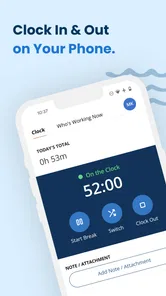
The smoothest experience comes when I treat the app as a connected work hub. Before leaving for a job, I can open it, check the relevant work context, and prepare to record the shift without relying on a paper note or trying to reconstruct the day from memory later. That immediacy matters for field crews because the most accurate time entry is usually made at the moment work begins or ends.
Connectivity also changes how quickly information can move between the person doing the work and the person coordinating it. A supervisor who expects current time records benefits when workers can submit actions while they are moving between jobs. This is more useful than a traditional spreadsheet that waits for someone to return to an office, remember the details, and type them in at the end of the week.
That convenience has a practical condition: the phone needs a usable connection at the moments when the worker interacts with the service. I would not build a process around assuming that every action will behave identically in a basement, rural property, large warehouse, or crowded event venue. The right habit is to open the app before the critical moment, allow enough time for the screen to respond, and avoid leaving the first clock-in attempt until the last second.
The important distinction is that mobile access is not the same as guaranteed access everywhere. ClockShark makes most sense for teams that can usually connect during their working routine and have a sensible fallback for unusual network conditions. That is not a criticism unique to this product; it is the trade-off of moving time records into a live service instead of keeping them in a notebook or a locally managed file.
More From Our News Desk

Weather by Xiaomi Review: Clear at a Glance, Less Clear Up Close

X Under Pressure: Can It Recover When Posting Goes Wrong?

Clash of Clans Is Won Between the Battles

Android Auto Makes the Case for Quieter Car Software

MobiOffice: Transforming Mobile Productivity with Seamless Integration

EA SPORTS FC™ Mobile Soccer: Redefining Mobile Sports Gaming
A realistic day on the road
Imagine a small maintenance crew with several appointments. One worker arrives at the first property, starts the workday, finishes the repair, and then moves to a second location. In a paper-based routine, the worker might jot down arrival and departure times on a form, then hand it over later. With ClockShark, the goal is to make each change close to the event itself, while the job context is still clear.
The benefit is not simply saving a few taps. It reduces the mental load of remembering which customer was visited first, when travel ended, and whether a short return visit belonged to the original job. If the team has already agreed on how to label or select work, the phone becomes a shared reference point rather than a personal memory aid.
There is also a less obvious advantage for managers: connected entries can encourage earlier correction. A questionable time record is easier to investigate while the day is still fresh than after several shifts have blurred together. I would use that as a management habit, checking exceptions promptly instead of treating the app as a box that only matters at payroll time.
Why the mobile setting matters
ClockShark is better suited to people who work away from a fixed desk than to a user who only needs a simple personal timer. A tradesperson, cleaning crew, installer, repair team, or service business can benefit from putting the time record where the work happens. The phone is already present, so the process can fit between tasks instead of requiring a separate office session.
At the same time, mobile use introduces distractions and awkward moments. Gloves, poor lighting, wet conditions, a phone mounted in a vehicle, or a rushed departure can all make a small interaction feel inconvenient. I would not ask workers to navigate a complicated sequence while driving or carrying equipment. The best workflow is one that is completed while safely stationary, with the team trained to make the same choices every time.
For a manager, the challenge is partly human rather than technical. If one employee clocks in immediately, another waits until lunch, and a third records everything at the end of the day, the system will not produce a consistent picture. The app can organize a process, but it cannot replace clear instructions about when a shift starts, when a job changes, and how corrections should be handled.
What happens when the connection is unreliable
This is where I would be most careful before introducing the app to a dispersed team. A weak signal can turn a quick action into a moment of uncertainty: did the tap register, should I try again, and will a duplicate entry appear? Even when the service eventually behaves correctly, uncertainty is frustrating because time tracking depends on confidence at very specific moments.
My practical advice is to create a recovery routine before rollout. Workers should know whom to contact, what time and job details to note temporarily, and how to report a missed or uncertain action. A simple written procedure can prevent a network problem from becoming a payroll argument. I would also test the routine in the actual places where the team works, rather than judging it only from an office Wi-Fi connection.
When an entry appears delayed, repeating the action immediately may not be the safest response. I prefer checking the visible state first and recording the real event separately if the screen is unclear. That small discipline helps avoid duplicate clock-ins or clock-outs. It also gives a supervisor something concrete to compare when reviewing the day.
Recovery is especially important for businesses with strict customer billing. A missed record can affect internal hours, project estimates, and the explanation given to a client. ClockShark can make the original record more structured, but the company still needs a correction policy. Decide in advance whether the worker submits a note, whether a supervisor reviews it, and when adjustments are locked for payroll processing.
Using mobile data thoughtfully
I would not assume that every team member has the same phone plan, signal quality, or willingness to use mobile data heavily. The app is free to download, but the broader cost of a connected workflow can include device availability, data usage, training time, and administrative attention. Those factors matter more for a large field operation than the download price alone.
A sensible rollout starts with a small group and a short observation period. Watch when people open the app, where they experience delays, and which job-selection mistakes appear repeatedly. This reveals whether the process is genuinely saving time or merely moving confusion from paper into a phone. It also lets the manager refine instructions before every worker depends on the same routine.
For data-conscious users, I would encourage opening the app deliberately rather than repeatedly refreshing it out of habit. Workers can prepare the job information they need before moving into a poor-signal area, and managers can avoid asking crews to check records unnecessarily throughout the day. These are modest habits, but they make a connected tool feel less intrusive.
Privacy and device handling deserve ordinary workplace attention too. A shared phone should not be treated like a personal device, and employees should know whose account is active before recording time. If a worker changes phones or hands a device to a colleague, the team should verify the active user and job context. A wrong identity can create a more serious administrative problem than a delayed tap.
Where it is stronger than familiar alternatives
Compared with paper timesheets, ClockShark offers a more immediate connection between the event and the record. Paper is forgiving when there is no signal, but it depends heavily on handwriting, memory, and later data entry. It is also harder to spot inconsistencies while the workday is still unfolding. For a mobile team, the app's main advantage is bringing the record closer to the job.
Compared with a basic spreadsheet, the difference is workflow rather than arithmetic. A spreadsheet can be flexible and inexpensive, especially for a very small business with one person entering everything. However, it often turns time tracking into an after-the-fact administrative task. ClockShark is more appropriate when several people need to record work from different places and the manager wants a more direct routine.
Compared with a generic stopwatch, it is more relevant to job-based work because the question is not only how long someone worked, but which work the time belongs to. A stopwatch can measure duration, yet it leaves the user to organize the meaning later. That may be fine for personal productivity, but it is less useful when a service company needs a shared record across multiple assignments.
The trade-off is that a dedicated system asks for more discipline than a notebook and may feel excessive for a freelancer who tracks one project at a time. If I only needed a rough personal estimate, I would choose the simplest tool that I would actually use. ClockShark earns its place when coordination, repeatability, and timely records matter more than absolute simplicity.
Who should use it, and who should skip it
I see the strongest fit for small and growing service businesses whose employees move between jobs and need a common way to record work. It can also suit a manager who is tired of chasing handwritten sheets or reconstructing hours from messages. The app's business focus makes it more purposeful than a personal timer when multiple workers and job contexts are involved.
I would be more cautious if the team works almost entirely in locations with unreliable connectivity and has no agreed manual fallback. I would also hesitate for a business that needs extensive customization, complex compliance controls, or a highly specialized workforce system beyond straightforward time and job organization. In those cases, a broader workforce platform may be a better long-term choice, even if it takes more effort to deploy.
It may not be the right choice for employees who rarely use smartphones or for companies unwilling to train people on a consistent clocking routine. The interface can be perfectly reasonable and still fail operationally if workers do not know which job to select or when to record a change. The real test is not whether one manager understands it, but whether the entire crew can use it correctly under normal pressure.
Version, cost, and the practical buying decision
The app is free, which lowers the barrier to trying it with a small team. I would still separate “free to install” from “free to operate” in the business decision. Devices, connectivity, onboarding, supervision, and time spent resolving inaccurate entries all have operational costs. A short pilot is the most honest way to see whether the workflow pays for itself in fewer corrections and less administrative chasing.
The current release is version 2.18.1, and the minimum operating system is Android 11. That makes device compatibility an early checkpoint, especially for companies using older phones. Before asking workers to depend on the app, I would confirm that the phones they actually carry can run it comfortably and that the team can keep those devices charged during a full shift.
The Everyone age rating makes it broadly approachable from a content standpoint, but that does not remove the need for workplace guidance. The important onboarding questions are practical: who uses which account, what happens when a job changes, how a missed action is reported, and who reviews questionable records. Answering those questions will have more effect on success than simply installing the application across the team.
My verdict on a connected time-tracking routine
After looking at ClockShark as a mobile business tool, I think its appeal is clearest when work happens away from the office and accurate timing needs to stay close to the job. It gives a team a more organized alternative to paper sheets, memory, and scattered spreadsheet updates. The free entry point makes experimentation reasonable, while the established install base shows that it is not an obscure one-off utility.
My reservation is connectivity and the uncertainty that can follow a delayed response. I would not present it as a magic solution for remote locations or assume that every network problem resolves itself without a process. A company should test its real work sites, teach a fallback routine, and review questionable records promptly. Those steps are not optional polish; they are part of using a connected timekeeping system responsibly.
For a field-service team that wants a shared mobile habit, I would recommend giving it a controlled trial. For a solo worker seeking only a quick timer, a simpler alternative may be less demanding. My overall view is positive but practical: ClockShark is most valuable when the business is ready to standardize how people record time, not merely when it wants another app on their phones.
ClockShark Time Tracking Frequently Asked Questions
What devices and operating systems can run ClockShark Time Tracking?
ClockShark Time Tracking is available for mobile use on devices running iOS 11 or later. Before downloading, check that your device meets this requirement and that you can install apps from its app store. The app is intended for business use, so employees may also need their organization to set up an account and provide access before they can use its work-tracking tools.
Who develops ClockShark Time Tracking, and what should I know about its app-store feedback?
Clockshark LLC develops ClockShark Time Tracking, a business app for managing work hours and jobs. It has an average rating of 3.5 from 95 ratings, with 39 written reviews and over 50,000 installs. Ratings and reviews can offer a quick sense of other users’ experiences, but they may reflect different devices, company configurations, and workplace needs.
What is ClockShark Time Tracking used for?
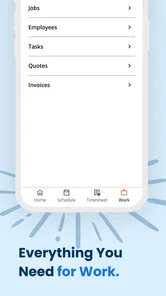
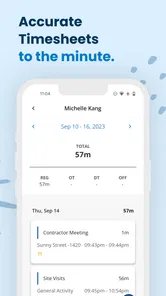
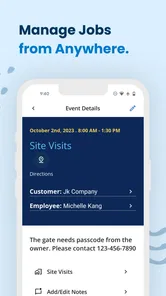
ClockShark is a time-tracking and workforce-management app designed mainly for field teams, contractors, and businesses with employees working at different locations. After reviewing its core features, the app is useful for recording work hours, organizing jobs, monitoring attendance, and simplifying payroll preparation. It can replace paper timesheets with digital records that managers can review from a central dashboard.
How do employees clock in and out with ClockShark?
Employees can generally clock in and out from the ClockShark mobile app, making it practical for construction crews, service technicians, and other mobile workers. Depending on the company’s settings, the app may use GPS location information, job assignments, reminders, and other controls to help confirm where and when work begins or ends. The exact options available depend on the administrator’s configuration and subscription plan.
Does ClockShark track employee locations?
ClockShark includes location-related tools intended to help businesses verify job attendance and manage workers in the field. Location tracking may be used while an employee is clocked in, although the specific behavior depends on account settings, permissions, device configuration, and company policy. Before downloading or using the app, employees should review their employer’s privacy rules and understand when location data is collected.
Pros
- GPS tracking helps verify job-site attendance and travel time.
- Geofencing can remind employees to clock in at the correct location.
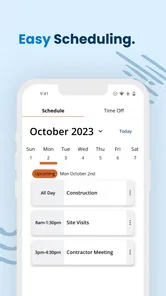
- Shift scheduling makes upcoming assignments easy to view.
- Time-off requests and approvals are handled within the app.
- Works well for teams managing multiple field locations.
Cons
- Some features require a paid subscription and may feel costly for small teams.
- Employees may need reliable internet for smooth syncing in the field.
- Location permissions can raise privacy concerns among workers.
- The interface may take time to learn for first-time users.
- Advanced reporting options can be more than simple teams need.











