

Cleveland Orch
- 17.00
- 4.9
- Installs
- 10.00K
- Price
- Free

Screenshots
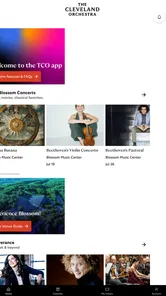
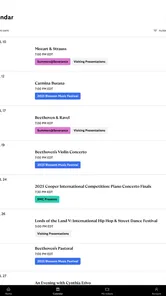
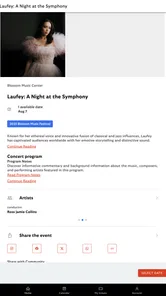
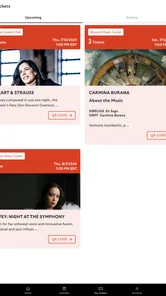
Analysis by Reviewed
I approached Cleveland Orch as a practical companion for following The Cleveland Orchestra rather than as a general concert-discovery service. That distinction matters. The app is built around one organization, its events, and the tickets connected with those events, so its value depends heavily on whether you already attend performances, plan to attend, or want a simpler way to keep track of the orchestra’s schedule.
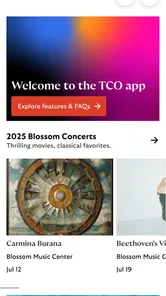
After spending time with it, my impression is straightforward: this is a focused events app that tries to reduce the small bits of friction surrounding a concert visit. Instead of moving between a browser, email confirmations, and a separate ticket wallet, you can use one Cleveland Orchestra-branded place to look at performances and manage your tickets. It is free, aimed at everyone, and developed by The Cleveland Orchestra itself.
The app has built a strong response among its users, with a 4.9 average from around 130 ratings and more than 10 thousand installs. Those numbers do not make it universally useful, but they do suggest that people who need this particular connection find it worthwhile. I think that is the right way to judge it: not as a replacement for every event platform, but as a specialized tool for orchestra supporters.
How Cleveland Orch feels in everyday use
I find the app easiest to judge as part of a real concert routine: it can bring an orchestra’s event details and ticket access closer together, but it does not coordinate the people around me. In this section, I’ll look at how that focused role fits into everyday use, then consider what changes when a household shares plans or devices.
A focused home for concerts and tickets
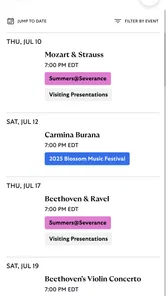
The main advantage is its narrow purpose. When I want information about a Cleveland Orchestra performance, a dedicated app feels more direct than starting with a broad ticket marketplace. General services are useful when I am comparing many venues or searching across several cities, but they can also bury the event I actually care about under unrelated listings. Cleveland Orch keeps the attention on the orchestra’s own schedule and ticket relationship.
That focus is especially helpful before a planned evening out. Imagine that I have arranged to meet someone for a concert after work. During the day, I can open the app to check the relevant event and bring up the ticket information without searching through old messages. The benefit is not dramatic, but it is exactly the kind of small convenience that prevents last-minute stress at the venue.
I also like that the app’s purpose is understandable immediately. There is no need to learn a broad entertainment platform or configure a complicated interest profile. If my goal is to discover performances from The Cleveland Orchestra or handle tickets for one, the app’s role is clear from the start. That clarity is a genuine strength for regular attendees.
More From Our News Desk

 Gmail
GmailGmail in a Busy Inbox: Who Benefits Most?
From first account to crowded workday, Gmail earns its place through dependable search and flexible sorting—but its best fit depends on how much inbox maintenance you can tolerate.

 Prime Video
Switching to Prime Video: What Changes in Your Viewing Routine
Prime Video can make a compelling second home for streaming, but switching means learning a different catalog, rental layer, and route from browsing to playback.

 Universal TV Remote Control
Universal TV Remote Control Works Best as a Reliable Backup
A phone remote earns its place through quick setup and reliable habits. Here is how to get more from Universal TV Remote Control—and where its limits show.

 Weather - By Xiaomi
Weather by Xiaomi Review: Clear at a Glance, Less Clear Up Close
Xiaomi’s weather app makes everyday forecasts quick to scan, but its calm surface can leave useful details and recovery paths harder to find than they should be.

 X
XX Under Pressure: Can It Recover When Posting Goes Wrong?
A resilience-focused review of X, examining setup, mistaken posts, interruptions, weak connections, and the gaps that matter when recovery needs to be dependable.

 Clash of Clans
Clash of Clans Is Won Between the Battles
Its raids are quick; its community is a long-term project of coordination, teaching, rivalry, and shared responsibility—with all the friction that entails.
Latest News



Who will get the most from it
The best audience is made up of current ticket holders, frequent concertgoers, and people who follow the orchestra closely. It can also suit someone who is considering a first visit and wants a direct way to browse the organization’s performances rather than relying on a search engine. For these users, the app can become a convenient habit: check upcoming events, choose something appealing, and return later when ticket details are needed.
It is less compelling for someone who rarely attends classical concerts or who wants one app covering every local event. A person comparing theater, sports, festivals, and concerts across multiple venues will probably prefer a broader event service. Cleveland Orch is not trying to solve that wider problem, and forcing it into that role would make the app seem weaker than it is.
I would also hesitate to recommend it as the only planning tool for a group that is still undecided about what to do. A general ticket marketplace may offer more useful comparisons for price, location, date, and event type. Once the group has settled on a Cleveland Orchestra performance, however, the dedicated app becomes more relevant.
The ticket workflow is where it earns its place
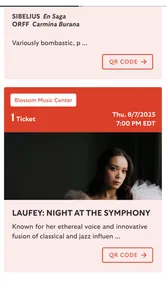
The most practical reason to keep Cleveland Orch installed is ticket access. A ticket is not useful only when it is purchased; it also needs to be available when plans change, when a companion asks for details, or when I am standing near the entrance and do not want to dig through a crowded inbox. Keeping that information associated with the orchestra’s app creates a more orderly workflow.
My advice is to open the ticket area well before leaving home, not for entertainment but as a simple readiness check. Confirm that the expected performance is visible, make sure the phone has enough battery, and avoid relying on a first-time sign-in while walking toward the venue. That is a small habit, but it turns the app from something I remember at the last second into a dependable part of the evening’s preparation.
There is another useful distinction here. The app can help manage tickets, but it does not remove the need for ordinary concert planning. I would still check the event details in advance, coordinate with the people coming with me, and keep a backup awareness of the booking information. A dedicated app reduces searching; it is not a substitute for being organized.
Discovering performances without feeling overwhelmed
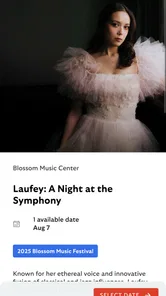
For discovery, the focused catalog is both an advantage and a limitation. I do not have to filter through unrelated entertainment, which makes the experience calmer than a large marketplace. I can approach the app with a specific question: what does The Cleveland Orchestra have coming up, and which performance fits my schedule?
That simplicity works best when I already know the performer or venue I want. It is less useful when I am browsing without a preference and want recommendations from the entire local arts scene. In that situation, a city events guide or a general ticketing app may provide more variety. Cleveland Orch gives me a cleaner path to the orchestra, not a complete map of everything happening nearby.
A practical way to use it is to browse when I have a free evening, then save the event decision for later rather than buying impulsively. Classical performances often require more coordination than a casual outing, especially when several people are involved. The app’s focused event access helps with the first step, while the final choice still depends on schedule, companions, and ticket availability.
What the current release tells me
The current version is 2026.8.56, which shows that the app is still being maintained rather than left as a one-time companion to an older ticketing process. That is encouraging for existing users because event and ticket apps need ongoing attention: schedules change, account flows evolve, and mobile operating systems move forward.
At the same time, a version number by itself does not tell me that every part of the experience has been transformed. I see it as evidence of continued product evolution, not a promise of a particular new feature. The sensible expectation is that the app remains a living tool for the orchestra’s current events and ticket needs, while the exact improvements should be judged through actual use after updating.
The app was released on January 21, 2021, and supports devices running Android 8.0 or later. That combination gives it a reasonably broad reach among Android users, including people who do not replace their phones every year. Before installing on an older device, I would still check that the phone’s software meets the requirement and leave room for normal app updates.
How the evolution affects returning users
For someone who has used the app for a while, the continued version progression should be reassuring because the basic investment in the app remains useful. Returning users are not starting from scratch each concert season; they have a familiar place to revisit event information and tickets. That continuity is more important here than flashy novelty.
There is also a less obvious benefit to staying current: a ticket app is part of a time-sensitive routine. If I wait until the afternoon of a performance to discover that an old installation needs attention, I create an avoidable problem. Updating when convenient, opening the app before the event day, and checking that the account experience is ready are sensible habits for existing users.
New users should approach the app with the same mindset. Install it before the concert-planning rush, explore its event and ticket areas, and become familiar with where information appears. This is not because the app is necessarily difficult, but because any ticket workflow feels more complicated when used for the first time under pressure.
Where the dedicated approach can fall short
The clearest limitation is scope. Cleveland Orch is tied to The Cleveland Orchestra, so it cannot replace a broad event-discovery app for people who want to compare many organizations. If my evening is flexible and I want to see every possible concert, a wider service will probably be more efficient. The dedicated approach is strongest after my interest has narrowed to this orchestra.
Another trade-off is that the app may become less valuable between concert decisions. A regular attendee can return often, but an occasional visitor may not need a dedicated installation for every part of the year. If I attend only once and already have a reliable way to access the ticket, the extra app may feel unnecessary. The free price makes trying it easy, but usefulness still depends on how closely my habits match its purpose.
I would also avoid assuming that an app can answer every practical question about an evening at the venue. Ticket management and event discovery are central, but broader planning may still require other sources or direct attention from the attendee. For example, I would not use Cleveland Orch as a general city guide, a social planner, or a replacement for checking my own transportation and meeting arrangements.
These are not flaws in the same sense as a broken feature. They are boundaries created by specialization. The app’s narrow design is what makes it convenient for Cleveland Orchestra events, but that same narrowness makes a second tool necessary for wider plans.
Useful habits that are easy to overlook
One useful workflow is to treat the app as a pre-visit checklist rather than merely a ticket drawer. A day or two before the performance, I would open the event, review the ticket access, and confirm that the information I expect is present. Doing this early gives me time to resolve an account or device issue while I am calm, instead of discovering it at the entrance.
A second tip is to separate discovery from commitment. I can use the event listings to identify a performance that interests me, then discuss the date with companions before finalizing plans. This is particularly helpful when the app makes the orchestra’s schedule easy to browse but does not replace the human decisions around travel, timing, and who is attending.
A third insight is that a dedicated app can reduce digital clutter only if I give it a defined job. I would not keep opening it for unrelated event searches. I would use it for Cleveland Orchestra performances and tickets, while leaving citywide discovery to a broader service. That division prevents disappointment and makes the app feel faster because I am not asking it to do work outside its design.
Finally, I would keep the app available even if I usually rely on email. Email is useful for receipts and reminders, but a dedicated ticket area can be easier to reach when messages are buried. I would still retain normal booking records, yet I would make the app my first stop on concert day because it is closer to the event itself.
Privacy, age suitability, and the practical decision
The Everyone age rating makes the app suitable for a broad audience, which fits its role as a concert and ticket companion rather than a mature-content service. Parents, older relatives, and first-time smartphone users can approach it without the age concerns associated with some entertainment platforms. Ease of use still depends on the individual, but the intended audience is wide.
Because the app deals with event access, I would use it on my personal device and keep the phone protected with the usual screen lock. That is ordinary good practice for any ticketing application. I would also avoid handing an unlocked phone to someone else simply to show a ticket; sharing the relevant event information is safer than giving unrestricted access to the device.
The fact that it is free removes one common barrier to testing it. I can install it, see whether its event and ticket workflow fits my routine, and decide based on convenience rather than an upfront purchase. Still, free does not mean essential. If I do not attend The Cleveland Orchestra or prefer a single app for many venues, I would skip it and use a broader alternative.
What I would watch in future updates
For future development, I would pay attention to how smoothly the app handles the complete journey from discovering a performance to retrieving a ticket at the right moment. Those stages are connected, and improvements are most valuable when they remove friction between them rather than adding decoration to the interface.
I would also watch for continued support on older Android phones, since the minimum requirement of Android 8.0 makes accessibility across existing devices relevant. A well-maintained event app should remain dependable for people who use their phone primarily as a practical tool, not as a constantly upgraded gadget.
Another area worth watching is how the app balances its focused identity with the needs of occasional visitors. It should stay simple for regular patrons while remaining welcoming to someone attending a first concert. That balance is difficult: too many additions could make the app feel like a generic marketplace, while too little guidance could leave newcomers dependent on other channels.
My final view is positive but deliberately specific. Cleveland Orch is a sensible free choice for people who want a direct connection to The Cleveland Orchestra’s concerts and tickets. I would recommend it to a friend who attends performances or has already bought a ticket and wants a more convenient way to manage the visit. I would not recommend installing it solely for broad local event discovery, because that is where a general-purpose alternative will serve better.
The app succeeds by staying close to one clear job. Its strong user rating, continued development, and focused event experience make it feel like a useful companion rather than an unnecessary extra, provided the orchestra is already part of your plans. If your concert life includes The Cleveland Orchestra, this is the app I would try first; if it does not, its specialization is exactly why you can safely pass.
Cleveland Orch Frequently Asked Questions
Who publishes Cleveland Orch, and is it an official Cleveland Orchestra app?
Cleveland Orch is published by The Cleveland Orchestra and is focused on its concerts and ticket-related services. Its purpose is to help users discover performances and manage Cleveland Orchestra tickets, making it a useful starting point for people planning to attend. The app is free to download, and its content rating is Everyone.
What is Cleveland Orch, and what can I use it for?
Cleveland Orch is an app designed to help users interact with and learn more about Cleveland Orchestra-related content and experiences. Depending on the available version, it may provide information about performances, events, venues, schedules, artists, and other orchestra resources. It is especially useful for concertgoers who want convenient access to details before, during, or after attending a performance.
Is Cleveland Orch free to download and use?
The Cleveland Orch app is free to download. However, tickets or other event-related purchases may involve separate charges. Before completing a purchase, check the pricing information shown in the app or on the official Cleveland Orchestra website, as availability and fees can change.
Can I buy tickets or manage my Cleveland Orchestra events through the app?
The app is designed to help users discover concerts and manage Cleveland Orchestra tickets. Look for options related to upcoming performances and your tickets in the app. Some transactions may redirect to an official website or ticketing platform, so an internet connection and a valid account may be required.
Does Cleveland Orch work without an internet connection?
Most features that display current concert schedules, ticket availability, venue information, account details, or multimedia content generally require an internet connection. Limited information may remain available after it has been loaded, but offline functionality should not be assumed. For the best experience, connect to a stable Wi-Fi or mobile-data network before traveling to a performance.
Pros
- Clear
- beginner-friendly interface for exploring the orchestra’s content.
- Useful access to concert details
- schedules
- and venue information.
- Helps users discover upcoming performances and plan visits more easily.
- A convenient mobile resource for fans of Cleveland Orchestra events.
- Provides cultural content in a compact
- easy-to-access format.
Cons
- Some features may depend on an active internet connection.
- Event information can change
- requiring users to check for updates.
- The app may offer limited value outside the Cleveland Orchestra audience.
- Performance details may not include every ticketing option or promotion.
- Notifications could feel unnecessary if you rarely attend orchestra events.











