

Classic PC Theme
- 5.00
- 5.0
- Installs
- 10.00K
- Price
- Free

Screenshots
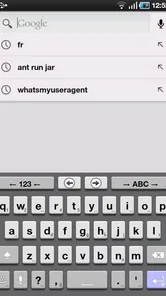
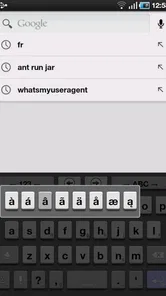
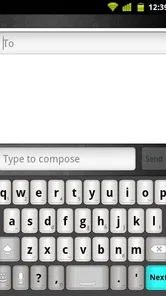
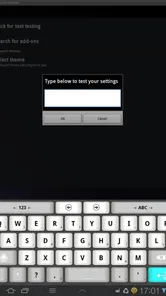
Analysis by Reviewed
If you use AnySoftKeyboard and miss the look of older desktop keyboards, Classic PC Theme is a pleasantly focused little add-on. I tried it as a visual change rather than as a replacement keyboard, and that distinction matters: it does not try to become a complete typing app on its own. Its job is to give AnySoftKeyboard a familiar old-school appearance, with the kind of visual character associated with classic PC keys.
That narrow purpose is also its main strength. Instead of adding another large keyboard system to configure, the app concentrates on presentation. The result is useful for people who already enjoy AnySoftKeyboard but find its standard appearance too modern, too plain, or simply less comfortable to recognize at a glance. I would not recommend installing it if you do not use AnySoftKeyboard, because the theme depends on that keyboard environment rather than functioning as a general keyboard for Android.
What using the theme feels like today
Classic PC Theme belongs to the Libraries & Demo section, which is a slightly unusual home for something that feels more like a customization component. The developer is AnySoftKeyboard, and the app is free with an Everyone content rating. It has been available since March 4, 2012, so this is not a newly introduced visual experiment. It is an established, deliberately simple theme for users who want a particular style to remain available.
The current version is 5.2.959 and requires Android 6.0 or newer. That makes checking your phone’s Android version the first practical step before trying it. On a compatible device, the installation itself is only the beginning: you still need AnySoftKeyboard installed and active, then you need to select the theme through the keyboard’s own settings. If you install the theme and expect your existing keyboard to change immediately, the lack of an instant visible result can feel confusing.
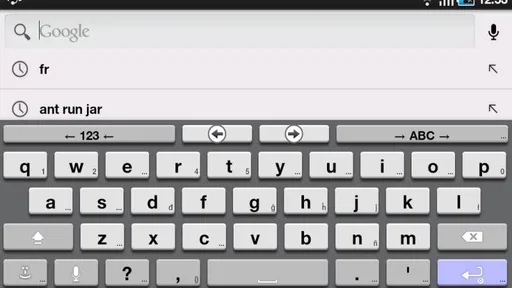
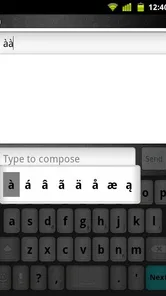
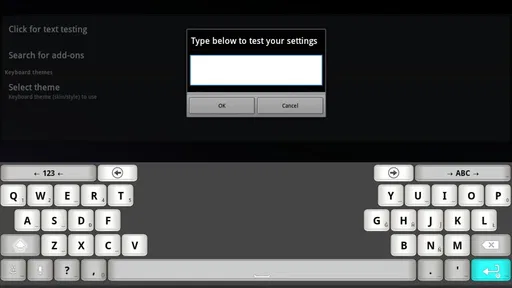
Once it is selected correctly, the appeal is straightforward. The keys look more like the raised, clearly separated buttons many people associate with older computer keyboards. I found that this can make the keyboard feel less visually anonymous, especially on a phone where modern keyboard designs often differ only in small details. The theme does not need a complicated learning period; the familiar arrangement remains the responsibility of AnySoftKeyboard, while this package changes the visual layer.
That separation is important when deciding whether it is worth keeping installed. You are not choosing between a full keyboard suite and a theme here. You are choosing whether the appearance of your current AnySoftKeyboard setup makes typing more pleasant. If the answer is yes, the small download and free price make the experiment easy to justify. If you want new language tools, gesture controls, predictive behavior, or a different typing engine, this is the wrong place to look.
A practical setup routine
My advice is to treat the first launch as a configuration task rather than as an app you will open regularly. Install it, open AnySoftKeyboard’s settings, locate the appearance or theme selection area, and look for the classic PC option. After applying it, open a text field and test several key rows instead of judging the result from the settings screen alone. The keyboard’s appearance can feel different when it is actually covering a messaging or notes interface.
More From Our News Desk

 Gmail
GmailGmail in a Busy Inbox: Who Benefits Most?
From first account to crowded workday, Gmail earns its place through dependable search and flexible sorting—but its best fit depends on how much inbox maintenance you can tolerate.

 Prime Video
Switching to Prime Video: What Changes in Your Viewing Routine
Prime Video can make a compelling second home for streaming, but switching means learning a different catalog, rental layer, and route from browsing to playback.

 Universal TV Remote Control
Universal TV Remote Control Works Best as a Reliable Backup
A phone remote earns its place through quick setup and reliable habits. Here is how to get more from Universal TV Remote Control—and where its limits show.

 Weather - By Xiaomi
Weather by Xiaomi Review: Clear at a Glance, Less Clear Up Close
Xiaomi’s weather app makes everyday forecasts quick to scan, but its calm surface can leave useful details and recovery paths harder to find than they should be.

 X
XX Under Pressure: Can It Recover When Posting Goes Wrong?
A resilience-focused review of X, examining setup, mistaken posts, interruptions, weak connections, and the gaps that matter when recovery needs to be dependable.

 Clash of Clans
Clash of Clans Is Won Between the Battles
Its raids are quick; its community is a long-term project of coordination, teaching, rivalry, and shared responsibility—with all the friction that entails.
Latest News



It is also worth checking the theme after changing the keyboard’s size or layout. A visual style that looks balanced at the default height may feel cramped when the keyboard is made shorter, while a larger layout can make the key separation more noticeable. This is one of the less obvious trade-offs: the theme gives you a recognizable old-school surface, but your preferred keyboard dimensions still affect how convincing and comfortable that surface feels.
For an everyday example, imagine that you use AnySoftKeyboard to answer short work messages during the day and write longer notes in the evening. With a familiar classic appearance, you may find it easier to visually locate the rows and edges of the keyboard after switching between apps. That does not make you a faster typist automatically, but it can reduce the feeling that every keyboard is an indistinct block of modern buttons. The benefit is mostly about visual confidence and personal comfort.
What has changed over the product’s life
The release history gives this theme a useful sense of continuity. It first appeared on March 4, 2012, and the current version is 5.2.959. I would read that evolution conservatively: the project has continued to maintain a compatible version rather than being abandoned after its original appearance. That is reassuring for an add-on whose value depends on remaining usable alongside its parent keyboard.
At the same time, a version number by itself should not be treated as proof of a dramatic redesign. The visible identity remains the same: a classic PC-inspired theme for AnySoftKeyboard. I did not approach it expecting a sequence of major new typing functions, because the product’s role is still visual. The sensible expectation is ongoing compatibility and refinement within the AnySoftKeyboard ecosystem, not a transformation into a feature-rich keyboard.
This distinction helps explain why the app can feel both old-fashioned and current. Its design goal is intentionally nostalgic, while its continued versioning keeps it relevant to newer installations of the main keyboard. In other words, its age is not a reason to expect a modern redesign. The point is to preserve a particular visual language while the surrounding keyboard software continues to develop.
There is a useful lesson here for existing users. If you already used an earlier release of the theme, the most important question is probably whether it still fits your current AnySoftKeyboard setup, not whether the update introduces an entirely new interface. If your keyboard layout or Android version has changed, revisit the theme settings and test it again. A theme can remain visually consistent while the host keyboard changes around it.
How it affects people already using AnySoftKeyboard
For an existing user, the biggest advantage is low disruption. You keep the keyboard you already know, including its general layout and language configuration, while changing the visual mood. That makes this a more sensible option than replacing the entire keyboard simply because you dislike its appearance. The theme lets you separate a design complaint from a typing-engine complaint.
I especially like that approach for people who have already invested time in arranging AnySoftKeyboard for their needs. Replacing a keyboard can mean relearning settings, moving between language packs, and getting used to a different prediction or correction style. A theme avoids most of that upheaval. You can first ask a smaller question: does a classic PC look make the current setup easier or nicer to use?
There are still a few points to watch during normal use. A theme may change the visual contrast and perceived spacing without changing the actual key positions. If you rely on muscle memory, the new appearance should not be mistaken for a new layout, but the borders and colors can alter how quickly your eyes identify a key. I recommend a short test in a notes field before using it for an important message, particularly if you type quickly or depend heavily on visual cues.
The theme is also a useful compromise for shared devices or family phones where one person prefers a more traditional interface. Rather than changing every keyboard behavior, you can offer a visual style that feels familiar to someone who learned to type on a physical computer keyboard. That is a modest use case, but it is more practical than the store summary alone suggests.
On the other hand, users who want a completely modern, minimal, or highly customizable look may find the classic treatment restrictive. Its identity comes from staying recognizable. If you want fine control over every color, key shape, toolbar element, or background, a broader keyboard customization system may serve you better. This theme is best when you already like its specific direction, not when you are searching for an unlimited design toolkit.
Where the experience still has limits
The first limitation is dependency. Classic PC Theme is not a standalone keyboard. Without AnySoftKeyboard, there is no meaningful typing environment for it to modify. That means the app is a poor choice for someone who simply wants to install one keyboard and start typing. You need to be comfortable with a two-part setup: the host keyboard supplies the behavior, and this package supplies the appearance.
The second limitation is scope. The theme does not solve problems such as inaccurate correction, missing language support, unwanted suggestions, or unfamiliar keyboard controls. If your frustration is caused by typing behavior, changing the skin may make the keyboard look better without making it work better for you. I would diagnose the problem first: choose this app for appearance, not as a general remedy for AnySoftKeyboard’s behavior.
There can also be a small amount of friction when switching between themes. You may need to navigate through the host keyboard’s settings, apply the choice, and return to a text field before the difference is obvious. That is not difficult, but it is less immediate than apps that include a large preview screen and a single apply button. People who rarely customize Android keyboards may wonder at first whether the installation worked.
Another trade-off concerns visual expectations. “Classic PC” suggests a recognizable era and style, but it does not mean your phone will reproduce the physical feel of a mechanical keyboard. The screen remains flat, and the theme cannot provide real key travel or tactile feedback. If what you miss is the physical response of desktop typing, an on-screen theme can only address the visual part of that memory.
I would also skip it if you are happy with your current AnySoftKeyboard appearance and do not care about nostalgia. A theme add-on adds value only when its particular look improves your experience. Installing several appearance packages without a clear preference can make settings harder to manage without giving you a practical benefit.
Who benefits most from this focused design
The strongest audience is made up of AnySoftKeyboard users who want a traditional computer-inspired presentation. It is a good fit for someone who finds highly rounded mobile interfaces distracting, for a longtime desktop user who prefers clearly defined keys, or for anyone who wants their keyboard to feel visually distinct from the default options.
It can also suit people who change phones often and want a familiar appearance across compatible Android devices. Because the theme is tied to AnySoftKeyboard rather than to one manufacturer’s keyboard, it offers a consistent starting point when setting up that keyboard again. You will still need to configure the host app, but the visual choice itself is easy to understand.
The audience is narrower than the rating might suggest. The app has an average rating of 5.0 from around 209 ratings, and it has passed 10K+ installs. Those figures show that people who find this exact style tend to appreciate it, but they do not mean the theme is universally suitable. A specialized theme can receive strong approval from its intended audience while remaining irrelevant to users who prefer other designs.
The Everyone age rating also makes it an uncomplicated choice from a content perspective. Families and casual users are not dealing with mature subject matter; they are installing a keyboard appearance. The more important compatibility question is whether the device runs Android 6.0 or newer and whether AnySoftKeyboard is the keyboard you actually use.
How it compares with the usual alternatives
The most obvious alternative is staying with AnySoftKeyboard’s existing theme. That option wins if you prefer a neutral appearance or do not want another setting to maintain. Classic PC Theme wins when the standard look feels too generic and the old-school styling makes the keyboard easier or more enjoyable to recognize.
Another alternative is switching to a completely different keyboard app with built-in themes. That can provide a more polished theme browser, broader visual controls, or a different typing experience. The cost is that you also change the keyboard engine and its settings. For someone satisfied with AnySoftKeyboard’s behavior, that is unnecessary disruption. For someone dissatisfied with its corrections or language workflow, a full keyboard replacement may be the better decision.
Manufacturer keyboards and mainstream third-party keyboards may also offer more contemporary customization, including animated backgrounds or extensive color controls. Those choices are better for users who want personalization as a hobby. This theme is better for users who already know the look they want and prefer a small, purpose-built add-on over a catalog of effects.
In my view, the most important comparison is not between individual colors or decorations. It is between a focused visual change and a complete keyboard migration. Classic PC Theme keeps the decision small. You can test the appearance without giving up the broader AnySoftKeyboard setup that may already work well for you.
Small tips that make the decision easier
First, test the theme with the keyboard layout you use most often, not only with the default English-style arrangement. The visual impression can change when extra language keys, alternate layouts, or a different row structure are involved. Since the theme is applied inside AnySoftKeyboard, the host configuration remains central to the final result.
Second, compare it during both short and long typing sessions. A theme may look appealing for a quick message but become visually tiring when you write a long note. Pay attention to whether the key boundaries help you or make the keyboard feel busy. This is a better test than deciding from a screenshot or a few taps.
Third, keep the host keyboard’s settings in mind when troubleshooting. If the theme appears not to work, verify that AnySoftKeyboard is active and that the theme has been selected there. If the keys look wrong after a layout change, inspect the keyboard layout and size before uninstalling the theme. These checks prevent a configuration issue from being mistaken for a failed installation.
Finally, treat the old-school appearance as a comfort choice rather than a performance promise. It may improve recognition and satisfaction, but it will not automatically increase typing speed or accuracy. Your results will depend on the host keyboard, your layout, and your habits. That honest expectation is important because the theme’s value is real but deliberately limited.
What I would watch going forward
For a product like this, future value depends mainly on compatibility with the continuing AnySoftKeyboard environment. I would watch whether the theme remains easy to select, displays consistently on newer Android releases, and continues to look coherent when the host keyboard gains layout or appearance changes. Those are more meaningful signals than a large list of decorative additions.
I would also hope that future maintenance preserves the theme’s restraint. Adding unnecessary visual effects could weaken the reason to choose it. The best direction is likely careful support for current AnySoftKeyboard configurations while keeping the recognizable classic PC character intact. That is an expectation about what would serve users, not a claim that a particular feature is already planned.
For current users, there is no need to wait for a major redesign to decide whether it belongs on your phone. Install it if you already use AnySoftKeyboard and want a traditional visual identity; remove it if the style makes the keyboard feel crowded or if you prefer a modern interface. The decision is easy to reverse because the app changes appearance rather than replacing your whole typing system.
After spending time with Classic PC Theme, I see it as a successful specialist rather than a complete keyboard solution. It does one thing, and the people who want that one thing are likely to appreciate the clarity of its purpose. The developer, AnySoftKeyboard, has kept the concept focused across its long availability, with the current release continuing that role for compatible Android devices.
My recommendation is simple: choose it when nostalgia, key recognition, and a familiar desktop-inspired look matter more to you than broad customization. Skip it when you need a standalone keyboard, advanced typing tools, or a highly modern design system. For the right AnySoftKeyboard user, the small visual change can make an established keyboard feel personally yours, while everyone else should avoid expecting it to solve problems it was never designed to address.
Classic PC Theme Frequently Asked Questions
Will Classic PC Theme work without AnySoftKeyboard?
Classic PC Theme is an old-school keys theme for AnySoftKeyboard, so it is intended to be used with that keyboard app rather than as a standalone phone theme. Install AnySoftKeyboard and select the Classic PC Theme from its theme settings to use the retro keyboard appearance. The keyboard’s own availability and settings determine how the theme can be applied.
What is Classic PC Theme?
Classic PC Theme is an Android customization app designed to give your phone a retro desktop-inspired appearance. It typically includes classic computer-style wallpapers, icons, widgets, colors, and interface elements that resemble older PC operating systems. The exact visual result may depend on your Android version, launcher, device manufacturer, and the customization permissions available on your phone.
How do I install and use Classic PC Theme?
After downloading Classic PC Theme from a trusted source, open the app and follow its setup instructions. Depending on the version, you may need to apply the theme through the app itself or through a compatible launcher, wallpaper tool, or icon-pack manager. Some devices require you to grant permission for notifications, storage, or displaying certain visual elements before the theme can work correctly.
Is Classic PC Theme compatible with every Android phone?
Compatibility can vary considerably between devices. Classic PC Theme may work best on Android phones that support third-party launchers, custom icon packs, widgets, or live wallpapers. Certain manufacturers restrict these features or use their own theme systems, which can limit customization. Before installing, check the app’s Android requirements and confirm that your device supports the functions it needs. It requires Android 6.0 or later.
Does Classic PC Theme change the entire phone interface?
Classic PC Theme generally changes the appearance of supported parts of your phone rather than replacing the complete operating system. It may modify the home screen, wallpaper, icons, widgets, or launcher layout, while settings, system menus, and some applications remain unchanged. The extent of the transformation depends on the theme version, your launcher, and the customization options enabled on your device.
Pros
- Faithfully recreates the familiar classic desktop appearance.
- Simple interface feels fast and easy to navigate.
- Useful for users who prefer a minimalist visual style.
- Lightweight design should work well on many devices.
- Nostalgic elements make the experience distinctive and fun.
Cons
- May feel outdated compared with modern interface designs.
- Limited customization may disappoint users seeking more control.
- Some visual elements might not scale perfectly on every screen.
- Could be less convenient on touchscreens than on a computer.
- The novelty may wear off after extended daily use.










