

CL Theme Road
- 0.00
- 0.0
- Installs
- 500.00
- Price
- $2.49

Screenshots
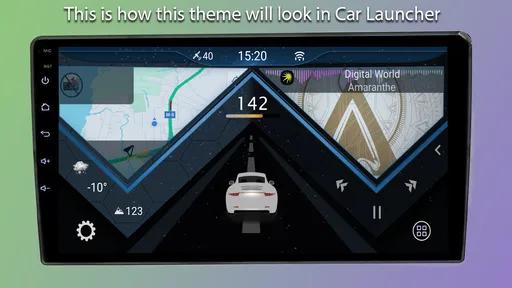
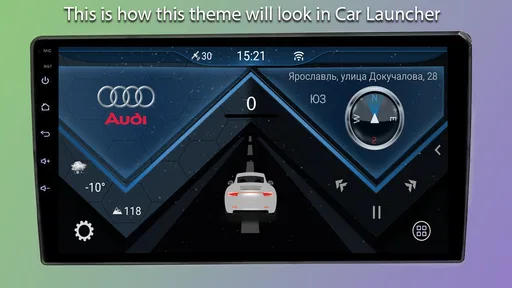
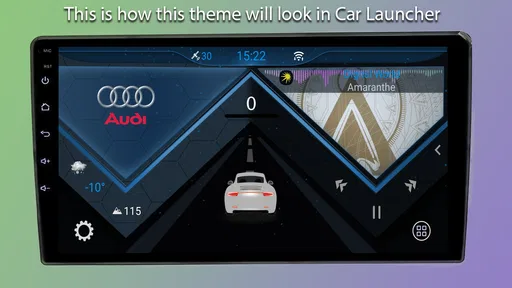
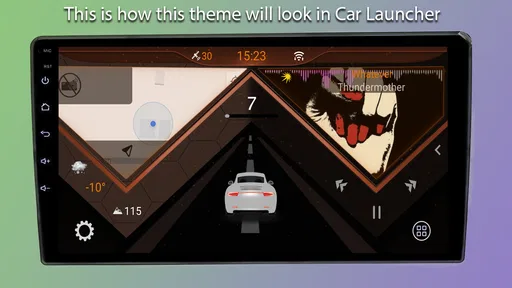
Analysis by Reviewed
I’d treat CL Theme Road first as a vehicle-display customization purchase, not as a general phone theme pack. It is an Auto & Vehicles app from Apps LabDev, costs $2.49, and is intended for Car Launcher v4.5 or newer. That compatibility detail matters more than the screenshots: if you do not use that launcher, this theme is unlikely to be useful. It has an Everyone age rating, and its current version is 1.4.
Check the fit before paying
The practical question is whether your setup already revolves around Car Launcher. A theme designed for that environment is a more focused choice than a broad Android launcher or a wallpaper app, but that focus is also its main limitation. I would check the launcher version on the device where I plan to use it before buying, rather than assume that any car dashboard interface will accept it. The app has over 500 installs, so I would approach it as a niche customization rather than a widely established product.
That narrow purpose can be a plus if you want the same visual language on a car screen every day. It is less compelling if you are looking for a complete infotainment system, navigation, or a theme that changes the look of your entire phone. A theme is best judged as a visual layer for a compatible launcher; it should not be confused with a replacement for the launcher itself or the functions provided by the phone and car.
Trust, controls, and what I would check
For a paid customization app, I like to know what I am changing and where the choice takes effect. Here, the useful boundary is the stated compatibility: the theme is for Car Launcher v4.5 and later. Before applying it, I would note the launcher’s current appearance or keep a simple way to return to it, so experimenting does not leave the dashboard less readable than before. That is especially sensible in a vehicle, where legibility should come before visual novelty.
I would also make the purchase decision based on the theme’s intended role, rather than assume it brings extra controls or services. The description identifies it as a launcher theme, not as a navigation or vehicle-monitoring tool. For privacy-conscious users, the right habit is to review the permissions Android actually displays during installation and use, and to make a choice based on those prompts. I would not infer a data policy or permission set from the fact that an app changes appearance.
A realistic way to use it
Imagine getting into the car before a commute and wanting the launcher screen to feel more cohesive without changing how you start your usual apps. A theme can make that screen feel more deliberately arranged, but the value depends on whether its visual treatment keeps your frequently used items easy to recognize. I would apply it while parked, then check the display in the lighting conditions where I normally drive. If contrast or labels are harder to make out, the original launcher styling may be the safer everyday option.
A small but useful workflow is to change one visual variable at a time when trying a new dashboard look. First compare the general screen appearance, then check the icons and text at the distance you actually view them. This makes it easier to tell whether the theme itself suits your setup, instead of changing several launcher settings at once and not knowing what helped or hurt. I would keep the test brief and do it before relying on the layout on the road.
More From Our News Desk

 Gmail
GmailGmail in a Busy Inbox: Who Benefits Most?
From first account to crowded workday, Gmail earns its place through dependable search and flexible sorting—but its best fit depends on how much inbox maintenance you can tolerate.

 Prime Video
Switching to Prime Video: What Changes in Your Viewing Routine
Prime Video can make a compelling second home for streaming, but switching means learning a different catalog, rental layer, and route from browsing to playback.

 Universal TV Remote Control
Universal TV Remote Control Works Best as a Reliable Backup
A phone remote earns its place through quick setup and reliable habits. Here is how to get more from Universal TV Remote Control—and where its limits show.

 Weather - By Xiaomi
Weather by Xiaomi Review: Clear at a Glance, Less Clear Up Close
Xiaomi’s weather app makes everyday forecasts quick to scan, but its calm surface can leave useful details and recovery paths harder to find than they should be.

 X
XX Under Pressure: Can It Recover When Posting Goes Wrong?
A resilience-focused review of X, examining setup, mistaken posts, interruptions, weak connections, and the gaps that matter when recovery needs to be dependable.

 Clash of Clans
Clash of Clans Is Won Between the Battles
Its raids are quick; its community is a long-term project of coordination, teaching, rivalry, and shared responsibility—with all the friction that entails.
Latest News



My take on the design and daily value
So, I’ve been diving into customization apps lately, and let me tell you about this gem I stumbled upon: CL Theme Road. If you're anything like me and love giving your phone a fresh look every few weeks, then buckle up because this app has some exciting features that’ll keep your home screen looking top-notch.
First Impressions Matter
When you first open up CL Theme Road, you're greeted with an interface that’s as sleek and stylish as the themes it offers. The app’s design is intuitive, making it super easy to navigate even if you’re not the most tech-savvy person out there. I was pleasantly surprised by how straightforward it was to find my way around.
A World of Customization
Now, onto the good stuff – the customization options! From minimalist aesthetics to vibrant, eye-popping themes, this app has it all. I found myself scrolling through an endless array of themes, each one more tempting than the last. The best part? You can mix and match elements to create something uniquely yours. Whether you’re into dark modes or playful pastels, there’s something in here to suit every mood.
Seamless Integration
One of the things that make CL Theme Road stand out is how seamlessly it integrates with your device. The themes apply effortlessly without any glitches or lags, which is a huge plus in my book. It’s not just about changing wallpapers; we’re talking widgets, icons, and even fonts. It’s like giving your phone a complete makeover without breaking a sweat.
Keeping It Fresh
And just when you think you've seen it all, the app surprises you with regular updates. New themes are added frequently, keeping things fresh and exciting. It feels like there’s always something new to try, which keeps the app from going stale. Plus, the developers seem to really listen to user feedback, constantly improving the app and adding features we didn’t even know we needed.
What a car-screen theme should prove in practice
For this particular kind of purchase, the key question is not how many ways I can alter a phone home screen; it is whether the result works on the Car Launcher display I actually use. I would treat any choice of colors, icons, or other appearance details as useful only if it helps me recognize the right item with a quick glance. That is a more meaningful measure than how dramatic the change looks when I am holding the phone close.
There is a practical distinction between personalizing a launcher and changing the behavior of the apps inside it. A theme can alter the presentation, but I would not expect it to make a map more accurate, change how a music app works, or add driving functions. If what I want is a new dashboard layout or a different set of vehicle tools, I would compare launcher options instead of paying for a visual layer.
Who will get the most from it?
I’d recommend it most to someone who already uses the compatible Car Launcher and genuinely cares about how that screen looks. The $2.49 price is easiest to justify when the theme will be part of a regular in-car setup, rather than a one-time curiosity. If you do not use Car Launcher, or you mainly want a phone-wide makeover, I would skip this and look for a launcher or customization option built for that broader purpose.
It may also suit someone who has a dedicated phone or tablet mounted in the car and wants its launcher screen to feel less like a general-purpose device. That does not mean the theme replaces careful setup: I would still keep the most-used apps easy to spot and avoid changing the display just before a trip. People who rarely use Car Launcher, or who prefer a factory interface they already know, have little reason to add another layer to their setup.
Everyday use and a low-risk trial
Consider a routine drive where the device is already mounted and Car Launcher is the first screen you see. Before leaving, I would apply the theme while parked, open the apps I normally use, and check whether their appearance remains familiar enough to identify without hunting around. Then I would leave the interface alone during the drive and decide afterward whether the new look helped or simply gave me one more thing to adjust.
A useful trade-off to keep in mind is that a polished-looking screen can be less practical if its labels or contrast do not suit the actual display. Bright daylight, a dim cabin, and viewing the screen from the driver’s seat can all make a design feel different from a close-up preview. I would judge it from the mounted position and in ordinary conditions, not from a screenshot alone. If readability suffers, returning to a simpler familiar appearance is a sensible result, not a failed experiment.
How it compares with broader alternatives
Compared with a general Android launcher, this is a narrower bet: the goal is to customize a Car Launcher setup rather than reorganize every screen on a phone. Compared with a wallpaper or icon pack, it is also tied more closely to that car-oriented launcher context. That specialization is the reason to consider it, but it also means that people wanting broad device-wide changes should look elsewhere.
If the issue is the launcher’s layout, missing functions, or the way it handles navigation, changing launchers is the more relevant route. If the layout already works and the visual presentation is what feels stale, a compatible theme may be the smaller change. I would decide which problem I am trying to solve before spending money; otherwise, it is easy to expect a design add-on to fix a functional limitation it was not meant to address.
Purchase and setup questions worth settling first
The compatibility question is the one I would answer before anything else: is Car Launcher installed on the device, and is it version 4.5 or newer? I would check that on the actual in-car device rather than assume compatibility from another phone. The app is listed as working with Android 5.0 or later, but that operating-system minimum does not replace the separate Car Launcher requirement.
It is also worth deciding whether a paid theme is likely to remain useful after the novelty wears off. At $2.49, I would weigh the cost against how often I see that launcher screen and whether the design makes it more pleasant or easier to read. The app was released on December 18, 2024, and Apps LabDev is the developer; its Everyone rating makes it broadly age-appropriate, but neither detail tells me whether the look will suit my own display.
On privacy and control, I would stick to what I can observe on my device: review Android’s permission prompts, choose whether to proceed, and pay attention to what the launcher lets me change or restore. I would not treat a visual theme as proof of any particular data practice. If the permissions shown do not make sense for an appearance-focused tool, I would pause rather than accept them automatically.
Keeping the setup under your control
Before experimenting, I would take a quick mental note of the current launcher arrangement and avoid changing several settings at once. That gives me a simple comparison point if the new look is harder to use. It also makes troubleshooting less confusing: I can tell whether the theme was the change that affected the display instead of trying to untangle a series of simultaneous adjustments.
There is no need to make the theme permanent just because I paid for it. If it does not fit the screen, is difficult to read, or simply feels less familiar on a regular drive, I would switch back to the launcher’s previous appearance. For a car display, being able to recognize controls comfortably matters more than making the setup look distinctive.
Final Thoughts
In a nutshell, if you’re looking to breathe new life into your phone’s appearance, CL Theme Road is definitely worth checking out. It’s user-friendly, packed with features, and offers a level of customization that’s hard to beat. Whether you're a customization novice or a seasoned pro, this app has something for everyone. So go ahead, give your phone the makeover it deserves and let your personal style shine through!
My more cautious recommendation is to consider the device and launcher first, then decide whether a dedicated theme is worth the purchase for your routine. It can be a tidy way to personalize a compatible car-launcher display, but it is not the right pick for someone seeking broader phone customization or a substitute for core driving apps. If it fits your setup and remains clear at a glance, the focused approach is its appeal; if not, keeping the familiar interface is the sensible choice.
CL Theme Road Frequently Asked Questions
What should I know about CL Theme Road before downloading it?
CL Theme Road is an Auto & Vehicles app from Apps LabDev, designed as a theme for Car Launcher v4.5 and later. It is aimed at people who want to change the appearance of that launcher rather than install a general-purpose phone wallpaper collection. The app costs $2.49, so it is worth checking that you use a compatible Car Launcher before purchasing.
What is CL Theme Road?
CL Theme Road is a dynamic app that allows users to customize their smartphone themes with a wide array of stylish designs and wallpapers. It provides a user-friendly interface where you can easily change the look and feel of your phone, ensuring a personalized experience that suits your taste. Its stated purpose is as a theme for Car Launcher v4.5 and later, making it most relevant to users who already use that launcher.
Is CL Theme Road free to use?
CL Theme Road is a paid app priced at $2.49, rather than a free download. The purchase is for a theme intended for Car Launcher v4.5 and later. Before buying, consider whether you use that launcher and want to personalize its appearance; the app is a focused add-on, not a general theme collection with a free tier.
How easy is it to apply themes with CL Theme Road?
Applying themes with CL Theme Road is incredibly straightforward. Once you have downloaded the app, simply browse through the available themes, select your favorite, and apply it with just a single tap. The app is designed to be user-friendly, even for those who are not tech-savvy, making personalization a breeze. Keep in mind that its intended launcher is Car Launcher v4.5 or later, so the theme is useful within that setup.
Does CL Theme Road affect phone performance?
CL Theme Road is optimized to ensure that it does not negatively impact the performance of your device. The app runs smoothly and efficiently, allowing you to enjoy your new themes without experiencing slowdowns or crashes. It's built to enhance your phone's aesthetic without compromising on functionality. As with any launcher theme, the overall experience also depends on using it with the launcher it is designed for.
Pros
- Outstanding sound quality and immersive audio experience.
- User-friendly interface with easy navigation.
- Wide range of customization options available.
- Regular updates with new features and improvements.
- Supports offline mode for uninterrupted listening.
Cons
- Limited free version with many premium features locked.
- Occasional bugs affecting app stability.
- High battery consumption during prolonged use.
- Requires a stable internet connection for streaming.
- Subscription fees can be relatively high.













