

CL Theme C1
- 0.00
- 0.0
- Installs
- 1.00K
- Price
- $1.99

Screenshots
Analysis by Reviewed
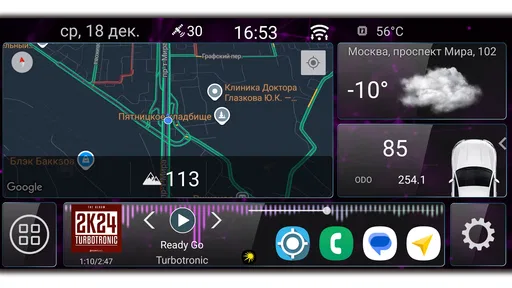
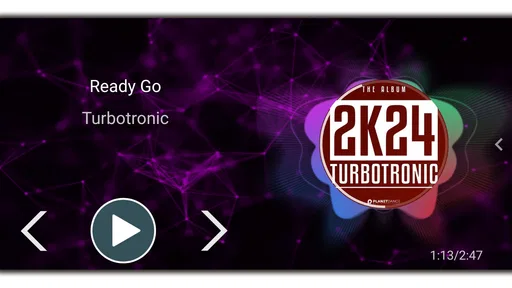
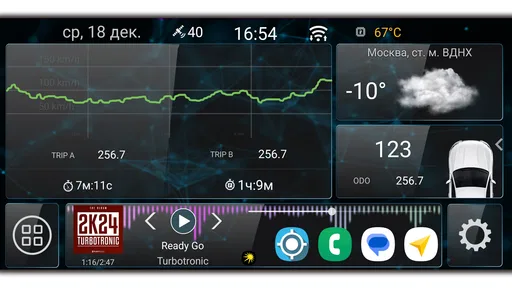
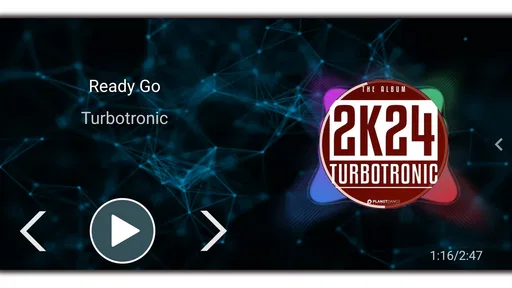
I’d be careful about what you expect from CL Theme C1: it is a paid theme for Car Launcher, not a general-purpose Android theme that transforms every screen on your phone. That distinction matters. If you use Car Launcher and want its in-car interface to look different, this may be relevant; if you are shopping for phone-wide wallpapers, icons, or widgets, I’d look elsewhere. For a dashboard you see often, even a focused visual change can make the launcher feel more personal, but it won’t replace the launcher itself.
Who this theme makes sense for
I’d consider it if Car Launcher is already part of your routine and you want to explore a particular alternative look without changing your whole setup. The practical question is not whether you need another phone theme, but whether this specific theme suits the launcher you already use. Before paying, I would check that Car Launcher is installed and that you are choosing the theme for the correct app. A theme add-on is a poor fit if you expect it to work as a standalone launcher or alter other apps.
There’s also a useful difference between a theme and a full launcher replacement. A replacement can change navigation, layout, and many parts of the home-screen experience; a theme generally changes presentation within its compatible environment. If you are happy with Car Launcher’s arrangement and only want a different appearance, a theme is the more focused choice. If you want a new way to organize apps or operate your phone, changing launchers is likely the better route.
A realistic check before buying
Imagine getting into the car and relying on the same launcher for music, maps, and other frequently used shortcuts. A different visual style might make the dashboard feel less stale, but appearance is only one part of that experience. I would keep the controls and information you rely on easy to recognize, rather than choosing a look solely because it stands out. For in-car use, legibility and quick recognition matter more than decoration, especially when you need to glance at the screen briefly.
Because this is a paid add-on, I’d also treat the purchase as a small but deliberate compatibility decision rather than an impulse download. Check the Car Launcher version and the device setup you intend to use before committing, and think about whether you actually want a new theme or simply a different wallpaper on your phone. That distinction can save you from buying something that does not address the change you wanted.
Apps LabDev’s Car Launcher theme costs $1.99, is rated for Everyone, and has reached over one thousand installs. Its average rating is 0.0, so there isn’t a meaningful community score to use as a shortcut in deciding. I’d weigh the price against your existing use of Car Launcher and your interest in this particular look, rather than treating the install count as proof of quality. It runs on Android 5.0 or later, which gives owners of older compatible devices a route to try it, though compatibility with your own launcher setup still matters.
Transform Your Device's Look
First things first, CL Theme C1 is all about customization. The app offers a plethora of themes that cater to different tastes and styles. Whether you're into minimalist designs or something more vibrant, there’s something for everyone. The best part? You don’t need to be a tech wizard to get started. The app’s interface is super user-friendly, making it easy for even the least tech-savvy among us to navigate. Just a few taps, and voilà! Your phone gets a whole new look.
More From Our News Desk

 Gmail
GmailGmail in a Busy Inbox: Who Benefits Most?
From first account to crowded workday, Gmail earns its place through dependable search and flexible sorting—but its best fit depends on how much inbox maintenance you can tolerate.

 Prime Video
Switching to Prime Video: What Changes in Your Viewing Routine
Prime Video can make a compelling second home for streaming, but switching means learning a different catalog, rental layer, and route from browsing to playback.

 Universal TV Remote Control
Universal TV Remote Control Works Best as a Reliable Backup
A phone remote earns its place through quick setup and reliable habits. Here is how to get more from Universal TV Remote Control—and where its limits show.

 Weather - By Xiaomi
Weather by Xiaomi Review: Clear at a Glance, Less Clear Up Close
Xiaomi’s weather app makes everyday forecasts quick to scan, but its calm surface can leave useful details and recovery paths harder to find than they should be.

 X
XX Under Pressure: Can It Recover When Posting Goes Wrong?
A resilience-focused review of X, examining setup, mistaken posts, interruptions, weak connections, and the gaps that matter when recovery needs to be dependable.

 Clash of Clans
Clash of Clans Is Won Between the Battles
Its raids are quick; its community is a long-term project of coordination, teaching, rivalry, and shared responsibility—with all the friction that entails.
Latest News



Features That Stand Out
One of the features I absolutely love is the ability to customize not just the wallpapers but also the icons and widgets. This means you can achieve a cohesive look that reflects your personal style. CL Theme C1 also updates its theme library regularly, so there’s always something new to try. And let's not forget the battery optimization. Unlike some other theme apps that drain your battery life faster than you can say "low power mode," this app is designed to be light on resources. So, you can enjoy a stunning interface without compromising on your device’s performance.
Performance and Usability
Performance-wise, I haven’t experienced any glitches or crashes, which is a huge plus. The themes load quickly, and applying them is a breeze. The app doesn’t hog your phone’s memory either, which is a relief if you're like me and tend to have a million apps open at once. It's also worth mentioning that the app supports a wide range of devices, so chances are, you’ll be able to use it regardless of your phone model.
Is It Worth It?
So, should you download CL Theme C1? If you’re looking to breathe new life into your device without a complete overhaul, then absolutely. It’s a fantastic way to personalize your phone and make it truly yours. Plus, with the regular updates and a diverse range of themes, you’ll never get bored. Whether you’re a customization novice or a seasoned pro, this app has something to offer.
In conclusion, CL Theme C1 stands out in the crowded world of theme apps thanks to its ease of use, variety, and performance. It’s a solid choice if you’re in the market for a fresh look for your device. So go ahead, give your phone the makeover it deserves!
What the release history tells me
The app was released on December 18, 2024, and its current version is 1.3. Those facts establish its present point in the product’s timeline, but they do not tell me what changed between versions or whether the theme’s appearance has been revised. I would not assume a particular feature was added just because the version number has moved on. For someone already using it, the sensible approach is to review the installed theme after an update and make sure the look still fits the Car Launcher layout they depend on.
Small checks that make a difference
Before applying a new look, I’d take a moment to note the layout and shortcuts I use most, then check whether they remain easy to spot afterward. This is especially helpful if more than one person uses the same vehicle or if the screen is mounted at an angle that makes some colors harder to distinguish. If the result feels less readable, switching back to the previous appearance is more useful than forcing a theme that looks stylish but slows down everyday use.
The main limitation is that the theme’s value depends on an existing Car Launcher setup and on liking the visual treatment it provides. It is not the right purchase for someone who wants a broad collection of interchangeable phone themes, or for a driver whose priority is changing functionality rather than appearance. I’d also keep expectations measured: the release date and version give a snapshot of its current state, not a promise about future additions. If you want to know whether a newer release changes anything important, check the app’s current details before buying or updating.
Making a fair comparison with alternatives
When I compare this add-on with the usual choices, I separate three different jobs. A wallpaper app changes the background, a phone-wide theme tries to restyle parts of the regular Android interface, and a launcher replacement changes the way the home screen is organized. A Car Launcher theme is narrower: it is for people who want to alter the presentation inside that car-focused environment. That narrow scope can be an advantage if you already like how you reach your driving apps; it is a disadvantage if you expect one purchase to restyle the rest of the phone too.
There is also a practical trade-off between choosing a ready-made theme and adjusting a launcher yourself. A preset can save time and give the dashboard a more consistent visual direction, while manual changes may be better if you have specific accessibility needs or want every element arranged to your taste. I would not buy a preset expecting it to solve a functional problem such as confusing shortcuts or an awkward layout. First decide whether your complaint is about how the screen looks or how it works; only the former points naturally toward a theme.
How I would test it in a real routine
For a driver who uses Car Launcher every weekday, I’d test the new appearance while parked rather than judging it at home in ideal lighting. Open the apps you reach for most, sit in your normal driving position, and see whether labels and key controls are still easy to identify at a glance. Then check the same screen in daylight and in the evening, since a design that looks clear indoors may feel different in a car. This is a simple way to avoid confusing visual novelty with practical improvement.
If another person shares the vehicle, I’d let them try the layout too. A theme that is immediately understandable to its purchaser may be less obvious to someone who relies on familiar colors or positions. Keep a note of the previous look and the shortcuts that matter before making changes; that small bit of preparation makes it easier to compare fairly and revert if necessary. The point is not to turn the dashboard into a project, but to make sure the change remains convenient for everyone who uses it.
Who should skip it
I’d skip this purchase if you do not use Car Launcher, if you are looking for a stand-alone navigation or music app, or if the change you want is a new phone wallpaper. It is also a poor match for anyone who expects a theme to add new driving tools or reorganize how the launcher works. In those cases, the better choice is the app or setting that addresses that specific need, rather than a visual add-on whose scope is limited to a compatible launcher.
It may also be the wrong pick if you are already satisfied with the current dashboard and only feel tempted to change it because customization is available. A visual refresh is worthwhile when it makes the interface more pleasant without making regular tasks harder. If your present setup is clear and dependable, leaving it alone is a reasonable decision. That is especially true in a vehicle, where familiarity can matter more than having a fresh design.
What to keep in mind as it evolves
Apps LabDev’s release history places the current version at an identifiable point, but the version number alone cannot tell an existing user whether the change from an earlier build is meaningful. I would treat future releases as something to assess on their actual merits: check whether the theme still works with the Car Launcher setup you use, whether the appearance has changed in a way you like, and whether any adjustments affect your familiar shortcuts. That approach is more useful than assuming every update adds features or improves the experience in a particular way.
Before installing or updating, the key question is whether the add-on is still compatible with your launcher and device configuration. The Android minimum is 5.0, but meeting that requirement does not by itself settle every compatibility question for a particular setup. If you are buying it for an older phone or a vehicle-mounted device, confirm that the launcher itself runs as you expect before spending money on its theme. For existing users, I’d avoid making changes right before a drive; check the result while parked and restore a familiar look if anything becomes harder to read.
My overall view is deliberately specific: this is worth considering as a paid visual extra for someone already committed to Car Launcher, not as a general Android makeover or a reason to switch launchers. The low install history and an average rating of 0.0 offer little crowd feedback to lean on, so the decision comes down to compatibility, taste, and whether a different in-car appearance would genuinely improve your everyday experience. If those points line up, it may be a focused way to personalize a dashboard you see often; if not, I’d keep the money and choose a solution that changes the part of your phone you actually want to change.
CL Theme C1 Frequently Asked Questions
What is CL Theme C1 designed to do for a car launcher?
CL Theme C1 is an Auto & Vehicles app described as a theme for Car Launcher. It is intended for people who want to change the look of that launcher rather than install a general collection of phone wallpapers or icons. If you use Car Launcher, consider whether you want a visual theme for that interface before downloading.
Who develops CL Theme C1, and what is its age rating?
CL Theme C1 is developed by Apps LabDev and has an Everyone content rating. That rating makes it suitable for a broad audience, while the app’s focus remains on theming Car Launcher. If you are choosing an app for a shared device, its age rating and its specific purpose are both useful details to consider.
What is CL Theme C1 and what platforms is it available on?
CL Theme C1 is a customizable theme application designed to enhance the visual aesthetics of your smartphone interface. It is available for both Android and iOS platforms, providing users with a seamless and visually appealing experience. With CL Theme C1, users can personalize their device's look with a variety of themes, icons, and wallpapers, ensuring a unique and tailored appearance.
How easy is it to install and use CL Theme C1 on my device?
Installing CL Theme C1 on your device is straightforward and user-friendly. Once downloaded from the App Store or Google Play Store, the app guides you through a simple setup process. The intuitive interface makes it easy to browse and apply different themes, allowing users to switch between styles effortlessly. Whether you're tech-savvy or a novice, you'll find the app easy to navigate and use.
Does CL Theme C1 offer a variety of themes and customization options?
Yes, CL Theme C1 offers a wide range of themes and customization options to suit different user preferences. From minimalist designs to vibrant and colorful themes, users can choose from a vast collection to match their unique style. The app also allows for customization of icons and widgets, providing a comprehensive personalization experience for your device.
Pros
- Highly customizable layout options.
- User-friendly interface.
- Regular updates and bug fixes.
- Supports multiple languages.
- Efficient performance with minimal lag.
Cons
- Limited free themes available.
- In-app purchases can be expensive.
- Occasional ad interruptions.
- May not support older devices.
- Requires internet for full features.













