Car Launcher Pro
- 785.00
- 4.4
- Installs
- 100.00K
- Price
- $6.99

Screenshots
Analysis by Reviewed
I like the idea behind Car Launcher Pro: instead of opening a general-purpose phone home screen in the car, you get a dashboard arranged around driving tasks. That change is most useful when you want maps, music and other chosen apps within easy reach, rather than hunting through a crowded screen. It’s an Android app in the Auto & Vehicles category, made by apps lab studio, and its central appeal is a more car-focused way to organize a phone.
A dashboard built around quick access
The launcher’s real value is not simply making a phone look different. It gives you a place to organize the items you expect to use on a drive, so the screen can feel more purposeful than a standard Android home screen. I’d treat that as a practical layout choice, not a substitute for safe driving: set up what you need while parked, then keep interaction to a minimum once moving.
This approach suits drivers who already rely on an Android device for navigation or audio and want those tools to be easier to find. It may be less compelling if your car’s built-in system already gives you a comfortable, familiar way to access the same apps. In that case, a new launcher adds another interface to learn without necessarily solving a real problem.
Revamping Your Car Experience
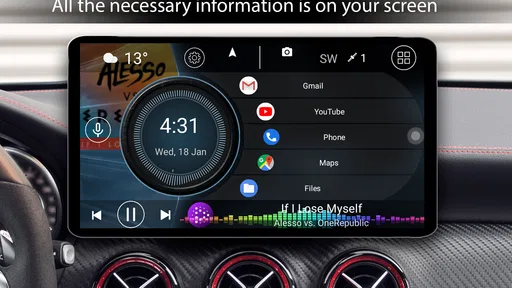
So, let’s talk about what Car Launcher Pro is all about. Essentially, it’s an app designed to transform your Android device into a sleek, customizable dashboard for your car. The idea here is to provide you with easy access to your favorite apps, music, maps, and more, all while you’re on the road. And let me tell you, it’s like giving your car a futuristic upgrade without breaking the bank.
First Impressions
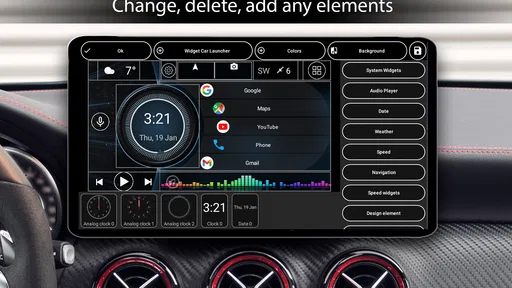
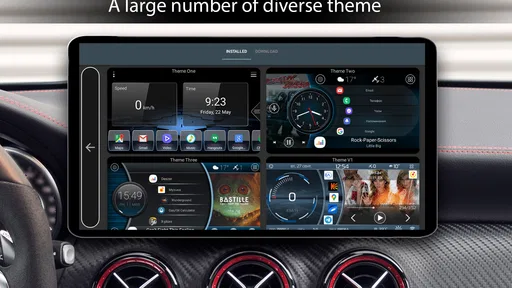
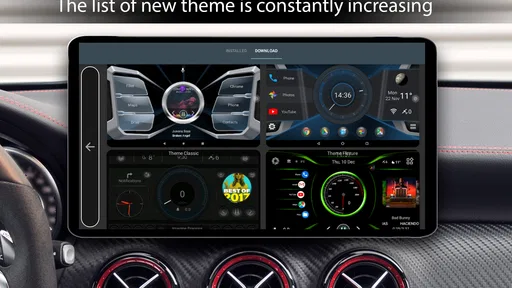
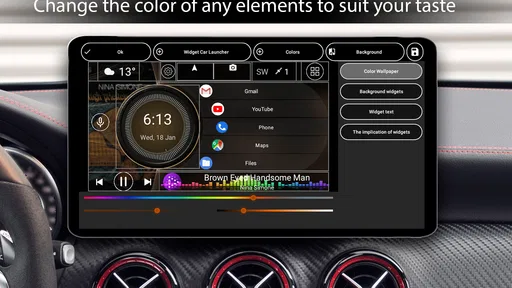
Upon launching the app, I was greeted with a clean, intuitive interface. It’s super user-friendly, which means you don’t have to be a tech wizard to set it up. The customization options are vast, allowing you to tweak everything from the layout to the icons. You can choose between various themes and widgets to make the dashboard truly yours. And the best part? It supports voice commands, so you can keep your hands on the wheel and your eyes on the road. Safety first, my friends!
The best setup is the one you can understand at a glance. I’d begin with only the apps I genuinely use in the car, rather than filling the screen with every available option. A familiar navigation shortcut and a music control are more useful than a busy dashboard that takes longer to scan. Make changes while parked, then try the layout on a short, familiar trip before relying on it for an unfamiliar route.
Features That Stand Out
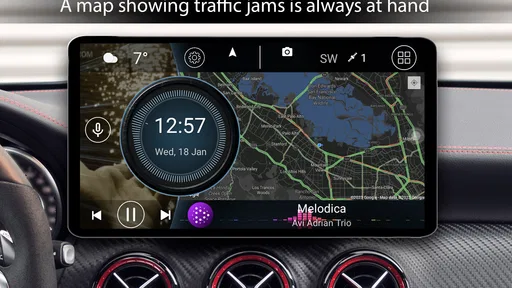
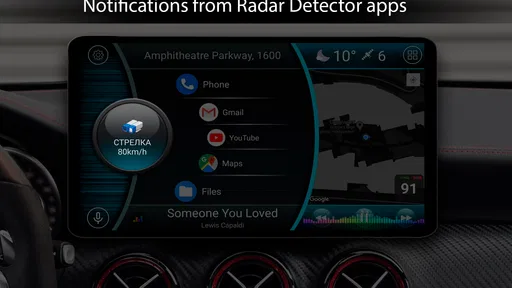
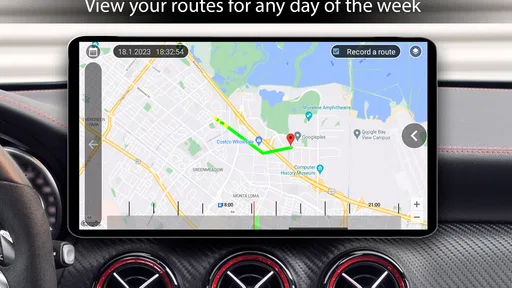
One of the coolest features of Car Launcher Pro is the integration with GPS and navigation apps. You can seamlessly switch between different map services, ensuring you never miss a turn. Plus, the app’s music control is on point. Whether you’re a Spotify addict or prefer good ol’ MP3s, the player is easy to navigate and keeps your driving tunes just a tap away.
More From Our News Desk

Weather by Xiaomi Review: Clear at a Glance, Less Clear Up Close

X Under Pressure: Can It Recover When Posting Goes Wrong?

Clash of Clans Is Won Between the Battles

Android Auto Makes the Case for Quieter Car Software

MobiOffice: Transforming Mobile Productivity with Seamless Integration

EA SPORTS FC™ Mobile Soccer: Redefining Mobile Sports Gaming
That flexibility is handy if you sometimes prefer one map app for a particular journey and another at other times. The trade-off is that a launcher helps organize access; it doesn’t make every navigation service behave identically. I’d test the map app and audio setup you actually use before a long drive, especially if you depend on switching between them without distraction.
And if you’re one of those folks who love tracking their driving stats, you’ll appreciate the real-time speedometer and fuel consumption data. It's like having a co-pilot who’s always got your back, giving you the info you need right when you need it.
Making it work on an ordinary drive
Picture a weekday commute: you get into the car, open your usual route, and start audio before pulling away. A car-oriented screen can make those familiar choices easier to reach than searching through unrelated phone apps. For a road trip, the same layout can help keep navigation and music close at hand, while the ability to use different map services is useful when your preferred option changes with the trip.
There is a small but worthwhile setup habit here: keep the first screen focused on actions you can identify quickly, and put less-used items elsewhere rather than trying to make everything visible. If a widget or shortcut isn’t helping during real use, remove it. A simpler arrangement is often safer and less distracting than one that shows more information just because customization allows it.
The app is aimed at Android, and the minimum operating-system requirement is Android 5.0. It is rated for Everyone. Its current version is 5.1.0.10, and it has been available since June 23, 2015. Those details make compatibility worth checking against the device you plan to leave in the car, particularly if it is an older phone or tablet.
Room for Improvement
Now, no app is perfect, and Car Launcher Pro does have some areas where it could shift into a higher gear. While the customization is impressive, it can be a tad overwhelming for someone who just wants a quick setup. A few more default templates could make life a lot easier for the less tech-savvy among us.
Also, while the app performs smoothly for the most part, I did notice a slight lag when switching between certain features. It’s nothing deal-breaking, but it’s worth mentioning if you’re someone who values speed above all else.
Compared with simply keeping the default Android home screen, this launcher is more purpose-built for a driving setup, but that extra control comes with a learning curve. Compared with a car’s integrated display, it depends on using your own Android device and its apps. If you want a ready-made setup with almost no adjustment, or you rarely use your phone in the car, the ordinary home screen or your vehicle’s existing system may be the better fit.
Who will get the most from it
I’d recommend it most to drivers who already use their Android device for maps and music, want those choices grouped into a dashboard, and enjoy adjusting a screen to suit their routine. The 4.4 average from around 42,000 ratings and more than 100,000 installs suggest it has found an audience, though popularity alone won’t tell you whether its layout suits your habits.
It costs $6.99, so I’d decide based on whether a dedicated driving interface would solve a recurring annoyance for you. If you only need occasional directions, paying for a more tailored launcher may be harder to justify. If you use the phone on most drives and value a consistent home screen, the price is easier to weigh against that daily convenience. There are also 773 written reviews, which can offer further perspectives from other users.
Overall, Car Launcher Pro is a fantastic tool for anyone looking to enhance their driving experience. It combines functionality with style, and let’s be honest, who doesn’t want their car to feel like they’re piloting a spaceship? If you’re ready to take your car’s dashboard to the next level, this app is definitely worth checking out. Safe travels, and happy driving!
Make the screen fit the way you drive
A useful way to judge the launcher is to think about the first few minutes of a trip. If you tend to set a destination, choose audio and then leave the phone alone, the dashboard should make those initial steps feel more orderly. If you often need to search for new places or change what you are listening to while moving, no home-screen arrangement can make that behavior risk-free. I’d use the customization to reduce decisions before departure, not to encourage more interaction during the drive.
For a shared car, I’d keep the layout especially plain. A driver who borrows the vehicle should be able to recognize the navigation and audio choices without learning an elaborate personal arrangement. That may mean resisting the urge to add decorative widgets or extra shortcuts. Personalization is valuable only when it makes the next action clearer; in a shared setting, predictability can matter more than making the dashboard feel uniquely yours.
A practical setup routine
Before relying on it, I’d set up the phone at home or while safely parked, open the map and audio apps I expect to use, and confirm that the shortcuts lead where I intend. Then I’d take a familiar local drive and notice whether the screen is readable at a glance and whether anything I added is distracting. This quick test can reveal a poor layout before it becomes inconvenient on a longer route. It also helps separate problems with a particular app from problems with the launcher’s organization.
One less obvious trade-off is that a dedicated dashboard can make an older spare Android device more useful in the car, but the minimum operating-system requirement is only one part of the decision. The device still needs to run the apps you want to reach comfortably. I’d check that basic combination before paying, rather than assuming that installing a launcher alone will make any phone a good in-car device.
If you’re deciding whether the paid version makes sense, focus on the job you want it to do. The $6.99 purchase is easiest to justify when the standard home screen regularly makes you search for the same driving apps and you’ll use the tailored layout often. For occasional trips, a familiar home screen may already be enough. The point is not to buy a more elaborate display for its own sake, but to solve a repeated annoyance.
Where a different option is wiser
I would skip this app if you mainly want your phone to remain a general-purpose device and have no interest in maintaining a separate driving layout. A launcher changes the way you reach apps, so even a sensible setup asks you to adapt to another interface. Likewise, if your car’s own controls already make navigation and audio easy to access, the extra layer may add little beyond a different look.
It is also not a replacement for a dedicated navigation experience or a reason to handle the phone while driving. Its value is in arranging access on an Android screen; route guidance and audio still depend on the apps you choose. I’d think of it as a tidy starting point for a parked setup, not a promise that every app, device or trip will behave in exactly the same way.
My recommendation
For drivers who make frequent use of an Android phone in the car, the strongest argument is consistency: a focused dashboard can put familiar choices in one predictable place. The biggest caveat is that the benefit depends on thoughtful setup and on whether the phone is already part of your routine. I’d keep the layout modest, test it before a demanding trip and remove anything that does not make the next step easier.
That leaves me with a positive but specific recommendation. If you want a customizable driving-oriented home screen and are willing to spend a little time arranging it, this is a sensible option to consider. If you prefer not to customize, rarely use a phone in the car, or already have a better-integrated system, stick with what you know. The right choice is the one that reduces distraction and makes your parked-before-departure routine simpler.
Car Launcher Pro Frequently Asked Questions
Is Car Launcher Pro available for iPhone or only Android?
Car Launcher Pro is an Android app, so it is intended for Android devices rather than iPhones. If you use an iPhone, this app is not the right download for your device. Android users should also check that their phone meets the operating-system requirement and think about whether they want a car-focused launcher on their phone.
How much storage space does Car Launcher Pro need, and will it slow down my phone?
Before installing any launcher, it is sensible to check that your device has enough free space and is working comfortably with its current apps. Car Launcher Pro is designed for use in the car, and how smoothly it runs can vary with a device’s hardware and Android version. If your phone is older or already feels slow, consider that before making it your driving interface.
Can Car Launcher Pro work with my car’s screen or infotainment system?
Car Launcher Pro is an Android launcher designed for use in the car, but whether it works with a particular vehicle display depends on the setup you use. A compatible Android device is the starting point; the app itself should not be assumed to add support for every built-in infotainment system. Check how your phone connects to your car before relying on it as your main driving interface.
Do I need an internet connection to use Car Launcher Pro?
The app’s role is to provide a car-oriented launcher interface, so its basic purpose is organizing access to apps and information on your Android device. Some of the apps or services you choose to open from that interface may need an internet connection, depending on what you use. If you plan to navigate or stream media on the road, check the requirements of those individual services too.
Can I try Car Launcher Pro before paying for it?
Car Launcher Pro is a paid app, so check its purchase page before downloading if you want to understand the cost and transaction terms. Whether a trial or refund option is available can depend on the app store and its current policies. It is worth reviewing the available purchase information and deciding whether a dedicated car-oriented launcher fits your needs before you buy.
Pros
- Highly customizable interface
- Smooth and responsive performance
- Supports multiple widgets
- Includes GPS speed display
- User-friendly navigation
Cons
- Limited free version features
- Occasional minor bugs
- No landscape mode support
- Can drain battery quickly
- Ads in free version













