

Christmas Countdown
- 4.71K
- 4.8
- Installs
- 1.00M
- Price
- Free

Screenshots


Analysis by Reviewed
I approach Christmas Countdown as a small seasonal ritual rather than a tool I need to keep open all day. Its appeal is simple: it gives the wait for Christmas a place on my phone and lets me shape that little experience with music, snow and personalization. If you enjoy a visible countdown and a bit of festive atmosphere, it is an easy app to understand; if you only want a bare date reminder, it may be more decoration than you need.
What to expect from the countdown
This is a free personalization app from Jupli, with optional in-app purchases priced from $3.49 to $9.99 per item. It is rated for Everyone and has a 4.8 average from around 31,000 ratings, with over 1 million installs. It has been around since 2013, and version 25.2.0 is the current release. Those details suggest an established seasonal favorite, but the deciding question is whether its festive presentation suits you.
The app’s central idea is to make the approach of Christmas feel tangible. Instead of checking a calendar and doing the mental arithmetic yourself, you can open a dedicated countdown and enjoy a seasonal setting. I find that more charming than a standard date widget when I am already in a holiday mood, though it is not a replacement for a general calendar or a practical planning system.
Your first setup and first useful moment
After installing it, I would start by looking over the available appearance options and choosing a style that feels comfortable for everyday viewing. Then I’d try the music and snow controls rather than turning every effect on immediately. That gives you a quick sense of whether the app feels calming or too busy, and lets you make the screen your own before it becomes part of a daily routine.
The first meaningful success is wonderfully small: open the countdown, see how close Christmas is, and settle on a look you actually enjoy returning to. I’d keep the app somewhere easy to reach during the season, perhaps beside the calendar or notes app, so checking it becomes a deliberate little break rather than another notification demanding attention. For a child who likes counting down, a parent could also make opening it together part of breakfast or the trip home from school.
Countdown to Joy
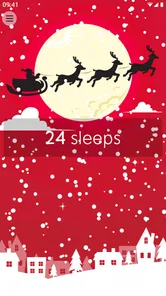
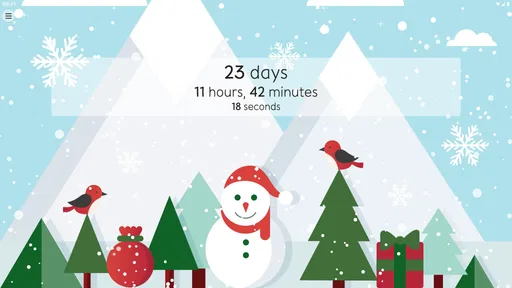
As soon as you fire up the Christmas Countdown app, you're greeted with a beautifully designed interface that’s as festive as a gingerbread house. The main screen features a countdown timer, ticking away the days, hours, minutes, and even seconds until Christmas Day. It’s like having your own personal Santa tracker!
Features That Sparkle
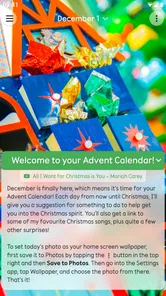
One of the coolest features is the daily advent calendar. Each day you unlock a new surprise, which can be anything from a fun fact about Christmas, a festive joke, or even a cute little animation. It's a delightful way to start each December morning, bringing a smile to your face as you sip your morning coffee.
More From Our News Desk

 Gmail
GmailGmail in a Busy Inbox: Who Benefits Most?
From first account to crowded workday, Gmail earns its place through dependable search and flexible sorting—but its best fit depends on how much inbox maintenance you can tolerate.

 Prime Video
Switching to Prime Video: What Changes in Your Viewing Routine
Prime Video can make a compelling second home for streaming, but switching means learning a different catalog, rental layer, and route from browsing to playback.

 Universal TV Remote Control
Universal TV Remote Control Works Best as a Reliable Backup
A phone remote earns its place through quick setup and reliable habits. Here is how to get more from Universal TV Remote Control—and where its limits show.

 Weather - By Xiaomi
Weather by Xiaomi Review: Clear at a Glance, Less Clear Up Close
Xiaomi’s weather app makes everyday forecasts quick to scan, but its calm surface can leave useful details and recovery paths harder to find than they should be.

 X
XX Under Pressure: Can It Recover When Posting Goes Wrong?
A resilience-focused review of X, examining setup, mistaken posts, interruptions, weak connections, and the gaps that matter when recovery needs to be dependable.

 Clash of Clans
Clash of Clans Is Won Between the Battles
Its raids are quick; its community is a long-term project of coordination, teaching, rivalry, and shared responsibility—with all the friction that entails.
Latest News



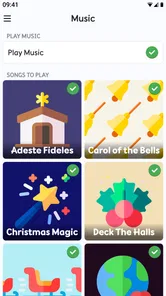
For those who love customization, the app allows you to choose from a variety of themes. Whether you’re into classic red and green or prefer a more modern look, there’s something for everyone. And let's not forget the soothing Christmas music that plays in the background, setting the perfect holiday mood without being too overbearing.
Interactive and Fun
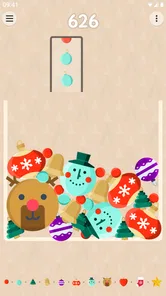
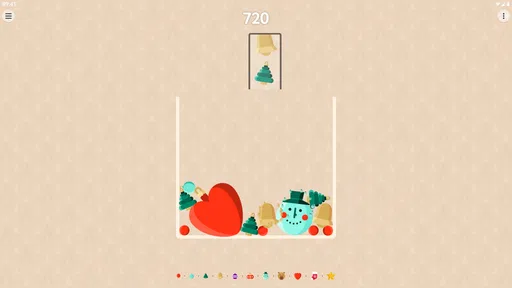
The app isn't just about waiting for Christmas; it's about celebrating the entire season. It offers interactive elements, like a virtual Christmas tree you can decorate with ornaments you unlock by completing fun challenges. It’s like a mini-game that adds an extra layer of engagement, making the countdown even more enjoyable for kids and adults alike.
Another nifty feature is the gift list manager. It's a lifesaver for those who tend to be a bit forgetful during the chaotic holiday shopping season. You can jot down gift ideas, mark them as purchased, and even set reminders, ensuring you don’t leave anyone out of your holiday cheer.
Making it fit real life
One practical way I’d use the countdown is as a shared prompt at home: check it while having breakfast, then let a child pick the day’s surprise or revisit the tree. That turns a quick glance into a small seasonal routine without needing to plan a full activity. For gift shopping, I’d treat the list as a lightweight memory aid: add an idea as soon as it occurs, then mark it when handled, rather than waiting until a busy shopping trip to reconstruct everything from memory.
There is a trade-off in having several festive elements in one place. Music and animated touches can make the countdown feel warm, but they may be distracting if you prefer a quiet, uncluttered screen. I’d try the atmosphere options one at a time and keep only the ones I enjoy; a seasonal app should feel like a treat, not another stream of noise. If you want a plain reminder or a year-round planner, your phone’s calendar is likely the better fit. If you want a broad collection of wallpapers, a dedicated personalization app may offer more everyday variety, while this one stays focused on Christmas.
Common questions before settling in
Is it useful outside December? I see it mainly as a seasonal companion, so its value naturally rises as Christmas approaches. Does it suit children? Its Everyone age rating and playful seasonal activities make it approachable for families, though I’d still choose settings and use habits that work for your household. Do you have to pay? The app is free to start, while some in-app items cost extra; I’d explore the free experience first and spend only if a particular addition is worth it to you.
One point worth keeping in mind is that a countdown measures anticipation, not preparation. It can make the season more fun, but it will not replace a separate system for appointments, budgets or detailed shopping plans. I’d also avoid expecting every festive feature to matter equally: the simple timer may be all one person wants, while someone else will return for the daily surprise or decorating activity. Choosing one or two favorite parts can keep the experience enjoyable instead of turning it into a checklist.
Choosing the right role for it
I think this app makes most sense for someone who wants Christmas to feel present in ordinary moments without turning the season into a project. A student might check the countdown between classes as a quick mood lift; a family could use it as a shared morning ritual; someone living far from home might enjoy a familiar festive scene while making plans to see relatives. In each case, the value is emotional and small-scale. It gives anticipation a visual cue, but it does not need to become a daily task with a target to hit.
There is also a practical way to keep the app from becoming clutter. When you first open it, I’d decide what role you want it to play: a quick timer, a seasonal display, or a short activity to share. Then adjust the experience around that one purpose. If you mostly want the number of days left, avoid spending time cycling through every decorative option. If the atmosphere is the point, experiment until the screen feels inviting, then stop tweaking and enjoy it. Treating setup as a one-time choice helps the app stay a pleasant ritual rather than another thing to manage.
The app is less compelling for people who want a personalization tool that remains useful all year, or for anyone who finds Christmas imagery tiring once it appears everywhere else. A general wallpaper or theme app is better when you want to change your phone’s look across seasons; a calendar is better when you need dates, appointments and reminders in one dependable place. Christmas Countdown has a narrower purpose, and that focus is a strength only if the seasonal countdown itself is something you’ll enjoy seeing.
A low-pressure seasonal routine
For a realistic routine, I’d check it while waiting for coffee or during a quiet moment after dinner, rather than adding a reminder to open it. On a busy day, the timer alone can be enough. On a slower morning, music or snow can make the visit feel more like a small break. That flexible approach matters: if the app asks for too much attention, a festive habit can quickly feel like one more obligation during an already crowded month.
For families, I’d keep the shared use simple and let different people choose what they like. One person may want to see the countdown, while a child might be more interested in the day’s surprise or the decorated tree. A brief check-in gives everyone a chance to enjoy it without needing to negotiate a long activity. If the phone is being passed around, it also helps to keep the experience guided by an adult’s preferences and household routines, especially when children are involved.
For gift planning, the gift list can be most useful at the moment an idea appears, not only when shopping begins. I’d add a recipient and a rough idea while it is fresh, then revisit the list before heading out. That turns it into a memory prompt rather than a full shopping system. If you need to track spending, compare prices, or coordinate purchases with several people, keep using a separate method that handles those details better; a festive list is convenient precisely because it can remain lightweight.
Small trade-offs that affect daily use
Sound is a good example of a feature that can be enjoyable in one setting and awkward in another. I’d try the music at home first, then decide whether it belongs in a shared room, a quiet workplace, or a commute. Even a pleasant seasonal sound can feel intrusive if it starts when you only wanted to check the timer. Keeping the app as an intentional visit, rather than something you open automatically in every situation, makes it easier to enjoy the atmosphere on your own terms.
Snow and other visual effects have a similar trade-off. They can make the countdown feel more alive, but a screen with movement may not be what you want when you are checking quickly or trying to keep your phone visually calm. My advice is to test one effect at a time and notice whether it improves the moment or merely adds activity. Customization is most useful when it helps the app fit your habits, not when it becomes a hunt for the most elaborate setup.
There is a seasonal trade-off, too: the nearer Christmas gets, the more naturally relevant the countdown feels, while its appeal can fade once the holiday has passed. That is not a flaw so much as the nature of a focused seasonal app. I would not install it expecting a permanent source of daily entertainment. If a short run of festive anticipation is exactly what you want, its limited scope can feel refreshing compared with apps that try to serve every occasion.
Before you make it part of the season
A first-time user may wonder whether they need to buy anything to enjoy the basic idea. I’d begin with the free experience and see whether the timer, atmosphere and available customization already suit you. Optional purchases are there for people who find a particular extra appealing, but I would not spend simply to make the app feel complete. The right question is whether an item adds something you personally want, not whether you have explored every possible option.
You may also wonder whether this can replace a regular countdown widget or calendar entry. I would use it alongside those tools only if the festive presentation is part of the appeal. A plain widget is faster when all you need is a date at a glance; a calendar is more useful when the countdown has to sit beside plans and appointments. This app earns its place when you want the checking itself to feel seasonal, rather than when you are trying to reduce your planning tools to one.
If you are unsure how much time to spend setting it up, keep the first visit short: choose a look, sample the sound and snow, and return later if you want to change anything. You do not need to discover every feature before you can enjoy the main countdown. That simple approach is reassuring for a first install and helps reveal quickly whether the app’s tone suits you. If it does, you can gradually make it part of a routine; if not, you have learned that without turning setup into a project.
Wrapping Up the Experience
Overall, the Christmas Countdown app is a fantastic way to embrace the holiday season. It’s packed with features that not only help you keep track of time but also enhance the festive experience. Whether you’re a Christmas fanatic or just someone who enjoys a good countdown, this app is sure to add a sprinkle of magic to your holiday preparations.
So why wait? Download the app and start your countdown to Christmas today. It’s time to deck the halls, sip some eggnog, and let the countdown to joy begin!
My recommendation is for anyone who enjoys a little daily Christmas atmosphere and wants a countdown that feels more personal than a date on a calendar. I’d skip it if you dislike seasonal sounds and visuals, need a serious organizer, or only want a reminder that takes no setup. For me, its best use is modest: pick a comfortable theme, make the countdown part of a pleasant routine, and let it add a bit of anticipation without asking it to manage the whole holiday.
Christmas Countdown Frequently Asked Questions
Is Christmas Countdown suitable for children and families?
Christmas Countdown has an Everyone content rating, making it suitable for a broad range of users, including families. Its seasonal countdown and festive presentation are easy to understand, so it can be a simple way to share the anticipation of Christmas. As with any app, adults can review its available settings and purchases before letting children use it.
How popular is Christmas Countdown?
Christmas Countdown has an average rating of 4.8 from around 31,000 ratings, with about 4,700 written reviews and over 1 million installs. Those figures suggest that many people have chosen it for their seasonal countdown. Ratings and reviews can help with a download decision, though individual preferences about features, appearance, and customization may differ.
Who develops Christmas Countdown, and what kind of app is it?
Christmas Countdown is a personalization app developed by Jupli, designed to bring a festive touch to the wait for Christmas. Its focus is on making the countdown feel more enjoyable through seasonal elements such as music, snow, and customization. It is rated for Everyone, so it is intended to be suitable for a broad range of users.
What features does Christmas Countdown offer?
Christmas Countdown provides a festive way to count down the days until Christmas. It includes a customizable advent calendar, daily holiday-themed wallpapers, and fun Christmas trivia. Users can also enjoy beautiful holiday music and set reminders for their holiday preparations. The app ensures a delightful experience for all ages.
Does Christmas Countdown work on my device?
Christmas Countdown requires Android 10 or later, so check your device’s operating system before downloading if you use Android. The app is also available for iOS devices. Its simple countdown concept is suited to a wide range of users, and the Everyone content rating makes it appropriate for families looking for a seasonal app to enjoy together.
Pros
- Beautiful and festive design
- Customizable countdown options
- Integrates with calendar
- Includes Christmas music
- Daily festive quotes
Cons
- Limited free features
- Ads in free version
- No offline mode
- Limited design customization
- No social media sharing











