

Cheap Hotels・Hotels70
- 91.00
- 3.6
- Installs
- 500.00K
- Price
- Free

Screenshots



Analysis by Reviewed
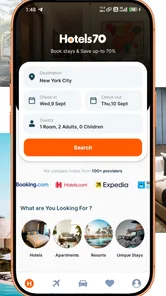
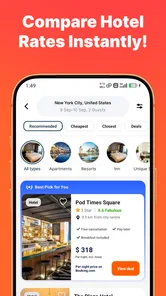
Booking a hotel from a phone is easy when the connection is reliable, but the experience changes quickly when you are moving between airports, train stations, unfamiliar streets, and crowded public networks. I tested Cheap Hotels・Hotels70 with that reality in mind. It is a free Travel & Local app from Booking70 - Flights, Hotels, Rental Cars, focused on comparing hotel prices and helping you look for accommodation from a mobile screen.
My overall impression is practical rather than spectacular. The app is most useful when I already know the destination and dates, have enough connectivity to search comfortably, and want a straightforward way to scan hotel options. It is less convincing as a complete travel companion, especially if I need extensive trip organization or dependable access while completely offline. That distinction matters: this is primarily a hotel-search tool, not a replacement for every travel app on a phone.
How the hotel search feels when the network is doing the work
The central experience depends on getting current search information through the internet. I enter a destination, consider the dates, and compare the available hotel results rather than opening several unrelated booking pages one after another. That can save time when I am still deciding between neighborhoods or trying to keep accommodation within a fixed budget.
The advantage is clearest at the beginning of a trip. Suppose I am planning a weekend away and have not chosen between staying near a station or farther from the center. A comparison-focused app gives me a convenient place to test both areas, watch how the hotel choices change, and decide whether a cheaper room is worth the extra journey. I would still inspect the final conditions carefully, but the first round of research feels more manageable on a phone.
Connectivity also affects how patient I am with the search. On a strong home or hotel Wi-Fi connection, loading results and moving through options feels natural. On a weak mobile signal, the same task can become a sequence of waiting, refreshing, and wondering whether a result has actually updated. That is not a small detail for travelers: hotel availability is time-sensitive, so a slow connection can make the process feel less trustworthy even when the app itself has not done anything wrong.
I would not treat a displayed option as permanently reserved simply because it appeared during a search. Before committing, I would review the room details, cancellation wording, total cost, location, and any conditions shown in the booking flow. A comparison screen is excellent for narrowing choices, but it should not replace a careful final check.
Where comparison saves time, and where it needs judgment
The app makes the most sense for people who prefer to compare before choosing. Instead of accepting the first familiar hotel, I can use the search as a quick market check. This is particularly useful for short trips, last-minute planning, and destinations where I do not yet understand the local price differences.
More From Our News Desk

 Weather - By Xiaomi
Weather by Xiaomi Review: Clear at a Glance, Less Clear Up Close
Xiaomi’s weather app makes everyday forecasts quick to scan, but its calm surface can leave useful details and recovery paths harder to find than they should be.

 X
XX Under Pressure: Can It Recover When Posting Goes Wrong?
A resilience-focused review of X, examining setup, mistaken posts, interruptions, weak connections, and the gaps that matter when recovery needs to be dependable.

 Clash of Clans
Clash of Clans Is Won Between the Battles
Its raids are quick; its community is a long-term project of coordination, teaching, rivalry, and shared responsibility—with all the friction that entails.

 Android Auto
Android Auto Makes the Case for Quieter Car Software
The car interface is no longer judged by how much it can do, but by how quietly it helps. Android Auto shows what drivers now expect—and what still gets in the way.

 MobiOffice: Word, Sheets, PDF
MobiOffice: Transforming Mobile Productivity with Seamless Integration
MobiOffice: Word, Sheets, PDF is redefining mobile productivity with a surprising blend of functionality and innovation.

 EA SPORTS FC Soccer Mobile 26
EA SPORTS FC™ Mobile Soccer: Redefining Mobile Sports Gaming
Dive into EA SPORTS FC™ Mobile Soccer, where immersive gameplay and strategic depth transform mobile sports gaming.
Latest News



There is a trade-off, though. A lower headline price may not be the best value once I consider distance, room type, cancellation flexibility, or the effort of reaching the property. I found that the useful skill is not simply sorting toward the cheapest result. It is comparing the total situation: how much I pay, how much uncertainty I accept, and how inconvenient the location might be.
That is one reason I would pair this app with a map and, when necessary, a second look at the hotel’s own information. A general search engine may be faster for discovering a landmark, while a familiar booking service may offer a more developed loyalty system or reservation history. Hotels70 earns its place when price comparison is the immediate task.
Using it in airports, stations, and moving vehicles
Mobile hotel research is rarely done at a desk. I can imagine using this app after a delayed flight, while waiting for a train, or in a café before the next part of a journey. Those situations favor a simple search flow because I may have only a few minutes and limited attention.
My advice is to search before the most stressful part of the journey. If I know I might need a room after arrival, I would compare areas and shortlist acceptable properties while I still have stable Wi-Fi. Then, if the connection becomes unreliable later, I am not trying to make a major accommodation decision from scratch.
Another useful habit is to save the practical information I will need before leaving a dependable connection. That means noting the hotel name, address, reservation details, and check-in requirements in a place I can reach easily. I would not assume that a search or reservation screen will remain available without connectivity simply because it was visible earlier. For travel, preparation is safer than relying on a live connection at the exact moment you need help.
This is also where the app’s mobile nature has a limit. A phone screen is convenient for scanning, but it is not ideal for comparing many rooms, dates, and neighborhoods at once. For a complicated multi-city itinerary, I prefer doing the broad planning on a larger screen and using the app for quick checks or changes.
What happens when a search is interrupted
Travel connections fail for ordinary reasons: a train enters a tunnel, a station network becomes overloaded, roaming is disabled, or a hotel’s Wi-Fi requires a login page that has not opened properly. In those moments, the important question is not whether the app can magically solve the outage; it is whether I have a sensible way to recover.
If a result stops loading, I would first check the phone’s connection rather than repeatedly tapping the same control. Moving to a window, switching between Wi-Fi and mobile data, or waiting until the network stabilizes can prevent accidental duplicate actions. I would also avoid assuming that a failed-looking booking attempt means nothing happened. Before trying again, I would check for a confirmation message, email, or reservation record wherever applicable.
A second recovery tactic is to reduce the scope of the search. Searching one destination and a narrow date range is easier to manage than changing several filters while the signal is poor. Once I have a stable result set, I can compare the important differences manually. This is less elegant than having every detail update instantly, but it reduces confusion when the connection is inconsistent.
I would also keep an alternative route to the hotel’s details. Writing down the property name and address is surprisingly valuable if the app cannot reload at the curb. If I am already traveling, the ability to show a driver or ask a local person for directions may matter more than having the perfect comparison screen open.
These habits are not glamorous features, but they make the app more dependable in real use. Hotels70 is a connected search tool, so my confidence comes from combining it with basic travel preparation rather than expecting it to carry the entire trip when the network disappears.
Keeping searches manageable on mobile data
People often worry about how much data a travel app uses, especially when roaming. I would approach Hotels70 conservatively: search with a clear destination, avoid repeatedly restarting broad searches, and use hotel names or areas once I have narrowed the trip. This is more efficient than exploring every possible neighborhood through a mobile connection.
Stable Wi-Fi is the better setting for detailed comparison. I would do the first research session at home, in a hotel, or in another trusted network, then use mobile data for a quick confirmation when necessary. That workflow also gives me more time to read room conditions instead of making a rushed decision while watching a data allowance.
There is a practical privacy benefit to this approach as well. Public Wi-Fi can be convenient, but I would be careful when entering personal or payment information on an unfamiliar network. The app’s free price makes it easy to install and try, yet the cost of the hotel booking itself remains the important financial decision. I would verify that I am on the intended booking step and review the final details before submitting anything.
Another data-conscious choice is to avoid treating every small price movement as a reason to refresh constantly. If I am not ready to book, I can record a few suitable hotels and compare them later. Constantly repeating searches may add little value, particularly when my dates and requirements have not changed.
Who will get the most from this app
I see the strongest fit for travelers who want a focused hotel comparison tool without paying to install it. It can suit someone arranging a spontaneous overnight stay, a budget-conscious traveler checking several areas, or a person who wants a second opinion before booking through a usual service.
It is also approachable for casual users. The content rating is Everyone, and the minimum operating system is Android 8.0 or later, so the app is aimed at a broad mobile audience rather than a specialist travel niche. Its current version is 3.0.16, which is useful context for anyone checking compatibility before installing.
On the other hand, I would look elsewhere if my priority is a deep loyalty program, a detailed itinerary workspace, extensive destination guidance, or a single place to manage flights, activities, transport, and reservations. The developer name includes flights, hotels, and rental cars, but my assessment here is centered on the hotel-search experience represented by this app. I would not choose it solely because I expect it to replace a full travel-management platform.
It may also be a poor fit for someone who regularly travels through areas with very limited connectivity and needs every important travel function to work offline. I would prepare the essential information in advance or use a service whose offline behavior is clearly suited to that need. For ordinary connected searches, however, the network dependency is manageable.
How it compares with familiar alternatives
The usual alternative is a large hotel-booking service that combines search with accounts, loyalty benefits, reservation management, and customer support. Those platforms can be better when I repeatedly book through the same company or want all past reservations in one place. Hotels70 is more appealing when I want to compare without beginning from loyalty considerations.
A general web search is another option. It can be useful for reading destination advice, checking a hotel’s surroundings, or finding official property information. Yet it often spreads the task across multiple tabs. A dedicated comparison app feels more focused when my immediate question is simply, “Which hotels should I consider for these dates?”
Hotel websites can sometimes provide the clearest property-specific terms, while map apps are stronger for judging walking distance and nearby transport. I would use Hotels70 as the starting filter, then validate the shortlist with those tools. That combination is more reliable than asking one app to answer every question.
The trade-off is convenience versus depth. A focused hotel finder can reduce the initial workload, but I still need judgment at the end. The cheapest visible option may not be the cheapest complete trip, and the fastest search may not reveal the most suitable cancellation arrangement. I appreciate the app more when I use it as a comparison layer rather than as an automatic decision-maker.
What the public response suggests, and what I noticed personally
The app has reached over 500 thousand installs, with an average rating of 3.6 from around 1.2 thousand ratings and 91 written reviews. I read that overall picture as moderate interest rather than universal enthusiasm. It is enough to show that the app has found a real audience, but not a reason to ignore my own priorities.
My experience matches that balanced interpretation. The concept is useful, the free entry removes a barrier to testing it, and the hotel-comparison purpose is clear. At the same time, the experience is only as comfortable as the connection and the quality of the final checking process. A traveler who expects a richly integrated booking ecosystem may find it limited.
The developer is listed as Booking70 - Flights, Hotels, Rental Cars. That gives the product a travel-oriented identity, but I still judge the app by the task it performs in front of me: finding and comparing hotels from a phone. The name alone does not change the need to inspect the actual room and booking details before paying.
My practical routine for using Hotels70
When I use a price-comparison app, I try to separate discovery from commitment. First, I search the destination and dates on a reliable connection. Next, I shortlist properties based on location, total cost, room suitability, and cancellation terms rather than price alone. Then I check the address and travel time with a map, especially if I am arriving late or carrying luggage.
Before completing a booking, I take a moment to confirm the dates, number of guests, room category, and final amount. I also record the hotel’s name and address in my travel notes. This workflow makes the app useful even if the signal weakens later, because the important decision has already been documented.
For a same-day booking, I would be even more careful. I would confirm that the property can accept a late arrival, check the stated check-in information, and avoid relying on a screenshot that does not show the full conditions. If the app becomes unresponsive at the final step, I would verify whether a reservation was created before submitting again.
For a longer trip, I would compare the cost of staying in one area against moving between neighborhoods. Hotels70 can help surface the options, but it cannot decide whether changing hotels is worth the lost time. That is where personal travel style matters more than a search result.
My connectivity verdict
Cheap Hotels・Hotels70 is a sensible free option for connected hotel research, especially when I want to compare prices quickly from an Android phone. Its strongest moment is before or during a trip when the destination and dates are clear, the network is stable, and I need a focused shortlist rather than a complete travel command center.
I would recommend it to a friend who wants an additional hotel-search tool and is comfortable checking the final details carefully. I would not recommend relying on it as the only source of travel information during a network outage, nor would I choose it for a complex itinerary that demands extensive offline organization.
The best way to use it is deliberately: research on dependable Wi-Fi, keep mobile searches narrow, verify the booking before repeating an interrupted action, and save essential hotel information before moving into unreliable coverage. With those habits, the app’s connectivity dependence becomes a manageable limitation instead of a surprise.
In the end, I see Hotels70 as a useful comparison companion rather than a complete booking ecosystem. It earns a place on my phone when I am hunting for a suitable hotel and want another angle on price and location. Its value is real, but it depends on using it with practical travel judgment and a backup plan for the moments when the internet is least cooperative.
Cheap Hotels・Hotels70 Frequently Asked Questions
Is Cheap Hotels・Hotels70 free to download, and what devices can run it?
Cheap Hotels・Hotels70 is free to download and is intended for travel planning and hotel searches. It requires Android 8.0 or later, so check your device’s operating system before installing. The app is rated for Everyone, making it suitable for a general audience. As with any travel app, you may still need an internet connection to search for available accommodation and compare offers.
What is Cheap Hotels・Hotels70, and what can I use it for?
Cheap Hotels・Hotels70 is a hotel-search and booking app designed to help travelers compare accommodation options and find lower prices. After entering a destination, travel dates, and number of guests, you can browse available properties, review prices, check photos, and examine important details such as facilities, location, and cancellation conditions before deciding where to stay.
Does Cheap Hotels・Hotels70 really offer the cheapest hotel prices?
The app can make it easier to discover affordable hotels by comparing available accommodation offers, but the displayed price is not guaranteed to be the lowest possible price everywhere. Rates may change according to demand, dates, taxes, fees, currency, and booking conditions. It is advisable to compare the final total with other trusted booking services before completing a reservation.
Can I cancel or modify a reservation made through Cheap Hotels・Hotels70?
Cancellation and modification options depend on the individual hotel and the rate selected during booking. Some rooms may allow free cancellation before a stated deadline, while discounted or non-refundable offers may have strict restrictions. Always read the cancellation policy, payment terms, and any additional charges carefully before confirming your reservation through the app.
Is Cheap Hotels・Hotels70 safe to use for booking accommodation?
The app is useful for searching and comparing hotels, but users should still review every booking detail before submitting payment or personal information. Check that the property has genuine-looking reviews, clear contact details, transparent policies, and a secure checkout process. Avoid sending payment outside the official booking flow, especially when a host or property makes an unusual request.
Pros
- Quickly compares hotel prices across multiple booking platforms.
- Useful filters help narrow results by location
- rating
- price
- and amenities.
- Hotel listings usually include photos
- facilities
- and guest review details.
- Can help uncover budget-friendly stays for flexible travel dates.
- Simple interface makes searching convenient for occasional travelers.
Cons
- Some prices may change before completing the booking.
- Final costs can vary after taxes
- fees
- or currency conversion.
- Hotel availability may not always update instantly.
- Booking support may depend on the external provider used.
- Search results can include sponsored or less relevant listings.











