

CharmPass
- 1.36K
- 4.5
- Installs
- 100.00K
- Price
- Free

Screenshots
Analysis by Reviewed
Buying a transit ticket can be easy when the signal is strong, your battery is healthy, and you already know where you are going. The harder moments come when you are standing outside a station, moving through an unfamiliar part of Maryland, or trying to board while your phone is struggling to connect. That is where CharmPass, the official mobile ticketing app from MDOT MTA, becomes worth considering. I found it most useful as a focused way to handle Maryland transit tickets from a phone, rather than as a complete travel-planning replacement for every tool I might use during a trip.
CharmPass is a free Travel & Local app made by MTA IT, available for users aged Everyone. It has reached over 100 thousand installs and holds a 4.5 average from around 3.6 thousand ratings, which suggests that many riders find the basic ticketing experience dependable enough for regular use. The app first appeared on September 26, 2018, and the current version is 3.21.7458, with Android support starting at version 6.0. Those details matter because a ticketing app needs to work on the phone you actually carry, not only on a newer device.
How CharmPass feels when your connection is doing the work
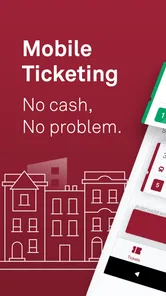
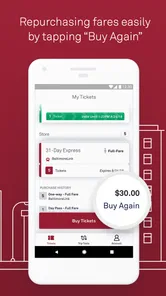
The central appeal is simple: instead of stopping at a machine or handling paper while other passengers wait, I can manage a transit purchase from my phone. That is especially convenient before leaving home, when I have time to choose the ticket and check that the transaction has gone through. It also changes the rhythm of an unplanned trip. If a friend asks me to meet them across town, I can prepare for the ride without first locating a ticket machine.
That convenience depends heavily on connectivity. The app is not something I would treat like a paper ticket that can be bought anywhere without preparation. Opening the app, signing in if needed, completing a purchase, and getting the ticket ready all involve moments where a working connection can make the difference between a smooth boarding process and an awkward delay. My practical advice is to buy and activate what you need before you reach the busiest part of the journey.
This is not a criticism unique to CharmPass; mobile ticketing always introduces a phone and network into a task that used to be physical. Still, it is an important trade-off. A person who likes to decide everything at the last second may find the app less reassuring than a ticket purchased well in advance. I prefer to use it proactively: while I am still somewhere with stable service, I check the ticket status and make sure the screen is ready before walking toward the boarding point.
Connectivity can also affect the emotional side of the experience. When the app responds quickly, I feel organized. When the network is slow, even a short loading pause feels longer because I am usually watching the vehicle arrive or standing in a line. The app does not remove that pressure; it moves the ticketing task onto a device that may be busy handling calls, messages, location services, and a weak cellular connection at the same time.
A realistic morning commute
Imagine a weekday morning when I am leaving home later than planned. I open CharmPass before heading out, choose the ticket I need, and complete the purchase while connected to my home network. By the time I reach the stop, I am not trying to type payment details with one hand or search for a machine. That is the strongest everyday use case I found: preparation turns the phone into a quick ticket wallet, while the actual ride becomes less stressful.
More From Our News Desk

 Weather - By Xiaomi
Weather by Xiaomi Review: Clear at a Glance, Less Clear Up Close
Xiaomi’s weather app makes everyday forecasts quick to scan, but its calm surface can leave useful details and recovery paths harder to find than they should be.

 X
XX Under Pressure: Can It Recover When Posting Goes Wrong?
A resilience-focused review of X, examining setup, mistaken posts, interruptions, weak connections, and the gaps that matter when recovery needs to be dependable.

 Clash of Clans
Clash of Clans Is Won Between the Battles
Its raids are quick; its community is a long-term project of coordination, teaching, rivalry, and shared responsibility—with all the friction that entails.

 Android Auto
Android Auto Makes the Case for Quieter Car Software
The car interface is no longer judged by how much it can do, but by how quietly it helps. Android Auto shows what drivers now expect—and what still gets in the way.

 MobiOffice: Word, Sheets, PDF
MobiOffice: Transforming Mobile Productivity with Seamless Integration
MobiOffice: Word, Sheets, PDF is redefining mobile productivity with a surprising blend of functionality and innovation.

 EA SPORTS FC Soccer Mobile 26
EA SPORTS FC™ Mobile Soccer: Redefining Mobile Sports Gaming
Dive into EA SPORTS FC™ Mobile Soccer, where immersive gameplay and strategic depth transform mobile sports gaming.
Latest News



The same workflow helps when traveling with someone who is unfamiliar with the local system. Rather than explaining where to buy a ticket after arriving, I can handle the purchase before we leave and spend the trip discussing the destination. For a visitor, this can be more approachable than learning a station machine under pressure. The limitation is that the visitor still needs a compatible phone, enough battery, and a connection at the important points.
I would be more cautious when traveling with a group that includes children or people who may need separate tickets. A phone-based purchase can be convenient, but managing several passengers on one small screen may require more attention than buying individual paper tickets. Before starting, I would decide who is responsible for presenting the tickets and avoid assuming that everyone can simply rely on my phone without a backup plan.
Using it on the move
CharmPass makes the most sense for riders who already use their phone as part of their daily travel routine. I can keep the ticketing step close to the other things I check before leaving, such as the route, meeting time, and battery level. The app is less attractive to someone who wants a completely physical process or who regularly travels in places where the phone cannot be charged or connected.
There is also a difference between buying a ticket and navigating a journey. I would not automatically replace a dedicated map or transit-planning tool with CharmPass. Its identity is centered on mobile ticketing, so I would use another source when I need broader route research, walking directions, or a detailed comparison of travel options. That division of labor is sensible: CharmPass handles the ticket task, while a navigation app can handle the wider journey.
On a small phone, the most useful habit is to avoid doing everything at once. I would first confirm where I am going, then open the ticketing app, complete the purchase, and leave the ticket visible before moving into a crowded area. This reduces the chance of switching between apps while boarding. It also makes it easier to notice whether the purchase has actually finished rather than assuming that tapping a button was enough.
For occasional visitors, the app can reduce the unfamiliarity of the first ride, but it does not eliminate the need to understand the ticket itself. I would still read the ticket details carefully and confirm that the selected option matches the journey. A fast purchase is only useful if it is the correct purchase. This is one place where slowing down for a few seconds is better than relying on a familiar-looking screen.
What happens when the network or phone misbehaves
The most important limitation is that a mobile ticketing workflow has more possible failure points than a paper ticket. A weak signal can interrupt loading. A low battery can make the phone unusable. A frozen screen, an expired session, or an incomplete payment can leave me uncertain about whether I am ready to board. These are ordinary smartphone problems, but they become more serious when a vehicle is waiting.
I would not wait until the last moment to discover whether the app is behaving properly. My preferred routine is to open it before arriving, complete the transaction early, and keep the phone charged enough for the rest of the trip. If something goes wrong, I have a little time to retry rather than being forced to solve everything at the door. Preparation is the real reliability feature here.
If a purchase appears stuck, repeatedly tapping the payment control is not my first choice. I would pause, check whether the phone has a stable connection, and look for a clear confirmation before trying again. That approach helps reduce the risk of confusion over duplicate attempts. I would also avoid closing the app immediately after a successful purchase if I still need to present the ticket, because reopening under a poor connection may be slower than keeping the relevant screen available.
Recovery is easier when I separate the possible problems. If the app will not load, the issue may be connectivity or the phone itself. If the app opens but the purchase does not finish, I would check the transaction state before starting another attempt. If the ticket is present but the screen is difficult to read, I would increase the phone’s brightness and move somewhere safer to handle it. These are small steps, but they are more useful than treating every problem as a reason to abandon the app.
I also think about what happens if my phone is lost or damaged during a trip. A paper ticket does not depend on recovering an account or charging a device. With CharmPass, the phone is part of the travel process, so riders should be comfortable accepting that responsibility. Someone who frequently travels in areas with unreliable coverage, or who often forgets to charge their phone, may be better served by a traditional purchase method when one is available.
Keeping mobile data use sensible
A ticketing app does not need to become a constant background companion. I would use it when I need to purchase or present a ticket, then close it rather than repeatedly refreshing it throughout the day. This is useful for people with limited mobile data, and it also keeps the phone focused on the task instead of spending time loading screens that are not needed.
The best data-conscious workflow is to prepare on a reliable connection whenever possible. Buying before leaving home can reduce the need to complete a payment over cellular service. It also gives me time to check the result without standing in a crowded station. I would still keep enough connectivity available for any step that genuinely requires the app, because saving data should not mean assuming that every part of the ticket process will work without a connection.
Another practical habit is to avoid switching repeatedly between the ticket screen and other apps while boarding. Every extra action creates another opportunity for the phone to refresh, lock, or lose the screen I need. I prefer to finish the purchase, verify the ticket, and keep the display ready. This is not glamorous, but it makes the experience feel much more controlled.
People on roaming plans should be especially deliberate. A free app does not automatically mean that every part of using it is free in every mobile situation; the phone’s data connection is still part of the equation. I would prepare while connected to trusted Wi-Fi and check my phone settings before a trip if data costs are a concern. The app’s price is free, but the surrounding mobile conditions still deserve attention.
Who should choose it, and who should look elsewhere?
I would recommend CharmPass to Maryland transit riders who want a straightforward digital ticketing option and are comfortable keeping their phone charged and connected. It is a good match for commuters, occasional riders who dislike ticket machines, and visitors who prefer arranging the practical part of a journey before reaching the stop. The positive rating and growing install base also make it feel like an established option rather than an experiment.
I would be less enthusiastic for someone who rarely carries a smartphone, shares one device with other travelers, or regularly boards in situations where checking a phone is inconvenient. It may also be a poor fit for riders who expect one app to provide every travel function, from route discovery to detailed navigation and ticketing. In that case, I would pair it with a separate planning tool or choose a broader transit service if that is more important than mobile ticket purchase.
The age rating of Everyone makes the app broadly approachable, but that does not change the practical responsibility of managing payment, battery, and ticket presentation. A younger rider may be able to use it easily, while a parent or group organizer may still prefer to control the purchase process. The right choice depends less on technical skill than on who will have the phone available when the ticket needs to be shown.
Compared with a station machine, CharmPass saves physical time and can move the purchase away from the boarding queue, but it adds dependence on the phone. Compared with paper, it is harder to lose in a pocket but impossible to use if the device is dead or unavailable. Compared with a general travel app, it is more focused on the ticketing part of the trip. I see that focus as a strength when I want a dedicated tool, not a weakness that needs to be disguised.
My connectivity verdict
After using CharmPass as a mobile ticketing tool, I see its value most clearly in preparation. It is not magic protection against weak networks, dead batteries, or last-second decisions. It is a convenient way to move ticket buying into a familiar phone workflow, provided I complete the important steps before connectivity becomes uncertain.
The app’s free price, Everyone content rating, Android compatibility from version 6.0, and current 3.21.7458 release make it accessible to a wide range of users. MTA IT has kept the product focused on its role, and that focus is helpful when I only need to obtain and manage a Maryland transit ticket. I would not install it expecting a complete replacement for every travel app on my phone.
My final recommendation is practical rather than unconditional: use CharmPass if you value speed and want to prepare before boarding, but build a small routine around it. Charge your phone, use a dependable connection for the purchase, verify the ticket early, and avoid treating a last-second mobile transaction as guaranteed. For riders willing to make those adjustments, CharmPass is a useful digital companion for Maryland transit, with connectivity as both its convenience and its main point of caution.
CharmPass Frequently Asked Questions
Is CharmPass the official app for Maryland transit tickets?
Yes. CharmPass is the official mobile ticketing app from MDOT MTA, designed to help riders purchase and show mobile tickets for participating Maryland transit services. It is a Travel & Local app, rather than a general-purpose travel planner, so its main role is handling transit fares. Before purchasing, check that the service and fare you need are available in the app.
What devices can run CharmPass, and is it free to download?
CharmPass is free to download, and its listed minimum requirement is Android 6.0. The app is rated for Everyone, making its content suitable for a broad audience. If you use a device on another platform, check the relevant app store for compatibility before downloading. Keep your operating system and app updated so you can use the current version and its available features.
What is CharmPass, and what can I use it for?
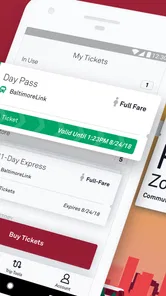
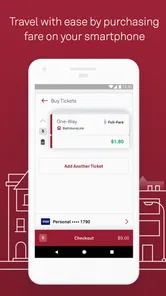
CharmPass is a mobile ticketing app designed for public transportation in the Baltimore area. After installing it, users can browse available fares, purchase tickets or passes, and display a valid mobile ticket when boarding or entering a service area. It is intended to make paying for transit more convenient, especially for riders who prefer not to carry cash or paper tickets.
Which transportation services are supported by CharmPass?
CharmPass is primarily associated with Maryland transit services, including options such as local bus, light rail, Metro SubwayLink, MARC Train, and other participating services depending on the ticket selected. Availability can vary by route, fare type, and location, so it is important to check the app’s current service listings before purchasing. Not every regional transportation provider is necessarily supported.
How do I buy and use a ticket in CharmPass?
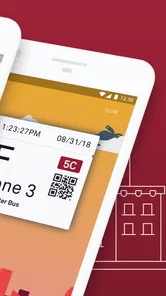
To purchase a ticket, open CharmPass, choose the relevant transportation service and fare, then complete payment through the available in-app options. After buying a ticket, activate it when required by the instructions shown in the app. Keep the active ticket visible on your phone during boarding or inspection. Make sure the ticket is activated before travel and avoid relying on a weak internet connection at the last moment.
Pros
- Buy and manage transit passes directly from your phone.
- Useful for checking pass validity and remaining travel time.
- Supports contactless smartphone validation on compatible services.
- Reduces the need to visit ticket offices or use paper tickets.
- Convenient for occasional visitors and regular public transport users.
Cons
- Requires a compatible device and reliable internet for some actions.
- Not every transport network or ticket type may be supported.
- Phone battery failure can make access to your pass difficult.
- Account or payment setup may take time before the first purchase.
- Ticket rules and availability can vary depending on the local network.











