

Charm mPHR
- 52.00
- 4.3
- Installs
- 50.00K
- Price
- Free

Screenshots
Analysis by Reviewed
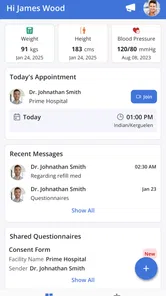
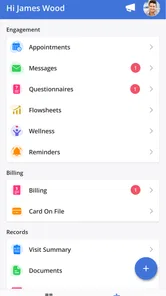
Charm mPHR is the kind of medical app that makes sense when your healthcare is already connected to a practice using Charm Health. I found its appeal less in novelty and more in the simple promise of keeping routine communication and appointment details in one place. From the first time I opened it, the purpose was clear: this is a personal health-record companion for appointments, messages, and the health information shared by your practice.
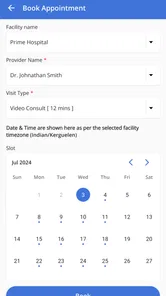
That focus is important. Charm mPHR is not trying to replace a doctor, diagnose symptoms, or become a general wellness tracker. It is a free app from Charm Health Apps / MedicalMine, available for users rated Everyone, and it sits in the medical category rather than the broader fitness or lifestyle space. Its store summary describes access to appointments, messages, and a shared health record from the practice, which matches the way I think it works best: as a patient-side connection to an existing care relationship.
My overall impression is positive, with one major condition: its lasting value depends heavily on whether your healthcare provider uses the connected Charm system. If that connection is active, the app can become a practical habit. If you install it expecting a complete standalone health organizer, it may feel limited very quickly.
What the first week feels like
The first week is when Charm mPHR makes its strongest case. Medical information is often scattered between paper reminders, phone calls, email threads, and separate appointment portals. Having a dedicated place to check practice-related messages and appointments can remove some of that uncertainty. I like the idea of opening one medical app before a visit instead of searching through several unrelated conversations.
The appointment side is especially useful for ordinary planning. A person can check upcoming care details when arranging work, transportation, or family responsibilities. That may sound basic, but medical appointments are exactly the sort of information people misplace when they rely on memory. The app’s value is practical rather than exciting: it helps turn a vague reminder into something visible and easier to manage.
Messages are another reason the app can earn an early place on a phone. Calling a practice is not always convenient, particularly for a non-urgent question that does not require an immediate conversation. A patient portal message creates a more deliberate channel for communicating with the practice. I would still treat it as a routine-contact tool, not an emergency service. If something is urgent, waiting for an app message would be the wrong choice.
The shared health record is potentially the most useful part for preparation. Before an appointment, I would use it to refresh my memory about information the practice has made available, then write down questions separately. That small habit matters because appointments can move quickly. Reviewing the record beforehand helps me arrive with a clearer idea of what I want to discuss instead of trying to reconstruct everything in the examination room.
More From Our News Desk

 Gmail
GmailGmail in a Busy Inbox: Who Benefits Most?
From first account to crowded workday, Gmail earns its place through dependable search and flexible sorting—but its best fit depends on how much inbox maintenance you can tolerate.

 Prime Video
Switching to Prime Video: What Changes in Your Viewing Routine
Prime Video can make a compelling second home for streaming, but switching means learning a different catalog, rental layer, and route from browsing to playback.

 Universal TV Remote Control
Universal TV Remote Control Works Best as a Reliable Backup
A phone remote earns its place through quick setup and reliable habits. Here is how to get more from Universal TV Remote Control—and where its limits show.

 Weather - By Xiaomi
Weather by Xiaomi Review: Clear at a Glance, Less Clear Up Close
Xiaomi’s weather app makes everyday forecasts quick to scan, but its calm surface can leave useful details and recovery paths harder to find than they should be.

 X
XX Under Pressure: Can It Recover When Posting Goes Wrong?
A resilience-focused review of X, examining setup, mistaken posts, interruptions, weak connections, and the gaps that matter when recovery needs to be dependable.

 Clash of Clans
Clash of Clans Is Won Between the Battles
Its raids are quick; its community is a long-term project of coordination, teaching, rivalry, and shared responsibility—with all the friction that entails.
Latest News



One practical tip is to use the app as a pre-visit checklist rather than merely opening it when a notification appears. I would check the appointment area, review the available record, and look through recent practice messages in one sitting. That workflow makes the app more valuable than treating each section as an isolated feature.
The app has been available since June 2020, so it is not a brand-new experiment. Its current version is 1.6.6, and the minimum operating-system requirement is Android 6.0. That relatively broad compatibility is helpful for people who keep an older phone, although the experience can still depend on how actively the connected practice uses the system.
Who gets the quickest benefit
Charm mPHR is a good fit for someone who has recurring contact with a participating medical practice and wants a straightforward way to keep up with appointments and practice communication. It is also useful for people who prefer checking information themselves instead of repeatedly calling reception for routine details.
Caregivers may find the organization helpful when they are assisting a family member with appointments or messages, although the app should be used only in a way that respects the patient’s privacy and the access arrangements supported by the practice. I would not install it simply because it is a medical app. The connection to the practice is the deciding factor.
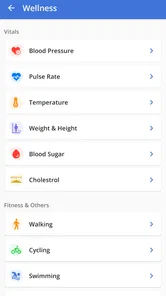
On the other hand, someone looking for medication reminders, exercise tracking, symptom analysis, wearable-device dashboards, or a broad personal health journal should look elsewhere or use additional tools. Charm mPHR’s strength comes from its relationship with the practice, not from trying to cover every health-related task.
Why it can still matter after the novelty fades
Many healthcare apps feel useful during setup and then disappear into a forgotten folder. For Charm mPHR, the month-to-month question is whether you have recurring reasons to return. If appointments, practice messages, or shared records are updated regularly, the app has a natural reason to remain installed. It becomes part of the rhythm around care rather than another app demanding attention every day.
I would not expect daily use, and that is actually a strength. A medical portal should not need to manufacture engagement. The right pattern is occasional, purposeful checking: before an appointment, after a message from the practice, or when reviewing information related to ongoing care. An app that remains quiet between useful moments can be healthier than one that constantly pushes reminders with little relevance.
The recurring value also comes from reducing small administrative tasks. If I can check an appointment in the same place where I read a practice message, I spend less time switching between channels. That does not transform healthcare, but it can make the process less tiring over several months. The benefit accumulates through convenience rather than through a single impressive feature.
A useful monthly routine would be to open the app before a scheduled visit, review what the practice has shared, and prepare a short list of questions. Afterward, I would return when the practice sends a message or makes new information available. This keeps the app connected to real decisions and prevents it from becoming a passive storage icon.
There is also a subtle advantage in separating care information from general phone clutter. Messages about appointments can be buried in email, while notes written on paper can be lost. A practice-linked record gives those details a more appropriate home. I would still keep my own important notes and medication information organized elsewhere when necessary, but the app can serve as a reliable starting point for information that comes directly from the practice.
Where it compares well with usual alternatives
Compared with calling a practice for every routine question, Charm mPHR offers a calmer, more self-directed workflow. I can check first instead of immediately adding another phone call to the practice’s workload. Compared with a generic notes app, it has the advantage of being connected to information shared by the medical practice rather than relying entirely on manual copying.
It also has a different purpose from a general health-record app that asks the user to enter everything manually. Manual organization can be flexible, but it requires discipline and may become outdated. Charm mPHR is more focused: its usefulness comes from the practice relationship and the information made available there.
The trade-off is flexibility. A generic organizer may let me combine records from many providers, track personal measurements, and create custom categories. Charm mPHR is not the better choice for that broad approach. I would choose it when the priority is staying connected to one participating practice, not building a complete cross-provider health database.
The app’s public footprint is modest but established, with over fifty thousand installs and an average rating of four point three from more than two hundred ratings. Those figures suggest that it has found a real audience, but they do not change the central question: whether the specific practice I use supports the experience I need.
The maintenance burden is low, but not zero
Charm mPHR does not seem like an app that requires constant tending. There is no reason for me to open it every morning, create elaborate entries, or maintain a detailed personal dashboard just to get value from it. That low maintenance requirement is one of its best long-term qualities.
Still, low maintenance is not the same as no maintenance. I would keep the app updated when a new version is available, make sure I can access the account associated with my care, and check messages rather than assuming every important detail will arrive through another channel. The app works best when I treat it as part of my appointment routine.
There is a human maintenance task too: deciding what information deserves follow-up. A shared record can be useful for preparation, but simply reading it is not the same as understanding every medical detail. I would mark down confusing terms or changes and ask the practice about them through the appropriate channel. The app can organize communication; it should not replace professional interpretation.
Another useful habit is to check the app at a sensible time before an appointment rather than minutes before leaving home. That gives me time to notice a message, prepare questions, or resolve an administrative issue. The difference between a helpful portal and a frustrating one is often not a hidden feature but whether the user gives it enough time to support planning.
Because the app is free, there is no subscription decision competing with that routine. That makes it easier to keep installed for occasional use. However, free access does not guarantee that it will be valuable for everyone. If my practice rarely uses the connected features, leaving the app on my phone may not provide much benefit.
The friction that can create fatigue
The biggest source of fatigue is likely to be expectation mismatch. The name and medical category may lead some people to expect a complete personal health manager. In reality, its usefulness is centered on appointments, practice messages, and the shared record. Someone wanting broad tracking may open it repeatedly looking for tools that are outside its purpose.
Another possible frustration is dependence on the practice. Even a well-designed patient app cannot display information that has not been shared through the connected care workflow. That means the quality of the experience is partly shaped by how the practice communicates and maintains its patient-facing service. I would judge the app together with that relationship, not as an entirely independent product.
There is also a risk of notification fatigue if a user treats every message as equally important. My approach would be to read practice communication during a planned check-in and separate routine information from anything requiring a response. That keeps the app from becoming another source of anxious, unstructured checking.
People who manage care across several unrelated providers may also find the experience fragmented. A practice-specific portal can be convenient for one relationship while leaving information from another provider elsewhere. In that situation, a broader health-record strategy may be better, with Charm mPHR used only for the practice that supports it.
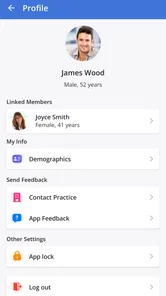
Privacy deserves practical attention even without turning the app into a technical exercise. Medical information should be handled carefully, and I would use a secure device lock and avoid casually sharing access. I would also be cautious when reading or sending messages on a public device. The app makes healthcare communication more convenient, but convenience should not encourage careless handling of personal information.
A realistic everyday scenario
Imagine that I have a routine appointment coming up during a busy workweek. Instead of searching email for the appointment details, I open Charm mPHR during a lunch break. I review the scheduled visit, look through the health information the practice has shared, and notice a question I want to ask. I write that question in my own notes and send a routine message through the practice channel if clarification is needed.
On the day of the visit, I can check the app again without relying on memory. Afterward, I return when the practice sends a message or adds relevant information. Nothing about this scenario is dramatic, but it shows where the app earns its place: it turns several small healthcare tasks into one repeatable workflow.
Now consider the opposite situation. I install it while using providers who do not connect through Charm, and I expect a medication tracker, symptom diary, and all-in-one medical archive. In that case, the app would probably feel disappointing. The problem would not necessarily be poor execution; it would be choosing a practice communication tool for a broader job it was not designed to perform.
How I would decide whether to keep it installed
After the first few weeks, I would ask myself three practical questions. Do my appointments appear where I expect them? Can I use the messaging function for ordinary practice communication? Does the shared record help me prepare for care? If the answer is yes to those questions, the app has a credible reason to stay on my phone.
If only one of those areas matters occasionally, I would still keep it if that one function saves meaningful time. A patient who rarely sends messages but frequently checks appointments may have a different usage pattern from someone who mainly wants access to the shared record. The app does not need to be opened constantly to be worthwhile.
I would skip it, or use a different tool alongside it, if I need one unified record covering multiple practices and personal tracking. A broader organizer can be a better central hub in that case, while Charm mPHR remains useful for the provider-specific connection. Trying to force one app to handle both jobs may create more work than it removes.
My long-term verdict
Charm mPHR earns lasting space when it is tied to an active Charm-connected practice and used with a clear routine. Its recurring value is quiet but real: appointments are easier to revisit, practice messages have a dedicated home, and the shared health record can make preparation more deliberate. I appreciate that it does not need to become a daily habit to remain useful.
Its limitations are equally clear. It is not the right choice for someone seeking a complete health and wellness dashboard, and the quality of the experience depends on the participating practice’s use of the system. Users with many providers may need another tool to bring everything together. Those are important trade-offs, not minor details.
With a free price, Everyone content rating, support for Android devices from version 6.0 onward, and a current version of 1.6.6, it is easy to try without a financial commitment. The developer, Charm Health Apps / MedicalMine, has positioned it as a focused patient-facing medical app rather than an attention-heavy lifestyle product. That focus is exactly why it can age well for the right person.
My recommendation is simple: if your practice uses Charm and you want a dependable place for appointments, messages, and shared care information, Charm mPHR is worth keeping. I would recommend it to a friend who wants less administrative friction around an existing healthcare relationship. I would not recommend it as a standalone replacement for a full personal health organizer. Its lasting value comes from fitting naturally into care you already receive, not from trying to become your entire medical life.
Charm mPHR Frequently Asked Questions
Is Charm mPHR free, and what devices can run it?
Charm mPHR is a free medical app from Charm Health Apps / MedicalMine for accessing patient health information and communicating with a healthcare practice. It is listed for devices running Android 6.0 or later. Before downloading, check that your device meets this requirement and that you can connect to a healthcare organization that uses Charm mPHR.
Who is Charm mPHR intended for?
Charm mPHR is intended for patients who want to access information shared by their healthcare practice, manage appointments, and communicate with the practice through the app. Its usefulness depends on whether your provider participates and has connected your patient account. It is rated for Everyone, but the medical information and tools you can access will be specific to your own care and provider.
What is Charm mPHR and what is it used for?
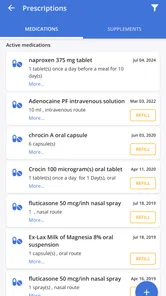
Charm mPHR is a personal health record application designed to help users access, organize, and manage their medical information digitally. Depending on the healthcare provider’s setup, it may allow you to review health records, appointments, prescriptions, lab results, documents, and messages in one place. It is mainly intended to improve communication and give patients easier access to their healthcare information.
Do I need an account or an invitation from my healthcare provider to use Charm mPHR?
In most cases, you need to create an account and connect it to a participating healthcare organization before you can use the app fully. Some providers may send an invitation, activation link, or registration code, while others may require you to register through their patient portal. Availability of features can vary, so downloading the app alone may not provide access to your medical records.
What features can I expect to find in Charm mPHR?
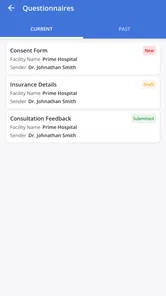
The available tools depend on the healthcare organization connected to your account, but Charm mPHR may provide access to appointments, clinical summaries, test results, prescriptions, invoices, medical documents, and secure communication with a provider. Some accounts may also support appointment requests, online forms, or health information updates. Certain features may be restricted by provider policy or location.
Pros
- Keeps essential medical details available during appointments or emergencies.
- Can reduce reliance on carrying printed health records.
- Useful for organizing personal health information in one place.
- May help users communicate medical history more clearly to healthcare providers.
- Convenient mobile access makes records available while traveling.
Cons
- Requires accurate
- regular updates to keep information reliable.
- Privacy depends on the app’s security and the user’s device protection.
- Not a substitute for professional medical advice or emergency services.
- Some features may depend on compatible healthcare systems or providers.
- Entering detailed medical information can be time-consuming initially.











