

Charlie Health
- 27.00
- 4.0
- Installs
- 10.00K
- Price
- Free

Screenshots

Analysis by Reviewed
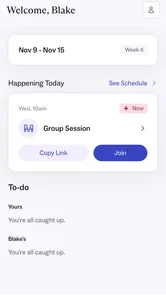
Charlie Health is a medical app from Charlie Health that brings its intensive treatment approach into a home-based setting. I approached it less like a general wellness tracker and more like a digital doorway into structured mental-health care. That distinction matters: it is aimed at people looking for treatment that goes beyond occasional self-guided exercises, not at someone who simply wants a mood diary or a collection of calming sounds.
My overall impression is that the app makes sense when it is used as part of a planned care journey. Its value depends on getting through the opening steps, understanding what the app is asking you to do, and knowing when a problem belongs to the phone or internet rather than to the service itself. The app is free, rated for Everyone, and runs on Android devices using version 7.0 or newer. Charlie Health released it on April 7, 2025, and the current version is 2.12.0.
There is already some public interest around it: the app has passed ten thousand installs, with an average rating of 3.9 from fifty-seven ratings and twenty-seven written reviews. I would not treat that score as a complete judgment of the care experience, because a medical app can be affected by appointment logistics, account setup, device problems, and expectations about treatment. Still, it is a useful signal that the experience has not been equally smooth for everyone.
Where the first-use experience can become difficult
The biggest adjustment is understanding what kind of product this is. Charlie Health is not designed to replace every part of mental-health care with a few taps. Its purpose is to help people find treatment from home through intensive programs shaped around their needs. That makes the opening experience more consequential than it would be in a simple meditation app. If you expect instant content with no intake or coordination, the process may feel slower than expected.
When I review an app in this category, I pay attention to the moment between installation and useful action. Medical services often require a user to move through several pieces of context: identifying who they are, understanding what the service is for, and knowing what happens next. A user who starts the process while tired, anxious, or distracted may interpret ordinary setup friction as a sign that the whole service is unavailable. My advice is to begin when you have a few quiet minutes rather than while rushing between errands.
A realistic example is a student or working adult who installs the app after deciding that weekly self-help tools are no longer enough. They may open it late in the evening, use a weak mobile connection, and stop when a screen loads slowly or the next step is not immediately obvious. In that situation, the best response is not to repeatedly tap every button. Take a screenshot of the point where the process stops, note the exact wording on screen, and return when the connection and attention are better. That simple habit makes later support much more useful.
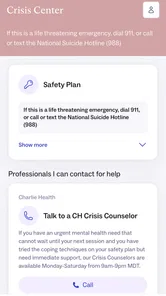
The app is best understood as an access point to structured care, not as an emergency response tool. If someone is in immediate danger or needs urgent medical attention, an app should not be the only plan. Contact local emergency services, a crisis service available in your area, or a trusted person who can stay with you. That is not a criticism of Charlie Health; it is an important boundary for any planned treatment platform.
More From Our News Desk

 Gmail
GmailGmail in a Busy Inbox: Who Benefits Most?
From first account to crowded workday, Gmail earns its place through dependable search and flexible sorting—but its best fit depends on how much inbox maintenance you can tolerate.

 Prime Video
Switching to Prime Video: What Changes in Your Viewing Routine
Prime Video can make a compelling second home for streaming, but switching means learning a different catalog, rental layer, and route from browsing to playback.

 Universal TV Remote Control
Universal TV Remote Control Works Best as a Reliable Backup
A phone remote earns its place through quick setup and reliable habits. Here is how to get more from Universal TV Remote Control—and where its limits show.

 Weather - By Xiaomi
Weather by Xiaomi Review: Clear at a Glance, Less Clear Up Close
Xiaomi’s weather app makes everyday forecasts quick to scan, but its calm surface can leave useful details and recovery paths harder to find than they should be.

 X
XX Under Pressure: Can It Recover When Posting Goes Wrong?
A resilience-focused review of X, examining setup, mistaken posts, interruptions, weak connections, and the gaps that matter when recovery needs to be dependable.

 Clash of Clans
Clash of Clans Is Won Between the Battles
Its raids are quick; its community is a long-term project of coordination, teaching, rivalry, and shared responsibility—with all the friction that entails.
Latest News



What to check before assuming something is broken
Start with the basics that are especially important for a medical service. Confirm that the device is running Android 7.0 or newer, that the application has finished installing, and that the phone has enough free space for normal operation. Then restart the app rather than leaving it suspended in the background. These steps sound ordinary, but they remove a surprising number of temporary failures.
Connection quality deserves extra attention. A phone can show a signal while still struggling with a congested network, a weak Wi-Fi point, or a connection that changes between Wi-Fi and mobile data. If a page remains blank, try a stable network and avoid switching connections during an important step. If the issue appears only on one network, that clue is more useful than simply saying that the app “does not work.”
Keep the operating system and the app current when an update is offered. The current version is 2.12.0, so a device that has not updated for a while may behave differently from the version being maintained now. At the same time, updating should not be treated as a cure for every problem. If the same screen fails after a restart and a reliable connection, the issue may be account-related or service-related instead.
Privacy also affects setup in a practical way. Because this is a medical app, use a personal device when possible and avoid completing sensitive steps on a shared phone. Check that notifications are not being silently blocked if you are expecting timely reminders or updates. I would also avoid using a public computer or an unsecured shared network for anything involving personal health information. These are sensible habits even when the app itself is functioning normally.
A calmer setup routine saves time later
I recommend preparing three things before beginning: a stable internet connection, access to the contact details associated with your care, and a private place where you can read instructions without rushing. This is not about creating a complicated ritual. It simply prevents the common mistake of starting a treatment-related process while missing the information needed to continue.
Read each screen fully before moving ahead. In a general entertainment app, skipping text is usually harmless. In a medical service, a missed instruction can create confusion about the next action or make you repeat a step. If a question feels unclear, write down the wording instead of guessing. Guessing may be faster in the moment, but it can create a mismatch between what you intended and what the service records.
Another useful check is to distinguish identity problems from loading problems. If the app opens but rejects information, repeatedly requesting a new code or trying random variations may make the situation harder to understand. If the screen will not load at all, connection and app state are more likely starting points. Keeping those two situations separate helps you choose a sensible next step instead of treating every failure as the same.
For families or caregivers helping someone else, agree in advance on who will handle the device and who will communicate with the care team. The person receiving treatment should remain at the center of the process, while practical support can cover charging the phone, finding a quiet room, or checking the connection. This arrangement is more respectful and usually produces clearer communication than several people changing settings at once.
Recovering when a workflow stops halfway
When a process breaks, the most effective approach is a short recovery sequence. Close and reopen the app, check the connection, and try the same step once more. If the problem continues, record the screen name, the action you took, and whether the failure happened on Wi-Fi, mobile data, or both. Include the device model and Android version when contacting support. A precise report is far more actionable than a message saying only that the app is stuck.
Do not repeatedly submit a form or tap a confirmation button just because the screen appears unchanged. A slow connection can make a successful action look unsuccessful, and repeated attempts can create duplicate requests or confusion about what was already sent. Wait briefly, look for a confirmation, and then decide whether another attempt is necessary. This is one of the less obvious ways to reduce friction in any care-related app.
If the app closes unexpectedly, restart the phone before taking more drastic steps. Clearing temporary app data can sometimes help with a damaged session, but it may also remove locally stored state or require you to sign in again. I would therefore treat it as a later troubleshooting step, not the first one, and make sure you know the information needed to regain access before using it.
Reinstalling is even more disruptive. It can resolve a damaged installation, but it should not be the automatic response to every error. First capture useful details, confirm that your account information is available, and consider whether the issue appears on another supported device. In a medical workflow, preserving a clear record of what happened is often more valuable than rushing into a reset.
How to tell whether the app is actually the problem
Some apparent app failures are really notification, network, or scheduling issues. For example, if you are waiting for an update and nothing appears, check whether the phone is blocking notifications, whether battery-saving settings are restricting background activity, and whether the relevant message might require opening the app rather than waiting for a pop-up. These checks do not prove where the fault lies, but they narrow the possibilities safely.
It is also possible for the app to open normally while the next step depends on an external part of the care process. A blank or unchanged screen may reflect a temporary service delay, an account state that needs attention, or a session that has expired. Avoid inventing your own workaround for a medical workflow. If the same action fails repeatedly after basic device checks, contact Charlie Health through the support route available to you and describe exactly what happened.
That distinction is important when comparing this service with ordinary mental-health apps. A meditation app can often be replaced immediately by another one if a screen fails. A treatment access app may be connected to a personal care pathway, so changing apps does not necessarily solve the underlying issue. The right response is usually to preserve continuity and ask for clarification rather than abandoning the process after one technical obstacle.
Where Charlie Health fits better than usual alternatives
Compared with a mood journal, Charlie Health is more appropriate for someone seeking organized treatment rather than private self-monitoring. A journal can help a person notice patterns, but it does not serve the same purpose as an intensive program. Compared with a meditation or breathing app, Charlie Health is also a more serious choice for people who need support beyond short daily exercises. Those simpler apps remain useful for relaxation and habit-building, but they are not interchangeable with a structured clinical pathway.
On the other hand, someone who only wants occasional stress relief may find Charlie Health too substantial for the problem they are trying to solve. If your goal is to log sleep, track moods, or practice a five-minute breathing exercise without entering a treatment process, a focused wellness tool may be easier and more suitable. The app’s strength is also its limitation: it points toward intensive care, so it should not be judged as though it were a lightweight self-care utility.
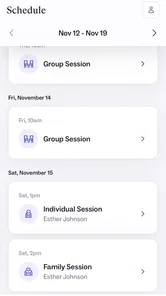
Another trade-off is the home-based format. Receiving care from home can reduce travel and make participation more realistic for people balancing work, school, family responsibilities, or mobility challenges. But home is not automatically a private or stable clinical environment. Noise, interruptions, shared devices, and unreliable internet can all affect the experience. Before choosing this route, consider whether you can regularly create a reasonably private space and keep the phone charged.
For a teenager or adult who has already decided that self-help is not enough, the app may feel like a practical bridge between searching for care and taking part in it. For someone needing immediate in-person assessment, constant supervision, or urgent intervention, a home-based app should not be treated as the better alternative simply because it is convenient. The setting matters as much as the software.
Small habits that make ongoing use easier
Use the same device and connection when possible, especially while you are learning the workflow. Consistency makes it easier to identify whether a problem is caused by the app, the network, or a particular phone. Keep the device charged before an important session or communication, and close unrelated apps if the phone is older or already struggling. None of these steps changes the care itself, but they reduce avoidable interruptions.
Keep a private note of support interactions, including the date, the screen where you stopped, and what troubleshooting you already tried. This prevents you from repeating the same explanation and helps you notice whether an issue is isolated or recurring. Do not store sensitive health details in an unsecured shared note merely for convenience; record only what is needed to explain the technical problem.
Finally, judge the app by whether it helps you stay connected to appropriate treatment, not by how entertaining or feature-rich it feels. A medical app can be valuable while remaining visually simple, and a polished interface cannot compensate for care that does not match your needs. The practical question is whether the service and its treatment format are suitable for you, with the app making access easier rather than becoming the focus itself.
My practical verdict after looking at the whole experience
I see Charlie Health as a focused medical access app for people considering intensive treatment from home. It is free to install, available to an Everyone-rated audience, and maintained by Charlie Health. The public rating of 3.9 suggests a mixed but meaningful user experience, and I would read that alongside the practical realities of medical technology: setup, account coordination, notifications, and connectivity can all shape how an app feels.
I would recommend trying it if you are actively looking for a structured program and the home setting is realistic for your life. Before starting, prepare a stable connection, a private space, and the information needed for your care journey. If a step fails, restart calmly, document the exact point of failure, and separate device troubleshooting from questions that require the provider’s help.
I would skip it as a first choice if you only want a casual wellness tool, a simple mood tracker, or immediate crisis assistance. In those situations, a narrower app or urgent human support may be more appropriate. The same is true if your home environment makes private participation impossible or if your needs require in-person care.
My final view is cautiously positive: Charlie Health makes the most sense when its app role is understood clearly—supporting access to intensive care rather than pretending to be care in isolation. Once that expectation is set, its home-based approach becomes easier to evaluate fairly. The important test is not whether every screen feels effortless, but whether the service helps the right person move toward suitable treatment without avoidable technical confusion.
Charlie Health Frequently Asked Questions
Is Charlie Health free to download, and what is its age rating?
Charlie Health is free to download, and its content rating is Everyone. That rating describes the app’s store classification; it does not mean every treatment program is appropriate for every age or situation. Charlie Health’s virtual mental health services are designed primarily for teenagers, young adults, and families, and treatment eligibility can depend on age, location, and clinical needs.
Can I use Charlie Health on my phone or tablet?
Charlie Health is a medical app for mobile devices. Check that your device meets the app’s operating-system requirement before installing, and make sure you have a reliable internet connection for virtual care. The app is one way to access Charlie Health, while treatment may involve telehealth sessions and communication with providers. Having the app does not by itself determine which services are available to you.
What is Charlie Health, and who is it designed for?
Charlie Health is a virtual mental health program designed primarily for teenagers, young adults, and families who need more support than traditional weekly therapy may provide. Its services can include individual therapy, group sessions, family therapy, and psychiatric support, depending on clinical needs and location. Availability, age requirements, and treatment options may vary by state or region.
How does the Charlie Health treatment process work?
After requesting care, users generally complete an intake or assessment so the clinical team can understand their symptoms, goals, safety concerns, and support needs. Charlie Health may then recommend a personalized program, often involving telehealth sessions and regular communication with providers. The exact schedule, length of treatment, and services offered depend on the individual care plan.
Can Charlie Health help with serious mental health conditions or crisis situations?
Charlie Health may support people experiencing significant mental health challenges, including anxiety, depression, trauma-related concerns, self-harm thoughts, or other complex needs. However, it should not be treated as a replacement for emergency services. Anyone in immediate danger, experiencing a life-threatening crisis, or at risk of harming themselves or others should contact local emergency services or an appropriate crisis hotline immediately.
Pros
- Offers virtual mental health support for teens and young adults.
- Provides personalized care plans based on individual needs.
- Includes access to licensed therapists and psychiatric professionals.
- Group sessions can help users feel less isolated and understood.
- Telehealth format makes support available from home.
Cons
- Availability may depend on location
- age
- and eligibility requirements.
- Some services may require insurance or involve significant out-of-pocket costs.
- Virtual sessions may not suit users who prefer in-person therapy.
- Scheduling can be difficult for users with limited free time.
- Not intended for immediate crisis support or emergency situations.











