

Charging Animation
- 154.00
- 4.7
- Installs
- 1.00M
- Price
- Free
Screenshots
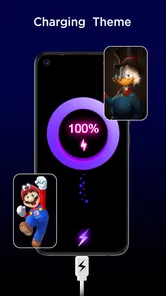
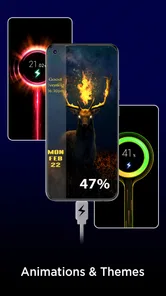
Analysis by Reviewed
I like the idea behind Charging Animation because it gives an ordinary moment a bit of personality: plug in your phone and, instead of seeing only the usual battery indicator, you get a visual change. That is the app’s appeal, but it also sets the right expectation. This is a personalization app, not a new way to charge a phone, and it makes most sense if you enjoy customizing small details on your device.
What changes when you plug in
The practical question is whether a charging animation feels worth opening an app for. For me, it works best as a little visual flourish during a pause: I connect my phone at my desk, glance over while it charges, and get a more distinctive screen than the standard charging display. It won’t make the battery fill faster, so I’d treat the animation as decoration rather than a charging tool.
That distinction matters if you’re shopping for help with slow charging or battery problems. An animation can make charging more noticeable, but it can’t replace a charger, cable, or phone settings that are suited to your device. If your priority is diagnosing a battery issue, the built-in battery information or a dedicated diagnostic tool is a better first stop.
How it fits into a charging routine
A useful way to judge any charging-screen effect is to ask whether you’ll actually see it. I’d try it during a regular overnight charging routine or while a phone is parked on a desk, rather than expecting it to be useful while the phone is in a pocket or being used. For a shared room, a bright animation may be distracting; a calmer look, if available in your setup, would be the more considerate choice.
There’s also a small trade-off between novelty and convenience. A custom screen can make plugging in feel more personal, but an extra visual layer is not essential if you prefer a quiet, uncluttered display. I’d keep the phone’s ordinary charging indicators in mind too: the animation should be a pleasant extra, not the only thing you rely on to know whether the device is charging.
Who is likely to enjoy it
Charging Animation is best suited to people who already like wallpapers, themes, and other small interface customizations. It is less compelling for someone who wants a measurable improvement to charging speed, detailed battery troubleshooting, or a screen that stays completely minimal. On Android, the exact experience can depend on the device and its software, so I’d check how the app behaves on your own phone before making it part of a routine.
The app is free to try, with optional in-app purchases listed at $0.99 per item. It is rated for Everyone, and Dreams Apps Solutions is the developer. The current version is 20251007.28, and the app requires Android 7.1 or later. Those details make it accessible to many Android users, though they don’t guarantee identical behavior across different phones.
More From Our News Desk

 Gmail
GmailGmail in a Busy Inbox: Who Benefits Most?
From first account to crowded workday, Gmail earns its place through dependable search and flexible sorting—but its best fit depends on how much inbox maintenance you can tolerate.

 Prime Video
Switching to Prime Video: What Changes in Your Viewing Routine
Prime Video can make a compelling second home for streaming, but switching means learning a different catalog, rental layer, and route from browsing to playback.

 Universal TV Remote Control
Universal TV Remote Control Works Best as a Reliable Backup
A phone remote earns its place through quick setup and reliable habits. Here is how to get more from Universal TV Remote Control—and where its limits show.

 Weather - By Xiaomi
Weather by Xiaomi Review: Clear at a Glance, Less Clear Up Close
Xiaomi’s weather app makes everyday forecasts quick to scan, but its calm surface can leave useful details and recovery paths harder to find than they should be.

 X
XX Under Pressure: Can It Recover When Posting Goes Wrong?
A resilience-focused review of X, examining setup, mistaken posts, interruptions, weak connections, and the gaps that matter when recovery needs to be dependable.

 Clash of Clans
Clash of Clans Is Won Between the Battles
Its raids are quick; its community is a long-term project of coordination, teaching, rivalry, and shared responsibility—with all the friction that entails.
Latest News



Visual Appeal Meets Functionality
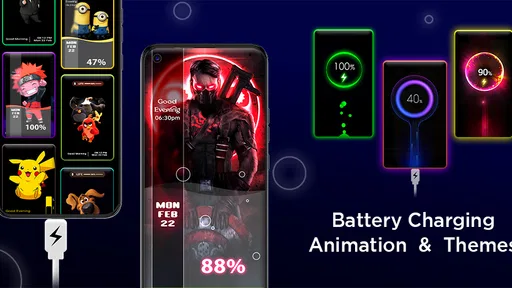
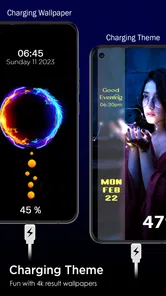
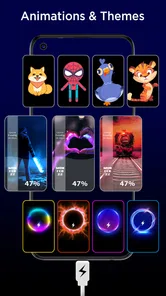
One thing that instantly caught my attention with the Charging Animation app was the array of animations it offers. From futuristic neon lights to cute cartoon characters, there's a little something for everyone. I mean, who wouldn't want to see a tiny rocket ship "fueling up" as your phone charges? The app turns your phone's screen into an engaging canvas, making the charging process a bit more exciting.
Customization at Your Fingertips
What I truly appreciate is the level of customization this app provides. You can choose from different themes and even adjust the speed and brightness of the animations. If you’re feeling creative, you can even add your own images or animations to personalize the experience further. It’s little touches like these that make the app feel personal and tailored to individual tastes.
Performance and Usability
Now, I know what you're thinking: "Won't this kind of app drain my battery even more?" Fear not! The developers have smartly optimized the Charging Animation app to ensure that it uses minimal resources. I've been using it for a few weeks now, and I haven't noticed any significant battery drain. Plus, the app runs smoothly without any hiccups, making it a joy to use.
Why It Stands Out
In a sea of utility apps, finding one that stands out can be challenging. But this app truly shines with its unique blend of aesthetics and functionality. Not only does it make charging your phone a bit more fun, but it also provides practical information like battery health and charging speed. It's like having a mini control center right on your lock screen.
With a 4.7 average from around 34,000 ratings and over a million installs, it has clearly found an audience among people who enjoy this kind of personal touch. It was released on January 12, 2023, and its rating is for Everyone. I’d still judge it by how it fits your own charging habits: popularity can be reassuring, but it doesn’t tell you whether a particular animation will suit your phone or your taste.
Keeping the display comfortable
For a realistic everyday test, I’d start by plugging in at the desk where you can see the screen, then try the same routine at night. If the effect feels too lively in a dark room, reducing its brightness or choosing a less attention-grabbing option can make the experience easier to live with. If you find yourself dismissing it every time, that is a useful sign that a plain charging screen is better for you.
Customization is most rewarding when it solves a small preference rather than creating a new chore. I’d choose one theme, leave it in place for a few days, and only then decide whether changing it adds anything. That simple approach helps separate a genuinely enjoyable detail from the initial novelty, and it avoids spending time adjusting a feature you may barely notice.
Speed, stability, and expectations
I wouldn’t use a charging animation to judge the actual speed or health of a battery. The visual effect and the phone’s charging behavior are separate things, and any battery or speed information shown should be treated as a convenient glance rather than a substitute for the device’s own settings. If the phone seems unusually slow, checking the cable, charger, and system battery screen is the more useful next step.
As with other personalization tools, the phone’s own software can shape how an effect appears. If the animation does not show as expected, I’d first check the app’s available settings and confirm that the phone’s ordinary charging display still works. I would not keep troubleshooting indefinitely: if the feature clashes with the device or gets in the way, removing it and returning to the default screen is a perfectly reasonable choice.
How it compares with simpler options
Compared with leaving the default charging indicator alone, this app offers more visual character and a chance to tailor the look. Compared with a wallpaper or theme, its appeal is narrower: it focuses on the moment the phone is connected rather than changing the whole interface. That makes it a good fit for someone who wants a small, reversible customization, but a poor choice for anyone expecting broader phone personalization or a practical charging upgrade.
A useful first-day setup
I’d approach the first setup as a quick compatibility check rather than a decorating project. Choose an animation that is easy to recognize, connect the phone once while you are nearby, and see whether the screen behaves in a way that feels natural on your device. This gives you a baseline before you spend time browsing themes or adding personal artwork. If the basic charging cue is awkward, a more elaborate design is unlikely to fix the underlying mismatch.
There is a practical reason to keep the first choice simple: a charging screen is usually seen in passing, not studied like a home-screen wallpaper. A high-contrast effect may be easier to notice across a desk, while a more detailed image can look better when the phone is close at hand. I’d prioritize legibility and comfort over choosing the most elaborate option, especially if the display will be visible from a bed or shared workspace.
Everyday use without extra fuss
Picture a typical workday: I place my phone beside my laptop, plug it in before a meeting, and glance at it during a break. In that situation, a distinctive animation can make the charging pause feel intentional and help me notice that the phone has been connected. But if I need the phone for a call or a quick message, I care more about getting back to the task than watching the effect. The app works best as a brief accent, not something that demands attention.
That is also why I would not turn customization into a daily maintenance habit. Pick a look that remains pleasant after the initial surprise, then leave it alone unless it genuinely stops fitting your routine. If you charge in different places, consider how the same effect feels at a desk, in a dim bedroom, and in a busy shared room. A setting that is fun in daylight may be too noticeable at night, so brightness is worth adjusting before deciding the app itself is unsuitable.
When the phone or routine is the limiting factor
Compatibility is the main point I would test before relying on the feature. Android phones do not all present charging screens in the same way, and the operating system can affect whether a personalization effect appears as expected. If it works at your desk but not when the screen is locked, or if it interrupts your normal use, I’d treat that as a device-specific limitation rather than assume the animation will behave identically everywhere.
Older or less capable devices may also make any visual layer feel less worthwhile, even if the app itself seems straightforward. I would avoid running a conspicuous effect while trying to conserve attention or keep a phone’s display quiet; the standard indicator is already better for that. The app’s minimum requirement is Android 7.1, but meeting that requirement does not mean every device offers the same experience. A short trial on your own phone is more useful than making plans around a particular animation.
What I would use instead
If I wanted a broad visual refresh, I would look at a wallpaper or system theme, since those can change the phone’s appearance beyond the brief moment it is connected to power. If I wanted to understand charging behavior, I would start with the phone’s battery settings or a purpose-built diagnostic option. Charging Animation occupies a narrower space between those choices: it adds a focused visual touch, without replacing a system tool or transforming the whole interface.
That narrow focus is a strength when the goal is modest. It is also the reason I would skip it if I rarely notice my phone while it charges, dislike animated screens, or want practical battery guidance. Free access makes it easier to try, while optional purchases mean I would decide whether the basic experience suits me before spending anything. The right question is not whether every user needs this kind of customization, but whether that small moment is one they would enjoy changing.
My performance verdict
For speed, I’d expect the app to add a visual layer, not to affect how quickly the phone charges. For stability, my judgment would depend on whether the effect appears consistently on the specific device and stays out of the way; I would not treat a smooth experience on one phone as a guarantee for another. The same caution applies to resource use: an animation is extra screen activity, so anyone particularly sensitive to battery use or background behavior should test it in their normal routine and compare how the phone feels with the feature enabled and disabled.
If something goes wrong, the sensible recovery path is simple: check the app’s settings, make sure the phone’s normal charging indicator still works, and return to the default display or remove the app if the effect remains inconvenient. I would not rely on a decorative charging screen to diagnose an issue or as the sole confirmation that power is connected. Keeping that distinction clear makes the app easier to enjoy without asking it to do a job it was not designed for.
Overall, the Charging Animation app is a delightful addition to anyone's phone. It’s not just about the visual experience; it’s about adding a touch of personality to your device. So next time your battery is running low, plug it in, fire up this app, and watch as your screen comes to life. Trust me, you’ll never look at charging the same way again!
Charging Animation Frequently Asked Questions
Can I use Charging Animation on an iPhone or is it for Android only?
Charging Animation is an Android personalization app, so it is intended for compatible Android phones rather than iPhones. If you use Android, check that your device meets the app’s minimum system requirement before downloading. The app focuses on changing the look of the charging screen, making it a choice for people who want a visual touch while their phone is plugged in.
What does Charging Animation offer besides moving graphics?
The app is presented as a way to customize the charging screen with animations and themes, and it also highlights full-battery alerts. This gives it a little more purpose than a purely decorative effect: you can choose a visual style and use an alert to know when charging is complete. The exact options are best explored in the app itself.
Is Charging Animation suitable for children and family devices?
Charging Animation has an Everyone content rating, which makes it broadly suitable for family devices. Its focus is personalization, with charging-screen animations, themes, and full-battery alerts rather than age-specific entertainment. Parents can still review the app and its available options before letting a child use it, especially if the device can make in-app purchases.
Does Charging Animation need an internet connection to show animations?
The app’s main purpose is to display a personalized charging screen, but whether a particular animation or theme needs an internet connection can depend on how that content is offered. It is sensible to open the app while connected and explore the choices you want to use. Once set up, you can see how the selected charging-screen effect behaves on your device.
Will Charging Animation replace my phone’s lock screen or home screen?
Charging Animation is a personalization app focused on the screen shown while your phone is charging, rather than a replacement for your regular home screen or lock screen. The app is meant to add an animation and theme to the charging experience. How the effect appears can depend on your phone’s settings and system environment, so try the available options after installation.
Pros
- Visually appealing animations
- Customizable themes
- Battery health insights
- User-friendly interface
- Supports fast charging
Cons
- Consumes battery power
- May cause app conflicts
- Ads can be intrusive
- Limited free features
- Requires device permissions











