ChambApp: Job Search in NY
- 198.00
- 4.7
- Installs
- 50.00K
- Price
- Free

Screenshots

Analysis by Reviewed
If you are looking for work in New York and want something more focused than a broad job board, ChambApp is worth a careful look. I approached it as a first-time user would: install it, understand what it is meant to do, and see whether it could help turn a vague job search into a practical next step. It is a free business app from Ollin Systems, built around the needs of working people in New York rather than around office recruitment language.
My first impression is that its value depends heavily on your situation. If you want a local starting point for finding work, especially when large employment platforms feel crowded or impersonal, the app has a clear purpose. If you expect a complete career-management suite, advanced résumé tools, or the depth of a major national job marketplace, you may find it limited. The important question is not whether it replaces every job-search tool, but whether it gives you a more relevant first move.
What to expect before you begin
ChambApp belongs to the business category, but it does not feel like an app designed mainly for managers or corporate teams. Its identity is much more practical: it is aimed at people trying to connect with work opportunities in New York. That local focus is the feature that shapes the whole experience. You are not opening it simply to browse an enormous worldwide database; you are opening it because location and everyday employment needs matter.
The developer is Ollin Systems, and the app has been available since August 12, 2020. It has built a 4.7 average from around 2.7 thousand ratings, with more than 50 thousand installs. Those figures suggest that it has found a real audience, while still being much more specialized than the biggest employment platforms. I would read that combination as encouraging, but not as a promise that every user will find a suitable position immediately.
It is free to install and is rated for Everyone, which makes the initial decision easy. There are in-app purchases priced between $2.99 and $4.99 per item, so I would not assume that every useful action is included without checking what appears inside the app. For a first-time user, my advice is simple: explore the free path first, understand what you can do without paying, and only consider an optional purchase when you know exactly what it changes for your search.
The current version is 3.5.1 and it supports Android 7.0 or later. That matters if you are using an older phone, because compatibility is the first practical hurdle. On a supported device, I would begin with modest expectations. Think of the app as a focused doorway into a New York job search, not as a guarantee of employment or a substitute for speaking with an employer.
The app is especially relevant if you are searching for accessible, local work and want to avoid spending your entire day adapting your search to a platform built for professional careers. It may also suit someone who is new to online job hunting and wants a narrower environment. On the other hand, a person seeking highly specialized positions, remote roles across several countries, or extensive career-planning tools may be better served by a larger employment service alongside this one.
More From Our News Desk

Weather by Xiaomi Review: Clear at a Glance, Less Clear Up Close

X Under Pressure: Can It Recover When Posting Goes Wrong?

Clash of Clans Is Won Between the Battles

Android Auto Makes the Case for Quieter Car Software

MobiOffice: Transforming Mobile Productivity with Seamless Integration

EA SPORTS FC™ Mobile Soccer: Redefining Mobile Sports Gaming
How I would prepare before opening it
Before starting, I would keep a short version of my work history ready in the phone’s notes. Include the kind of work you want, the areas of New York that are realistic for you, your available schedule, and the experience you can explain clearly. This is more useful than writing a long résumé before you know how the app presents opportunities.
I would also decide what “success” means for the first session. It should not be “get hired today.” A better first target is to identify one realistic opportunity, understand what it asks for, and take the next action without guessing. That approach prevents the common mistake of scrolling through listings without learning anything about your own search.
From installation to the first useful result
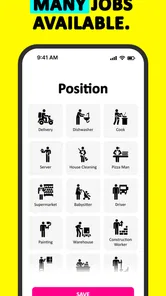
Once installed, I would give myself a few minutes to understand the app’s layout rather than tapping through quickly. Look for the parts that control your search and the parts that describe an opportunity. The distinction is important: one area helps you narrow what you are looking for, while the other helps you judge whether a particular opening is worth your time.
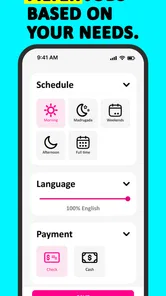
For a first setup, use the most honest description of your situation. If you are open to several kinds of work, choose a broad but meaningful direction instead of selecting everything. A search that is too wide can become noisy, while one that is too narrow may hide practical options. I find that a good first filter is based on the work you can actually accept, not merely the work that sounds attractive.
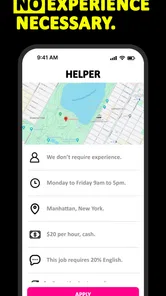
Location deserves special attention. New York is not one uniform commute, and an opportunity that looks good on a screen can become unrealistic once travel time, schedule, and transportation are considered. I would treat neighborhood or area information as part of the job itself. If an opening is too far away for the hours offered, it is not a genuine match, even if the role sounds suitable.
The first meaningful action should be deliberate. Choose one opportunity that appears close to your experience and practical limits. Read it slowly, note what the employer seems to need, and compare those requirements with what you can honestly offer. Then follow the available next step in the app. The point is to complete one informed action rather than collect a long list of possibilities that you never revisit.
A realistic example would be someone who has worked irregular shifts and is now looking for steadier employment in a reachable part of the city. Instead of searching for every available job, that person could use the app to focus on work compatible with their schedule and travel limits. After finding a promising opening, they could prepare a short introduction that mentions relevant experience, availability, and the reason the location works. That is a much stronger use of the app than sending the same vague message everywhere.
One useful habit is to keep a simple record outside the app. Write down the opportunity, the date you acted, what information you sent, and when you plan to check again. This is not a criticism of ChambApp; it is a way to prevent a focused job-search tool from becoming another place where applications disappear into a scroll history. A small note on your phone can make your follow-up much more organized.
Three ways to get more from a focused local search
First, use the app to test your search assumptions. If you repeatedly see work that does not fit your schedule or location, do not simply blame the results. Ask whether your chosen job type is too broad, whether your travel area is too restrictive, or whether your availability needs to be explained differently. The pattern in the results can tell you how to adjust your search.
Second, separate “possible” from “ready.” An opportunity may be interesting but still require a résumé update, a clearer work history, or confirmation that you can manage the commute. I would save the details in my notes and prepare before taking the next step. This small pause reduces rushed applications and makes each contact more credible.
Third, use the local focus as a reason to be specific in your introduction. Rather than writing, “I need a job,” explain the type of work you can do, the area you can reach, and the hours you can reliably cover. A local employment search becomes more useful when your own message is local and concrete too. This is one of the app’s less obvious advantages: its narrower purpose encourages a more realistic conversation about work.
Where first-time users may get confused
The biggest possible confusion is expecting the app to behave like a universal job board. A broad platform may offer more categories, more regions, and more tools for comparing employers. ChambApp’s appeal is the opposite: it is intended to make sense for working people in New York. If your search is outside that context, its central focus becomes less helpful rather than more convenient.
Another point to keep in mind is the difference between discovering an opportunity and completing the hiring process. Finding a suitable opening is only one stage. You still need to present your experience clearly, respond promptly, and judge whether the work is safe and practical for you. I would never treat an in-app opportunity as automatically trustworthy simply because it appears in a dedicated service. Read the details carefully and use normal judgment before sharing sensitive information or committing to anything.
Payments can also create uncertainty for new users. Since the app is free but includes optional purchases priced from $2.99 to $4.99 per item, I would inspect any purchase screen before confirming it. Make sure you understand what the item provides and whether it is genuinely useful for your current goal. If you are only trying to identify suitable work, paying immediately may be unnecessary. The free experience should be your starting point, not something you rush past.
The rating is another detail that needs sensible interpretation. A 4.7 average is a strong sign that many people have had a positive experience, but it cannot tell me whether the app contains the exact kind of work I need today. Ratings describe general satisfaction, not personal fit. I would use them as reassurance about interest in the app, then judge the actual opportunities and workflow for myself.
Some users may also wonder whether they should abandon larger job platforms. I would not recommend that. A large service is usually better when you need a wide market, sophisticated résumé management, employer research, or roles outside New York. ChambApp makes more sense as a focused part of a search. Use it for local discovery and practical targeting, then use another tool when you need broader coverage or more advanced career features.
Who should use it, and who should skip it
I would recommend trying it if you live in New York, are actively looking for work, and prefer a direct, locally oriented starting point. It is also a reasonable option for someone who feels overwhelmed by national job sites and wants to concentrate on opportunities that are more relevant to daily life. The Everyone age rating and free installation make it easy to explore without a large initial commitment.
I would be more cautious if your search is highly specialized or geographically flexible. Someone pursuing senior professional roles, international work, or a remote position that can be based anywhere will probably need a broader platform. Likewise, if your main need is building a polished résumé, tracking dozens of applications, or comparing detailed company information, ChambApp may not be the best single tool.
It may also be a poor fit if you expect instant results with almost no effort. A local app can narrow the path, but it cannot replace preparation. You still need to know what you can offer, check whether the schedule works, and follow through. The people most likely to benefit are those willing to use the app as an organized first step rather than as an automatic hiring machine.
My recommendation after using it as a first-time job seeker
I see ChambApp as a practical, specialized option for New York workers who want to begin with local relevance. Its strongest idea is also its clearest limitation: the focus keeps the search grounded, but it does not provide the breadth of a general employment marketplace. That trade-off is worthwhile when your location and everyday work needs matter more than having endless results.
My suggested path is to install it, confirm that your device supports Android 7.0 or later, and spend the first session learning how opportunities are presented. Start with the free experience, set a realistic work direction, and choose one opening that fits your actual schedule and travel range. Prepare a concise introduction, take one clear action, and record what you did so you can follow up rather than starting over.
After that first action, decide whether the app is helping you find more relevant possibilities than your usual alternatives. If it is, keep it as one part of your routine. If the results do not match your experience or location, do not force the fit; move to a broader job service or a more specialized resource. My honest view is that ChambApp is most useful when you want a focused New York starting point and are prepared to make the search personal, specific, and consistent.
For that audience, I would recommend giving it a fair trial before deciding. It is free to begin, has a strong 4.7 average from around 2.7 thousand ratings, and comes from Ollin Systems with a clear working-class focus. Just keep your expectations practical, treat optional purchases carefully, and remember that the app’s real success is helping you take a better next step—not promising to take the whole job search out of your hands.
ChambApp: Job Search in NY Frequently Asked Questions
Is ChambApp: Job Search in NY intended only for people who already live in New York?
ChambApp is centered on employment in New York, so its listings are most relevant to people seeking work in that area. You do not necessarily have to be an established local resident to explore opportunities: newcomers, students, and professionals considering a move may also find it useful. Check each vacancy’s location and requirements to see whether it fits your plans.
What devices can I use to install ChambApp?
ChambApp is a mobile app for job searching, and the Android version requires Android 7.0 or later. Before installing, check that your device meets this requirement and that you are using the appropriate official app store for your device. The app is listed as suitable for everyone, making its age rating straightforward for prospective users to understand.
What is ChambApp: Job Search in NY, and who is it designed for?
ChambApp: Job Search in NY is a job-search application focused on employment opportunities in New York. It is designed for people looking for full-time, part-time, temporary, entry-level, or more specialized positions. The app can be useful for local residents, newcomers, students, and professionals who want to browse vacancies from a mobile device instead of relying only on traditional job boards.
How does the job search process work in ChambApp?
After opening the app, users can generally explore available vacancies and narrow results according to their interests, location, job category, or other available filters. Each listing should be reviewed carefully because requirements, salary information, schedules, and application instructions may differ. Depending on the employer, ChambApp may redirect you to an external application page or provide instructions for contacting the company directly.
Is ChambApp free to download and use?
ChambApp is free to download, although optional in-app purchases are available. Check the current app-store listing before installing so you understand any purchase options that may appear. Even when browsing jobs is free, applying through an external employer website could involve separate account-registration requirements. Review the terms shown in the app and on any external application page before proceeding.
Pros
- Focused on finding jobs and services specifically in New York.
- Local listings can make searches more relevant than broad job platforms.
- Useful for discovering opportunities from smaller local businesses.
- Simple concept suited to users who want a targeted job search.
- May help newcomers identify work options within nearby communities.
Cons
- Its usefulness is limited if you are searching outside New York.
- Listing quality and availability may vary by neighborhood and industry.
- Some opportunities may lack detailed employer or salary information.
- The app may not offer the advanced filters of larger job platforms.
- Users should verify employers and listings before sharing personal details.











