

Cengage Read
- 349.00
- 3.6
- Installs
- 100.00K
- Price
- Free

Screenshots

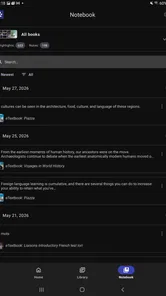
Analysis by Reviewed
Reading a digital textbook sounds simple until you try to do it between classes, on a crowded commute, or with only one hand free. Cengage Read is built for that specific job: it gives students a mobile way to open and study their Cengage eTextbooks instead of depending entirely on a printed book or a desktop browser. I found its appeal strongest when I treated it as a companion for short study sessions rather than as a complete replacement for every other learning tool.
That distinction matters. This is an education app from Cengage Learning, and its value depends heavily on whether your course materials are already part of the Cengage ecosystem. If they are, having the book on a phone or tablet can remove a lot of friction. If your learning material comes from another publisher, the app is unlikely to become part of your routine. It is free to install, rated for Everyone, and available for devices running Android 7.0 or later, which makes it approachable for many students using older hardware.
How the reading experience works in everyday study
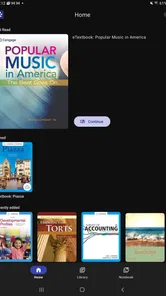
My first impression is that Cengage Read is most useful when I want to get back into a textbook quickly. A mobile textbook is not automatically easier to use than paper, but it can be more convenient when the alternative is carrying a heavy volume or waiting until I reach a computer. The app’s purpose is focused: open the assigned eTextbook, move through its chapters, and study wherever a few spare minutes appear.
That focus is a strength for students who dislike clutter. Instead of combining a textbook reader with unrelated social features, entertainment, or a broad course-management system, the app keeps attention on the reading material. I can imagine using it before a lecture to review a section, during a library break to revisit a difficult explanation, or at home when the physical book is in another room.
The trade-off is that a focused reader may not replace the wider study environment many students need. If your routine depends on detailed flashcards, live tutoring, assignment submission, or a full learning-management system, you should expect to use other tools alongside it. Cengage Read is better understood as the textbook part of a study setup, not the entire setup.
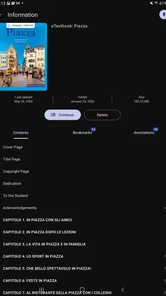
Navigation is especially important on a phone because long chapters can become tiring to browse. I found the most sensible workflow was to avoid treating the app like a book that must always be read from the first page to the last. Instead, I would use the table of contents or the current chapter as an anchor, then jump directly to the topic needed for class. This is a small change, but it makes mobile reading feel purposeful rather than like endless scrolling.
For a realistic example, imagine a student with a biology class in the afternoon. On the bus, the student can open the relevant chapter, skim the headings, and identify the terms that need more attention. Later, at a desk, the same student can return to the longer explanations and take notes elsewhere. The phone is not ideal for every deep-reading task, but it is very effective for turning unused travel time into a quick review window.
More From Our News Desk

 Instagram
Instagram’s Power Comes From Its Place in Your Phone
A close look at how Instagram turns Meta’s reach, recommendation systems and everyday camera habits into durable platform power—and what that costs users.

 Gmail
GmailGmail in a Busy Inbox: Who Benefits Most?
From first account to crowded workday, Gmail earns its place through dependable search and flexible sorting—but its best fit depends on how much inbox maintenance you can tolerate.

 Prime Video
Switching to Prime Video: What Changes in Your Viewing Routine
Prime Video can make a compelling second home for streaming, but switching means learning a different catalog, rental layer, and route from browsing to playback.

 Universal TV Remote Control
Universal TV Remote Control Works Best as a Reliable Backup
A phone remote earns its place through quick setup and reliable habits. Here is how to get more from Universal TV Remote Control—and where its limits show.

 Weather - By Xiaomi
Weather by Xiaomi Review: Clear at a Glance, Less Clear Up Close
Xiaomi’s weather app makes everyday forecasts quick to scan, but its calm surface can leave useful details and recovery paths harder to find than they should be.

 X
XX Under Pressure: Can It Recover When Posting Goes Wrong?
A resilience-focused review of X, examining setup, mistaken posts, interruptions, weak connections, and the gaps that matter when recovery needs to be dependable.
Latest News



Readability depends on the device and the task
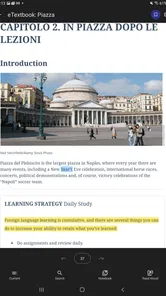
A phone screen is convenient, but it is still a small reading surface. Short sections and quick references work well, while dense pages with diagrams, tables, or side-by-side explanations can feel cramped. I would choose a tablet or computer for extended sessions whenever possible, especially for subjects that rely on charts, formulas, maps, or detailed illustrations. The app makes the text portable; it does not make a small screen physically larger.
This is also where personal reading preferences matter. Some people find digital text easier to enlarge and reposition than printed pages. Others concentrate better with paper and become distracted or fatigued on a glowing screen. Cengage Read can be a meaningful improvement for someone who needs the book close at hand, but it will not automatically solve visual strain or attention difficulties.
One practical tip is to divide reading into two modes. Use the app for locating material, reviewing headings, and revisiting short passages. Reserve longer, demanding chapters for the largest comfortable screen you have. That approach avoids forcing every kind of textbook work onto a phone and makes the mobile version feel like a useful extension rather than a compromise.
Navigation habits that save time
Students often lose time not because the textbook is difficult, but because they repeatedly search for the same section. I would make a simple habit of recording the chapter and topic needed for the next study session before closing the app. A note such as “review the section on cellular respiration” is more useful than reopening the book later and trying to remember where I stopped.
Another helpful approach is to preview the structure before reading closely. Scan the chapter title, headings, and any visible summaries, then decide whether the goal is exam revision, preparation for class, or filling a specific knowledge gap. This prevents passive scrolling and makes a mobile session manageable even when I have only ten minutes.
These are not flashy features, but they are important trade-offs of textbook apps. The convenience comes from immediate access, while the responsibility for organizing the study session remains with the reader. Someone who expects the app to automatically turn reading into a guided lesson may find the experience too hands-off.
Access for different abilities and situations
The most useful way to judge Cengage Read is not simply to ask whether it is portable, but to ask who benefits from that portability. A digital textbook can help readers who find printed books heavy, difficult to carry, or inconvenient to keep open. It can also support students who need to adjust their position frequently, study away from a desk, or move between home, campus, and work.
For readers with visual considerations, the main potential advantage of digital reading is flexibility in how the material is viewed. A phone or tablet can be held closer, and a larger device can provide a more comfortable layout than a small paperback page. Still, I would not assume that every textbook page will be equally comfortable. Complex illustrations, small labels, and crowded layouts may remain challenging even when the surrounding text is readable.
Readers with motor limitations may appreciate not having to hold a thick textbook open or turn many paper pages. On the other hand, a touchscreen introduces its own demands. Precise tapping, swiping, and maintaining a steady grip can be tiring for some people. A larger device placed on a stand may be more comfortable than a phone held in one hand. The best setup depends less on the app alone and more on how the device is positioned.
For sensory needs, a quiet reading environment and a larger display can make a noticeable difference. A student who is sensitive to crowded spaces might use the app in a calm corner of a library instead of carrying several books around campus. Someone who is easily distracted by notifications may prefer to use a dedicated study period with unrelated alerts silenced. The app cannot control the whole environment, but its portability gives the reader more choice about where studying happens.
That flexibility is particularly valuable for students with changing energy levels. On a difficult day, reading a few pages from a phone while resting may be more realistic than sitting at a desk with a large book. On a better day, the same material can be studied on a bigger screen. I like this kind of adaptable workflow because it treats access as a practical question: what can help me study today, in the conditions I actually have?
When mobile access is genuinely helpful
There are several situations where I would recommend trying the app. The first is commuting. A textbook stored on a phone is easier to bring along than a heavy printed volume, and a short journey can become a useful review period. The second is timetable gaps. Students often have twenty minutes between classes, and that is enough time to revisit a definition, read a subsection, or prepare for a lecture.
The third is shared living space. If a student does not have a permanent desk, mobile access makes it possible to study from a sofa, kitchen table, or quiet outdoor area without transporting a full set of books. The fourth is emergency access: forgetting a physical book at home is less disruptive when the same course text is available digitally.
There is also a useful role for quick orientation before group work. I would open the assigned chapter, identify the relevant terminology, and arrive at the discussion with a basic map of the topic. That is different from mastering the material, but it can make collaborative study more productive.
Students who rely on audio learning, extensive handwritten annotation, or highly specialized reading tools should evaluate the app more cautiously. A digital textbook reader may fit into those workflows, but it should not be assumed to replace them. If your learning depends on a particular combination of text-to-speech, tactile marking, color coding, or external note systems, test the complete process with one chapter before committing to the app as your main reading method.
Where the experience still has friction
The biggest limitation is ecosystem dependence. Cengage Read makes sense when your required textbook is available through Cengage. It is not a universal bookshelf for every publisher, and installing it will not solve access to unrelated course materials. Before building your study routine around it, confirm that the specific eTextbook used by your class is available through your Cengage account or course arrangement.
Another limitation is the difference between possession and comprehension. Having a textbook on a phone can make reading more convenient, but convenience does not provide reminders, explanations, feedback, or a personalized study plan. I would pair the app with a calendar, a notebook, or the learning platform required by the course. That combination is more realistic than expecting the reader itself to manage every academic responsibility.
Screen size can also become a barrier. A phone is excellent for searching and short reviews, but long chapters may cause fatigue. Students with visual strain should try the app on their largest available display and consider changing the physical setup rather than assuming the smallest device is the most portable and therefore the best.
There is a psychological barrier too. Some readers remember less when they skim a digital page casually. I found it helpful to pause after each subsection and explain the main idea in my own words. This simple retrieval step turns the app from a passive reading surface into part of an active study routine.
Storage and device habits can influence the experience as well. Students should keep their phone charged before a long study session and avoid relying on a single device for everything. A low battery, a damaged screen, or an unexpectedly busy day can interrupt access. Keeping chapter references in a separate note and knowing where the course materials are located makes the routine less fragile.
How it compares with paper, browsers, and general reading apps
Printed textbooks still win for long, concentrated reading and for readers who prefer physical page landmarks. Paper also avoids battery concerns and can be easier to annotate in a familiar way. Cengage Read wins on portability and quick access, particularly when the physical book is too bulky to carry or the student moves between several locations.
A desktop browser may offer a more comfortable view for dense pages and extended sessions. I would choose a computer when I need to compare several sections, inspect a complicated figure, or write detailed notes at the same time. The mobile app is more convenient when the goal is to read away from a desk, check a passage before class, or make use of a short break.
General ebook apps may provide a smoother experience for novels and personal reading, but they are not necessarily designed around assigned Cengage course texts. The relevant comparison is therefore not simply which reader looks nicest. It is whether the app gives you access to the exact academic material you need. For a Cengage student, that practical connection can matter more than having a broader library elsewhere.
Its public reception is mixed rather than flawless: the app has a 3.6 average from around one thousand ratings and has passed over one hundred thousand installs. I read that as a sign that it is useful for a substantial group of students, while still leaving room for frustration depending on device, textbook layout, and personal expectations. The current version is 2.0, so I would keep the app updated and judge it using the actual course book rather than relying only on general impressions.
Who should use it and who should look elsewhere
I would recommend Cengage Read to students whose required textbooks are already supplied through Cengage and who regularly study away from a fixed desk. It is especially sensible for commuters, students who move between several locations, and anyone who wants a lighter alternative to carrying printed books. It can also suit readers who prefer having course material available on a familiar mobile device.
I would be more hesitant for someone who reads for several hours at a time on a small phone, needs advanced accessibility tools that have not been tested with the specific textbook, or wants one app to handle reading, assignments, flashcards, and tutoring. In those cases, a computer, tablet, printed book, or a combination of specialized tools may be a better fit.
The app is free, but the important practical question is not the installation cost. It is whether your course provides access to the relevant Cengage eTextbook. That is the first thing I would check before changing a study routine. The Everyone age rating makes the app broadly approachable, but academic suitability still depends on the course, subject, and reading needs of the individual student.
My inclusive verdict
After using Cengage Read as a mobile textbook companion, I see its strongest contribution as situational access. It helps put required reading within reach when a printed book is inconvenient, a desk is unavailable, or a short break is the only study opportunity. That can make a real difference, especially for students whose schedules, mobility, energy, or living arrangements do not fit a traditional study setup.
At the same time, I would not describe it as a complete answer to every reading need. Small screens can make demanding pages uncomfortable, touch interaction may not suit every motor preference, and the app remains tied to Cengage course materials. Those are not reasons to dismiss it; they are reasons to use it deliberately.
My practical recommendation is to test one real chapter on the device you expect to use most. Try a short review session, a longer reading session, and a quick search for a topic needed in class. If the text remains comfortable and the book fits your course, Cengage Read can become a convenient part of your study routine. If those tests expose strain or navigation problems, keep a larger screen or printed copy available rather than forcing the mobile format.
For Cengage students who value portability, this is a useful access tool rather than a magic study solution. I would install it when the assigned eTextbook is available and use it alongside the methods that already help me learn: active recall, personal notes, scheduled review, and a comfortable reading setup. That balanced approach is where the app makes the most sense.
Cengage Read Frequently Asked Questions
Is Cengage Read suitable for reading on a phone or tablet?
Cengage Read is designed for mobile study, letting learners read eTextbooks and study while away from a desk. Whether a particular book feels comfortable on a phone or tablet can depend on its layout and the device’s screen size. If you plan to use it for regular coursework, consider how you prefer to read and take notes on a mobile screen.
What is Cengage Read and who is it designed for?
Cengage Read is a digital reading app connected to Cengage learning materials, allowing students to access selected textbooks, course readings, and educational content on a mobile device. It is mainly intended for learners using Cengage products through a school, college, university, or individual purchase. Availability and features can depend on the specific title, course, and account provided by the institution.
Do I need a Cengage account or access code to use Cengage Read?
In most cases, you need to sign in with a Cengage account and have authorized access to the relevant digital book or course material. Access may be provided through an institution, a subscription, a purchase, or an activation code. Simply installing the app does not necessarily unlock all content, so you should confirm your access details before downloading and check whether your course uses a compatible Cengage platform.
Can I read Cengage books offline after downloading them?
Cengage Read may allow supported books or chapters to be saved for offline reading, which is useful when traveling or studying without a reliable internet connection. However, offline availability can vary by title, licensing arrangement, and app version. You may need to open the content online first, and some account checks, interactive features, or synchronized tools may still require an internet connection.
What study features are available in Cengage Read?
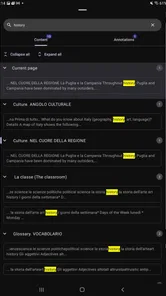
The app is intended to provide more than basic page viewing, depending on the book and course configuration. Users may be able to search within a title, adjust reading settings, bookmark pages, highlight passages, and add notes. Some materials can also connect with related Cengage learning resources. Feature support is not identical across every publication, so the tools available should be checked after signing in.
Pros
- Access to assigned digital textbooks and course materials in one place.
- Search tools make it easy to find terms
- chapters
- and key passages.
- Offline downloads allow reading when an internet connection is unavailable.
- Text customization improves comfort during longer study sessions.
- Syncing helps continue reading across supported devices.
Cons
- Access usually depends on an active Cengage course or subscription.
- Some books may have limited offline availability or download restrictions.
- The app can feel slow when loading large textbooks or media-rich pages.
- Interactive content may not work equally well on every mobile device.
- Annotations and navigation can take time to learn for new users.











