Celsius to Fahrenheit Convert
- 560.00
- 4.2
- Installs
- 100.00K
- Price
- Free
Screenshots
Analysis by Reviewed
When I first opened Celsius to Fahrenheit Convert, I immediately understood its purpose: it is a focused weather utility for changing temperatures between Celsius and Fahrenheit. It does not try to replace a full weather service, and that is exactly why it can be useful. If you have ever looked at a recipe, travel forecast, school exercise, appliance guide, or overseas news report and paused because the temperature used the “wrong” scale, this app gives you a direct way to make sense of it.
The app comes from Webtoweb and is available free of charge for everyone. Its simple idea has attracted a 4.2 average from around three thousand ratings, while its install count has passed one hundred thousand. Those numbers do not make it a universal weather solution, but they do suggest that many people want a small conversion tool rather than another crowded forecast dashboard.
My overall impression is that this is best treated as a pocket calculator for temperature scales. The store summary describes conversion between Celsius and Fahrenheit, and that narrow focus matters: you should install it when the problem is understanding a temperature value, not when you need radar maps, hourly forecasts, alerts, or local weather details.
What to expect before using the converter
The most important expectation to set is that this is a conversion app, not a source of weather information. It will help you translate a number you already have. It will not, by itself, tell you whether it will rain tomorrow, what the wind is doing, or whether a particular city is currently hot. That distinction sounds obvious, but it is the main reason someone might wrongly judge the app after opening it.
I found the focused approach more comfortable than using a general calculator for this particular job. A normal calculator can perform the formula, but it leaves you to remember which operation belongs to which direction. A temperature converter is more practical when you are moving quickly between a familiar scale and an unfamiliar one.
The app is especially suitable for people who regularly switch between measurement systems. A traveler planning a trip can use it while reading local forecasts. A student can check an answer while learning about temperature scales. Someone following an American recipe can translate oven or chilling instructions more confidently. It can also help when a family member sends a temperature reading in a scale you do not normally use.
There is a useful mental shortcut behind the tool, but I would not rely on mental arithmetic for anything important. Celsius and Fahrenheit do not share the same zero point, so a simple number swap is not enough. The app’s value is that it removes the need to remember the formula and reduces the chance of making a sign or multiplication mistake.
More From Our News Desk

Clash of Clans Is Won Between the Battles

Android Auto Makes the Case for Quieter Car Software

MobiOffice: Transforming Mobile Productivity with Seamless Integration

EA SPORTS FC™ Mobile Soccer: Redefining Mobile Sports Gaming

How Microsoft OneDrive Became a Mobile Productivity Giant

How Google Translate Breaks Language Barriers Effortlessly
One practical limitation is equally clear: a specialist converter cannot provide the broader context that a weather app offers. If you want a forecast for your location, a weather service is the better choice. If you need to convert cooking units, distances, weights, or currencies as well, a multi-purpose conversion app may be more efficient. This one makes the most sense when temperature is the recurring problem.
What happens after installation
The application is free to install, and its content rating is Everyone, so it is approachable for a broad audience. It was released on April 20, 2018, and the current version is 1.4.3. Devices running Android 7.0 or later meet the stated minimum operating-system requirement, which makes it relevant to people using older compatible phones as well as newer ones.
I would not approach the first launch expecting a long onboarding sequence. A small utility like this should get out of the way and let you work with the temperature value in front of you. The first useful habit is to identify the scale you are starting with before entering anything. If a friend says the temperature is in Fahrenheit, choose Fahrenheit as the source rather than assuming the direction from the number alone.
That source-and-target distinction is more important than it may appear. A value such as 20 can represent a mild Celsius day or a very cold Fahrenheit reading. The number itself does not tell you which scale was intended. Before tapping a conversion control, I recommend reading the labels carefully and checking that the direction matches the question you are trying to answer.
There is no reason to create a complicated routine around the app. Keep it available for moments when a temperature appears unexpectedly, open it, select the correct conversion direction, enter the value, and check the result. The app is most successful when it stays a short step between confusion and understanding.
In-app purchases are listed at $2.99 per item. That is worth keeping in mind before treating the app as completely cost-free in every respect. For a person who only needs occasional conversions, the free entry point may be enough. For someone who uses it frequently, it is sensible to look at what those optional purchases provide before deciding whether they add meaningful value to your routine.
Your first successful conversion
For a first test, I suggest using a temperature whose scale you know well rather than starting with a number from an unfamiliar source. Enter the value, confirm the starting unit, choose the other scale, and read the displayed result. This gives you a quick way to verify that you understand the screen and the direction of the conversion without adding travel, cooking, or weather-related pressure.
A realistic everyday example is checking a forecast before a trip. Imagine that your usual weather source gives you a Fahrenheit value while you normally dress according to Celsius. Instead of guessing whether the day will feel mild or cold, open the converter and translate the forecast. The meaningful success is not merely seeing another number; it is using that number to make a decision about clothing, outdoor plans, or whether to pack an extra layer.
The same workflow works well in the kitchen. If a recipe or cooking instruction uses a temperature scale you rarely see, convert it before setting an oven or judging a chilling step. I would still read the original instruction carefully, because a temperature conversion does not resolve other cooking questions such as whether the instruction refers to an oven setting, a surface temperature, or a food’s internal temperature.
For study, the app is useful as a checking tool rather than a replacement for learning. I would first write down the formula or attempt the calculation myself, then use the app to compare the result. That approach turns the converter into feedback. If the answers differ, you can inspect whether the mistake came from the direction, the subtraction, or the multiplication instead of simply copying the app’s number.
One less obvious use is communication. When discussing weather with someone who uses another measurement system, you can convert the value before replying instead of forcing both people to interpret different numbers. This is particularly handy in group chats, travel planning, and family conversations where one person may be reporting local conditions from another country.
For reliable reading, do not round too early. If you are converting a value for a rough conversation, a rounded result is usually perfectly understandable. If you are working from a precise instruction or comparing two measurements, keep the displayed precision until the final decision. The app can perform the conversion, but you still decide how much accuracy the situation actually needs.
Common points of confusion
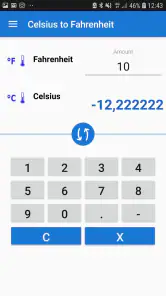
The first common mistake is reversing the direction. “Celsius to Fahrenheit” and “Fahrenheit to Celsius” are separate tasks, even when the same two units appear on screen. I make a point of saying the task aloud in my head: “I have this scale, and I want that scale.” That small pause prevents many avoidable errors.
The second mistake is assuming that a converted value should look familiar in the same way as the original. The scales use different intervals and different zero points, so a result may appear unexpectedly high or low. That does not automatically mean the app is wrong. If the result feels surprising, check the source unit first and then consider whether the original number was a weather reading, a cooking setting, or some other kind of temperature.
Negative temperatures deserve extra attention. A minus sign changes the calculation, and it is easy to overlook when reading a message or typing quickly. I would enter the sign deliberately, then look at the result before using it for a real decision. This is a small step, but it is more valuable than trying to estimate a freezing temperature mentally.
Another point is the difference between conversion and interpretation. The app can tell you the equivalent number in another scale, but it cannot tell you how that temperature will feel to your body, whether a road is safe, or whether a cooking process is complete. For weather, you still need local context such as wind, humidity, and forecast timing. For food, you still need to follow the complete recipe rather than treating one converted number as the whole instruction.
Users may also wonder whether this can replace a built-in calculator. Technically, a calculator can reproduce the conversion if you know the correct formula. In practice, this dedicated tool is better for repeated temperature questions because the purpose is already framed around the two scales. The trade-off is that a general calculator is more versatile, while this app is quicker when temperature is the only thing you need to translate.
It is also fair to ask whether this is the right choice for a person who already owns a full weather app. My answer is: sometimes. A weather app may show temperatures in your preferred unit, but it may not help when you receive a single value from a recipe, message, textbook, or device manual. This converter fills that small gap. On the other hand, if you only ever read forecasts in one familiar scale, you may have little reason to keep a separate utility installed.
How I would use it beyond the first try
After the first successful conversion, I would use the app as a quick verification layer in a broader workflow. For travel, I would convert the forecast values I actually need, then return to the weather source for rain, wind, and timing. For cooking, I would convert the relevant temperature and keep the original recipe visible so that no surrounding instruction is lost. For schoolwork, I would solve first and check second.
This order matters because it keeps the app in its proper role. It is strongest when it removes one specific obstacle without pretending to answer the entire question. I prefer tools that are honest about their boundaries, and this one’s narrow purpose makes it easy to decide when to open it and when to use something else.
A useful personal routine is to verify the unit before every conversion, especially when copying a number from another app. Do not assume that a forecast, recipe, or message uses the scale you normally use. If the source is unclear, find that out before entering the value. The converter can only produce a meaningful answer when the starting information is correct.
I would also avoid treating every decimal place as equally important. For deciding what jacket to wear, a rounded result is generally enough. For a classroom exercise, preserve the precision expected by the question. For cooking or equipment instructions, follow the source’s level of precision and be cautious about making changes beyond the unit conversion itself.
Webtoweb has kept the product centered on a very specific need, and that focus is its main strength. The 4.2 average and roughly three thousand ratings show a solid reception, while more than one hundred thousand installs indicate that the concept has reached well beyond a niche audience. Still, popularity does not change the app’s limits: it remains a temperature converter, not a complete weather companion.
The version number and Android requirement also matter for practical planning. If your phone runs Android 7.0 or newer, it fits the stated compatibility threshold. If you are choosing an app for a family member with an older device, check the phone’s system version before recommending it. That is a more useful first step than assuming every Android phone can run the same utility.
Who should install it, and who should skip it
I recommend this app to travelers, students, home cooks, international families, and anyone who regularly encounters both Celsius and Fahrenheit. It is also a good fit for people who want a dedicated tool that makes the direction of a conversion clear instead of repeatedly rebuilding the calculation in a general-purpose calculator.
I would skip it if your real need is live weather information. A forecast app will serve you better when location, timing, alerts, radar, or conditions are central to the decision. I would also look elsewhere if you need many measurement categories in one place. A broad conversion app may reduce the number of separate utilities on your phone, even if it feels less direct for temperature.
People who rarely encounter the other scale may not gain much from installing another app either. If the need appears only once, a calculator or a quick reference may be sufficient. The dedicated converter becomes more worthwhile when the same question keeps returning and you want a repeatable, low-effort answer.
For children or younger students, the Everyone rating makes the app approachable, but I would still encourage them to understand the direction of the conversion rather than tapping until a number looks plausible. Used that way, it can support learning. Used without checking the source unit, it can make a wrong assumption look precise.
My final take on this focused weather utility
After using it as a temperature tool rather than judging it as a full weather app, I see a clear reason to keep it around. It turns an awkward Celsius-versus-Fahrenheit moment into a short, understandable task. The free starting point, broad age suitability, and modest system requirement make it easy to try, while the focused design keeps the first meaningful result close at hand.
Its main weakness is also its identity: there is not much reason to open it when you need anything beyond temperature conversion. Optional purchases at $2.99 per item may also make frequent users consider whether the extra value suits their needs. Those are not deal-breakers for me, but they are reasons to choose it deliberately rather than assuming it replaces every weather or conversion tool.
My recommendation is simple: install Celsius to Fahrenheit Convert if you often read temperatures in both systems and want a dedicated answer without remembering formulas. Start by checking the source unit, perform one familiar test, and then use the result in the real situation that brought you to the app. If your needs involve forecasts, alerts, or several kinds of measurements, pair it with a more capable alternative instead of expecting this small utility to do everything.
Celsius to Fahrenheit Convert Frequently Asked Questions
Is Celsius to Fahrenheit Convert suitable for children and students?
The app is rated Everyone, so its intended audience is broad, and its focused purpose can make it handy for students learning about temperature scales. It provides a quick way to check conversions for schoolwork or everyday questions. As with any educational tool, students should still understand the conversion process when an assignment asks them to show how they reached an answer.
What devices can run Celsius to Fahrenheit Convert?
Celsius to Fahrenheit Convert is available for Android, and its minimum operating system requirement is Android 7.0. Before downloading, check your device’s Android version in its settings to make sure it meets that requirement. The app is listed as a free download, with in-app purchases available. Confirm that the download page matches your device and platform before installing.
What does Celsius to Fahrenheit Convert do?
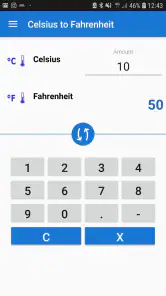
Celsius to Fahrenheit Convert is a simple temperature conversion tool designed to change values between Celsius and Fahrenheit quickly. After testing the app, its main purpose is clear: enter a temperature in one unit and receive the equivalent value in the other. It is useful for checking weather reports, cooking temperatures, school assignments, travel information, and everyday measurements without performing the formula manually.
How do I convert a temperature with the app?
Using the converter is straightforward. Select or enter the Celsius or Fahrenheit value, then choose the direction of the conversion. The app displays the result immediately, making it convenient when you need a quick answer. You generally do not need to create an account or complete a complicated setup, although the exact layout and available controls may vary depending on the Android or iOS version installed.
Is Celsius to Fahrenheit Convert accurate?
The app uses the standard conversion formulas: Fahrenheit equals Celsius multiplied by 9/5, plus 32, while Celsius equals Fahrenheit minus 32, multiplied by 5/9. Results should therefore be mathematically accurate, with the displayed precision depending on how many decimal places the app provides. For ordinary weather, cooking, and educational use, the results are generally sufficient, but scientific work may require checking rounding settings.
Pros
- Converts Celsius to Fahrenheit quickly with minimal input.
- Simple interface is easy for beginners to understand.
- Useful for cooking
- travel
- weather
- and science calculations.
- Provides instant results without requiring manual formulas.
- Lightweight app that should run smoothly on most devices.
Cons
- Limited usefulness if you rarely work with temperature conversions.
- May feel too basic for users needing multiple unit conversions.
- Results depend on entering the temperature correctly.
- Could offer more customization for frequent or professional users.
- Some versions may include ads or require permissions.
- Category
- Weather
- Version
- 1.4.3











