Ceiling Fan Balancer
- 35.00
- 4.4
- Installs
- 1.00K
- Price
- $2.99
Screenshots
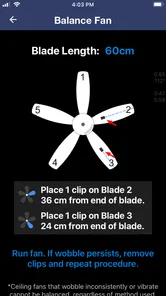
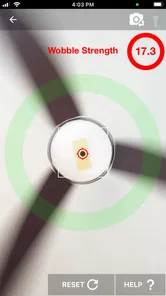
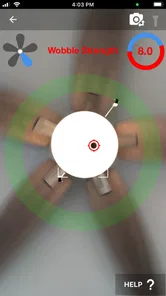
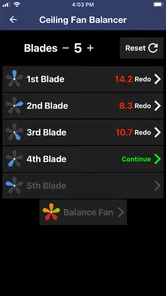
Analysis by Reviewed
I like the idea behind Ceiling Fan Balancer: use a phone to help diagnose a familiar household annoyance instead of guessing at each adjustment. A fan that wobbles can be distracting, but the fix is not always obvious. This House & Home app from pseudomath LLC is aimed at people willing to work through a careful, hands-on process rather than call someone for every small issue.
Where the process can get tricky
The main friction is not finding the app’s basic instructions; it is carrying them out safely and consistently. You need to reach the fan, handle its blades, and make adjustments without rushing. I would switch the fan off before touching it, use a stable ladder, and avoid standing beneath moving blades while testing. The app may help organize the balancing process, but it cannot make awkward access or unsafe working conditions a good DIY job.
It also helps to treat each adjustment as a controlled test, not a reason to change several things at once. If you alter multiple blades or placements between runs, it becomes difficult to tell what helped. I’d keep track of what I changed and test the fan under the same conditions each time. That small habit can save repeated work and make the instructions easier to follow in practice.
Setup checks before you begin
Before relying on any vibration reading, make sure the phone is secure and positioned consistently, and follow the app’s directions rather than improvising. A loose phone or a different placement from one test to the next can undermine comparisons. Because this approach depends on a phone sensor and contact with fan blades, I would not attempt it while the fan is running or use a device that cannot be held safely in the intended position.
If the fan has a loose-looking part, damaged blade, or an unstable mount, stop and deal with that first rather than trying to compensate with balancing weights. A balancing tool is for addressing imbalance, not repairing structural problems. For a fan that is difficult to reach, visibly damaged, or still unstable after careful basic checks, getting qualified help is the sensible alternative.
Simplifying Fan Balancing
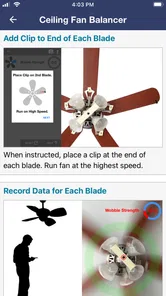
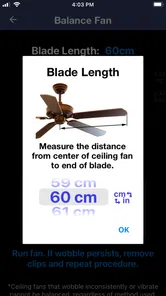
From the get-go, the Ceiling Fan Balancer is designed with simplicity in mind. The interface is clean and straightforward, which means you don't need a degree in engineering to get started. It walks you through the process with easy-to-follow instructions and even offers visual guides. Personally, I found this aspect incredibly helpful, especially when dealing with multiple fans in different rooms.
How It Works
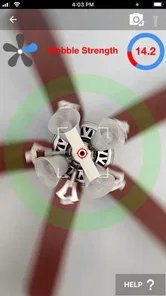
The app uses your smartphone's sensors to detect vibrations. You simply place your phone on the fan blades, and it calculates the imbalance. It then gives you precise instructions on where to add weights to counteract the wobble. The whole process feels like a mix of science and magic. I was skeptical at first, but seeing my fan run smoother than ever was proof enough.
More From Our News Desk

 Gmail
Gmail in a Busy Inbox: Who Benefits Most?
From first account to crowded workday, Gmail earns its place through dependable search and flexible sorting—but its best fit depends on how much inbox maintenance you can tolerate.

 Prime Video
Switching to Prime Video: What Changes in Your Viewing Routine
Prime Video can make a compelling second home for streaming, but switching means learning a different catalog, rental layer, and route from browsing to playback.

 Universal TV Remote Control
 Works Best as a Reliable Backup
A phone remote earns its place through quick setup and reliable habits. Here is how to get more from Universal TV Remote Control—and where its limits show.

 Weather - By Xiaomi
Weather by Xiaomi Review: Clear at a Glance, Less Clear Up Close
Xiaomi’s weather app makes everyday forecasts quick to scan, but its calm surface can leave useful details and recovery paths harder to find than they should be.

 X
X Under Pressure: Can It Recover When Posting Goes Wrong?
A resilience-focused review of X, examining setup, mistaken posts, interruptions, weak connections, and the gaps that matter when recovery needs to be dependable.

 Clash of Clans
 Is Won Between the Battles
Its raids are quick; its community is a long-term project of coordination, teaching, rivalry, and shared responsibility—with all the friction that entails.
Latest News



That method makes most sense when the wobble is mild enough to investigate and the fan is otherwise in good condition. A useful practical distinction is between a persistent shake and noise that appears only at certain speeds: note when the symptom occurs before starting, then compare at the same setting after each adjustment. The phone can guide a balancing attempt, but a changing noise or movement may point to another issue that weights alone will not solve.
User Experience
One of the standout features is the app's user-friendly design. Navigation is intuitive, and the step-by-step guide ensures you won't get lost in the process. Plus, the app doesn’t bombard you with ads, which is a huge relief. It’s clear the developers wanted to focus on functionality rather than flashy distractions.
A minor hiccup, though, is that it requires a certain level of patience. Balancing a fan isn’t a five-minute job, so be ready to spend some time on it. But trust me, the end result is worth every minute.
Recovering when a test does not help
If an adjustment makes no clear difference, I would not keep adding weight at random. Return to the last setup you can identify, check that the phone placement and test conditions are repeatable, and make just one change before trying again. If the result remains confusing, pausing is better than turning a small vibration into a bigger maintenance problem. The app is most useful as a guide through an orderly process, not as a substitute for inspecting the fan itself.
Who gets the most from it
This is a better fit for a homeowner or renter who can safely reach a fan and enjoys practical DIY tasks. It is less suitable if you want a one-tap diagnosis, cannot safely access the blades, or would rather have a technician inspect a fan with persistent shaking. Compared with simply tightening things by guesswork, a guided sensor-based workflow gives you a more deliberate way to test changes. Compared with professional service, though, it asks you to do the physical work and make the safety decisions yourself.
It also suits someone maintaining several fans over time more than a person facing one unexplained rattle and hoping for an instant answer. The value is in having a repeatable method to consult when a fan needs attention, not in turning the phone into a general-purpose home inspection device. If you rent, it is worth checking whether you are allowed to adjust the fixture before attempting any physical work; a tool cannot settle that responsibility question for you.
Cost, compatibility, and expectations
The app costs $2.99, has an Everyone age rating, and is currently at version 3.5. It has a 4.4 average from around 50 ratings and over 1,000 installs. It was released on March 5, 2024, and requires Android 11 or later, so an older Android phone may rule it out before you start. The purchase makes most sense if you have a fan to troubleshoot and expect to use the guided process; for a single fan that is already quiet and steady, there is little reason to buy a dedicated tool.
In practical terms, the key question is not whether the app sounds useful, but whether you have a safe, suitable fan and a phone you can position as directed. I would make that decision before paying: if the fan is mounted too high for comfortable access, or the blades are fragile or visibly compromised, a professional inspection is the better use of time and money. If the fan is reachable and the issue looks like a modest imbalance, the app offers a more structured route than trial-and-error placement of weights.
Android compatibility matters in another everyday way: the phone you use for balancing must be available at the fan, so check that it is the device you can safely handle and that it runs Android 11 or later. I would not try to balance while juggling a phone, a ladder, and tools alone. Arrange the work area first, keep anything needed within easy reach, and ask another adult to help if that makes access safer. If those basic logistics are awkward, stopping is a sensible choice rather than a failure of the app.
A realistic use case is a fan that starts wobbling after a seasonal clean. I would first check for obvious looseness or damage, then use the app’s steps and keep each adjustment small and trackable. If the wobble persists despite a careful attempt, or the fan’s mounting looks questionable, I would stop and seek help rather than treating the sensor result as a guarantee of safety.
When the fan, not the app, is the problem
It is easy to blame the balancing process when a fan still makes noise, but not every symptom points to imbalance. A persistent wobble after careful, repeatable testing, a sudden change in sound, or movement around the mounting area deserves a different response from a mild shake that improves as you work. In those cases, I would stop the balancing attempt and inspect only what can be checked safely from the ground, then arrange qualified help if anything looks uncertain.
This distinction is useful because a phone-based tool can only make its particular task more orderly; it cannot confirm that every part of a ceiling fan is sound. Nor would I treat a quieter test as proof that a loose fixture is safe. If tightening or inspection would require electrical work, disassembly, or working at an uncomfortable height, I would leave it to someone qualified rather than turning a small household repair into a risk.
Why You Might Need It
If you're like me and love a peaceful, noise-free environment, this app is a game-changer. A balanced fan runs quieter and more efficiently, which can even help with energy savings. Plus, it's a fun little project that adds a touch of DIY pride to your home maintenance skills.
For a more grounded expectation, I think of the app as a helper for one narrow job, not a promise of a perfectly silent fan or lower energy use. It is most rewarding when the fan is in sound condition and the wobble is the kind that careful balancing can address. If the noise comes from another source, or you are already content with how the fan runs, the app is unlikely to change much about your day.
How it compares with the usual alternatives
The usual alternative is to inspect the fan by eye, tighten what appears loose, and try moving a balancing weight until the wobble seems better. That may work for someone experienced, but it is easy to lose track of which change made a difference. This app’s appeal is that it gives the process a sensor-guided structure, which can make comparisons less dependent on memory. It still requires the same careful physical work, and it is not a replacement for a technician when the cause is uncertain or the fan seems unsafe.
Another option is to leave the fan alone if its movement is slight and not worsening, or simply avoid using it until it can be checked. That is less satisfying than solving the annoyance, but it is the right call when safe access is a problem. I would choose a basic visual check for obvious issues, the app for a manageable balancing attempt, and professional help for damage, unstable mounting, or a result that remains unclear. The best choice depends less on enthusiasm for DIY than on the condition and accessibility of the fan.
One practical trade-off is that this is a focused purchase rather than a tool with broad household uses. The modest price may feel reasonable to someone with more than one fan or recurring balancing needs, while a person who only wants to silence a single fan might prefer to borrow help or call a repair professional. The app can make the process more systematic, but the ladder, time, patience, and judgment are still part of the real cost.
In conclusion, the Ceiling Fan Balancer app is a must-have for anyone dealing with wobbly fans. It's practical, efficient, and surprisingly easy to use. So, if your fan sounds like it's about to take off, give this app a try. You might just find yourself enjoying the quiet breeze a little more.
Ceiling Fan Balancer Frequently Asked Questions
Does Ceiling Fan Balancer cost anything to download?
Ceiling Fan Balancer costs $2.99. It is a focused House & Home app from pseudomath LLC, aimed at people who want help addressing a wobbling or unbalanced ceiling fan. Consider whether you have a fan you intend to troubleshoot and whether the app’s sensor-guided approach suits your needs before purchasing it.
What is the Ceiling Fan Balancer app used for?
The Ceiling Fan Balancer app is designed to help users identify and solve issues related to unbalanced ceiling fans. By using the app, you can detect vibrations and imbalances in your fan, allowing you to make adjustments for a smoother, quieter operation. This can improve fan efficiency and prolong its lifespan.
How does the Ceiling Fan Balancer app work?
The Ceiling Fan Balancer app utilizes your smartphone's sensors to detect vibrations and imbalances in your ceiling fan. By placing your phone on the fan, the app analyzes the movement and provides feedback on how to adjust the fan blades or weights to achieve optimal balance, ensuring a quieter and more efficient fan operation.
Is the Ceiling Fan Balancer app compatible with all smartphone models?
The Ceiling Fan Balancer app is compatible with most modern smartphones that have built-in gyroscope and accelerometer sensors. However, it's recommended to check the app's compatibility requirements on the app store page to ensure your device meets the necessary specifications for optimal performance.
Do I need any additional tools to use the Ceiling Fan Balancer app?
While the Ceiling Fan Balancer app primarily uses your phone's sensors, you may need some basic tools like a screwdriver to make physical adjustments to your fan. Additionally, the app may suggest adding small weights to the fan blades, which can be purchased separately if required for balancing.
Pros
- Easy to use interface
- Quick balancing results
- Compatible with most fan models
- Affordable price point
- Enhances fan efficiency
Cons
- Limited to ceiling fans only
- Requires initial calibration
- May not fix severe imbalances
- Noisy during operation
- Limited customer support