

CCW – Concealed Carry 50 State
- 1.70K
- 4.7
- Installs
- 100.00K
- Price
- $1.99

Screenshots
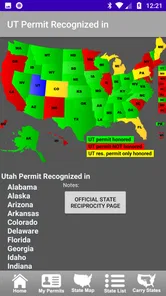
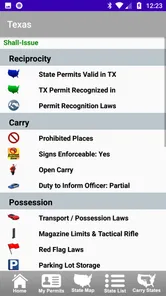
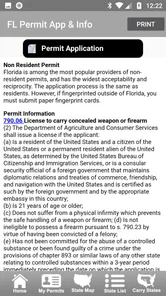
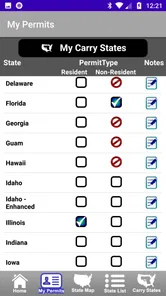
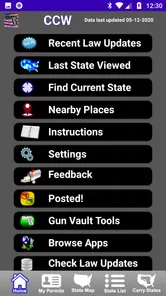
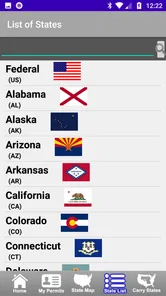
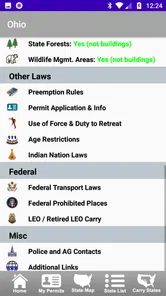
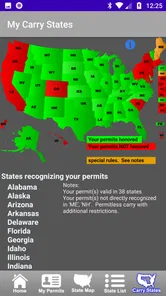
Analysis by Reviewed
I treat CCW – Concealed Carry 50 State as a reference for checking questions before a trip, not as permission to carry or a substitute for careful legal research. That distinction matters: firearm rules can turn on a state’s specific conditions, and a quick glance at an app should never be the only step before making a decision. For me, its value is in helping organize what to investigate, especially when a route crosses state lines.
Where a quick check can fall short
The hardest part of interstate carry is often not finding a state name, but identifying which rule applies to your exact situation. Permit recognition, transport requirements, and restrictions at particular locations are separate questions. I would avoid treating a map or a broad summary as a complete answer: a route can pass through several jurisdictions, and recognition does not mean every other rule is identical.
A useful habit is to check each state on the route before leaving, then confirm any detail that could change how you travel or store a firearm. Keep the question narrow—for example, whether a permit is recognized, or what transport rules apply—rather than relying on a vague sense that a state is “friendly.” Use the app to spot the questions you need to verify, not to make assumptions on your behalf.
Setup checks before relying on it
This is a paid Books & Reference app from Workman Consulting LLC, priced at $1.99, with in-app purchases listed at $0.99 per item. Its age rating is Everyone, and it requires Android 6.0 or later. The current version is 4.1.3. Before a trip, I would make sure the installed app opens and that I can reach the relevant state information while I still have a reliable connection.
The app has a 4.8 average from around 3,700 ratings, with about 1,700 written reviews and over 100,000 installs. Those figures suggest an established audience, but they do not tell me whether a particular legal detail is current or applies to my circumstances. I’d still check the date or context of any information available in the app and consult an authoritative state source when a rule is consequential.
Recovering when a trip plan changes
If a detour adds a state, I would pause somewhere safe before driving and review that state’s rules rather than trying to read while on the road. If the app is slow or a page does not appear, I’d close and reopen it, check the connection, and try again before departure. Because access without a constant connection can be useful in signal gaps, I’d also open the needed information in advance instead of assuming every screen will be available offline.
For a longer journey, write down the states you expect to cross and revisit the list if your route changes. That simple backup reduces the temptation to make a rushed decision at a border. It also helps separate a technical problem from a legal question: if the screen is unavailable, stop and use a dependable source before proceeding.
More From Our News Desk

 Gmail
GmailGmail in a Busy Inbox: Who Benefits Most?
From first account to crowded workday, Gmail earns its place through dependable search and flexible sorting—but its best fit depends on how much inbox maintenance you can tolerate.

 Prime Video
Switching to Prime Video: What Changes in Your Viewing Routine
Prime Video can make a compelling second home for streaming, but switching means learning a different catalog, rental layer, and route from browsing to playback.

 Universal TV Remote Control
Universal TV Remote Control Works Best as a Reliable Backup
A phone remote earns its place through quick setup and reliable habits. Here is how to get more from Universal TV Remote Control—and where its limits show.

 Weather - By Xiaomi
Weather by Xiaomi Review: Clear at a Glance, Less Clear Up Close
Xiaomi’s weather app makes everyday forecasts quick to scan, but its calm surface can leave useful details and recovery paths harder to find than they should be.

 X
XX Under Pressure: Can It Recover When Posting Goes Wrong?
A resilience-focused review of X, examining setup, mistaken posts, interruptions, weak connections, and the gaps that matter when recovery needs to be dependable.

 Clash of Clans
Clash of Clans Is Won Between the Battles
Its raids are quick; its community is a long-term project of coordination, teaching, rivalry, and shared responsibility—with all the friction that entails.
Latest News



Keeping It Legal
One of the most nerve-wracking aspects of carrying a concealed weapon is navigating the labyrinth of state laws. Trust me, with CCW – Concealed Carry 50 State, you can breathe easy. The app provides up-to-date information about concealed carry laws across all 50 states. From permit recognition to transportation laws, it’s all there, laid out in a way that even those of us who skipped law class can understand. It's like having a GPS for legal compliance!
Features That Hit the Bullseye
What makes this app a standout? For starters, the user interface is as smooth as a well-oiled Glock. You can easily find the information you need without fumbling around. The developers clearly know their audience, offering features like real-time law updates and even a map that outlines where your permit is valid. Another neat feature is the "Traveling" mode, which allows you to check the laws of multiple states in one fell swoop. How cool is that?
Oh, and did I mention the reciprocity maps? These are a game-changer. For those new to the concealed carry lifestyle, reciprocity refers to whether one state's permit is recognized by another state. With this app, you can quickly see which states you’re good to go with your permit. It’s like having a buddy who’s memorized the legal codes of the entire country!
Practical Use on the Go
Imagine you’re on a cross-country journey, and you suddenly realize you’re about to cross into a state with different carry laws. Panic? Not if you’ve got this app. It’s designed for quick, on-the-go consultation. Just a couple of taps, and you’re informed. The peace of mind it offers is worth its weight in gold. Plus, the app doesn’t require a constant internet connection, so you’re covered even in those signal-dead zones.
Who benefits most—and who should look elsewhere?
I see the strongest use case for someone who already understands their responsibilities and wants a compact reference for planning a multi-state drive. A weekend visit to family, a work trip with an unexpected route change, or a holiday journey through several states can all create a need to compare rules without searching from scratch each time. The app is less suitable for someone who wants legal advice tailored to personal circumstances or a guarantee that carrying is lawful in every place they visit.
Compared with searching the web state by state, a dedicated reference can make it easier to keep the route and permit-recognition questions in view. But official state materials are the better choice when you need a definitive answer, and a qualified legal professional is more appropriate for interpreting a complicated personal situation. I would use those sources alongside the app, not treat them as competitors that must be replaced.
A practical routine for the road
Suppose I’m planning a drive with an overnight stop and a possible detour. I’d list the states on the planned route, check the relevant summaries before packing, and confirm any location-specific or transport issue through an authoritative source. I’d then review the route again if weather or traffic changes it. This takes more care than glancing at a map, but it is a safer way to use a convenient reference.
One useful trade-off is speed versus certainty: an app can make an initial comparison quick, while legal verification takes more time. I’d prioritize details that affect the actual journey—such as whether a permit is recognized and how transport is handled—rather than trying to memorize every rule. If the answer remains unclear, the sensible move is to pause and verify, not infer permission from a neighboring state’s rules.
What to expect from a paid reference
The upfront price and optional in-app purchases are worth considering if you only need a one-time answer for a single destination. Someone who regularly crosses state lines may get more practical value from having a dedicated reference ready, while a person who rarely travels may prefer to consult official resources as needed. I would also avoid assuming that a purchase alone settles a legal question; the benefit is faster access to organized information, not a replacement for judgment.
The app’s long-running presence and broad audience are reassuring in a limited way, but laws can change and summaries can never cover every fact pattern. A careful user should confirm important details close to travel time and keep the app updated. That combination—convenient reference plus independent verification—is more dependable than relying on memory or a single search result.
Choosing what to check first
When time is short, I would not try to read every section for every state with equal attention. I’d start with the route itself: identify the states where I will stop, the ones I will only pass through, and any overnight location that changes how the firearm is stored or transported. Then I’d turn each concern into a separate question. That prevents a quick check about recognition from being mistaken for a complete review of the trip.
A practical detail that is easy to overlook is the difference between planning a route and reacting to one. For a planned journey, I can compare the relevant rules calmly and save a written list of states to revisit. For a last-minute detour, I should pull over safely and verify before continuing. A reference app is most useful when it supports that pause, not when it encourages a hurried decision at the roadside.
What the app can—and cannot—settle
Readers often want to know whether a permit recognized in one state automatically answers every question about carrying there. I would treat recognition as only one checkpoint. Rules about locations, transportation, and the circumstances of a particular trip remain distinct, so I would verify the issue that actually applies rather than letting a favorable result on one point stand in for all the others.
Another sensible question is whether this can replace searching official state resources. In my view, no: it can make the initial comparison more organized, but the state source is the place to confirm a consequential detail. Nor would I use it as personal legal advice. If an unusual circumstance makes the answer depend on more than a general rule, asking a qualified professional is a better next step than trying to infer a conclusion from a summary.
Small habits that prevent rushed decisions
I’d keep the app’s role modest and specific: prepare at home, revisit the route when it changes, and confirm important points before acting. Opening the relevant state information while a connection is available is a useful precaution, but I would not assume that every screen will remain accessible offline. A written route checklist is a low-tech backup and makes it easier to notice a newly added state before it becomes an urgent problem.
There is also a useful trade-off in carrying a dedicated reference rather than relying only on browser searches. The app may make it easier to find comparable state information in one place, while web searches can lead to scattered pages with different levels of authority and context. The dedicated format does not make a summary definitive, though. I’d use it to narrow the research, then go directly to an authoritative source for the exact point that affects my plans.
The Verdict
So, should you get CCW – Concealed Carry 50 State? If you’re a gun owner who travels, it’s practically a no-brainer. It’s like having a legal consultant who never sleeps and doesn’t charge by the hour. The app is well thought out, user-friendly, and invaluable for staying informed and compliant. Sure, it won’t replace common sense, but it’s an indispensable tool for anyone serious about responsible firearm ownership. Safe travels and stay legal out there!
My recommendation is more measured than that final enthusiasm suggests: I’d consider it a convenient starting point for a traveler who expects to cross state lines and is willing to verify consequential rules independently. If you travel only once, prefer primary sources, or need advice tied to unusual personal circumstances, the app may not justify the purchase or may not be the right tool at all. Its strongest role is helping you plan the questions and keep the route in view—not making the decision for you.
CCW – Concealed Carry 50 State Frequently Asked Questions
What does the CCW – Concealed Carry 50 State app cost, and are there additional purchases?
CCW – Concealed Carry 50 State is a paid Books & Reference app from Workman Consulting LLC. It costs $1.99 to download, and in-app purchases are listed at $0.99 per item. Before installing, review the purchase details shown for your device so you can decide whether the app and any optional purchases suit your needs.
What is CCW – Concealed Carry 50 State app?
CCW – Concealed Carry 50 State is a mobile application designed to provide gun owners with information on concealed carry laws across all 50 states in the U.S. The app helps users stay informed about their rights and restrictions related to carrying concealed firearms, offering a reference for travelers and residents alike. Its stated purpose is to help users follow complex state permit laws and lawfully carry firearms in each state.
Is CCW – Concealed Carry 50 State app reliable for legal advice?
While the CCW app offers information on state laws regarding concealed carry, it is essential to note that it should not be used as a substitute for professional legal advice. Users are encouraged to consult with legal professionals or local authorities to ensure compliance with the latest regulations and interpretations of the law. Treat the app as a reference, particularly when a decision depends on a specific legal circumstance.
How often is the information on the CCW app updated?
The developers of CCW – Concealed Carry 50 State strive to keep the app's information current by updating it with changes in state laws and regulations. However, users should verify critical information with official state resources or legal counsel, as laws can change frequently and may not be immediately reflected in the app. Checking authoritative sources before traveling or carrying is a prudent step.
Does the CCW app provide information on firearm reciprocity between states?
Yes, the CCW – Concealed Carry 50 State app includes information about firearm reciprocity agreements between different states. This feature allows users to understand where their concealed carry permit is recognized and what restrictions may apply when traveling across state lines. Because requirements can vary, check the rules for each destination and confirm them with official sources before relying on a permit while traveling.
Pros
- Comprehensive gun law guide
- Easy to navigate interface
- Regularly updated content
- Offline access available
- User-friendly design
Cons
- Paid subscription required
- Limited free features
- No community forum
- Occasional app crashes
- In-app ads can be intrusive











