

Cashli: Cash Advance & Rewards
- 2.81K
- 4.1
- Installs
- 100.00K
- Price
- Free

Screenshots

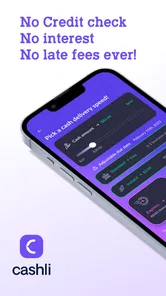

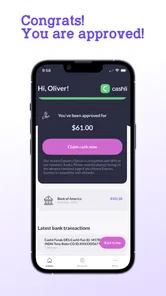

Analysis by Reviewed
Cashli: Cash Advance & Rewards is a finance app from Cashli Funds that caught my attention because it focuses on a very specific moment: needing a small amount of money before the next payday. I approached it as a first-time user would, looking for a simple path from installation to a useful result rather than expecting a complete banking replacement. That distinction matters. This is best considered a short-term cash-access tool, not a full budgeting suite, savings account, or everyday payment wallet.
The app is free to install and is rated for Everyone, which makes the initial barrier feel low. Its store summary promises access to up to 150 dollars, but I would treat that as a maximum possibility rather than an amount every user should expect. Eligibility, available amount, and the exact steps required can depend on the individual account and the information requested during setup. My main advice is to read each screen carefully and avoid assuming that the first amount mentioned will automatically be available.
Getting from installation to a useful first result
I’d use this section to set up a deliberate first session rather than rush toward a request: decide what shortfall you’re trying to cover, and have the relevant account details ready before opening the app. That preparation makes it easier to judge whether the next step actually fits your situation, which is the key distinction I explore in the following section.
What to expect before you begin
The first thing I would tell a friend is to install Cashli only when they have a few uninterrupted minutes. Finance apps are rarely enjoyable when rushed, especially when the purpose is to access money quickly. Have the information you normally use for financial verification nearby, keep your phone connected to a reliable network, and make sure you understand why the app is asking for each piece of information before continuing.
Cashli’s presentation is aimed at people dealing with an immediate cash shortfall. That makes the experience more focused than a conventional personal-finance app, where the main tasks are tracking spending, building a budget, or monitoring investments. If your goal is to see where your money goes over several months, this is probably not the right first choice. If your goal is to investigate whether a modest advance could help with a time-sensitive expense, its narrower purpose makes more sense.
The current release is version 1.0.19, and the app runs on Android 8.0 or later. That is useful to know before downloading it onto an older phone. The service has also reached over 100 thousand installs, with an average rating of 4.1 from roughly 4.9 thousand ratings and about 2.8 thousand written reviews. Those figures suggest that many people have tried it, while also reminding me not to treat the app as universally smooth for every user.
I would also separate the word “rewards” from the cash-advance idea in my expectations. A rewards element may sound like a way to earn money simply by opening the app, but a careful user should look for the actual conditions attached to any reward-related activity. Read the wording around qualification, timing, and redemption instead of counting on rewards to solve an urgent bill. That small habit can prevent an otherwise avoidable disappointment.
More From Our News Desk

 Instagram
Instagram’s Power Comes From Its Place in Your Phone
A close look at how Instagram turns Meta’s reach, recommendation systems and everyday camera habits into durable platform power—and what that costs users.

 Gmail
GmailGmail in a Busy Inbox: Who Benefits Most?
From first account to crowded workday, Gmail earns its place through dependable search and flexible sorting—but its best fit depends on how much inbox maintenance you can tolerate.

 Prime Video
Switching to Prime Video: What Changes in Your Viewing Routine
Prime Video can make a compelling second home for streaming, but switching means learning a different catalog, rental layer, and route from browsing to playback.

 Universal TV Remote Control
Universal TV Remote Control Works Best as a Reliable Backup
A phone remote earns its place through quick setup and reliable habits. Here is how to get more from Universal TV Remote Control—and where its limits show.

 Weather - By Xiaomi
Weather by Xiaomi Review: Clear at a Glance, Less Clear Up Close
Xiaomi’s weather app makes everyday forecasts quick to scan, but its calm surface can leave useful details and recovery paths harder to find than they should be.

 X
XX Under Pressure: Can It Recover When Posting Goes Wrong?
A resilience-focused review of X, examining setup, mistaken posts, interruptions, weak connections, and the gaps that matter when recovery needs to be dependable.
Latest News



Setting up an account without rushing
After installation, I would move through the account-creation process slowly and check that personal details are entered consistently. A mismatch between what you type and the information used for verification can create friction, and correcting financial information later is more stressful than entering it carefully the first time. Use an email address and phone number you actively monitor, since time-sensitive notifications are not helpful if they go somewhere you rarely check.
One practical tip is to take a moment to understand the difference between an application step and an approval step. Reaching a screen that lets you request an advance does not necessarily mean the money has already been accepted or sent. In my view, this is one of the most important mental boundaries in Cashli: treat every request as a review process until the app clearly confirms the outcome.
I would not enter information merely because a screen makes the process feel urgent. Instead, pause when you see a request you do not understand and read the accompanying explanation. A finance app should be approached with the same care as a bank form. The promise of quick access can make people click through too quickly, but speed is only useful if the final arrangement is one you understand and can manage.
Another helpful setup habit is to note the repayment or account terms shown during the process, if applicable, before confirming anything. I am not suggesting that every user will see identical screens or conditions; rather, I would make a personal record of the details presented to me. That gives me something to refer back to later and helps separate the amount received from the amount that may need to be repaid.
Finding the first meaningful action
For a new user, the first successful action should not simply be opening the app. It should be completing the request flow with a clear understanding of what happens next. I would start by reviewing the available cash-advance area, checking the amount displayed for my account, and reading the confirmation screen from beginning to end. If the amount is suitable and the terms make sense, I would submit the request; if not, I would stop rather than borrowing just because the option appears.
This is where Cashli can be useful in a realistic everyday situation. Imagine a necessary expense arrives shortly before payday and you are deciding between an advance, a late payment, or a more expensive form of credit. I would use the app to see whether its available option fits the gap, then compare the total obligation and timing with the alternatives. The app can be a convenient place to investigate a solution, but convenience should not replace that comparison.
Once a request is submitted, I would look for a clear status indicator or confirmation and save the relevant details. Do not assume that closing the app means the process is complete. If the app asks for another step, check whether that step is required before funds can move. This is a small but important workflow insight: a successful submission and usable money are not always the same event.
I would also avoid requesting more than the immediate problem requires. If the app presents an amount higher than the bill or shortfall, taking the maximum can turn a temporary gap into a larger repayment problem. The strongest use case for a cash-advance service is a controlled, clearly defined need with a realistic plan for handling the next income cycle.
Where first-time users may become confused
The biggest source of confusion is likely to be the difference between an advertised upper limit and a personal offer. “Up to 150 dollars” communicates the ceiling described by the app, not a guarantee that every account will qualify for that exact amount. I would judge Cashli by the actual offer shown after setup, not by the headline figure. If the available amount is lower, that does not automatically mean the app is malfunctioning; it may simply reflect the account’s eligibility at that moment.
The second point to watch is the relationship between cash advances and rewards. These are related to the app’s overall purpose but should be evaluated separately. An advance is a borrowing decision, while a reward is usually something earned under particular conditions. Combining the two in your head can make the app appear more generous than the practical outcome. I would inspect the reward section independently and never borrow money in order to chase a reward.
Notifications can also cause uncertainty if you are waiting for an update. My approach would be to return to the app and check the request status rather than relying on a single alert. If a message asks for action, read it carefully and confirm that it relates to the request you actually made. Keeping screenshots of confirmation pages can be useful for your own records, although I would avoid capturing sensitive information unnecessarily.
Another common mistake is treating a finance app like a casual shopping app. Cashli may be free to download, but that does not mean every financial action connected with it is automatically cost-free or risk-free. The download price and the financial terms of using an advance are different questions. I would make that distinction before accepting anything, especially if I am already under financial pressure.
How it compares with familiar alternatives
Compared with a standard budgeting app, Cashli is more immediate but less suited to long-term financial organization. A budgeting tool helps me categorize expenses, set spending limits, and identify patterns. Cashli addresses a short-term liquidity problem instead. If I repeatedly need advances because my monthly budget does not balance, a budgeting app, direct conversation with creditors, or a more durable income-and-expense plan would probably help more than repeated borrowing.
Compared with using a credit card, Cashli may feel more targeted because the purpose is explicitly tied to a cash shortfall. However, a credit card can offer a familiar payment method and established account history, while an advance app may involve a separate approval process and its own conditions. I would compare the total cost, due timing, and consequences of missing repayment rather than choosing based only on which interface looks simpler.
Compared with borrowing from a friend or family member, Cashli offers a formal digital route that does not require a personal conversation. That privacy can be valuable, but a personal loan may be more flexible in timing and repayment if both sides agree. The trade-off is that informal help depends on trust and can strain relationships, while an app-based arrangement still requires careful attention to its terms. Neither option is automatically better in every situation.
Compared with a traditional bank, Cashli appears designed for a smaller, faster need rather than a broad relationship involving checking, savings, bill pay, and financial advice. A bank may be preferable if you need a larger structured loan, a permanent account, or face-to-face support. Cashli’s appeal is its focused purpose, not the depth of a full banking service.
Small habits that make the experience safer
I would create a simple personal checklist before submitting any request: the amount needed, the date the money is expected, the date repayment may affect my budget, and the backup plan if my next paycheck is smaller than expected. This takes less time than dealing with a second shortfall. It also keeps the app in its proper role: a tool for a specific gap, not a substitute for an emergency fund.
A second tip is to review the app after the immediate need has passed. Check whether the request is marked complete, whether any reward activity has a separate status, and whether there are notifications requiring attention. People often focus so intensely on receiving money that they forget the follow-through. In a finance product, the follow-through is part of the user experience, not an optional extra.
Third, I would use the smallest workable request and avoid stacking decisions close together. Even without assuming anything about how Cashli evaluates repeat use, multiple short-term advances can make a fragile budget harder to manage. If the first request does not solve the underlying issue, that is a signal to reassess the expense rather than automatically opening another request.
Finally, keep the application updated when a new version is available through the normal app-store process, while still reading important screens after an update. Cashli’s listed version is 1.0.19, and its minimum Android requirement is 8.0. Updates can improve compatibility or fix problems, but they do not remove the need to understand current terms and account messages.
Who will benefit most from Cashli
I can see Cashli working best for an adult who has a clearly defined, short-lived cash gap and wants to explore a digital advance without setting up a full bank relationship. It may also suit someone who prefers handling the process privately on a phone and is comfortable reading financial confirmations carefully. The free installation and Everyone rating make it approachable at the download stage, although the financial decision itself still deserves adult judgment.
I would be more cautious recommending it to someone who is already relying on advances to cover regular living costs. In that situation, the convenience can hide a recurring income problem. I would also steer away from it for anyone who dislikes reading terms, cannot predict when they can repay, or expects the maximum advertised amount without completing an eligibility process.
It is not my first recommendation for someone seeking investment tools, detailed spending analytics, credit-building guidance, or a complete household money-management system. Those needs call for different products. Cashli’s value comes from being specific, and that same specificity limits it when the financial question is broader than “How can I manage this short-term gap?”
My recommendation after using it as a first-time user
Cashli is most useful when treated as a carefully checked option, not as instant free money. I like the focused path toward a small cash advance, and I think the app could be reassuring for a user who needs to investigate a short-term solution without navigating a traditional bank. The rewards angle may add interest, but I would keep it secondary and verify every condition before relying on it.
The main friction is not the download itself; it is the responsibility that begins once a request becomes a real financial obligation. The amount available may differ from the headline maximum, the request may involve review steps, and the consequences of repayment deserve more attention than the speed of the interface. Those are not reasons to dismiss the app, but they are reasons to slow down.
Cashli: Cash Advance & Rewards has a clear place among finance apps for people investigating a modest, temporary cash need. Cashli Funds has built it around that focused scenario rather than trying to replace every financial tool on a phone. I would recommend trying it only after defining the exact amount needed, checking the terms presented in the app, and confirming a realistic repayment plan. Used that way, it can be a practical option; used impulsively, it can make a tight budget even tighter.
Cashli: Cash Advance & Rewards Frequently Asked Questions
Is Cashli: Cash Advance & Rewards free to download?
Cashli is free to download, so you can install it without paying an upfront app price. That does not necessarily mean every service inside the app is free: cash advances or optional features may have costs or conditions. Before accepting an offer or enabling a feature, check its terms carefully so you understand any charges, repayment requirements, or recurring payments.
Who can use Cashli, and what should I have ready before signing up?
Cashli is a finance app from Cashli Funds, but access to an advance can depend on individual eligibility and the terms shown in the app. Be prepared to provide accurate personal and financial details if you decide to apply, and review any permissions or account connections requested during setup. Check the offer and repayment information before proceeding, rather than assuming every applicant will qualify.
What is Cashli: Cash Advance & Rewards, and how does it work?
Cashli: Cash Advance & Rewards is a financial app that may help eligible users access a cash advance while also offering reward-related features. After creating an account, you typically provide personal and financial information, review the available offer, and follow the repayment terms shown in the app. Availability, advance amounts, fees, and conditions can vary by user, location, and approval criteria.
Is Cashli: Cash Advance & Rewards a legitimate loan or cash advance service?
Cashli should be treated as a financial service rather than a conventional banking app. Before accepting an advance, carefully review the provider information, agreement, repayment schedule, applicable fees, and any authorization requested for your bank account. The app may connect users with third-party providers, so the exact lender, costs, and terms should be confirmed in the offer documents before proceeding.
How much money can I receive through Cashli, and how quickly is it delivered?
The app’s summary promotes access to up to 150 bucks, but the amount and delivery speed are not necessarily the same for every user. Cashli may determine eligibility using information such as income, account activity, identity details, and other approval factors. Some transfers may arrive quickly, while standard delivery can take longer depending on the financial institution or third-party provider. The app should display the final amount, timing, and any related charges before confirmation.
Pros
- Fast application process with clear eligibility information
- Rewards can provide extra value beyond the cash advance feature
- Useful repayment reminders help users avoid missed due dates
- Simple interface makes account details easy to find
- May help cover short-term expenses between paychecks
Cons
- Cash advances may include fees or other borrowing costs
- Availability and terms can vary by state and user profile
- Late repayment could lead to additional charges or account limits
- Rewards may require specific actions or have redemption restrictions
- Not suitable as a long-term solution for recurring financial needs











