

Carnival HUB
- 72.40K
- 4.6
- Installs
- 5.00M
- Price
- Free

Screenshots
Analysis by Reviewed
I see Carnival HUB as a shipboard helper rather than a complete vacation planner. It is a free travel app from Carnival Corporation, and its usefulness comes from bringing cruise-day information and a few practical tools together. I would install it before sailing, then use it when I need to check what is happening, coordinate with people on board, or make a dining decision.
Free to download, useful once aboard
There is no purchase price to weigh against the benefits described here, but free access should not be confused with every onboard service or expense being included. I would treat Carnival HUB as a practical companion, not as a way to assume that specialty dining, photos, or other cruise purchases cost nothing.
Its audience is clear: people taking a Carnival cruise who want ship-specific information in one place. The app has an average rating of 4.6 from around 171,000 ratings, and it has been installed over five million times. Those figures suggest it is familiar to many cruisers, but I would still judge it by whether its schedule, dining details, and onboard communication fit the way your group travels.
The distinction matters when deciding whether it is worth space on your phone. The app’s cost is free, while some of the choices it helps you consider may involve separate spending. I would use the menus and schedule to plan, but make any purchase decision on its own terms rather than treating the app as an all-inclusive pass.
The Essential Cruise Companion
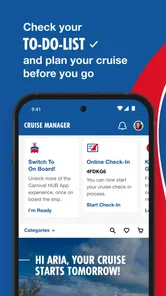
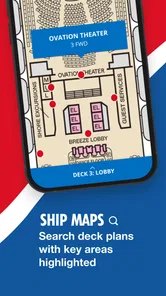
Picture this: you're on a massive cruise ship, surrounded by endless ocean and countless activities. Sounds exciting, right? But it can also be a tad overwhelming. That's where the Carnival HUB app comes into play. From the moment I downloaded it, I knew I was in for a treat. The app is designed to help you navigate your cruise with ease, offering everything from a daily schedule to a chat feature for keeping in touch with family and friends on board.
Features That Make Waves
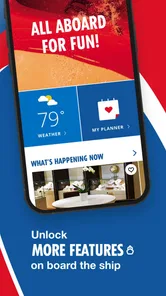
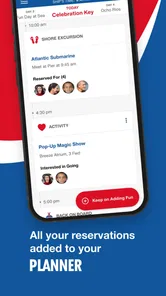
One of the standout features of the Carnival HUB is the daily schedule. It's like having a personal planner in your pocket. Whether you're interested in catching a live show, hitting the gym, or just lounging by the pool, the schedule keeps you on top of all the ship's happenings. No more FOMO, folks! You can even set reminders for events you don't want to miss. Trust me, this feature is a game-changer.
My practical tip is to check the schedule early in the day, then use reminders for just the events you genuinely care about. A packed cruise day can make every activity look tempting, but trying to chase everything can turn a relaxing holiday into a timetable. I would choose one or two must-do events and leave breathing room around them; the schedule is most helpful when it supports your plans rather than dictates them.
More From Our News Desk

 Weather - By Xiaomi
Weather by Xiaomi Review: Clear at a Glance, Less Clear Up Close
Xiaomi’s weather app makes everyday forecasts quick to scan, but its calm surface can leave useful details and recovery paths harder to find than they should be.

 X
X Under Pressure: Can It Recover When Posting Goes Wrong?
A resilience-focused review of X, examining setup, mistaken posts, interruptions, weak connections, and the gaps that matter when recovery needs to be dependable.

 Clash of Clans
 Is Won Between the Battles
Its raids are quick; its community is a long-term project of coordination, teaching, rivalry, and shared responsibility—with all the friction that entails.

 Android Auto
 Makes the Case for Quieter Car Software
The car interface is no longer judged by how much it can do, but by how quietly it helps. Android Auto shows what drivers now expect—and what still gets in the way.

 MobiOffice: Word, Sheets, PDF
MobiOffice: Transforming Mobile Productivity with Seamless Integration
MobiOffice: Word, Sheets, PDF is redefining mobile productivity with a surprising blend of functionality and innovation.

 EA SPORTS FC Soccer Mobile 26
EA SPORTS FC™ Mobile Soccer: Redefining Mobile Sports Gaming
Dive into EA SPORTS FC™ Mobile Soccer, where immersive gameplay and strategic depth transform mobile sports gaming.
Latest News



This approach also helps when the group does not want to spend the day together. Each person can identify a preferred activity and use a shared time or meeting point to reconnect later. Rather than trying to build one rigid itinerary for everyone, I would use the schedule to find a few natural anchor points, such as a show or meal, and let the rest of the day stay open.
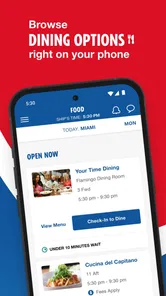
Now, let's talk about dining. With so many delicious options available, deciding where to eat can be a tough call. The app provides detailed menus and restaurant hours, so you can plan your meals down to the last bite. Plus, you can reserve tables at specialty restaurants directly through the app. Bon appétit!
That information is especially useful when your group has different appetites or wants to avoid making dinner decisions at the last minute. I would check hours before setting off across the ship, and look at menus together before choosing a place. A reservation option can simplify plans, but it should not be mistaken for a guarantee that every time or restaurant will suit your schedule; keep a flexible backup in mind.
A less obvious benefit of checking dining details ahead is that it gives a group a quick way to narrow its choices without a long discussion when everyone is hungry. I would ask each person to pick a first choice and a backup, then compare menus and hours in the app. That keeps the tool useful without relying on it to settle every preference or make the evening inflexible.
Stay Connected and Share the Fun
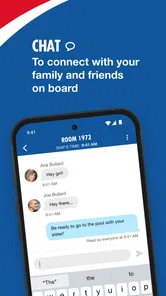
Staying connected with loved ones on board is a breeze thanks to the app's chat feature. You can send messages to fellow cruisers without the need for an internet package. It's perfect for coordinating meet-ups or just sharing a laugh over dinner.
For a family or a group of friends, this changes the small logistics of a sea day. One person can suggest a meeting point, while others can check messages when they have a moment instead of repeatedly trying to find one another in person. I would agree on a simple fallback plan too—such as where to meet if someone misses a message—because a chat tool is helpful, but it does not eliminate the need to make clear plans.
To get the most from chat, I would use it for concise arrangements rather than expecting everyone to monitor it constantly. A message that names a place and an approximate time is easier to act on than a string of vague updates. This is especially handy when the group splits up, but a pre-agreed fallback meeting spot is still the sensible option if a plan changes and someone does not see the message.
And for those who love to capture every moment, the app offers access to your purchased photos. You can view and share your cruise memories with just a few taps. It's like having a digital photo album at your fingertips.
The key detail is “purchased”: I would think of this as a convenient place to revisit photos you have bought, rather than assume that every picture taken during the cruise is automatically available at no cost. If photos matter to you, decide what you want to keep before spending, then use the app to look through the images you have chosen.
Where it fits—and where it doesn't
Compared with the usual travel tools, Carnival HUB has a narrower job than a general itinerary planner or maps app. Those alternatives are better for organizing flights, hotels, ground transport, or a trip that spans several operators. On a Carnival sailing, however, a ship-focused schedule, dining information, onboard chat, and access to purchased photos are more relevant than a generic travel checklist. I would use both kinds of tools for a trip that includes time before or after the cruise.
That difference is useful to keep in mind before sailing. A general planner can hold the whole journey, while this app is most relevant once the cruise itself is the focus. I would keep transport details, hotel plans, and other parts of a multi-stop vacation in whichever general tools I already use, then turn to Carnival HUB for onboard decisions. Trying to make one app handle both jobs would be less convenient than using each for what it does best.
It is also not the right choice for someone who is not sailing with Carnival, or for a traveler who mainly wants a broad vacation planner. Even on a cruise, people who prefer to keep every decision spontaneous may find that checking schedules and menus adds little. The app is most worthwhile when you expect to coordinate with others, choose among activities, or consult dining details during the sailing.
A realistic use case is a family deciding how to spend a busy afternoon: check the day’s activities over breakfast, set a reminder for the one show everyone wants, message relatives about where to meet, and review dining options before evening. That small routine can prevent missed plans without requiring someone to manage the whole holiday like an event coordinator. I would keep the phone charged and check the app when convenient, rather than let notifications or plans take over the day.
For a couple travelling together, the same tools may be less central. If both people prefer to decide as the day unfolds and are comfortable finding each other without messaging, a quick schedule check may be enough. I would not install it expecting it to transform a cruise that already suits your habits; its value is strongest when specific ship information saves a real bit of effort.
One practical question is whether it replaces a phone’s ordinary internet and travel tools. It does not replace a general planner for travel outside the sailing, and the onboard chat’s usefulness is specifically in keeping in touch with fellow cruisers on board. I would keep my usual maps or itinerary options for ports and transit, and use Carnival HUB for the cruise-focused details described here.
Worth installing for the right sailing
In the end, the Carnival HUB app is a must-have for anyone embarking on a Carnival cruise. It’s intuitive, packed with useful features, and truly enhances the cruising experience. Whether you're a first-time cruiser or a seasoned sailor, this app has something for everyone. So, before you step aboard, make sure you have this trusty app installed. It’s your ticket to a stress-free and unforgettable cruise adventure.
For a free app rated for Everyone, I see little downside to installing it before departure, especially if you plan to use its schedule, dining details, or onboard chat. Carnival HUB is on version 3.35.1 and requires iOS 11 or later. My verdict is to download it if you are sailing with Carnival, while keeping a general travel app for the parts of your trip beyond the ship. Its value comes from making onboard choices and coordination easier, not from replacing every other travel tool.
The app was released on January 15, 2015, and its current version reflects an established product rather than a brand-new experiment. That history and its broad audience may reassure a first-time cruiser, but neither is a substitute for deciding whether the tools match your plans. I would make the download decision based on the sailing itself: if checking activities, restaurant hours, and messages will help, the free price makes trying it an easy choice.
My final recommendation is straightforward: install it if you are travelling on Carnival and want a convenient place for ship-related planning. Skip it if you are not sailing with Carnival, or if you only need help organizing flights and hotels. For people in between, it is a low-commitment addition whose strongest value appears when a group has a few plans to coordinate and still wants room to enjoy the day spontaneously.
Happy cruising!
Carnival HUB Frequently Asked Questions
What is Carnival HUB, and who is it designed for?
Carnival HUB is a travel app from Carnival Corporation for people vacationing on a Carnival cruise. Its purpose is to help passengers make the most of their time aboard by bringing cruise-related tools together in one place. If you are preparing for a Carnival trip, it is intended to support planning and make it easier to stay informed during your vacation.
Is Carnival HUB free to download, and what is the age rating?
Carnival HUB is free to download, so you can install it without paying for the app itself. It has an Everyone age rating, which makes it suitable for a general audience. Keep in mind that the app’s price is separate from any optional services or purchases you choose to arrange during your cruise; those are not the same as paying to download Carnival HUB.
Which devices can run Carnival HUB, and should I update before a cruise?
Carnival HUB is a travel app from Carnival Corporation, and the current version is 3.35.1. It requires iOS or Android 11 or later, so check your device’s operating system before downloading. Keeping the app updated can help you use the latest available version while preparing for your trip and once you are aboard.
What is Carnival HUB and how can it enhance my cruise experience?
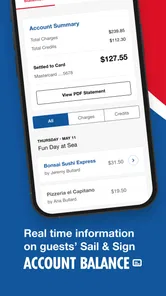
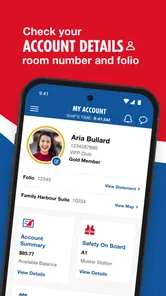
Carnival HUB is an easy-to-use app designed to enhance your cruise experience by providing a wide array of features such as itinerary planning, daily schedules, and real-time updates. It also allows you to book shore excursions, dining reservations, and view your onboard account balance. This app ensures you maximize your enjoyment and convenience while cruising with Carnival.
Is Carnival HUB free to use, and are there any in-app purchases?
Yes, Carnival HUB is free to download and use for all passengers on Carnival cruises. While the app itself does not have in-app purchases, it does offer the convenience of booking additional services such as shore excursions and specialty dining, which will be charged to your onboard account.
Pros
- User-friendly interface
- Real-time updates
- Easy event scheduling
- Secure payment options
- Comprehensive customer support
Cons
- Limited offline functionality
- Occasional bugs in updates
- Requires constant internet
- High battery usage
- Limited customization options











