

Carla Car Rental - Rent a Car
- 1.46K
- 4.6
- Installs
- 500.00K
- Price
- Free

Screenshots


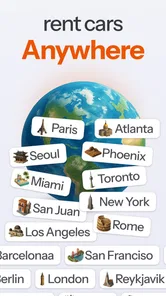
Analysis by Reviewed
When I need a car in an unfamiliar place, I want to compare options without opening a stack of rental-company apps. Carla Car Rental is built for that job: it brings car-hire searches together, including choices near your location and at airports. I see its main value as a convenient starting point for planning, rather than a guarantee that every listed car or term will suit every trip.
That distinction matters because a rental is more than a headline price. I would use the app to narrow down possible vehicles and then read the conditions carefully before committing. The final choice still depends on practical details such as where collection takes place, what the booking includes and whether the rental terms fit my plans.
A useful comparison tool, with the right expectations
The clearest reason I’d open Carla is to compare choices across rental brands without beginning from scratch on each provider’s app or website. The service covers more than 300 brands, which can make a difference when I’m flexible about the company but fixed on a pickup area, travel date or vehicle type. It’s especially handy at the planning stage, when I’m trying to understand what kinds of rentals are available rather than ready to commit to the first familiar name.
That broad search is not automatically better than booking direct. A rental company’s own app may be the simpler route if I already know the provider, have a membership or want to manage an existing reservation there. Carla makes more sense when comparison is the point: I can use it to form a shortlist, then judge each option by the details that matter for my trip.
I would also separate finding a car from confirming that it is the right car. Search results can help me see alternatives, but I still need to check the terms attached to the exact offer before booking. A low starting price is not enough if the pickup location, mileage allowance or other conditions make the rental inconvenient. My practical rule is to compare like with like: the same dates, a similar vehicle class, the collection point and the rental terms.
Getting Started with Carla Car Rental
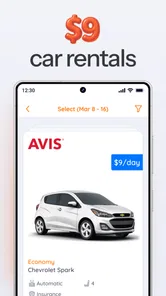
First things first, let’s talk about the app's interface. As soon as you fire up Carla Car Rental, you’re greeted with a sleek, easy-to-navigate home screen. I mean, who needs a complicated app when all you want to do is hit the road, right? The search functionality is front and center, allowing you to quickly punch in your location and browse through available vehicles.
The app is a free travel and local service from Carla Car Rental - Rent a Car | Kasaba Teknoloji. Its audience is broad: it is rated for Everyone, and the current version is 6.5.3. It has been around since June 30, 2016, and its 4.6 average from around 18,000 ratings suggests that many people have found it useful. Those figures offer helpful context, but I would still judge a booking by the specific car and rental conditions shown for my dates.
More From Our News Desk

 Weather - By Xiaomi
Weather by Xiaomi Review: Clear at a Glance, Less Clear Up Close
Xiaomi’s weather app makes everyday forecasts quick to scan, but its calm surface can leave useful details and recovery paths harder to find than they should be.

 X
XX Under Pressure: Can It Recover When Posting Goes Wrong?
A resilience-focused review of X, examining setup, mistaken posts, interruptions, weak connections, and the gaps that matter when recovery needs to be dependable.

 Clash of Clans
Clash of Clans Is Won Between the Battles
Its raids are quick; its community is a long-term project of coordination, teaching, rivalry, and shared responsibility—with all the friction that entails.

 Android Auto
Android Auto Makes the Case for Quieter Car Software
The car interface is no longer judged by how much it can do, but by how quietly it helps. Android Auto shows what drivers now expect—and what still gets in the way.

 MobiOffice: Word, Sheets, PDF
MobiOffice: Transforming Mobile Productivity with Seamless Integration
MobiOffice: Word, Sheets, PDF is redefining mobile productivity with a surprising blend of functionality and innovation.

 EA SPORTS FC Soccer Mobile 26
EA SPORTS FC™ Mobile Soccer: Redefining Mobile Sports Gaming
Dive into EA SPORTS FC™ Mobile Soccer, where immersive gameplay and strategic depth transform mobile sports gaming.
Latest News



The Booking Process
When it comes to booking your ride, the app truly shines. You can filter options based on your preferences, whether you’re looking for something compact for city driving or a more spacious SUV for a family trip. Once you’ve found the car that matches your needs, booking it is just a tap away. The app provides all the necessary details about the car, including rental rates, insurance options, and mileage limits, which I found super helpful. Transparency is key, and this app nails it.
For a realistic use case, imagine arriving at an airport for a short work trip and needing a car before heading to a meeting. I’d search the airport first, compare suitable options, then check the collection arrangements and rental conditions before choosing. If my plans involved a late arrival or a long drive, I’d pay particular attention to pickup timing, mileage terms and insurance details rather than choosing solely by the lowest displayed rate. That small pause can prevent a seemingly good deal from being a poor fit.
Making the comparison work for your trip
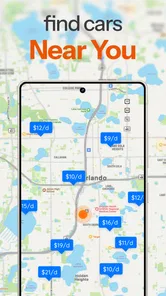
One useful way to search is to treat the pickup point as a choice rather than a fixed assumption. If I’m flying in, I’d compare airport collection with a nearby location when the trip schedule allows it. A nearby branch may require extra travel after landing, so convenience could outweigh a difference in price; on the other hand, someone staying in the city may not need to collect at the airport at all. The app’s ability to search around you as well as at airports makes that comparison worth considering.
I’d also settle the less obvious parts of the trip before narrowing the list. For a weekend away, a compact car may be easier to park, while a family carrying luggage may care more about space than the headline rate. For a work trip with several stops, mileage terms and collection hours can matter more than a small saving. These are not reasons to overcomplicate a search; they are quick checks that help ensure the offer fits the actual journey.
When comparing insurance options, I would read what is included and what the rental conditions require rather than treating an insurance label as a complete explanation. The same goes for mileage: a limit that works for a short city visit may be a poor match for a long-distance route. I find it useful to decide what I need first, then compare the relevant terms across a shortlist instead of browsing cars indefinitely.
Features that Stand Out
One of the features I absolutely love is the price comparison tool. It allows you to compare rates from various rental companies, ensuring you get the best bang for your buck. Plus, the app occasionally offers exclusive in-app deals and discounts. Who doesn’t love a good deal, right?
Its broad selection is useful when I’m flexible about the rental brand: comparing many providers in one place can save the time of checking them individually. The trade-off is that a comparison is only as useful as the details I compare. I’d line up the total cost, location and terms, not just the initial price, and I’d verify the booking conditions before relying on a particular offer.
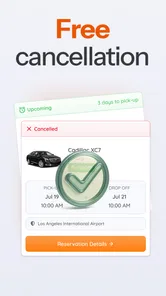
Another noteworthy feature is the ability to manage your bookings directly within the app. You can modify or cancel your reservations with ease, which adds a layer of flexibility that’s often missing in traditional car rental services.
That flexibility is most valuable when plans might change, but I wouldn’t assume every booking can be changed on identical terms. Before reserving, I’d check the cancellation and modification conditions attached to that option. If I already have a preferred rental company and know exactly what I want, booking directly with that company may be simpler; Carla is more compelling when I want to compare alternatives first.
What to check before you commit
For me, the most important step before booking is to make sure the collection plan is realistic. An airport result can still involve instructions or a pickup arrangement that affects how quickly I can leave. I’d confirm the location and timing shown for the specific rental, especially if I’m arriving late or have a tight appointment. This is a better use of a few extra minutes than discovering a mismatch when I’m tired and standing in a terminal.
I’d keep a short checklist beside the shortlist: pickup point, rental dates and times, vehicle size, mileage terms, insurance details, and the change or cancellation conditions. That helps avoid comparing one offer’s headline rate with another offer’s more complete cost. It also makes it easier to explain the decision to a travel companion who may care about a different detail, such as luggage space or how far the pickup is from the airport.
A practical question is whether I can rely on one search to settle the trip. I wouldn’t. Availability and suitability depend on the specific dates and options being considered, so I’d treat the results as a planning snapshot and review the chosen terms before paying. If my dates or pickup point change, I’d search again rather than assume the previous shortlist still fits.
On the Road Experience
So, how does the app fare once you're behind the wheel? Pretty darn well, if you ask me. The app provides you with all the necessary information and support, including customer service contacts if you run into any hiccups along the way. I found this particularly reassuring, knowing that help is just a call away if needed.
I’d still prepare for pickup before leaving home: keep the booking details accessible, check the collection address, and make sure the driver and payment arrangements match the reservation. The app can help organize a rental, but it cannot remove the need to read the provider’s instructions or allow extra time at an airport desk. For travelers who value one place to compare and manage options, that’s a reasonable balance; for someone who wants a single company’s direct service and established routine, a provider’s own app may be the better fit.
Who benefits most—and who may prefer another route
I’d recommend this app to travelers who are open to different rental brands, people comparing airport pickups with nearby locations, and anyone who wants to keep a reservation manageable from their phone. It may be less useful if you do not need a rental, already have a booking you are happy with, or prefer to deal exclusively with one rental company. Its 500,000-plus installs show that it has reached a substantial audience, but the best reason to try it is still whether its choices match your particular trip.
One practical tip is to search as soon as your travel dates and pickup point are reasonably settled, then revisit the options if your plans change. This makes it easier to compare vehicle types and terms without rushing at the airport. I would also avoid treating the first result as an automatic recommendation: a slightly less convenient pickup or a different mileage allowance could matter more than a small price difference over the course of a trip.
It is also a sensible option for someone arranging a rental for a companion, provided the person who will actually drive checks the booking details too. The name on the reservation, pickup requirements and payment arrangements should line up with the provider’s conditions. I wouldn’t leave those checks to the last minute or assume that the person searching is automatically the person who can collect the car.
On the other hand, I’d skip a comparison app if I have already made a reservation that meets my needs and I’m only looking for support with that booking. In that situation, the direct rental provider is the more relevant contact. Carla’s value is strongest before the decision, or when I want to review alternatives—not as a reason to duplicate a booking I’m already comfortable with.
How the app fits into a longer-running service
The app has been available since 2016, and the current version is 6.5.3. That gives existing users a concrete reference point for the version they are using, but I would not read a version number by itself as proof of a particular feature change. What matters to me in day-to-day use is whether I can search, understand the individual terms and keep track of the reservation I chose.
For someone who already uses the service, the sensible approach is to judge the present app by the trip in front of them: can they find a suitable option for their dates, understand the conditions, and access their booking information when needed? If the answer is yes, there may be no reason to change a familiar workflow just because the app has a later version. New users, meanwhile, can treat it as a way to compare before deciding whether the convenience suits them.
The 4.6 average from around 18,000 ratings and roughly 1,400 written reviews provide a broad signal of user response, not a promise that every rental will go smoothly. The experience can depend on the individual car and provider as well as the app used to find it. I’d use public feedback as background, then focus my final checks on the exact reservation and its terms.
Final Thoughts
Overall, Carla Car Rental makes the process of renting a car incredibly straightforward and stress-free. Whether you’re traveling for business or leisure, this app is a game-changer for anyone in need of a reliable ride. With its user-friendly interface, comprehensive features, and competitive pricing, it’s no wonder it’s becoming a popular choice among travelers.
For me, the best way to use it is as a comparison and booking companion, while staying attentive to the details of each individual rental. Its current version, 6.5.3, gives existing users a clear version reference, while the app’s longer history offers context for a service that has been available for years. I’d watch how well the options and booking details fit my own routes and needs over time, rather than assuming a newer version alone changes the rental experience.
If you haven’t already, I highly recommend giving Carla Car Rental a spin the next time you need a rental car. Happy travels!
Carla Car Rental - Rent a Car Frequently Asked Questions
What does Carla Car Rental do, and who is it for?
Carla Car Rental is a travel app for people looking to arrange a rental car. It brings car rental options together so you can search and compare offers in one place, whether you are planning a trip or need a vehicle near you. It is designed to help make the search more convenient before you choose a rental company and booking.
Is Carla Car Rental suitable for finding a car at an airport?
Yes. Carla Car Rental lets you search for rental cars near you or at airports, making it useful when you want to arrange pickup close to your arrival point. Search for the location that suits your plans, then compare the available options and review the pickup details and rental terms before choosing a car.
Is Carla Car Rental free to download?
The app is free to download, so you can install it and browse rental options without paying for the app itself. Renting a vehicle is a separate transaction, and the price depends on the option you select. Review the rental terms and the total shown for your choice before confirming a booking.
Who makes Carla Car Rental, and what is its user rating?
Carla Car Rental is developed by Carla Car Rental - Rent a Car | Kasaba Teknoloji. It has an average rating of 4.6 from around 18,000 ratings, with roughly 1,400 written reviews. Those figures can offer a general sense of user feedback, but it is still worth reading recent reviews and checking whether the app suits your needs.
Can I compare rental cars from different companies in Carla Car Rental?
Yes. Carla Car Rental lets you compare options from more than 300 rental brands, helping you look at available cars and prices in one place. You can search for a vehicle near you or at an airport, which is useful when choosing between pickup locations. Review the details and rental terms for the option you prefer before booking.
Pros
- Wide variety of car options available.
- User-friendly interface for easy booking.
- Competitive pricing with no hidden fees.
- 24/7 customer support for all queries.
- Flexible rental terms and conditions.
Cons
- Limited availability in remote areas.
- Occasional app crashes reported.
- Some users find pricing inconsistency.
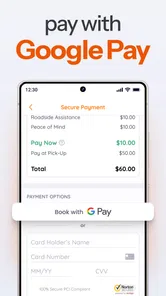
- Limited payment methods accepted.
- Requires internet connection to function.











