Captions Lite
- 376.00
- 4.0
- Installs
- 1.00M
- Price
- Free

Screenshots
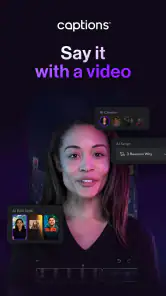
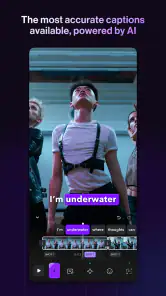
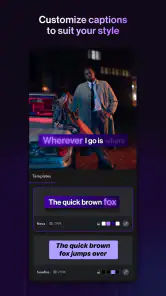
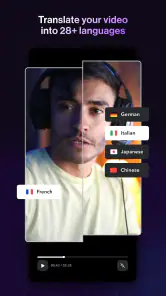
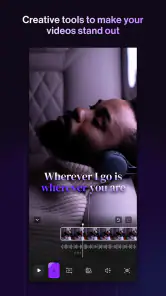
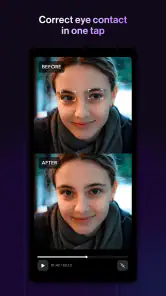
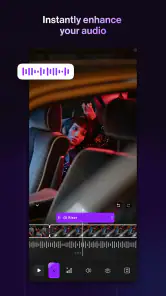
Analysis by Reviewed
At home, I can see a simple use for Captions Lite: one person records a quick explanation, recipe tip, or family update, then adds readable subtitles before sharing it. That small edit is useful when someone watches with the sound off, and it can make a spoken message easier to follow. I’d treat it as a focused video-editing app rather than a shared household workspace, though; each person should keep their own drafts and account boundaries clear instead of assuming the app coordinates several users.
A sensible setup for a shared device
If more than one person uses the same phone or tablet, I’d agree on who is editing and exporting a clip before opening a project. That’s a practical habit, not a special family feature: it helps prevent one person’s unfinished video from being mistaken for another’s. For a shared recording, decide who will check the transcript and final appearance, since automatic speech recognition can mishear names, slang, or a line spoken over background noise.
The review and editing process is best suited to a short talking video where the words carry the message. I’d record a brief sample first, look over the generated text, and correct it before spending time adjusting its look. That order matters: polished captions still create confusion if a key word is wrong. Captions Lite is a video app from Captions, and its focus on spoken content makes it more relevant to explainers and direct-to-camera clips than to elaborate, music-led edits.
Who is likely to get the most from it?
I’d recommend trying it if you regularly post spoken clips and want a quicker starting point than typing every subtitle yourself. It can also help a household member prepare a clear announcement or how-to video for relatives who may watch without audio. People who mainly need a full timeline editor, detailed sound design, or precise control over every cut may be happier with a broader video editor; this app’s appeal is the captioning workflow, not replacing every editing tool.
Captions Lite is free to download, with optional in-app purchases ranging from $4.99 to $629.99 per item. I’d check the purchase screen carefully before committing, especially on a device used by several people, and make sure everyone knows who is authorizing a purchase. The app is rated for Everyone, but that age label isn’t a substitute for an adult’s judgment about what a child records, shares, or buys. Its current version is 4.11.0 and it requires Android 9 or later.
Its 4.0 average from around 17,000 ratings and more than 1 million installs suggest that many people use it, but I’d still judge it by whether the transcript saves time on your own recordings. The practical trade-off is straightforward: automated captions reduce typing, while review and correction remain part of the job. I would not publish a clip straight from transcription without checking it, particularly if accuracy matters.
If you want a quick way to make talking videos easier to follow, I think Captions Lite is worth testing on one low-stakes clip before building it into your routine. If your household needs shared project management or a comprehensive editing suite, choose a tool designed around those needs instead. For occasional captions and simple visual adjustments, it offers a focused place to start.
More From Our News Desk

Clash of Clans Is Won Between the Battles

Android Auto Makes the Case for Quieter Car Software

MobiOffice: Transforming Mobile Productivity with Seamless Integration

EA SPORTS FC™ Mobile Soccer: Redefining Mobile Sports Gaming

How Microsoft OneDrive Became a Mobile Productivity Giant

How Google Translate Breaks Language Barriers Effortlessly
Making a repeatable household workflow
For recurring videos, I’d keep the process deliberately simple: record in a quiet spot, use a short test clip to check how the speech is transcribed, then work on the full take only after the result looks usable. That can be especially helpful for a weekly update or a family recipe demonstration, where the same person may want to make several clips over time. A clean recording is not a guarantee of a perfect transcript, but it gives the automatic text a better chance than speech mixed with a television, kitchen noise, or several people talking at once.
I’d also choose one person to do the final read-through, rather than letting several people make small edits without checking the whole sentence afterward. Names, measurements, and instructions deserve special attention: a subtitle error in a casual joke may be harmless, while a wrong ingredient or step can make a how-to video misleading. For an important announcement, read the captions alongside the video from beginning to end and confirm that the words appear when the speaker says them. This last viewing catches mistakes that are easy to miss while editing individual lines.
Where it fits beside other editing options
Compared with typing every subtitle by hand in a general video editor, the main advantage here is the speech-first starting point. The transcription can spare you repetitive typing, and the ability to adjust caption appearance and placement gives you room to make the words readable against the footage. A conventional editor is still a better fit when the job depends on arranging many clips, shaping a soundtrack, or making detailed changes across a timeline. I’d use Captions Lite for the spoken layer, not assume it is the one tool for every part of a finished video.
There is also a middle ground between doing everything manually and relying on automatic text without checking it. I’d let the app create a draft, correct the wording, and then decide whether its styling is enough for the clip. If the video needs highly exact subtitles for a formal presentation, a careful human transcription and a more controlled editing workflow may be worth the extra time. For a casual update, a corrected automated draft is a more sensible balance.
Keeping expectations and account boundaries clear
On a shared device, the question is not only who edits but who owns the finished file and is responsible for sharing it. I’d agree on that before filming, particularly if the clip includes other relatives or details that someone may not want posted publicly. Captions make speech easier to follow; they do not decide whether a video is appropriate to share. That distinction matters when a child is helping make a clip or when a family message contains personal information.
I would not treat the app as a substitute for separate household accounts or a shared archive. A simple routine—identify the editor, review the captions together if needed, and save or share the finished clip intentionally—helps avoid confusion without assuming the app provides family coordination tools. If several people need to track projects, approvals, and versions, a shared workspace built for that purpose is likely a better choice.
The age rating of Everyone makes the app broadly suitable by content classification, but adults still need to think about how younger users record and distribute videos. I’d supervise purchases as well as sharing on a device used by children. The free download makes it easy to try, while the range of optional purchase amounts means it is sensible to pause and read each purchase screen instead of treating every option as a small add-on.
Small choices that improve the result
Caption placement is worth checking against the actual video, not just the editing preview. A line that looks clear over a plain wall may be harder to read when the speaker moves in front of a busy background. I’d avoid putting important words where they compete with faces or key objects, and I’d watch the exported clip at the size people are likely to view it. The goal is not decorative text; it is captions that stay legible without distracting from the speaker.
For a clip with several takes, I’d settle the spoken wording before styling the captions. Reworking the visual treatment while the script is still changing can create needless extra work, especially if the final version has different pauses or phrasing. And if the recording contains overlapping voices, I’d consider re-recording a short section rather than trying to make a caption edit rescue unclear audio. That is a practical limit of a speech-based workflow: transcription can help with words that are audible, but it cannot make indistinct speech clear.
Captions Lite is most appealing when the video is short, the speaker is easy to hear, and the message matters more than elaborate editing. It is less compelling for a montage driven by music, a project that needs careful multi-clip assembly, or work where every caption must meet a strict review process. Those are not failures so much as useful boundaries: choosing the right tool at the start is often faster than forcing a focused caption app to behave like a full production suite.
Who should try it—and who should pass
If you make talking-head posts, quick lessons, informal product explanations, or messages for relatives who often watch with their audio off, I’d test it with a short, unimportant clip first. That gives you a chance to see whether the transcription handles your voice and vocabulary well before you depend on it. The app is also a reasonable option for someone who finds typing each subtitle tedious but still wants to review and correct the result personally.
I’d skip it as a primary editor if you need precise control over a complex sequence, collaborative review, or a complete sound-and-picture workflow in one place. It may also be the wrong choice if you expect automatic captions to be publication-ready without proofreading. In my view, its useful promise is narrower and more believable: it can reduce the mechanical work of getting spoken words onto a video, while leaving the creator responsible for accuracy, presentation, and sharing.
Captions Lite is free to start with, and the optional purchases make it important to distinguish trying the app from choosing a paid option. The developer is Captions, and the Android release began on March 20, 2024. The current version is 4.11.0, and it runs on Android 9 or later. It is listed for Everyone; that rating is helpful context, not a replacement for a parent deciding what a child should film or post. I’d approach the purchase choices carefully on a shared device, since a household should know who is approving any charge.
The app’s 4.0 average across around 17,000 ratings and its more than 1 million installs give a rough sense of its reach, but neither tells me whether it will transcribe your particular voice accurately. I’d let your own test clip decide. Check names and specialized terms, listen for sections where background sound masks speech, and review the timing before sending the video to anyone else. That small quality check is the difference between a helpful shortcut and a polished-looking clip that says something unintended.
For a household, I’d recommend Captions Lite when one person needs to make short spoken videos clearer and everyone understands who is editing, checking, and sharing them. It does not need to become a shared family system to be useful. Keep the account and purchase decisions with the responsible user, proofread the generated text, and choose a full editor or a collaborative tool when the project grows beyond captions. Used for the job it handles best, it is a practical place to begin.
If you’re anything like me, you’ve probably found yourself scrolling through videos on social media, wondering how people manage to make their content so engaging. Well, let me introduce you to Captions: For Talking Videos, a nifty app that’s here to up your video game. Whether you're a budding influencer or just someone who loves sharing moments with friends, this app promises to add a touch of magic to your videos.
What Makes Captions: For Talking Videos Stand Out?
First off, the ease of use is a huge plus. You don’t need to be a tech wizard to navigate this app. With its user-friendly interface, Captions: For Talking Videos allows you to add subtitles to your videos effortlessly. This is especially handy if you’re creating content for a global audience or just want to make sure everyone gets the punchline of your latest joke.
Features That Caught My Eye
One of the standout features of the app is its voice recognition capability. It automatically transcribes your speech into subtitles, saving you the hassle of typing it out manually. And let's be honest, who doesn't love saving time?
The app also offers a variety of fonts and colors, so you can customize the captions to match your video’s vibe. Whether you’re going for something playful or professional, there’s a style for every occasion. Plus, you can adjust the timing and positioning of the captions, giving you full control over how they appear on your screen.
Why It’s Worth Downloading
Aside from making your videos more accessible, captions can also boost your engagement. Think about it: how many times have you watched a video on mute? With captions, your audience can still follow along with your content even if they can’t listen to the sound. This feature alone makes the app a valuable tool for anyone looking to broaden their reach on social media.
Moreover, Captions: For Talking Videos is perfect for those who love to experiment with different video styles. The creative freedom it offers is fantastic, allowing you to express yourself in unique ways. And the best part? You don’t have to break the bank to enjoy these features, as the app is free to download with optional in-app purchases.
In conclusion, if you’re serious about elevating your video content, give this app a try. It’s a small addition to your toolkit that can make a big difference in how your videos are perceived. So next time you’re ready to hit record, remember that Captions: For Talking Videos has got your back. Happy filming!
Captions Lite Frequently Asked Questions
Can I use Captions Lite to make videos more accessible to viewers?
Captions Lite is designed to subtitle and edit videos with AI, which can help make spoken content easier to follow. Captions may be useful for viewers who prefer reading along or have difficulty hearing the audio. As with any automatically generated subtitles, it is sensible to review the text and correct any mistakes before sharing a finished video.
Who develops Captions Lite, and what kind of app is it?
Captions Lite is developed by Captions and belongs to the video players and editors category. Its focus is adding subtitles and editing videos with AI, making it relevant to people who work with video content. If you are looking for a tool centered on captioning and video editing rather than a general-purpose media player, its purpose may fit your needs.
What should I know about Captions Lite before downloading it?
Captions Lite is a video editing app from Captions, designed to subtitle and edit videos with AI. It may suit people who create talking videos and want to make spoken content easier to follow through captions. Its age rating is Everyone, and it is listed in the Video Players & Editors category. Consider whether AI-assisted captioning and video editing match what you need before installing it.
Does Captions Lite work on my Android device?
Captions Lite requires Android 9 or later, so check your device’s operating system before downloading. The app’s current version is 4.11.0, and it is available on Android. If your device meets the minimum requirement, you can try the app and see how its captioning and editing tools fit your workflow. Keeping Android up to date can also help you use current app features smoothly.
What is Captions: For Talking Videos used for?
Captions: For Talking Videos is an innovative app designed to enhance video content by adding subtitles or captions. It's particularly useful for content creators who want to make their videos more accessible to a global audience, including those who speak different languages or are hearing impaired. The app uses advanced speech recognition technology to automatically generate captions, ensuring both accuracy and ease of use.
Pros
- Easy to use interface for quick video editing.
- Offers a variety of fonts and styles for captions.
- Supports multiple video formats.
- Captions improve video accessibility.
- Quick export options available.
Cons
- Limited customization for advanced users.
- Occasional app crashes reported.
- Requires in-app purchases for premium features.
- Limited free features.
- Ads can be intrusive.
- Category
- Video Players & Editors
- Version
- 4.11.0











