Captcha Entry: Typing Job work
- 2.34K
- 4.8
- Installs
- 500.00K
- Price
- Free

Screenshots
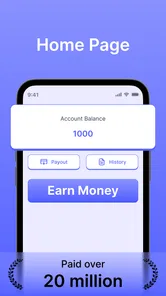
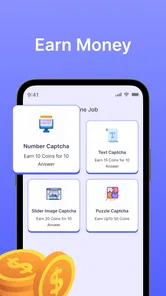
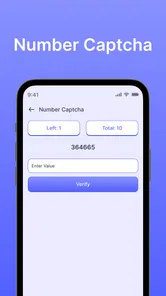


Analysis by Reviewed
I tried Captcha Entry as a small, task-focused business app, and its purpose is easy to understand: it presents captcha challenges for the user to solve and rewards completed work with points. That narrow focus is both its appeal and its main limitation. It is not a general productivity tool, a full freelance marketplace, or a replacement for a regular typing job. It is better viewed as a simple, repetitive activity that may suit someone who wants to use spare minutes on a phone.
The app is free, rated for Everyone, and developed by Akash Vaghani. It has built a sizeable audience, with over 500 thousand installs and a 4.8 average from around 148 thousand ratings. Those figures suggest that the basic idea is easy for many people to approach, although popularity should not be confused with guaranteed earnings or effortless results. In my experience, the important question is not whether the concept sounds simple, but whether this kind of repetitive work fits your patience, schedule, and expectations.
How it fits a shared household routine
The most realistic household use case is a shared-device situation in which one person occasionally hands over a phone to another family member. For example, someone might finish a few personal tasks, leave the device available at the kitchen table, and let a relative complete captcha entries during a short break. Because the app centers on individual entries rather than a complicated project, it can be easier to explain than a larger work platform.
That convenience does not mean everyone should use the same account casually. A shared phone can make it tempting to treat the app like a communal points jar, but account activity and earned points should be kept separate. If two people alternate without agreeing who is signed in, it becomes difficult to know whose work produced the balance or who should handle a login problem. My practical advice is to treat each account as personal, even when the hardware is shared.
This matters especially when a household has different expectations about the value of the activity. One person may see captcha solving as a way to occupy ten quiet minutes, while another may expect meaningful income from it. Before sharing the device, I would explain that points are not the same thing as a wage and that the app should not be treated as a dependable source of household money. That conversation prevents the most common misunderstanding before anyone starts.
A shared-device routine also benefits from simple handoff habits. The previous user should finish the current task, return to a neutral screen, and avoid leaving personal account details visible. I would not pass the phone around while an account is open unless everyone involved understands whose session it is. These are ordinary precautions, but they become more important when the app is being used by several people in the same home.
What the first session feels like
The core interaction is deliberately repetitive. You read the captcha, enter what you see, submit it, and continue with the next challenge when available. That simplicity makes the learning curve gentle. I did not need to understand a complicated dashboard or build a profile before grasping the basic task. For someone who dislikes crowded business apps, this focused design is a genuine advantage.
More From Our News Desk

Weather by Xiaomi Review: Clear at a Glance, Less Clear Up Close

X Under Pressure: Can It Recover When Posting Goes Wrong?

Clash of Clans Is Won Between the Battles

Android Auto Makes the Case for Quieter Car Software

MobiOffice: Transforming Mobile Productivity with Seamless Integration

EA SPORTS FC™ Mobile Soccer: Redefining Mobile Sports Gaming
At the same time, captcha work demands more attention than the short description might suggest. Small characters, unusual spacing, distorted symbols, and similar-looking letters can slow you down. The work is not physically demanding, but it can be mentally tiring because the same narrow decision repeats again and again. I found it more suitable for short sessions than for treating the phone like a full-time workstation.
One useful approach is to start with a brief trial rather than committing to a long session. Notice how quickly you can read the challenges, how often you make mistakes, and whether the repetition bothers you. If accuracy drops after several minutes, taking a break is more sensible than rushing. A point gained through hurried entries may not be worth the frustration of correcting avoidable errors or losing concentration.
Keeping setup boundaries clear
Since the app is available at no purchase cost and supports Android devices beginning with version 6.0, it can be accessible on older phones that are no longer ideal for demanding apps. That is helpful for a household with a spare device, but an old phone still needs to be comfortable to use. A dim display, worn touchscreen, or unreliable keyboard can make captcha entry unnecessarily difficult.
I would set up the app on the device that the intended user actually understands. If a child, parent, or housemate is going to use it, they should know how to return to their own account and how to stop the session. The app’s low technical barrier does not remove the need for basic digital boundaries. A person who can solve the captcha may still need help recognizing whether they are using the correct account or whether the device is being shared responsibly.
The current version is 2.6.3, so users should keep their installation aligned with the version available to them rather than relying on an old copy. I would also avoid installing it on a device that is needed for urgent calls or work communications if the user tends to become absorbed in repetitive tasks. A spare phone is a better fit than the only household device, particularly when several people need access throughout the day.
Another boundary concerns time. Captcha entry can look harmless because each individual task is small, but repeated tasks can quietly consume a longer period than expected. I recommend deciding in advance whether the session is for a short break, a commute, or a specific personal goal. That approach keeps the app in its proper place instead of allowing a points target to dictate the household schedule.
Coordinating people without mixing responsibilities
Coordination is most useful when several people want to use one phone but do not want to share one identity. A simple household agreement can cover three things: whose account is active, when the phone is available, and who is responsible for checking the resulting points. The app does not need to become a family project. In fact, the less complicated the arrangement, the less likely it is that someone will accidentally work under another person’s session.
I would avoid keeping a handwritten total that combines everyone’s activity. That creates a misleading picture because the app’s points belong to the accounts and users that earned them. If the household wants to compare progress, keep the comparison informal and separate. The goal should be clear ownership, not pressure to outperform a sibling or housemate.
There is also a practical coordination issue when one person is much faster than another. A confident typist may finish more entries, while someone with weaker eyesight or less familiarity with captcha patterns may need more time. That difference is not a reason to turn the activity into a competition. For shared use, it is healthier to let each person decide whether the effort feels worthwhile rather than assigning quotas.
For a couple or roommates, the app may work best as an individual spare-time option rather than a joint earning plan. One person can use it while waiting for an appointment, and the other can use the phone later, but neither should assume that the other will maintain a balance or continue a session. This distinction sounds minor, yet it prevents arguments about unfinished work and unclear ownership.
If you are considering the app for a small informal team, I would be cautious. Captcha solving is simple to explain, but the narrow task does not automatically provide the tracking, communication, or project management that a team normally needs. A conventional freelance platform or a structured microtask service may be better when several people must coordinate deadlines, records, and payments. Captcha Entry is strongest when one person wants a direct, uncomplicated activity.
Age, supervision, and trust
The Everyone age rating makes the app appear approachable for a broad audience, but an age label should not replace adult judgment. The more important question is whether the person using it understands accounts, points, and online work well enough to make sensible decisions. A younger user may be able to type the answers while still needing an adult to explain that points are not guaranteed cash and that no task is worth sharing private information.
I would present the app to a young family member as a supervised introduction to repetitive digital work, not as a promise of earnings. Set a short time limit, use the correct personal account, and review the activity together afterward. This is especially important on a shared phone, where another person might already be signed in or where notifications and saved details could be visible to the next user.
Trust also matters between adults. If someone else offers to “manage” the work, I would keep control of the account with the person who owns it. Do not hand over login details simply because another household member types faster. The easiest arrangement is usually for each person to operate their own account directly, with help limited to device setup or basic troubleshooting.
People who have difficulty reading small or distorted text should test the app gently. Captcha challenges can be visually demanding, and forcing a user to continue when the entries are becoming guesses is not a good use of time. A larger-screen device, better lighting, or a different type of online task may be more appropriate. The app’s simplicity does not guarantee that its central task will be comfortable for every user.
Where it beats ordinary alternatives
Compared with a traditional typing job, this app is much easier to start because the work is broken into small captcha entries rather than requiring an application, client communication, or a long assignment. That makes it suitable for people who have only occasional free time and do not want to search for customers. It also avoids the broader learning curve of office software, document formatting, or marketplace bidding.
Compared with general reward apps, its activity is more focused. You are not moving between surveys, shopping offers, videos, and unrelated promotions; the central action remains captcha entry. That focus can be refreshing if you want to know exactly what you are doing. However, a general rewards service may offer more variety and may be less tiring for someone who loses interest in repeating the same visual task.
Compared with a proper freelance platform, Captcha Entry is far less suitable for building a professional work history. It does not replace client-based typing, transcription, virtual assistance, or data-entry work when your goal is to develop a portfolio or negotiate rates. Those alternatives require more effort, but they can offer work that uses broader skills. I would choose this app for low-commitment spare time, not for a career plan.
The trade-off is therefore straightforward: convenience over depth. The app gives you a narrow task with a low entry barrier, while traditional alternatives demand more setup but may offer more meaningful progression. Anyone deciding between them should ask whether they want immediate simplicity or a skill-building path. Choosing the wrong one can lead to disappointment even if the app itself performs as intended.
What points do and do not mean in everyday use
The store summary emphasizes solving captchas and earning points, but I would keep the word “earn” in perspective. Points are an in-app measure of progress, not automatically equivalent to a predictable hourly return. Your personal result depends on how accurately and comfortably you work, how long you continue, and what the app allows those points to represent. I would never plan rent, bills, or essential purchases around this activity.
A better way to evaluate it is to treat the first few sessions as a personal test. Record privately how long you used the app and how you felt afterward, without assuming that one session predicts every future session. If the activity is tolerable and the points feel worthwhile to you, it may have a place in your routine. If you feel eye strain, irritation, or pressure to continue, the correct conclusion may be that another app category suits you better.
That approach also answers a question many new users have: should they leave the app running for long periods? I would not. Captcha entry requires active attention, and passive use does not turn it into effortless income. Short, deliberate sessions are safer for concentration and easier to fit around family responsibilities. The app works best when you choose the time, rather than allowing the points to control it.
My household verdict
After looking at it as both a personal tool and a shared-device option, I see Captcha Entry as a narrowly useful app. It is free, accessible on older Android hardware, and simple enough for a first session without a long tutorial. Its strong user response, including a 4.8 average from roughly 148 thousand ratings, supports the impression that many people find the basic experience approachable.
My recommendation comes with clear limits. Use it if you want a repetitive captcha-solving activity for spare minutes, understand that points are not a guaranteed salary, and can keep account ownership separate in a shared home. I would skip it if you need dependable income, professional typing experience, varied tasks, or a structured system for several people working together.
For families and roommates, the safest arrangement is uncomplicated: one person per account, clear handoffs on a shared phone, short sessions, and realistic expectations. The app can fit that routine when treated as an individual optional activity. It becomes a poor choice when household members pool identities, compete over points, or expect a simple captcha task to behave like a conventional job.
In the end, I would recommend trying it only with a small personal boundary around time and expectations. If the repetitive work feels comfortable, the app offers an easy way to fill otherwise empty moments. If it feels tiring or financially unclear, there is no reason to force it. Its value is in its straightforwardness, and that same narrow focus tells you exactly when to choose something else.
Captcha Entry: Typing Job work Frequently Asked Questions
Can I install Captcha Entry: Typing Job work on my iPhone or Android device?
Captcha Entry: Typing Job work is a mobile app in the Business category. Android users need a device running Android 6.0 or later. Before downloading, check the app’s page in the store on your device to confirm that it is available and compatible with your operating system. The app is free to download, and its content rating is Everyone.
Who developed Captcha Entry: Typing Job work, and what is its main purpose?
Captcha Entry: Typing Job work was developed by Akash Vaghani. Its central activity is solving various types of captchas and earning points, making it a task-focused app rather than a general-purpose typing tool. If you are considering installing it, think about whether this kind of repetitive challenge-based activity suits you, and read the app’s instructions to understand how tasks and points work.
Is Captcha Entry: Typing Job work free, and what should I know before downloading?
Captcha Entry: Typing Job work is a free business app by Akash Vaghani, with an Everyone content rating. It is designed around solving different types of CAPTCHA challenges and earning points. Before installing, make sure your device runs Android 6.0 or later, and download it from an official app store when available. As with any task-based app, read the on-screen instructions and terms before spending time on tasks.
What is Captcha Entry: Typing Job work, and how does it work?
Captcha Entry: Typing Job work is presented as a task-based app where users type or solve CAPTCHA-style challenges and may receive rewards for completed entries. After opening the app, users typically review available tasks, enter the requested characters, and submit their answers for verification. The exact workflow, task availability, and earning conditions can vary, so read the in-app instructions carefully before starting. The app’s focus is solving various types of captchas and earning points, so check how those points are described in the app before beginning.
Can I really earn money with Captcha Entry: Typing Job work?
The app may advertise earnings for completing typing or CAPTCHA-related tasks, but users should not assume that substantial income is guaranteed. Any rewards depend on factors such as task availability, accuracy, minimum withdrawal limits, payment methods, and regional eligibility. Before investing significant time, check the current terms, user reviews, payout evidence, and whether the app clearly explains how rewards are calculated and redeemed. Its stated activity involves earning points, so confirm whether and how those points can be exchanged for anything of value.
Pros
- Simple interface makes captcha tasks easy to understand.
- Can be used flexibly during spare time.
- Tasks require no specialized skills or experience.
- Lightweight app should run well on many Android devices.
- Short tasks may suit users seeking quick online work.
Cons
- Earnings per task can be very small.
- Task availability may vary by location and demand.
- Typing repetitive captchas can become tiring quickly.
- Income may not be consistent from day to day.
- Users should review privacy and payment terms carefully.











