CamToPlan
- 270.00
- 4.4
- Installs
- 100.00K
- Price
- $19.99
Screenshots
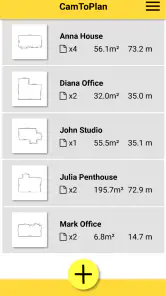
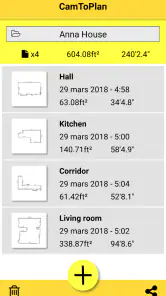
Analysis by Reviewed
When I need a quick sense of whether a piece of furniture will fit, the hardest part is often getting a useful measurement without stopping to find a tape. That is the practical idea behind CamToPlan: it uses a phone camera and augmented reality to estimate distances and areas, turning a quick look around a room into a rough plan. I find that most useful as a first check, not as a replacement for careful measuring before a costly purchase or renovation.
A camera-based measuring workflow
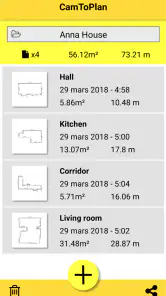
In ordinary use, I would treat the camera as a way to map out the space I want to understand. I can check a floor area, compare the approximate length of a wall, or sketch a layout before deciding where to put a desk. The key benefit is convenience: there is less back-and-forth with a separate tape and notebook when all I need is an initial estimate. Since the app is designed to measure distances, surfaces, and draw plans, its value is less about one impressive reading and more about gathering several spatial clues while I am already standing in the room.
A useful habit is to measure the same span more than once, especially if the result will influence a real decision. I would also keep the phone steady and take a moment to inspect the area I am measuring rather than rushing through it. Those small checks help me distinguish a plausible planning estimate from a number I should verify with a physical tape. That distinction matters most around tight clearances, uneven boundaries, or furniture that must fit precisely.
Where it earns a place in a routine
Picture browsing a second-hand desk and wondering whether it will work in a home office. I can use the app to get a quick sense of the available floor area and the wall length, then compare those estimates with the desk’s stated dimensions. If the space looks borderline, I would confirm it with a tape measure before arranging delivery. For choosing between broad layout options, though, the quick estimate can save time and help me avoid an obviously unsuitable choice.
This also makes the app useful for people who handle room layouts, small DIY jobs, or property walk-throughs and want a convenient first pass. Compared with a traditional tape measure, it is faster to start when the phone is already in hand and the goal is a rough plan. Compared with a dedicated floor-planning tool, its appeal is the camera-based measurement workflow rather than detailed design work. I would choose the alternative when I need a carefully documented plan or exact dimensions for construction.
Making a quick scan more useful
For a room visit, I would begin with the decision I am trying to make rather than attempting to record everything. If I am checking whether a bookcase might fit, the important measurements are the wall span and the space it will occupy, not a full inventory of the room. A few targeted readings are easier to compare later and less likely to leave me with a collection of numbers whose purpose I have forgotten.
It also helps to keep a simple note of what each estimate refers to: for example, “clear wall beside the door” is more useful than a number without context. That small habit matters when I am comparing two rooms or revisiting a space after a few days. The app can provide a convenient spatial check, but the decision still depends on knowing exactly which edge or area I meant to measure.
More From Our News Desk

Clash of Clans Is Won Between the Battles

Android Auto Makes the Case for Quieter Car Software

MobiOffice: Transforming Mobile Productivity with Seamless Integration

EA SPORTS FC™ Mobile Soccer: Redefining Mobile Sports Gaming

How Microsoft OneDrive Became a Mobile Productivity Giant

How Google Translate Breaks Language Barriers Effortlessly
When a floor plan is only a first draft
A quick outline can help me think through the shape of a room, but I would not assume it captures every practical obstacle. Radiators, door swings, alcoves, and changes in wall depth can determine whether furniture works even when the broad floor area seems suitable. I would use the camera-based plan to identify questions to check, then inspect those details directly before committing to a layout.
This is where a sketch on paper can still be a useful companion. I can jot down a rough plan and label the features that affect movement or placement, while using the app to gather initial dimensions. That combination is often more practical than expecting one tool to handle both spatial measurement and all the decisions that follow from it.
Your Personal Measuring Tape
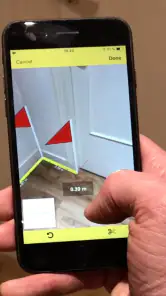
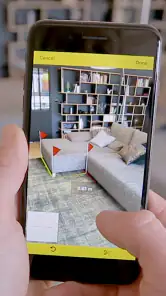
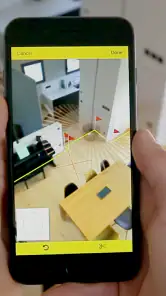
First things first, CamToPlan is all about using your camera to measure distances and areas in real-time. Imagine pointing your phone at your living room floor and instantly getting the dimensions. It's like having a digital measuring tape that fits right in your pocket. How cool is that? The app uses your device's camera and augmented reality technology to map out the area, giving you precise measurements without all the fuss of physical tools.
Easy Peasy Setup
One of the things I love about this app is how user-friendly it is. No need to fumble around with complex settings or tutorials. As soon as you fire up the app, it guides you through the initial setup, ensuring you get the hang of it right away. The interface is intuitive, with clear instructions that even my grandma could follow! Plus, it supports multiple units of measurement, so whether you're a metric or imperial fan, you’re covered.
For a better result, I would decide what I need to learn before opening the camera: one wall length, a floor area, or a quick outline for a layout. A focused measurement is easier to assess than a rushed attempt to capture an entire room at once. I would also note which readings are estimates and verify only the ones that affect a purchase or a build. That keeps the app useful without asking it to do the job of a specialist measuring tool.
Accuracy Matters
Now, let's talk about accuracy. The app claims to offer millimeter precision, and in my experience, it does a pretty solid job. Of course, like any tech, it's not foolproof. Occasionally, it might be off by a smidge, especially in low-light conditions or on reflective surfaces. But for everyday use, it's impressively reliable. Just make sure your lighting is decent, and you’re good to go.
That limitation is worth keeping in mind when deciding whether this is the right approach. A camera-based estimate can be handy for comparing spaces, but I would not rely on it alone for cutting materials, ordering a custom fit, or checking a narrow opening where a small error matters. A physical tape is slower to set up but gives me a direct measurement to double-check. For a visual first look at a room, CamToPlan is more convenient; for precision-critical work, the tape is the safer choice.
Choosing the right tool for the job
For an informal room check, the camera approach has a clear advantage over a tape: I can begin exploring a space without asking someone to hold the other end or searching for a tool first. That convenience is most valuable when I am comparing broad options, such as whether a dining table belongs in one corner or another. It is less decisive when I need a precise record to share with a contractor, because a quick estimate is not a substitute for a measured and checked specification.
A dedicated planning program makes more sense when the goal is to develop a polished layout, work through many design revisions, or prepare a plan that others will rely on. A tape measure is the simpler choice for a single critical dimension. I see this app between those options: it is a practical way to gather an initial spatial impression, but it does not remove the need to choose the right level of accuracy for the task.
A useful check before buying
One everyday situation where I would reach for it is shopping for a sofa while visiting a friend’s apartment or looking at a room I may rent. I could quickly estimate the open floor area and the wall available, then compare those rough figures with the seller’s dimensions. Before paying or arranging delivery, I would confirm the narrowest doorway, hallway turn, and final placement with a tape. The app helps narrow down the options; it should not be the only check for whether a large item can physically get inside.
That distinction is easy to overlook because a room can appear spacious while its access route is awkward. I would treat the measurement as a way to decide what deserves a closer look, not as proof that a purchase will work. Used that way, the camera saves time without encouraging false confidence about details it cannot settle on its own.
Why You’ll Love It
Okay, so here’s why I think CamToPlan is a must-have. If you’re into DIY projects or simply love redecorating your space, this app is a game-changer. It saves you the hassle of dragging out the old measuring tape and scribbling measurements on bits of paper. Plus, it’s a great conversation starter. Show it to your friends, and watch their jaws drop as you measure the coffee table by just waving your phone over it!
It is a business app from Tasmanic Editions, and its usefulness depends on whether quick spatial checks are part of your day. The app has a 4.4 average from around 7,700 ratings and has passed 100,000 installs, which gives a sense of its reach without changing the practical question: will camera-based measuring suit my work? It is rated for Everyone, costs $19.99, and version 5.4.1 requires Android 7.0 or later. I would consider the price against how often I need quick plans; someone who measures a room once in a while may be better served by a tape and a free note-taking method.
Who benefits most—and who may not
I think the strongest fit is someone who repeatedly needs an early estimate while moving through spaces: a person comparing room layouts, planning a small home project, or checking whether a piece of furniture is obviously too large. For that kind of user, saving the time of finding a tape for every preliminary question can make the app worthwhile. The value is less clear if measuring is a rare task or if nearly every result must be exact.
I would also steer away from relying on it as the sole tool for professional work where a wrong dimension could lead to wasted materials, rework, or a costly order. In those cases, a physical measurement and a documented plan are the responsible route. The app can still help with an early walk-through, but the final figures should come from a method suited to the consequences of an error.
Questions worth settling before relying on it
If you are wondering whether it replaces a tape measure, my answer is no—not for every job. It offers a faster first estimate when you are already looking at a room, while the tape remains the better choice for confirming a close fit. If you are asking whether it can support room planning, I would say yes for rough spatial thinking, especially when you want to compare broad layout possibilities. For a complete design workflow or a plan that needs to be precise and shareable, I would pick a dedicated planning tool instead.
The other sensible question is whether it is a good buy if you only measure occasionally. At $19.99, I would weigh that against how often I expect to use camera-based checks and how much time they would save. Someone who handles spaces regularly may find the convenience meaningful; someone measuring a room once in a while may prefer a tape and notes. Whichever route you choose, I would verify any dimension that affects a close fit, a cut, or a purchase.
People often want to know whether it can replace a tape measure, whether it helps with room planning, and whether it is suitable for professional measurements. My answer is that it can make early planning quicker, but I would verify important dimensions physically. It can help me think through a layout, but it is not the same as a full design or drafting workflow. And for work where errors carry a real cost, I would use it as a convenient reference rather than the final authority.
In conclusion, if you’re looking for an app that combines practicality with a bit of tech wizardry, give it a try. It’s not just another app on your phone; it’s a tool that transforms how you interact with your surroundings. Whether you’re a tech geek, a DIY enthusiast, or just someone who loves cool gadgets, this app is sure to impress. So go ahead, download it, and start measuring your world with a touch of augmented reality magic!
CamToPlan Frequently Asked Questions
Can I use CamToPlan without an internet connection?
CamToPlan’s main measuring experience centers on using your device’s camera and augmented reality, so it is suited to taking measurements directly in your surroundings. If you expect to use it somewhere with limited connectivity, consider opening the app and preparing your project while connected first. The key practical requirement for measuring is a compatible device and a camera that can view the area clearly.
Who develops CamToPlan, and is it suitable for everyday users?
CamToPlan is developed by Tasmanic Editions and is categorized as a business app, but its measuring tools can also be useful for everyday home projects. You can use it to estimate room dimensions or plan a layout without needing professional design experience. Its simple camera-based approach makes it approachable, while people handling important construction or renovation decisions should still verify measurements carefully.
What is CamToPlan and how does it work?
CamToPlan is an innovative app that uses augmented reality (AR) technology to measure distances and create floor plans with your device's camera. Simply point your camera at the floor and the app will calculate lengths, areas, and dimensions in real-time. This tool is ideal for professionals in real estate, interior design, and construction, as well as for personal home improvement projects.
Is CamToPlan accurate enough for professional use?
CamToPlan offers impressive accuracy by utilizing advanced AR technology; however, its precision can be affected by environmental factors such as lighting and surface texture. While it's suitable for many professional applications, users should perform a double-check with traditional measurement tools for critical projects to ensure utmost accuracy.
What devices are compatible with CamToPlan?
CamToPlan is compatible with Android devices that support AR capabilities and requires Android 7.0 or later. Make sure your device's camera is functioning well and has the necessary hardware to support augmented reality functions to use the app effectively.
Pros
- Easy to use interface for beginners.
- Accurate measurements with AR technology.
- Real-time measurement updates.
- Compatible with both Android and iOS.
- Supports metric and imperial units.
Cons
- Requires a well-lit environment.
- May not work on older devices.
- Occasional app crashes reported.
- Limited free version features.
- Ads present in the free version.
- Category
- Business
- Version
- 5.4.1











