

Call Screen & Ringtones Music
- 439.00
- 4.4
- Installs
- 10.00M
- Price
- Free

Screenshots
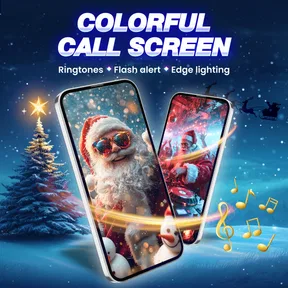
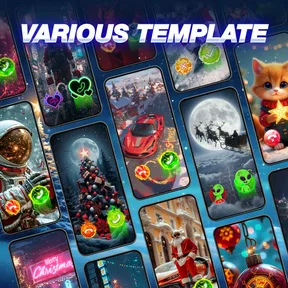

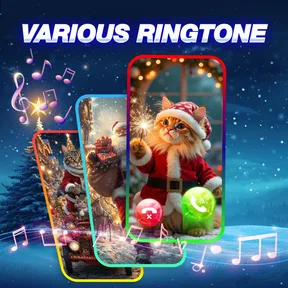



Analysis by Reviewed
Have you ever been in a situation where you wanted to customize your phone’s ringtone to the next level? Well, that’s exactly what Call Screen & Ringtones Music promises to deliver. This app isn’t just about changing your ringtone; it’s about personalizing your entire call experience. Let me walk you through my journey with this app and why it might be the next big thing for your phone customization.
What personalizing calls really means
I’d think of this as a focused personalization app rather than a replacement for the phone’s calling features. Its appeal is visual and audible: you can make incoming calls feel more recognizably yours instead of relying on the same default screen and sound. If you enjoy small, expressive changes to your phone, that can be satisfying; if you prefer a quiet, minimal interface, the extra decoration may feel unnecessary.
A practical use is choosing a distinctive sound for a busy household or a shared workspace, where several phones may be nearby. A ringtone you recognize quickly can help you tell whether your phone is ringing without immediately picking it up. I’d still keep an important contact’s sound clear and restrained rather than choosing an elaborate effect that could be hard to hear in a noisy place.
Who benefits from a more recognizable ring
I’d consider this app most useful for someone who receives calls throughout the day and wants to recognize a few callers without checking the display every time. That includes people who leave a phone across the room while cooking, doing chores, or working at a desk. It is less compelling if most of your communication happens through messaging or if your phone stays on silent; in those routines, custom call visuals and tones may rarely get a chance to help.
There is also a useful middle ground between personalizing everything and keeping the default setup. You can treat the app as a small experiment: choose one sound that is easy to recognize, use it for a while, and see whether it genuinely changes how quickly you respond. If it becomes background noise or feels distracting, reverting to a standard tone is a sensible outcome, not a failure to use the app properly.
Bringing Calls to Life
First things first, when I downloaded Call Screen & Ringtones Music, I was immediately impressed by its user-friendly interface. Navigating through the app is a breeze, even for those who aren’t so tech-savvy. It’s like having a mini studio right in your pocket. Imagine having a library full of unique ringtones and call screen themes at your fingertips! The app offers a plethora of options to choose from, and you can easily set them up with just a few taps.
Customization at Its Best
What sets this app apart is its extensive customization features. You can mix and match call screen themes with different ringtones to create a personalized experience that stands out. Whether you’re into pop music, classical tunes, or quirky sound effects, there’s something for everyone. One feature I particularly loved is the ability to assign specific ringtones to different contacts. It’s perfect for identifying who’s calling without even looking at your phone.
More From Our News Desk

 Gmail
GmailGmail in a Busy Inbox: Who Benefits Most?
From first account to crowded workday, Gmail earns its place through dependable search and flexible sorting—but its best fit depends on how much inbox maintenance you can tolerate.

 Prime Video
Switching to Prime Video: What Changes in Your Viewing Routine
Prime Video can make a compelling second home for streaming, but switching means learning a different catalog, rental layer, and route from browsing to playback.

 Universal TV Remote Control
Universal TV Remote Control Works Best as a Reliable Backup
A phone remote earns its place through quick setup and reliable habits. Here is how to get more from Universal TV Remote Control—and where its limits show.

 Weather - By Xiaomi
Weather by Xiaomi Review: Clear at a Glance, Less Clear Up Close
Xiaomi’s weather app makes everyday forecasts quick to scan, but its calm surface can leave useful details and recovery paths harder to find than they should be.

 X
XX Under Pressure: Can It Recover When Posting Goes Wrong?
A resilience-focused review of X, examining setup, mistaken posts, interruptions, weak connections, and the gaps that matter when recovery needs to be dependable.

 Clash of Clans
Clash of Clans Is Won Between the Battles
Its raids are quick; its community is a long-term project of coordination, teaching, rivalry, and shared responsibility—with all the friction that entails.
Latest News



Make choices that work in daily life
Contact-specific sounds are most useful when you keep the selection small and memorable. I’d start with the few people whose calls I most need to recognize, then leave everyone else on a general ringtone. That avoids turning a handy cue into a collection of sounds I can’t remember. It also gives you a simple way to judge whether the app’s personalization is useful to you before spending time customizing every contact.
For example, imagine you’re cooking and your phone is on the counter across the room. A familiar ringtone for a family member can tell you who is calling before you wipe your hands and check the screen. At work or in a quiet waiting room, though, a dramatic sound or bright call screen may draw attention you don’t want. I’d choose settings with the place you use your phone in mind, not just what looks entertaining in the app.
Small workflows that keep customization manageable
One way I’d avoid turning setup into a project is to decide on the purpose of each change before browsing. A ringtone can be a practical identifier, while a call screen can simply be a visual style you enjoy. Keeping those jobs separate makes it easier to notice whether a choice is helping or merely adding decoration. It also keeps the number of decisions low, which matters when an app offers a range of sounds and themes.
I’d make changes when I can test them, rather than choosing a sound in a hurry and assuming it will work everywhere. A tone that seems clear while browsing may be too subtle outdoors or too loud in a shared room. Trying it in the places where calls usually reach you gives a more useful impression than judging it only through a preview. If the tone is hard to identify, choose something simpler instead of adding more effects.
Quality and Variety
The sound quality of the ringtones is top-notch. You won’t find any of those low-quality, crackling sounds that are often common in free apps. Everything is crisp and clear, making your call experience that much more enjoyable. The app also updates its library regularly, so you’re always in for a fresh batch of tunes and themes. It’s like having a never-ending playlist of fun!
Another cool feature is the seasonal themes. With holidays and special occasions, the app rolls out themed call screens and ringtones. It’s a fun way to add some festive cheer to your phone, no matter the season.
Variety versus simplicity
Compared with using the ringtone options already built into a phone, this app is for someone who wants a more playful, themed presentation rather than only a functional sound change. The built-in settings are usually the simpler choice if you want a plain tone, fewer decisions, or no additional customization app. Here, the trade-off is clear: more ways to make calls feel personal, but also more choices to browse and maintain.
I’d treat seasonal designs as an occasional change rather than something that needs constant attention. A festive screen can be fun for a while, but a familiar everyday setup is easier to recognize and less likely to feel dated once the occasion passes. Keeping a simple default in mind makes it easier to switch back when you want your phone to feel less showy.
Trust, access, and practical checks
Because the app changes how incoming calls appear and sound, installation and setup deserve a moment of attention. I’d read each Android permission prompt before accepting it and consider whether the request makes sense for the call-personalization task I’m trying to use. Permission screens and available controls can differ by device, so I wouldn’t assume a particular setting is present on every phone. If a prompt feels unrelated or you’re uncomfortable granting access, pause and use the phone’s built-in ringtone settings instead.
Before relying on a new screen or tone, I’d test it with a regular incoming call and check the phone’s own sound and notification settings. This is a useful safeguard because a custom ringtone is only helpful if it remains audible in your usual environment. If you use silent mode, vibration, or do-not-disturb settings, check how those existing choices affect the experience rather than expecting a personalization app to override them.
What to check before settling on a setup
For a cautious first try, I’d pay attention to the choices the app asks me to make rather than accepting every prompt automatically. I’d also look at whether the call-screen style and ringtone I select suit the places where I take calls. Those are practical checks a user can make directly on the device; they are more useful than guessing about how an app handles information or access. If the setup does not feel comfortable, the phone’s existing call and sound options remain a straightforward fallback.
Think about the people who might see or hear the phone as well as your own preference. A bright visual theme can be enjoyable at home but conspicuous in a meeting, and a distinctive sound can identify a caller while also drawing attention to the phone. I’d use restrained choices for shared or quiet spaces and save more playful ones for settings where they won’t interrupt anyone. This is a small but worthwhile trade-off when a personalization app changes something other people may notice.
As a free app from WECHOICE MOBILE, Call Screen & Ringtones Music has in-app purchases ranging from $1.99 to $24.99 per item. I’d explore the available choices before paying and make sure any purchase is for something I genuinely want, rather than assuming every theme or sound is included at no cost. It is rated for Everyone, has a 4.5 average from around 29,000 ratings, and has over 10 million installs; those figures suggest broad interest, but they don’t tell you whether its style will suit your own phone habits.
Easy Installation and Setup
Setting up the app is a walk in the park. You simply download it from your app store, and within minutes, you’re ready to transform your call screen. The app provides clear instructions and tips throughout the setup process, so you feel guided every step of the way. Plus, it’s compatible with both Android and iOS, making it accessible to a wide range of smartphone users.
Who should give it a try
This is a better fit for people who enjoy themed call screens, like changing their ringtone, and want a visual cue that feels more personal than the standard phone interface. It may also suit anyone who wants to distinguish a few important callers by sound. I’d skip it if you rarely receive calls, keep your phone on silent most of the time, or would rather avoid extra customization and purchase choices. In those cases, the built-in controls are likely enough.
On Android, the listed minimum operating system is version 8.0, and the current version is 1.9.8. If you’re deciding whether to install it, check that your phone meets that requirement and take a moment to consider whether you want call-screen changes as well as new sounds. The app is free to start with, but the in-app purchase range is worth keeping in mind if you prefer to avoid optional spending.
How it fits beside the phone’s own tools
The usual alternative is not another elaborate customization app; it is simply leaving the phone’s call screen alone and changing a ringtone through its built-in settings. That route is better if you want fewer setup steps, a familiar interface, or a sound change without a themed visual layer. This app makes more sense when you actively want both parts of the incoming-call experience to feel different. I’d choose based on the change I actually want, not on the size of the available library.
There is a practical difference between choosing a tone for its novelty and choosing one that remains useful after repeated calls. A catchy sound can become irritating when it plays often, while a subtle one may be difficult to notice when the phone is not nearby. I’d prioritize recognizability and comfort over picking the most unusual option. The best customization is the kind you stop thinking about because it fits naturally into your day.
A cautious final take
I’d approach it as an optional way to make incoming calls more distinctive, not as something every phone needs. Start with one ringtone and one screen style, see whether they remain useful after the novelty wears off, and expand only if the changes genuinely help. That small trial also makes it easier to decide whether the free experience is enough for you or whether any paid item is worth considering.
The app was released on June 14, 2023, and its current version is 1.9.8. My recommendation is simple: try it if you enjoy expressive call personalization and are comfortable reviewing setup prompts and optional purchases. If reliability, minimalism, or sticking to your phone’s existing controls matters more, the standard settings are the more straightforward choice.
Call Screen & Ringtones Music Frequently Asked Questions
Does Call Screen & Ringtones Music require Android 8.0 or later?
Yes. Call Screen & Ringtones Music requires Android 8.0 or a newer version, so check your phone’s operating system before installing it. The app is intended for Android rather than iOS. If your device meets the requirement, you can explore its call screen designs, ringtone options, and flash alert features, though the way these work may vary between phones.
Who develops Call Screen & Ringtones Music, and what age group is it rated for?
Call Screen & Ringtones Music is developed by WECHOICE MOBILE and is rated for Everyone. That rating may make it suitable for a broad audience, but it is still worth reviewing the app’s options and any purchase details yourself, especially if a child will use it. The app is focused on personalizing call screens, ringtone music, and incoming-call alerts.
Can I use Call Screen & Ringtones Music without making a purchase?
The app is free to download, so you can try it without paying upfront. Some content or features may require an in-app purchase, and the available purchase options range from $1.99 to $24.99 per item. Check the details shown in the app before confirming a transaction, and consider whether the free options meet your needs before spending anything.
Is Call Screen & Ringtones Music suitable for someone who only wants to change their ringtone?
Yes. The app’s focus includes ringtones as well as call screen designs, so you can explore it for sound customization even if changing the visual incoming-call screen is not your main goal. It is a free personalization app, with optional in-app purchases for paid content. The available choices and features may vary within the app, so review them before deciding whether to make a purchase.
What is Call Screen & Ringtones Music and how does it work?
Call Screen & Ringtones Music is an app designed to enhance your phone's calling experience by offering a variety of unique call screen themes and ringtones. When you receive a call, the app replaces your default call screen with a visually appealing design of your choice. Additionally, it provides a vast library of ringtones, allowing you to customize the sound of incoming calls with your favorite tunes. It is user-friendly, making it easy to install and apply new themes and ringtones with just a few taps.
Pros
- Customizable ringtone options
- Wide variety of music choices
- Easy-to-use interface
- Caller ID integration
- Frequent updates
Cons
- Contains ads
- Limited free features
- In-app purchases required
- May drain battery
- Occasional bugs











