

Calibre Sync
- 95.00
- 3.2
- Installs
- 10.00K
- Price
- $5.49

Screenshots
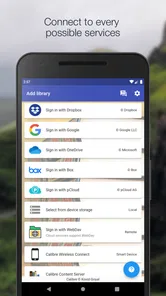
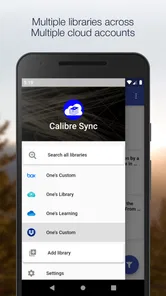
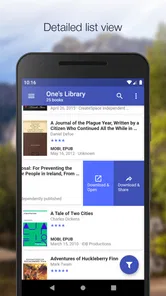
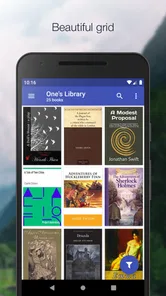
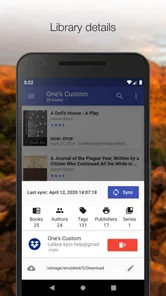
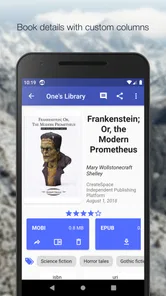
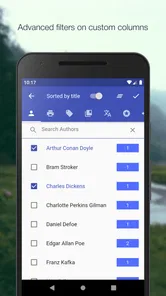
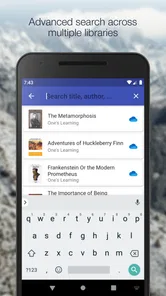
Analysis by Reviewed
In a household where several people read on phones or tablets, a shared Calibre library can be easier to browse than a folder of files passed around by hand. Calibre Sync is intended to bring a Calibre collection onto mobile devices, which makes it useful when one person curates books on a computer and readers want access away from it. I’d treat it as a library companion, though, not assume it replaces every reader app or turns separate household accounts into one coordinated system.
One library, several readers
A practical use is a parent or book-loving housemate keeping the central collection organized in Calibre while another reader looks for something to read on a tablet. Rather than searching through a long list of files, the reader can browse the library and download a title for offline reading. That can be handy before a commute, a trip, or a spot in the house where Wi-Fi is unreliable. It also gives the person managing the collection a clear role: curate on the computer, then let others choose from what is available on their own devices.
That arrangement works best when everyone understands that a common collection is not automatically a shared reading account. I would agree on which device is used for browsing and downloading, and avoid assuming that one person’s reading position or preferences will be private or separately managed for everyone. For a household that wants individual profiles, family reading controls, or a unified reading history, a service designed around those needs may be a better fit.
Setting expectations before syncing
The app is most appealing if you already use Calibre. Its value depends on having a Calibre library to connect to, so it is not the natural starting point for someone who simply wants to buy a book and begin reading. Before relying on it, I’d test the connection with a small part of the collection and confirm that the books you expect to see are accessible from the mobile device. This is a sensible way to catch a library-location or network setup issue before a long trip.
There is also a useful distinction between browsing a library and keeping every book on a phone. Download only the titles you expect to read soon if device storage matters, and leave the rest available to fetch later. That small habit keeps a large collection from becoming a large pile of locally stored files. If you mainly read one or two purchased titles at a time and have no interest in managing a catalog, your e-reader’s built-in shop or a straightforward reading app will probably involve less setup.
Keeping household reading orderly
For shared use, I’d establish a simple routine: the person maintaining Calibre handles the catalog, while each reader searches and downloads the books they want on their own device. If a title is hard to find, try searching by author as well as title; a remembered cover description is less dependable than catalog details. It also helps to decide whether downloads should be kept after finishing a book, especially on a device used by more than one person.
This is a modest coordination system, not a substitute for talking about who is using which device or maintaining separate libraries. A common collection can make books easier to discover, but it does not remove the need for sensible boundaries around a shared tablet. I would not put personal material into a household collection unless everyone who can access that device is meant to see it.
More From Our News Desk

 Gmail
GmailGmail in a Busy Inbox: Who Benefits Most?
From first account to crowded workday, Gmail earns its place through dependable search and flexible sorting—but its best fit depends on how much inbox maintenance you can tolerate.

 Prime Video
Switching to Prime Video: What Changes in Your Viewing Routine
Prime Video can make a compelling second home for streaming, but switching means learning a different catalog, rental layer, and route from browsing to playback.

 Universal TV Remote Control
Universal TV Remote Control Works Best as a Reliable Backup
A phone remote earns its place through quick setup and reliable habits. Here is how to get more from Universal TV Remote Control—and where its limits show.

 Weather - By Xiaomi
Weather by Xiaomi Review: Clear at a Glance, Less Clear Up Close
Xiaomi’s weather app makes everyday forecasts quick to scan, but its calm surface can leave useful details and recovery paths harder to find than they should be.

 X
XX Under Pressure: Can It Recover When Posting Goes Wrong?
A resilience-focused review of X, examining setup, mistaken posts, interruptions, weak connections, and the gaps that matter when recovery needs to be dependable.

 Clash of Clans
Clash of Clans Is Won Between the Battles
Its raids are quick; its community is a long-term project of coordination, teaching, rivalry, and shared responsibility—with all the friction that entails.
Latest News



Age, trust, and choosing the right reader
The app has an Everyone age rating, but that label does not judge the suitability of every book in a Calibre library. Adults managing a shared device should still choose which titles are available and keep device access appropriate for the reader. The key distinction is between the app’s audience rating and the contents someone adds to the library: the latter is up to the collection’s owner.
It is a Books & Reference app from BIL Studio, currently at version 6.6.4, and it has a 3.8 average from around 330 ratings, with over 10,000 installs. It costs $5.49, so I’d weigh that against how often you use Calibre and whether mobile access solves a real problem for you. The Everyone rating makes it broadly suitable as an app, but it should not be mistaken for parental controls or a guarantee about the books themselves.
Getting Started with Calibre Sync
So, first things first, setting up Calibre Sync is a breeze. You just need to download the app, and voilà, you're ready to dive into the world of books. The interface is super user-friendly, making it perfect for book lovers who aren't exactly tech-savvy. The app connects effortlessly with your Calibre library, and before you know it, your eBooks are synced across all your devices. No more lugging around your bulky laptop just to read your favorite novel on the go.
Features that Make a Difference
What I love about it is how it goes beyond just syncing. It offers a plethora of features that cater to every bookworm’s needs. You can organize your books by author, genre, or even by your reading status. Plus, the search function is a lifesaver when you can't remember where you left that one book with the blue cover and the mysterious title.
Another standout feature is the ability to download books directly to your device. Whether you’re on a long flight or stuck in a no-WiFi zone, your reading adventures are never interrupted. And let's not forget the customizable reading settings. Adjust the font size, background color, or switch to night mode – it’s all about making your reading experience as comfortable as possible.
Seamless Integration and Accessibility
The magic of it lies in its seamless integration with various formats. Whether it’s an EPUB, MOBI, or PDF, this app handles them all like a pro. It's like having a Swiss Army knife for eBooks. Moreover, it supports multiple languages, making it an excellent choice for readers around the globe.
Accessibility is another area where this app shines. It supports text-to-speech, which means you can listen to your books while driving or doing chores. It's like having a personal narrator along for the ride. The app also syncs your reading progress, so you can pick up right where you left off, no matter what device you’re using.
What a normal reading day looks like
For me, the most convincing use is a small, deliberate handoff between the home computer and a reader’s device. Someone adds and tidies a title in Calibre; later, another household member opens the mobile catalog, searches by author, and downloads that book before leaving. Once it is stored locally, the person can read without keeping a network connection available. The advantage is less about replacing the computer library and more about making a prepared selection reachable at the moment it is useful.
I’d make that routine more reliable by checking the book on the actual device before a journey, especially if it is a PDF or a title with unusual page layout. A file can be present yet still be awkward to read on a small screen. Downloading in advance also separates two questions that are easy to confuse: whether the library connection is working and whether the particular book is comfortable to read on that device.
Making the catalog easier to share
A shared catalog is only as helpful as its organization. If the person who maintains Calibre uses consistent author and title details, readers have a better chance of finding what they want than if they rely on cover memory or filenames. I’d also agree on a simple way to request additions: tell the curator the title or author, rather than making several people edit the source collection independently. That keeps the desktop library as the place where changes are managed, while mobile browsing remains convenient.
There is a trade-off here: one organized library avoids scattered copies, but the curator becomes a point of coordination. If that person is away or does not maintain the catalog, other household members may have to work with what is already available. A family that expects everyone to manage their own purchases and reading lists independently may be happier with individual store accounts or separate libraries instead of building a shared Calibre routine.
Choosing it over a store or a file manager
Compared with a built-in ebook store, this approach makes more sense when you already have a collection you manage yourself and want to browse it away from the computer. A store is usually the simpler route for buying and opening a new book without maintaining a catalog. Compared with a file manager, a library-centered view is more useful when you care about finding books by their catalog details rather than remembering where a file was saved. Neither alternative is universally worse; each removes a different kind of friction.
I would not choose this as my first ebook app if I only read occasional purchases, want one obvious place to buy titles, or do not want to configure and maintain a Calibre library. Nor would I rely on it to create household profiles or protect one reader’s history from another. Its strongest case is narrower and clearer: Calibre is already part of the household’s book routine, and mobile access would make that collection more practical.
What to check before depending on it
A few quick checks can prevent avoidable frustration. Confirm that the intended library is the one visible on the device, try searching for a title using its author as well as its name, and open a sample from each format you regularly read. Then download a book before you need it offline and verify that it opens as expected. These steps are especially useful when a device is shared, because they help distinguish an access or catalog problem from a reader preference or layout issue.
Storage is another reason to be selective. Keeping only near-term reading on a phone or tablet reduces clutter and makes it easier for the next person to see what is actually available offline. After finishing a book, decide together whether to remove its local copy; that is a practical housekeeping choice, not a substitute for keeping the main catalog organized. For a child or guest using a shared device, I would also check the visible collection and the device’s general access settings rather than assuming an app-level age label controls what appears.
Who I’d recommend it to
I’d recommend it to someone with an established Calibre library who wants to browse and carry selected books on a phone or tablet. It is less compelling if you want a storefront, a simple one-device reader, or household profiles that keep recommendations and progress distinctly separate. Compared with relying on a basic file manager, a library-focused app is a more practical way to find a title in a sizable collection; compared with a dedicated ebook store, it asks you to bring and maintain your own catalog.
One small but useful habit is to test a book from each format you actually use before depending on the app as your only travel option. A quick check of a PDF, for example, can tell you whether that particular book is comfortable on your screen, while downloading it in advance avoids depending on a connection later. Calibre Sync’s broad format support is helpful, but a format opening successfully does not necessarily mean every page layout will feel ideal on a phone.
Final Thoughts
All in all, it is a strong option for anyone who loves eBooks and already organizes them with Calibre. It simplifies managing and accessing your library, giving you more time to enjoy the stories you love. Whether you're a casual reader or a book hoarder, this app can earn a place in your digital toolkit if mobile access is what you need. Released on April 13, 2020, it has had time to establish a focused role, but I’d still decide based on your own setup: if Calibre is already part of your routine, the $5.49 price is easier to justify than if you are starting from scratch. For readers who want a shared catalog without expecting it to manage family accounts, it is worth considering.
Calibre Sync Frequently Asked Questions
What does Calibre Sync cost, and what should I know before downloading it?
Calibre Sync is a paid Books & Reference app from BIL Studio, priced at $5.49. It is intended for people who already use Calibre and want to access their libraries on a phone or tablet. Before buying, consider whether connecting to your existing library fits the way you manage and read e-books; the app is designed as a companion to that collection rather than as a standalone source of books.
What is Calibre Sync and how does it work?
Calibre Sync is an application designed to synchronize your e-book library across various devices seamlessly. It works by connecting to your Calibre library on your computer and allowing you to access and manage your e-books from your mobile device. With Calibre Sync, you can download books to read offline, organize your library, and even modify metadata directly from your smartphone or tablet.
Is Calibre Sync compatible with all e-book formats?
Calibre Sync supports a wide range of e-book formats, including EPUB, MOBI, PDF, and others commonly used in e-book reading. This ensures that users can sync and access almost any book format they have in their library. However, it's essential to verify if specific formats with DRM protection are supported, as some may require additional steps to access.
How secure is my e-book library with Calibre Sync?
Calibre Sync prioritizes the security of your e-book library by providing encrypted connections and secure login processes. The app ensures that your data is only accessible to you and those you permit. It’s advisable to use strong passwords and enable any additional security features offered by the app to further protect your library from unauthorized access.
Can I use Calibre Sync offline?
Yes, Calibre Sync allows users to download e-books to their devices for offline reading. This feature is particularly useful for those who travel frequently or have limited internet access. You can choose which books to download and access them anytime, without needing an active internet connection, ensuring uninterrupted reading pleasure.
Pros
- Easy integration with Calibre library
- Supports multiple devices and platforms
- Efficient cloud syncing capabilities
- User-friendly interface design
- Customizable sync options
Cons
- Limited offline functionality
- Occasional sync delays
- Requires Calibre setup
- Some features require premium
- Initial setup can be complex











