

Caesars Rewards Resort Offers
- 8.61K
- 4.6
- Installs
- 1.00M
- Price
- Free

Screenshots



Analysis by Reviewed
I find resort apps most useful when they reduce the small hassles around a trip, not when they promise a glamorous getaway by themselves. That is the practical lens I’d use for Caesars Rewards Resort Offers: it is a free Travel & Local app from Caesars Entertainment, aimed at people considering its casino resorts and wanting offers and trip details in one place. It has a 4.6 average from around 53,000 ratings, but a strong score does not make it a fit for every traveler.
Where trip planning can get stuck
The main friction is that an offer is only useful if its property, dates, and terms suit the trip you actually want. I would check those details before building an itinerary around a discount; a lower room price does not automatically make a particular location or travel date convenient. Treating the app as a starting point for comparing possibilities, rather than a guarantee of a bargain, makes for a more sensible plan.
It is also worth separating the appeal of rewards from the cost of a visit. A credit or member benefit can be useful, but it should not persuade you to spend more than you intended. If you are arranging a short stopover, traveling with a group that has different priorities, or simply want a quiet, non-casino-focused break, a standard hotel search may be a better first step.
Planning and using the app with fewer surprises
Before relying on it for a trip, I would make sure I can sign in and find the relevant property and offer while I have a stable connection. If a page is slow or does not load, I would first try again after checking the connection, then close and reopen the app. Those basic steps are more useful than repeatedly tapping a booking action, especially when I am trying to compare details carefully.
Discovering the Hidden Treasures
When I first downloaded the Caesars Rewards Resort Offers app, I was greeted with an interface that was both sleek and user-friendly. Navigating through the app felt like strolling through a lavish resort lobby. Everything is intuitively laid out, from the homepage where you can snag those irresistible offers to a detailed map of all Caesars properties that makes planning your next getaway a breeze.
Exclusive Offers and More
Let’s talk about the heart of the app – the offers. Whether you’re a high roller or just looking to escape the daily grind, there’s something for everyone. The app provides a plethora of discounts, from room rates to dining experiences. I was particularly impressed with the dining deals; it’s as if they knew I was a foodie at heart! And the best part? These offers are regularly updated, so there’s always something new to look forward to.
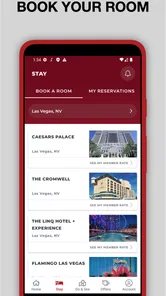
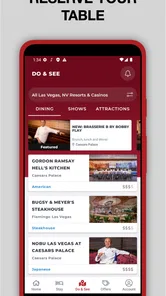
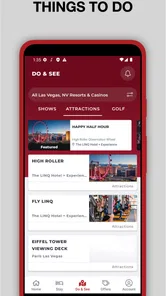
But it’s not just about the offers. The app also keeps you in the loop with events and shows happening at various Caesars locations. I found this feature incredibly handy, especially when you’re trying to make the most out of a weekend getaway. Plus, the booking process is seamless. With just a few taps, you can secure your stay, book a table, or grab tickets to a show.
More From Our News Desk

 Weather - By Xiaomi
Weather by Xiaomi Review: Clear at a Glance, Less Clear Up Close
Xiaomi’s weather app makes everyday forecasts quick to scan, but its calm surface can leave useful details and recovery paths harder to find than they should be.

 X
X Under Pressure: Can It Recover When Posting Goes Wrong?
A resilience-focused review of X, examining setup, mistaken posts, interruptions, weak connections, and the gaps that matter when recovery needs to be dependable.

 Clash of Clans
 Is Won Between the Battles
Its raids are quick; its community is a long-term project of coordination, teaching, rivalry, and shared responsibility—with all the friction that entails.

 Android Auto
 Makes the Case for Quieter Car Software
The car interface is no longer judged by how much it can do, but by how quietly it helps. Android Auto shows what drivers now expect—and what still gets in the way.

 MobiOffice: Word, Sheets, PDF
MobiOffice: Transforming Mobile Productivity with Seamless Integration
MobiOffice: Word, Sheets, PDF is redefining mobile productivity with a surprising blend of functionality and innovation.

 EA SPORTS FC Soccer Mobile 26
EA SPORTS FC™ Mobile Soccer: Redefining Mobile Sports Gaming
Dive into EA SPORTS FC™ Mobile Soccer, where immersive gameplay and strategic depth transform mobile sports gaming.
Latest News



A practical way to compare options
For a real-world example, imagine planning a weekend in Atlantic City with friends. I would look at the property options and any relevant offers first, then check that the dates line up with everyone’s plans before deciding where to stay. If the group mainly wants to see a show or eat together, I would compare those priorities against the room deal rather than choosing a property solely because an offer looks attractive.
That is where this app differs from general hotel and travel apps: it is centered on Caesars properties and rewards, while broader alternatives are usually more useful for comparing unrelated hotels, transport, or neighborhoods. I would use both when the destination is still undecided. Once I know a Caesars resort is a serious option, this app is the more focused place to explore its offers and related plans.
Making offers work for your actual itinerary
A useful habit is to decide the shape of the trip before browsing: which city, roughly when, and what matters most once you arrive. Then I would compare the available resort choices against that short list, rather than letting a prominent offer set the agenda. A deal that fits a trip I already wanted is meaningful; one that requires changing the dates, adding an extra night, or traveling farther may not be a saving in any practical sense.
I would also separate the research stage from the commitment stage. First, use the app to see whether a Caesars property and its offers deserve consideration. Then pause long enough to compare the total plan with a broader travel search: location, travel time, and the needs of everyone going. This is especially helpful for groups, where one person may care about dining or entertainment while another mainly wants a convenient place to sleep. The app can support the Caesars part of that decision, but it should not decide for the whole group.
Perks of Being a Member
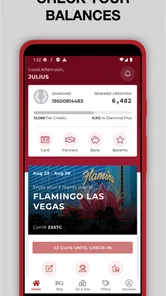
Signing up for the Caesars Rewards program through the app is a no-brainer. Membership unlocks a whole new level of benefits, such as earning credits for every dollar spent, which can be redeemed for even more goodies. Trust me, those credits add up faster than you’d think, and before you know it, you’re enjoying complimentary stays and meals.
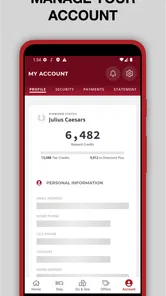
The app also does a fantastic job of keeping track of your rewards balance and tier status. It’s like having a personal assistant who’s always got your back, ensuring you never miss out on an opportunity to upgrade your experience.
Using rewards without letting them steer the trip
I would treat credits and tier information as useful account context, not as a reason to stretch a budget. Before counting on a reward, check what the app shows for your account and the offer you plan to use. A balance is only valuable if it can be applied to something you genuinely want, under terms that fit your stay. That mindset keeps rewards from turning into a shopping list of extra spending.
For someone who visits Caesars properties occasionally, the practical gain may be having offers and account details easier to revisit in one place. Frequent resort visitors may get more reason to check their account and compare benefits as plans develop. In either case, I would make a note of the offer details that matter to the reservation before switching to another task. That small step reduces the chance of relying on memory when dates or options change.
Keeping expectations realistic
I would check the account and offer details before traveling, rather than assuming that a benefit will apply automatically at checkout. If a booking or reward does not appear as expected, I would first confirm that I am signed into the account I used and review the relevant offer. If the issue is with a reservation rather than the app itself, contacting the property or booking support is more useful than reinstalling the app and starting over.
There is a trade-off in keeping a resort-specific app: it is most helpful when you are actively considering Caesars destinations, but it offers less value as an everyday travel planner if your trips rarely involve those properties. Caesars Rewards is rated Mature 17+, so it is also not intended as a general family travel app for younger users. The app has been available since February 17, 2014, and version 9.8.11 supports devices running at least OS 10; it has over a million installs, which suggests a substantial audience, but your own travel habits matter more than popularity.
Setup checks and simple recovery
Before a booking session, I would check that the device is running a supported operating system and that the app is current. The minimum requirement is OS 10, and the version identified here is 9.8.11. If the app opens but information seems stale or a page fails to load, I would check the connection, close and reopen it, and sign in again if needed. I would avoid making repeated booking attempts until I can see clearly whether the earlier action went through.
If the problem is limited to one offer, I would return to its details and verify the property and dates rather than assuming the entire app is broken. If account information looks wrong, checking that I am using the intended account is a sensible first move. For a reservation concern, I would keep the relevant confirmation details available and contact the appropriate property or booking support. Reinstalling should not be my first response to a booking mismatch, since it does not resolve questions about the reservation itself.
When another tool is the better choice
For a traveler still choosing among cities or hotel brands, general travel apps have the advantage: they help compare a wider range of stays and often make it easier to think about transport and location together. A map app is more useful for checking how far a property sits from a specific meeting or attraction. I would use those tools for broad planning, then bring this app into the process only when a Caesars stay is a genuine contender.
That division of labor is not a flaw so much as a boundary. The focused resort experience can be convenient when you already know which brand you are considering, but it is not a substitute for comparing the whole trip. Travelers who prefer independent hotels, want a casino-free break, or do not expect to use member benefits may have little reason to keep it installed after their research. For families, the Mature 17+ rating is another reason to think carefully about who will be using the app, even when the trip itself includes people of different ages.
Final Thoughts
In a nutshell, the Caesars Rewards Resort Offers app is a must-have for anyone planning a visit to a Caesars property. It not only enhances your trip with exclusive deals and insider tips but also makes you feel like a VIP every step of the way. So, if you’re ready to indulge in the ultimate resort experience, go ahead and give this app a whirl. Your next adventure awaits!
My more measured recommendation is to install it when a Caesars stay is on your shortlist, then use it alongside a general travel planner for the parts of the trip it does not specialize in. I would skip it if you want a neutral comparison of many hotel brands or have no interest in resort offers. For a traveler who does have a likely Caesars visit ahead, it can make researching offers and keeping rewards in view more convenient—provided you check the details and plan around the trip you actually want.
Caesars Rewards Resort Offers Frequently Asked Questions
Is Caesars Rewards Resort Offers suitable for someone who only wants to browse travel deals?
Yes. Caesars Rewards Resort Offers is a Travel & Local app for exploring offers connected with Caesars Entertainment resorts, so it can be useful even if you are still comparing ideas for a trip. You can browse the offers and destinations presented in the app before deciding whether to make plans. The app is free to download, while any travel or other purchases are separate.
Do I need a Caesars Rewards account before I can use the app?
You can create or log into a Caesars Rewards account after installing the app. The published app guidance describes account access as part of using its offers and booking features, and says non-members can sign up through the app. Having an account is therefore relevant if you want to access member promotions, manage reservations, or use the other account-related features described here.
Is Caesars Rewards Resort Offers free to download, and which devices can run it?
Caesars Rewards Resort Offers is free to download, so you can install it without paying for the app itself. It is available for Android and iOS devices, with Android requiring version 10 or later. The app is intended for adults, with a Mature 17+ content rating, so keep that in mind before installing it or setting it up for another user.
What is Caesars Rewards Resort Offers?
Caesars Rewards Resort Offers is a mobile app designed to provide users with exclusive access to special offers, discounts, and promotions at Caesars Entertainment resorts. By utilizing the app, users can easily browse and book hotel stays, access their Caesars Rewards account, and enjoy tailored experiences, making it an essential tool for anyone planning to visit a Caesars property.
How do I use the Caesars Rewards Resort Offers app?
To use the Caesars Rewards Resort Offers app, simply download it from the Google Play Store or Apple App Store. Once installed, create or log into your Caesars Rewards account. Navigate through the app to view available offers, manage bookings, and access personalized promotions. The intuitive interface is designed for ease of use, ensuring you can quickly find and utilize the offers that best suit your needs.
Pros
- Wide variety of rewards options.
- User-friendly interface design.
- Frequent updates with new offers.
- Seamless integration with hotel bookings.
- Exclusive member-only promotions.
Cons
- Requires internet connection.
- Limited features for non-members.
- Occasional app crashes reported.
- Notifications can be overwhelming.
- Some offers have restrictive terms.











