

Cadence - Event Experiences
- 9.00
- 3.7
- Installs
- 10.00K
- Price
- Free

Screenshots
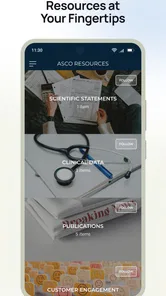
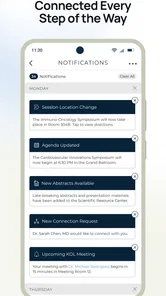
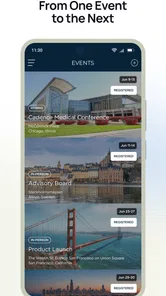
Analysis by Reviewed
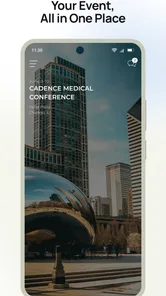
Cadence - Event Experiences is an events app from Event Cadence, Inc. that aims to put the information for an event in one mobile place. I approached it as the kind of app you might open while moving between sessions, checking what is happening next, or trying to make sense of a busy event schedule without carrying printed material. Its store summary, “Everything You Need. Right Where You Need It,” describes the intention well, although the real value depends heavily on how completely an event has been set up inside the app.
After spending time with it, my overall impression is that Cadence is most useful as a companion to a specific event rather than as a general discovery service. It is not the sort of app I would install for casual browsing every day. Instead, it becomes relevant when an organizer, conference, or event community uses it as a central information point. That distinction matters because the experience is shaped not only by the app itself, but also by the quality and timeliness of the event content available through it.
How Cadence Fits Into a Real Event Day
In practical terms, this is an events app designed to bring event-related material into a mobile interface. The appeal is easy to understand: event information is often scattered between email messages, web pages, social posts, venue signs, and last-minute announcements. A dedicated app can reduce that searching, provided the relevant details are actually maintained in one place.
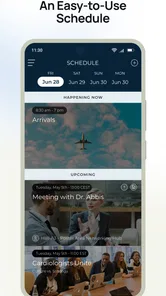
I can imagine using Cadence before arriving at a conference to get familiar with the schedule, then returning to it during the day when plans change. A person attending several talks may use it to compare time slots, while someone helping at an event may need quick access to current information rather than a long email thread. The most useful habit is to treat the app as a working reference, not merely something to open once during registration.
That approach also reveals its main limitation. Cadence cannot make an event organized if the underlying information is incomplete, outdated, or poorly arranged. A polished interface helps, but it cannot replace clear event planning. If a user opens the app and finds only a small amount of useful material, the disappointment may come from the event setup rather than from the basic idea of the application. Even so, a mobile event tool has to make that distinction clear through good navigation and timely updates.
The app is free, which makes trying it straightforward for attendees. It is also rated for Everyone, so its intended audience is broad rather than restricted to a particular age group. On Android, the listed minimum requirement is version 7.0, meaning people with older devices may need to check compatibility before relying on it for an important occasion.
Connectivity Changes the Experience
The most important thing I would tell a prospective user is that Cadence should be approached as a connected experience. Event information can change, and any app built around schedules, announcements, or shared event content is more useful when the phone can reach the service. I would not assume that every screen or update will remain available in every situation without a connection. For an important event, I would review the key details before leaving and keep essential information easy to find elsewhere as a sensible backup.
More From Our News Desk

 Gmail
GmailGmail in a Busy Inbox: Who Benefits Most?
From first account to crowded workday, Gmail earns its place through dependable search and flexible sorting—but its best fit depends on how much inbox maintenance you can tolerate.

 Prime Video
Switching to Prime Video: What Changes in Your Viewing Routine
Prime Video can make a compelling second home for streaming, but switching means learning a different catalog, rental layer, and route from browsing to playback.

 Universal TV Remote Control
Universal TV Remote Control Works Best as a Reliable Backup
A phone remote earns its place through quick setup and reliable habits. Here is how to get more from Universal TV Remote Control—and where its limits show.

 Weather - By Xiaomi
Weather by Xiaomi Review: Clear at a Glance, Less Clear Up Close
Xiaomi’s weather app makes everyday forecasts quick to scan, but its calm surface can leave useful details and recovery paths harder to find than they should be.

 X
XX Under Pressure: Can It Recover When Posting Goes Wrong?
A resilience-focused review of X, examining setup, mistaken posts, interruptions, weak connections, and the gaps that matter when recovery needs to be dependable.

 Clash of Clans
Clash of Clans Is Won Between the Battles
Its raids are quick; its community is a long-term project of coordination, teaching, rivalry, and shared responsibility—with all the friction that entails.
Latest News



This is especially relevant in crowded venues. Large gatherings can place unusual pressure on mobile networks, and a phone that works perfectly at home may feel less dependable among hundreds or thousands of attendees. If the app is being used to decide where to go next, a slow refresh can be more frustrating than a simple printed schedule. My practical advice is to open the relevant event pages in advance, note the next important appointment, and avoid waiting until the exact moment a session begins to retrieve everything.
Connectivity also affects how much confidence I place in live information. A recently changed schedule is valuable only if the update reaches the device. When the network is weak, users may be looking at information that was correct earlier but has since changed. That is not a reason to dismiss Cadence; it is a reason to combine it with ordinary awareness. Check venue signs, listen for announcements, and confirm major changes when timing matters.
The app works best when it reduces information hunting, not when it is treated as the only possible source of truth. That is a useful distinction for anyone attending a large event for the first time.
Using It While Walking, Waiting, and Switching Plans
For mobile use, the design needs to support short visits. Event attendees rarely sit down for a long reading session every time they open an app. More often, they glance at a phone while walking between rooms, waiting in a line, or deciding whether to stay for one activity or move to another. I found that the best way to use Cadence is to establish a simple rhythm: check the schedule before a transition, look for the next useful detail, then put the phone away.
This also changes how I judge the app. A feature that looks impressive during a relaxed test may be less valuable if it takes too many taps when a user is already late. For event software, clarity matters more than decoration. The app should help answer immediate questions such as where to go, what is happening next, and whether a planned activity still fits the day. If I have to repeatedly search through unrelated information, the central promise becomes weaker.
One non-obvious benefit of using a dedicated event app is reduced dependence on scattered browser tabs. A conventional website may be perfectly adequate for reading a general schedule at home, but it can become awkward when the user is switching between pages, email, maps, and messages. Cadence has a clearer role when the event content is organized for mobile checking. The trade-off is that a normal website may be easier to access for someone who does not want another app, especially if the event is small and the schedule rarely changes.
I would also avoid planning an entire day too rigidly around the app. Events often involve queues, room capacity, conversations, delays, and spontaneous choices. Cadence can support the plan, but it cannot account for every physical condition at the venue. I prefer using it to identify priorities and alternatives rather than treating the displayed schedule as a guarantee that every transition will be effortless.
A Realistic Day With Cadence
Imagine arriving at a professional gathering with three talks you want to attend. Before entering the venue, I would use Cadence to review their times and decide which one matters most. If two sessions overlap, I would choose one and keep the other as a backup rather than trying to remember every detail. During the first break, I would check the next session again, because an event day can change quickly and my own timing may have slipped.
Later, a notification or event update may change the plan, or I may discover that moving across the venue takes longer than expected. This is where the app can save mental effort: I can return to the event information instead of searching through old messages. But I would still verify important changes through visible venue information or staff when the decision affects a limited opportunity.
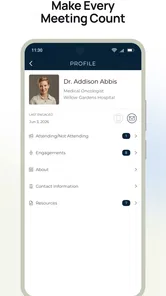
For a volunteer or organizer, the use case is different. The value lies in having a shared mobile reference that can help people point attendees toward the same information. That may reduce repeated questions, but it also creates responsibility: if the content is not kept current, users may lose trust quickly. The app is therefore a good fit for events where communication is active and centralized, not necessarily for a tiny gathering whose details fit comfortably in one message.
What Happens When the Connection or Information Fails?
Every event app deserves a failure plan, and this is where I would be cautious. A weak signal, a crowded network, a low battery, or an unexpected change can interrupt the smooth flow that the app is meant to provide. I would not wait until I am standing outside a room to discover that I have forgotten the next location. Before the busy part of the day, I would identify the most important schedule items and keep a simple personal note of them.
That backup is not an argument against Cadence. It is a realistic way to use any connected event tool. The app can remain the main reference while a short note, screenshot, email, or venue guide protects against a moment when the phone cannot retrieve what I need. I especially recommend this for transportation details, entry instructions, or a session that cannot easily be repeated.
Recovery is also about recovering from incorrect assumptions. If an event page appears unchanged, I would not automatically conclude that nothing has moved. Check the time, location, and any recent announcement area rather than relying on memory. If the app becomes slow, close unnecessary tasks, move to a less crowded location if possible, and try again later. These are ordinary steps, but they matter more when a user is navigating an unfamiliar venue.
For organizers, the lesson is even sharper: a connected app should complement staff communication, signs, and direct announcements. Attendees may have different phones, different network conditions, and different levels of comfort with apps. Cadence is most credible when it is one part of a communication system rather than the only channel used during the event.
Using Cadence Without Wasting Mobile Data
Because the app is intended for event information, I would use it deliberately rather than leaving it open continuously. Check the schedule at natural points, such as before a session or during a break, instead of refreshing every few minutes. This is easier on a limited mobile plan and reduces the chance of draining the battery while the phone is already working hard in a crowded venue.
A useful workflow is to review the day’s priorities when the connection is strong, then use the app for changes and confirmations while moving around. I would avoid repeatedly reopening the same pages without a reason. If the event includes a large amount of material, focus first on the schedule and locations that affect your day. This makes the app feel less like an endless information feed and more like a practical tool.
Privacy-conscious users may also prefer to keep their interaction narrow. Use only the event information you need, and think carefully before sharing personal details or enabling optional interactions unless they clearly add value to your visit. I am not suggesting that Cadence is unsafe; I am saying that event apps often encourage participation, and each person should decide how much involvement is useful.
Battery planning is just as important as data planning. A long event day may already involve navigation, messages, photos, and calls. I would arrive with the phone charged, lower unnecessary background activity, and carry a power bank for a full-day gathering. That advice is particularly relevant when Cadence is being used for frequent schedule checks, because a dead phone removes access to every mobile resource at once.
Who Will Get the Most From It?
Cadence makes the most sense for people attending an event with enough moving parts to justify a dedicated companion. Conference visitors, participants in organized programs, and attendees who dislike juggling several sources of information are the clearest audience. It can also suit someone who wants to prepare a personal shortlist before arriving and then adjust that plan as the day develops.
I would be more hesitant to recommend it for a very small event with one location and a simple timetable. In that situation, a message, calendar entry, or ordinary web page may be faster and more familiar. Likewise, people who strongly prefer not to install event-specific apps may find a browser-based alternative less burdensome, assuming the organizer offers one. Cadence is not automatically better simply because it is dedicated.
The app’s reach is still meaningful: it has passed ten thousand installs, while its average rating sits at 3.7 from thirty-nine ratings. I read that as a modest but mixed signal rather than a decisive verdict. The product has a real audience, yet the rating suggests that expectations and individual event experiences may vary. I would judge it primarily by the event I plan to attend and by whether that organizer clearly relies on it.
Version, Maturity, and Everyday Friction
The current version is 2.7.442, and the app has been available since May 18, 2017. That history suggests a product with time to develop, but longevity alone does not guarantee that every event experience will feel equally polished. Event apps are unusually dependent on the way each organizer configures and maintains content, so two users can reasonably come away with different impressions.
My main friction point is not the concept but the dependency chain around it. The app needs a relevant event, useful content, a functioning connection at important moments, and an attendee willing to check it at the right time. If any one of those pieces is weak, the benefit drops. This is why I would install it when an event specifically points me toward Cadence, but I would not keep it as a general-purpose event planner for occasions that are not represented inside it.
Compared with a calendar app, Cadence can be more event-specific and better suited to information that changes during a gathering, while a calendar is usually better for long-term reminders and personal commitments. Compared with email, it can be easier to consult quickly, but email remains useful as a durable record and backup. Compared with a printed program, it may be more adaptable, yet paper does not depend on a signal or battery. The strongest setup combines the strengths of these options instead of expecting one tool to cover every failure.
My Connectivity Verdict
After reviewing Cadence as a mobile event companion, I see a focused tool with a sensible purpose rather than an app that belongs on everyone’s phone. Its strongest moment is the busy event day when I need one place to return to for schedule context and practical orientation. Its weakest moment is any situation where I expect it to replace venue communication, personal planning, or a backup when connectivity becomes unreliable.
Event Cadence, Inc. has built something that can reduce the mental clutter around organized gatherings, especially when the event content is current and thoughtfully arranged. The free price removes an obvious barrier, and the Everyone age rating makes it approachable for a broad audience. Still, I would install it because a particular event uses it, not because the app alone promises a complete event experience.
My recommendation is conditional but positive: use Cadence when it is the official or clearly supported companion for an event, prepare the important details before the crowd and network become busy, and keep a simple fallback for essential information. If you want a permanent personal calendar, a universal event-discovery service, or a tool that works independently of event organizers, another option will probably suit you better. If your goal is to navigate a supported event with less searching and fewer scattered messages, Cadence is worth trying.
Cadence - Event Experiences Frequently Asked Questions
What devices and operating systems can run Cadence - Event Experiences?
Cadence - Event Experiences is an event app for mobile devices, and it supports Android devices running version 7.0 or later. Before downloading, check that your device meets this requirement and that you have enough storage for the app. Keeping your operating system and app updated can also help the event tools work smoothly when you need them.
Who develops Cadence - Event Experiences, and what is its age rating?
Cadence - Event Experiences is developed by Event Cadence, Inc. Its age rating is Everyone, so the app is marked as suitable for a broad audience. It is focused on event experiences rather than general social networking, and the content and features you encounter may depend on the event you join and the way its organizer has set it up.
What is Cadence - Event Experiences?
Cadence - Event Experiences is an event companion app designed to help attendees stay connected before, during, and after conferences, festivals, meetings, and other organized experiences. Depending on the event, you may be able to view schedules, explore speakers or sessions, receive announcements, access venue information, and interact with other participants. The exact features and available content can vary according to the event organizer.
How do I join an event in Cadence?
After installing Cadence, you generally need to find your event using an invitation link, event code, QR code, or the event name provided by the organizer. Some experiences may require you to create an account or sign in with an email address, while others may allow limited access without registration. If your event does not appear, confirm that you are using the correct details and that registration has opened.
Does Cadence require an account or personal information?
The information required depends on how the event organizer has configured the experience. Some events may request your name, email address, profile details, or registration credentials so that schedules, networking tools, and personalized updates work correctly. Review the app’s privacy information and the event’s own terms before submitting data, especially if you plan to use messaging, attendee profiles, or matchmaking features.
Pros
- Simple event discovery makes finding nearby experiences quick.
- Useful details help users compare events before committing.
- Clean interface keeps browsing focused and easy to understand.
- Convenient access to event information while traveling or on the go.
- Can help users discover experiences beyond their usual social circles.
Cons
- Event availability may vary greatly depending on your location.
- Some experiences may require separate booking or payment steps.
- Limited local listings can reduce the app’s usefulness in smaller areas.
- Event details may change
- so users should verify information before attending.
- The app may need location access for its discovery features to work well.











