

CA DMV Wallet
- 2.64K
- 4.8
- Installs
- 500.00K
- Price
- Free
Screenshots
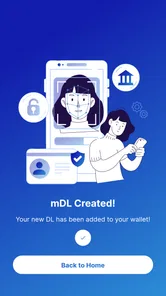
Analysis by Reviewed
CA DMV Wallet is the kind of app I would judge less by flashy extras and more by how calmly it handles an important moment. It comes from the California Department of Motor Vehicles and sits in the Travel & Local category, with a very focused purpose: keeping a California DMV wallet experience on a phone. I found that focus refreshing. It does not try to become a general travel planner, a map, or a replacement for every DMV task.
The app is free and rated for Everyone, which makes it easy to consider before a trip to a DMV office or a situation where having a phone-based credential could be useful. Its current version is 0.2.29, and it requires at least iOS 11. The project was released on May 12, 2023, so I approach it as a relatively young, purpose-built government app rather than a mature all-in-one identity platform.
How CA DMV Wallet feels in real mobile situations
My first impression is that the value depends heavily on context. A wallet app matters most when I am already away from my desk, carrying limited physical items, and trying to retrieve something quickly. That could be while moving between vehicles, preparing for a DMV-related visit, or checking the phone before leaving home. The smaller the task, the more noticeable the convenience becomes.
At the same time, I would not treat a digital wallet as an automatic substitute for every physical document or every official process. The sensible approach is to understand what the app is intended to support and keep a backup plan for situations where a phone, account, or network connection is unavailable. That is not a criticism unique to this app; it is the basic trade-off of putting an important credential on a mobile device.
The app has earned a 4.7 average from around 29 thousand ratings, with roughly 2.6 thousand written reviews. That level of response suggests that many people find the focused experience useful. It has also passed 500 thousand installs, so this is not an obscure experiment that only a handful of users have tried. Still, popularity does not remove the need to test the app before relying on it in a stressful situation.
What happens when the connection is good
Connectivity shapes the experience most clearly during setup, sign-in, verification, or any moment when the app needs to communicate with DMV systems. With a stable connection, I can approach those steps as a short preparation task rather than something to solve at the last second. My practical advice is to open the app at home, complete the available setup, and inspect the wallet before heading out.
This preparation is especially useful before visiting a DMV office. A person who waits until standing in a crowded lobby may be dealing with weak indoor reception, a busy cellular network, or a phone battery that is already low. Doing the first run earlier gives the app a chance to reveal any account or verification friction while there is still time to deal with it.
More From Our News Desk

 Weather - By Xiaomi
Weather by Xiaomi Review: Clear at a Glance, Less Clear Up Close
Xiaomi’s weather app makes everyday forecasts quick to scan, but its calm surface can leave useful details and recovery paths harder to find than they should be.

 X
XX Under Pressure: Can It Recover When Posting Goes Wrong?
A resilience-focused review of X, examining setup, mistaken posts, interruptions, weak connections, and the gaps that matter when recovery needs to be dependable.

 Clash of Clans
Clash of Clans Is Won Between the Battles
Its raids are quick; its community is a long-term project of coordination, teaching, rivalry, and shared responsibility—with all the friction that entails.

 Android Auto
Android Auto Makes the Case for Quieter Car Software
The car interface is no longer judged by how much it can do, but by how quietly it helps. Android Auto shows what drivers now expect—and what still gets in the way.

 MobiOffice: Word, Sheets, PDF
MobiOffice: Transforming Mobile Productivity with Seamless Integration
MobiOffice: Word, Sheets, PDF is redefining mobile productivity with a surprising blend of functionality and innovation.

 EA SPORTS FC Soccer Mobile 26
EA SPORTS FC™ Mobile Soccer: Redefining Mobile Sports Gaming
Dive into EA SPORTS FC™ Mobile Soccer, where immersive gameplay and strategic depth transform mobile sports gaming.
Latest News



That workflow also changes how I think about the app. It is not just something to download when a document is suddenly needed. It works better as a small piece of preparation: install it, follow the official process, check that the relevant wallet content is available, and then carry the phone as one part of a broader plan.
A realistic everyday scenario
Imagine I am leaving for an appointment before work. I have my phone, keys, and a physical wallet, but I do not want to search through papers or open a laptop to check my DMV-related information. If the wallet has already been set up, opening the app can be faster than navigating a desktop website. That is where I see the strongest everyday argument for it: the information is placed in the same device I already carry.
Now change the scenario. I am outside a building with inconsistent reception and have never completed the app’s setup. In that case, the convenience largely disappears. I may be waiting for a connection, repeating a login step, or discovering that I should have prepared earlier. The lesson is simple: use the app before the important moment, not for the first time during it.
Why a phone wallet is different from the usual alternatives
The usual alternative is a physical card or document kept in a traditional wallet. Physical items do not need a charged phone and are not affected by a cellular dead spot. They can also be easier to hand over when an official specifically asks for a physical document. For those reasons, I would not throw away a physical backup simply because I installed this app.
Another alternative is using a browser or a general government website. A browser can be more comfortable on a large screen and may expose broader account or service options. The wallet app is more appealing when I want a narrower, phone-first path. Instead of opening a browser, finding the correct page, and signing in among several services, I can go straight to the dedicated wallet experience.
That focus is both the app’s advantage and its boundary. If I need broad DMV information, forms, appointment-related guidance, or a service outside the wallet’s role, a normal browser visit may be the better tool. I would choose CA DMV Wallet for quick mobile access to its specific purpose, not as my only way to interact with the California DMV.
Using it while moving between places
Travel and local apps are often judged in motion, and this one is no exception. I think about it in places such as a parking lot, a roadside stop, a transit area, or the entrance to an office. Those environments are less controlled than a desk: glare can make a screen difficult to read, one hand may be occupied, and the connection may change from one moment to the next.
That is why I would open the app before walking into the situation where I expect to use it. If the information is already ready on screen, I am less dependent on a perfect connection at the exact moment someone needs to see it. I would also raise the brightness enough for comfortable reading, keep the phone charged, and avoid burying the app in a folder where it is hard to find.
There is a subtle trade-off here. A digital wallet reduces the number of physical items I need to carry, but it increases my dependence on the phone itself. A cracked screen, a forgotten passcode, a dead battery, or a device problem can turn a convenient tool into an obstacle. The app is most useful when I treat phone readiness as part of document readiness.
When connectivity becomes the weak point
A network problem can appear in several ways. A page may take longer to load, a sign-in step may not complete, or a verification process may pause. Even when the app is functioning correctly, the surrounding conditions can make it feel unreliable. Public Wi-Fi may require a browser sign-in, cellular service may be congested, and indoor reception can vary from one corner of a building to another.
I would avoid making a last-minute change to my wallet immediately before an appointment or trip. If an update or account action needs communication with DMV systems, it is safer to do it while I have a strong connection and enough time to retry. This is one of the less obvious habits that makes a difference: separate preparation from presentation.
I also would not assume that every part of the experience will be available without connectivity. The safest plan is to verify what is visible on the device before leaving and to retain whatever physical backup is appropriate for the situation. That keeps me from confusing “the app is installed” with “every needed action will work anywhere.”
Failure, recovery, and staying calm
When a mobile government app does not behave as expected, the worst response is usually repeated tapping without understanding the problem. I would first check the basics: battery level, connection, app version, and whether the phone is connected to the account I intended to use. Then I would close and reopen the app, move to a location with better reception, and retry only after confirming that the previous step did not already complete.
If the issue involves an account or verification step, I would record the exact message rather than guessing. A clear note about where the process stopped is more useful than saying only that the app “did not work.” I would also avoid uninstalling immediately, because removing an app can create additional setup work and may not solve an account-side problem.
Recovery planning matters more here than it does with a casual entertainment app. Before relying on the wallet, I would know which physical document or alternate official route I could use if the phone failed. That does not make the app pointless; it makes the use of it more responsible. Digital convenience works best when it reduces routine effort without becoming a single point of failure.
Being careful with mobile data
For people who monitor their cellular usage, the app encourages a sensible habit: perform setup and any substantial account activity on a trusted connection when possible, then check the wallet ahead of time. I would not repeatedly refresh the same screen while standing somewhere with poor reception. Repeated attempts can waste time, drain the battery, and use data without improving the result.
Keeping the app current is also part of data-conscious use. The current version is 0.2.29, and updates can matter for compatibility and reliability. I prefer to update over a dependable connection before an important day rather than waiting until I am already outside. I would then open the app once after updating to make sure the experience still looks ready for use.
Privacy deserves a practical mention even though the app’s purpose is straightforward. A DMV wallet is more sensitive than a restaurant loyalty card, so I would use a screen lock, avoid leaving the wallet open where others can casually view it, and be selective about connecting to unfamiliar public networks. These are phone habits rather than special features, but they directly affect the safety of using a digital credential.
Who will appreciate it most
I think CA DMV Wallet is a good fit for California residents who regularly carry an iPhone and want a dedicated way to keep their DMV wallet experience close at hand. It is also useful for people who dislike searching through email, browser bookmarks, or paper folders when they need to check something related to the DMV.
The app may be especially appealing to someone who already manages daily tasks from a phone and is comfortable completing setup in advance. Its free price removes a common barrier, and the Everyone rating makes it approachable for a broad audience. The strongest benefit is not a long list of tools; it is the reduction of small bits of friction around a specific official service.
I would be more cautious about recommending it as the only option to someone who rarely keeps a phone charged, has unreliable connectivity, dislikes account-based setup, or frequently needs services outside the wallet’s narrow purpose. A physical document and the broader DMV website may serve that person better. The app is a companion, not a universal replacement for every DMV interaction.
Small habits that improve the experience
My first tip is to prepare on a normal day. Install CA DMV Wallet, go through the available process, and check the result while you are at home. My second is to test the exact situation you expect: if you plan to use it at an office, open it before leaving and confirm that you can reach the relevant screen without rushing.
My third tip is to keep two forms of readiness: digital and physical. Carrying a backup does not cancel the convenience of the app; it protects you from battery, device, and network problems. My fourth is to avoid making changes during a queue or appointment unless necessary. A wallet that was checked earlier is less likely to create a surprise at the worst time.
Finally, I would place the app somewhere easy to reach and keep the phone’s basic security in good shape. A wallet app should not be hidden behind a maze of folders, but it also should not be left exposed on an unlocked device. That balance is more useful than chasing a perfectly streamlined setup that ignores real-world interruptions.
My connectivity verdict
After looking at the app through the lens of network access, I see a focused and practical tool rather than a complete DMV replacement. The California Department of Motor Vehicles has made a free mobile option for a specific wallet need, and the strong user response gives it a credible starting point. I like the directness of that approach.
Its main limitation is also clear: the experience is most dependable when I prepare ahead of time and have a functioning phone with suitable connectivity. I would not wait until a busy office entrance, a weak-signal location, or a nearly empty battery to discover whether my setup is ready. For urgent or official situations, a backup remains sensible.
My recommendation is straightforward: install it if you want a dedicated California DMV wallet experience on your phone, complete the setup early, and use it alongside—not instead of—reasonable physical and account backups. If your needs extend beyond that focused purpose, the regular DMV website or a traditional wallet will often be more flexible. For the right user, though, CA DMV Wallet makes a narrow task easier without pretending to be something broader.
CA DMV Wallet Frequently Asked Questions
Who is CA DMV Wallet intended for?
CA DMV Wallet is intended for people with an eligible California driver’s license or identification card who want to set up a digital credential on a compatible smartphone. It is the California Department of Motor Vehicles’ app for accessing that wallet. Before downloading, consider whether you have a California credential to enroll and whether a digital ID would be useful at places that support it.
What should I check before downloading CA DMV Wallet?
Check that your phone’s operating system is compatible, that you can access its app store, and that you have an eligible California driver’s license or identification card for enrollment. It is also worth considering where you expect to use a digital credential, since acceptance depends on the organization. The app is free, and its content rating is Everyone.
Does CA DMV Wallet work on my phone?
CA DMV Wallet is available for compatible devices running iOS 11 or later. Before downloading, check that your phone’s operating system meets that requirement and that you can access the app store on your device. The app is a free Travel & Local app from the California Department of Motor Vehicles, intended for people who want to set up and use an eligible California digital credential.
Is CA DMV Wallet free, and who publishes it?
The app is free to download and is published by the California Department of Motor Vehicles. That official publisher is useful to check when searching for the right app, since the wallet is designed for California driver’s licenses and identification cards. Its content rating is Everyone, though you still need an eligible credential and a compatible device to complete enrollment and use its digital identification features.
What is CA DMV Wallet, and what can I use it for?
CA DMV Wallet is California’s official mobile wallet for eligible digital driver’s licenses and identification cards. After setting it up, you can use the digital credential at participating locations and for supported identity-verification services. It is designed to complement, not automatically replace, your physical card, so you should continue carrying your physical California driver’s license or ID when traveling or visiting places that do not yet accept the wallet.
Pros
- Stores your California driver’s license or ID for quick digital access.
- Uses device security features to help protect your digital credential.
- Useful at participating locations that accept mobile California IDs.
- Reduces the need to carry your physical ID for supported situations.
- Official DMV app with a focused
- straightforward purpose.
Cons
- Not accepted everywhere
- so you should still carry your physical ID.
- Requires a compatible device and a supported operating system.
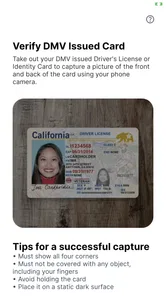
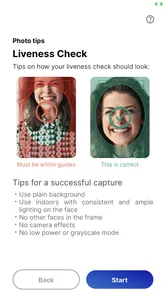
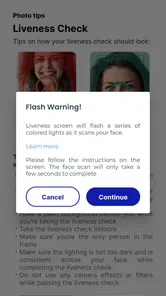
- Initial setup includes identity verification that may take some time.
- A dead battery or damaged phone can prevent access to your ID.
- Availability and features may vary depending on location and participating services.











