

byAir: Flight Tracker & Status
- 150.00
- 4.7
- Installs
- 100.00K
- Price
- Free

Screenshots





Analysis by Reviewed
When a household is trying to follow the same journey, flight information quickly becomes a coordination problem rather than a simple search. One person may be at home, another may be driving to the airport, and the traveler may be too busy to answer messages. I found byAir: Flight Tracker & Status most useful in that situation: it puts the practical details of a flight into one place so everyone can work from the same reference instead of forwarding screenshots and guessing whether a delay is serious.
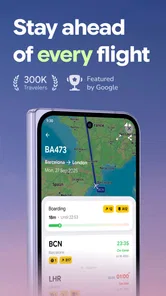
This is a free travel and local app from BYAIRAPP S.L. It focuses on live flight status, delay predictions, a flight-board view, and alerts. Its audience is broad enough for occasional travelers, airport pickups, frequent flyers, and relatives who simply need to know when someone will land. The app is rated for Everyone, which fits its straightforward purpose, although younger users still need an adult to explain what the status changes mean and to avoid treating an estimate as a guarantee.
My overall impression is positive, especially for people who want a dedicated flight tool rather than a full airline or travel-booking application. It is not a replacement for a boarding pass, an airline account, or airport staff. Instead, it works best as a shared information layer around a trip: a quick way to check what is happening and decide what to do next.
How byAir works in a shared household
I find a shared flight tracker most helpful when everyone agrees what decision it is meant to support. For a household, that might mean one person checks arrival changes while another handles the pickup, rather than everyone reacting to every alert. Keeping the flight’s traveler and route clear in family messages also makes it easier to avoid mixing up journeys when plans overlap.
A useful scenario at home and on the road
Imagine that a relative is flying home while the rest of the household is arranging pickup. The traveler can check the flight during the journey, while someone at home can watch the status and adjust the departure time. If the flight moves, the person collecting them does not have to rely entirely on a message sent at the wrong moment. That small difference can prevent an unnecessary drive to the airport or a long wait at arrivals.
I also like the separation between the traveler’s needs and the household’s needs. A passenger cares about whether the flight is delayed and whether the schedule has changed. The person waiting at home cares about timing, uncertainty, and whether it is sensible to leave yet. A flight tracker is valuable because those are related questions, but they are not exactly the same question.
The flight-board view is particularly suitable for shared use. Instead of asking someone to describe the current status from memory, a family member can look at the relevant airport or flight information directly. That makes the conversation shorter and reduces misunderstandings caused by old screenshots. It is a practical strength that may be more important to households than to solo travelers.
More From Our News Desk

 Weather - By Xiaomi
Weather by Xiaomi Review: Clear at a Glance, Less Clear Up Close
Xiaomi’s weather app makes everyday forecasts quick to scan, but its calm surface can leave useful details and recovery paths harder to find than they should be.

 X
XX Under Pressure: Can It Recover When Posting Goes Wrong?
A resilience-focused review of X, examining setup, mistaken posts, interruptions, weak connections, and the gaps that matter when recovery needs to be dependable.

 Clash of Clans
Clash of Clans Is Won Between the Battles
Its raids are quick; its community is a long-term project of coordination, teaching, rivalry, and shared responsibility—with all the friction that entails.

 Android Auto
Android Auto Makes the Case for Quieter Car Software
The car interface is no longer judged by how much it can do, but by how quietly it helps. Android Auto shows what drivers now expect—and what still gets in the way.

 MobiOffice: Word, Sheets, PDF
MobiOffice: Transforming Mobile Productivity with Seamless Integration
MobiOffice: Word, Sheets, PDF is redefining mobile productivity with a surprising blend of functionality and innovation.

 EA SPORTS FC Soccer Mobile 26
EA SPORTS FC™ Mobile Soccer: Redefining Mobile Sports Gaming
Dive into EA SPORTS FC™ Mobile Soccer, where immersive gameplay and strategic depth transform mobile sports gaming.
Latest News



There is also a useful distinction between checking an update manually and receiving an alert. Manual checking is fine when the trip is still far away. As departure or arrival gets closer, alerts become more valuable because they reduce the need to repeatedly open the app. I would still treat any notification as a prompt to verify the latest information, not as permission to ignore the airline or airport.
Setting it up without confusing personal and shared information
My advice is to decide first who needs to follow the flight and why. The traveler may want departure updates, while the person collecting them may care more about arrival changes. A household should avoid assuming that one person’s view automatically covers everyone else’s needs. Each user should know which flight they are checking and whether they are looking for departure, arrival, or a possible delay.
This matters on a shared device. If several people use the same phone or tablet, old searches and alerts can become confusing. Before a new trip, I would review the visible flight information and remove attention from journeys that are no longer relevant, where the app’s available controls allow that. The goal is not to create a complicated household system; it is simply to prevent yesterday’s trip from being mistaken for today’s.
I would also keep the app’s role clear. It can help a household follow status, but it should not be the only place where important travel details live. Boarding documents, booking references, passport information, and airline messages belong in their appropriate secure locations. Keeping those boundaries makes the tracker more useful because it is not being asked to perform jobs it was not designed to perform.
For a family member who is not comfortable with travel apps, the best setup is a simple routine: identify the flight, check the board, read the current status, and then decide whether an action is needed. That is easier to teach than a collection of complicated shortcuts. I would rather see a household use a basic, repeatable process than have everyone install several overlapping travel apps and still miss the important update.
Coordinating airport pickups and changes
The strongest everyday use case is airport coordination. Suppose a flight is expected in the afternoon, but the status begins to suggest a later arrival. The person driving can delay leaving, the traveler can send a short message when practical, and another household member can keep an eye on the situation. The app does not solve transportation by itself, but it gives the group a common starting point for the decision.
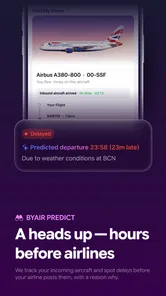
Delay predictions deserve a careful approach. An estimate can be helpful before an official change becomes obvious, particularly when someone is deciding whether to leave home. However, predictions are not promises. Weather, airport congestion, aircraft changes, and operational decisions can alter the situation quickly. I would use a prediction as a reason to monitor the flight more closely, not as proof that a particular arrival time is final.
A good household habit is to agree on an action threshold. For example, the driver might wait for a meaningful status change before leaving, while the traveler might send a message once they are able to use their phone. This avoids a common mistake: multiple people reacting to every small update independently. byAir can support coordination, but the household still needs a simple plan for who makes the final call.
Alerts are most useful when they support that plan. If every person receives every possible notification, the result may be noise rather than clarity. If only one person checks anything, the household becomes dependent on that person. I prefer a middle ground: the traveler keeps the official travel information close, and the person handling pickup uses the tracker for timing and awareness.
Another practical tip is to compare the flight status with the real-world airport situation before changing plans dramatically. A status update may tell you that a flight is delayed, but it does not automatically tell you whether the terminal is crowded, whether baggage will take longer, or where a car can wait. This is where the app is helpful but not complete. It informs the decision; it does not replace local judgment.
Age, trust, and shared-device habits
Because the app is suitable for Everyone, it can be introduced to a household with different levels of technical confidence. A teenager can understand a board and a status label, while an older relative may appreciate having a single screen to consult instead of searching through airline pages. Still, age suitability is not the same as independent travel expertise. A child may read a delay message accurately but misunderstand what it means for pickup or safety.
I would show younger users how to distinguish a current status from a prediction and how to recognize that a notification may need confirmation. I would also avoid giving a shared device more personal travel information than necessary. The app’s purpose is to follow a flight, not to become a family noticeboard containing everyone’s complete itinerary.
Trust is another reason to keep account boundaries clear. If several relatives use the same device, the person checking a flight should know whether they are viewing their own trip or someone else’s. Shared access can be convenient, but it can also create accidental confusion when two journeys have similar routes or dates. A short label in the household’s own messages can help: identify the traveler and route rather than relying on a vague phrase such as “the flight.”
I would not treat the app as a substitute for direct communication with a traveler. Someone may have limited connectivity, be asleep, be in a security queue, or be unable to respond. A tracker can show useful information, but it cannot explain a missed connection, a gate issue, or a change in personal plans. That limitation is easy to overlook when an app displays a confident-looking status.
What the app does well compared with usual alternatives
The usual alternatives are the airline’s own application, an airport website, a booking service, or a general travel organizer. Airline apps are usually the natural home for booking details and passenger-specific messages. Airport websites can be useful for terminal information. Booking apps may be better for managing an entire itinerary. byAir appeals to a different need: quickly following flight movement without turning the task into a complete travel-management project.
That focused approach is convenient for a pickup person who is not the passenger. They may not have the booking reference, airline login, or full itinerary. A dedicated tracker can be easier to consult when the question is simply whether the flight is on time, delayed, or worth monitoring. For a frequent traveler, it can also provide a consistent place to look across different airlines.
The trade-off is authority. The airline remains the more important source for passenger-specific instructions, boarding changes, rebooking, and documents. The airport remains important for terminal and local operational details. I would use byAir for awareness and coordination, then confirm consequential decisions through the airline or airport when appropriate.
The app’s rating of 4.7 from around 4.3 thousand ratings suggests that many users find the experience useful, and it has passed the hundred-thousand-install mark. Those figures make it look established enough to consider for regular use, but they do not remove the need for personal testing. Notification behavior, data freshness, and the usefulness of a particular airport view matter more to an individual trip than popularity alone.
Where the experience can feel limited
The first limitation is that flight information is inherently dependent on changing events. No tracker can make an airport schedule perfectly predictable. A clean interface may create a feeling of certainty that the underlying situation does not deserve, especially when a prediction is displayed alongside an official status. I would be cautious whenever a pickup, connection, or hotel check-in depends on a narrow time window.
The second limitation is that a focused status app may feel unnecessary for people who already live entirely inside an airline app. If one airline account already provides the booking, boarding pass, gate messages, and travel notifications needed for a trip, adding another tool may create duplicate alerts. byAir makes more sense when several people need visibility or when the person monitoring the flight is not the passenger.
There is also a cost boundary to keep in mind. The app is free to download, while in-app purchases range from $4.99 to $199.99 per item. I would review any purchase screen carefully and decide whether the free experience already covers the household’s actual need. Occasional travelers may have little reason to pay for extras, while someone who follows flights often may judge additional functions differently. Either way, the purchase decision should be based on a real workflow rather than on fear of missing an alert.
Another possible friction point is attention management. A tracker can encourage repeated checking, especially when a trip is emotionally important. For a household, that can lead to several people watching the same status and sending conflicting updates. I found the app more useful when it was part of a calm routine: check at sensible moments, respond to meaningful changes, and avoid treating every refresh as a new event.
Practical ways I would use it
For a pickup, I would add or locate the flight early enough to understand the scheduled journey, then use the flight-board view and status updates as the travel day approaches. I would ask the traveler to keep the airline’s own information available, while the driver uses byAir to decide when to begin the trip. If a delay prediction appears, I would wait for a clearer change before committing to a long drive.
For a family member traveling alone, I would make sure the household agrees on who is monitoring the flight. One person can check the status, another can remain available for transportation, and the traveler can focus on the journey. This division avoids the false comfort of having many people watch the same screen without anyone knowing what action to take.
For a shared tablet, I would keep the display limited to the current trip and avoid leaving unrelated travel details visible. I would also explain that a flight number or status is not a substitute for identification documents or a boarding pass. That is a small but important lesson for children and occasional travelers who may assume that every travel need belongs in the same app.
For frequent travel across different airlines, the app’s general flight-tracking focus may be more convenient than maintaining several airline applications. Even then, I would keep the official airline channel for changes that affect the passenger directly. The best workflow is not “one app for everything”; it is using each source for the information it handles most reliably.
Who should choose it, and who should skip it
I would recommend byAir to households coordinating airport pickups, relatives following someone else’s journey, and travelers who want a clear status view without building a complete itinerary-management system. It is also a sensible option for people who move between airlines and want one dedicated place to monitor flights.
I would be less enthusiastic for someone who only needs a boarding pass and already has a dependable airline app. I would also hesitate to rely on it alone for a tight connection, a time-sensitive business meeting, or a complicated international itinerary. In those cases, the airline, airport, and booking details deserve priority, with this app serving as an additional awareness tool.
The age rating makes the app approachable for a mixed household, but adults should still set expectations around predictions, notifications, and personal information. It is easy enough for a relative to use, yet the consequences of misunderstanding a status can be inconvenient. A short explanation is worthwhile before handing the task to a child or someone unfamiliar with airports.
My household verdict
After using it as a flight-awareness tool rather than a complete travel manager, I see a clear place for byAir in a shared household. Its best quality is not simply showing a flight status; it is helping different people make a coordinated decision when they are not in the same place. The flight-board view, status tracking, delay predictions, and alerts all support that role, provided the household treats them as practical guidance rather than absolute certainty.
Its free entry point makes it easy to try for an upcoming trip, while the available in-app purchases mean I would check the cost of any optional feature before approving it. BYAIRAPP S.L. has positioned the app around a focused travel need, and that focus is more useful to me than a crowded travel dashboard when all I want to know is whether a flight is moving as expected.
My recommendation is simple: use it as the household’s shared flight watch, but keep the airline as the final authority for passenger-specific decisions. If your family regularly arranges pickups or checks on travelers, this app can remove a surprising amount of uncertainty. If you already have every required detail inside an airline app and never need to coordinate with anyone else, it may be an extra layer you do not need.
byAir: Flight Tracker & Status Frequently Asked Questions
Who develops byAir, and what kind of app is it?
byAir: Flight Tracker & Status is a travel app from BYAIRAPP S.L. It is aimed at people who want flight information close at hand, whether they are preparing for a trip or keeping an eye on someone else’s journey. Its focus is practical flight tracking rather than booking, making it worth considering if checking status and travel updates is your main need.
What is byAir: Flight Tracker & Status used for?
byAir: Flight Tracker & Status is designed to help travelers monitor flights before and during a journey. After entering a flight number or route, you can typically view departure and arrival information, estimated times, terminal details, delays, and other status updates. It can be useful for passengers, people meeting someone at the airport, and travelers organizing several flights in one itinerary.
How accurate and timely are the flight updates in byAir?
The app relies on airline, airport, and aviation data sources, so the information is generally helpful for checking the latest known flight status. However, updates may occasionally be delayed or differ from airport display boards, especially during weather problems, technical disruptions, or last-minute gate changes. For important travel decisions, compare the app with your airline’s official notifications and airport announcements.
Can byAir show gate, terminal, delay, and arrival information?
byAir may provide practical details such as scheduled and estimated departure or arrival times, delay information, terminals, gates, and aircraft or route data when those details are available from its data providers. Not every airport publishes the same information, and gates can change shortly before boarding. Treat these details as helpful guidance rather than a replacement for official airport signage.
Does byAir support saved flights, alerts, or travel notifications?
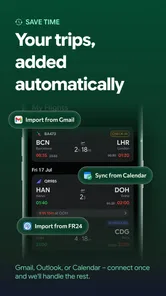
Depending on the current version and your device settings, byAir can allow users to follow selected flights and receive status-related notifications. These features are particularly useful when you want to check a flight without repeatedly searching for it. Notifications require permission, an internet connection, and compatible data coverage, and they should be enabled carefully because alerts may not always arrive instantly.
Pros
- Tracks flight status
- delays
- gates
- and terminal changes in one place.
- Supports airport searches for quick departure and arrival information.
- Useful alerts can help travelers react to schedule changes promptly.
- Clean interface makes essential flight details easy to find.
- Helpful for monitoring trips without repeatedly checking airline websites.
Cons
- Some advanced tracking features may require a paid subscription.
- Flight data can occasionally lag behind updates from the airline or airport.
- Accuracy and coverage may vary for smaller regional airports.
- Frequent notifications can become distracting during busy travel days.
- The app may use noticeable battery and mobile data while tracking flights.











