Bushel
- 150.00
- 2.7
- Installs
- 50.00K
- Price
- Free

Screenshots
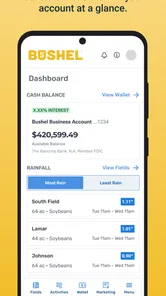
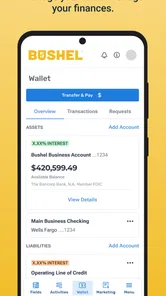
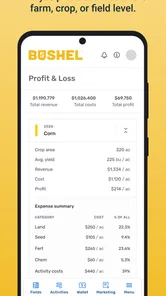
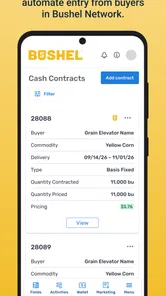
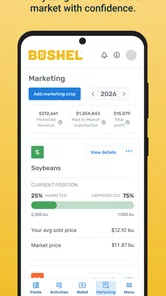
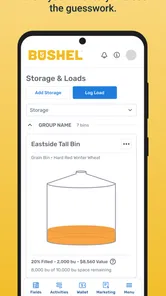
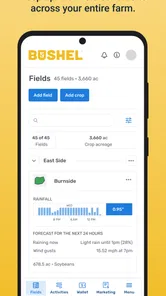
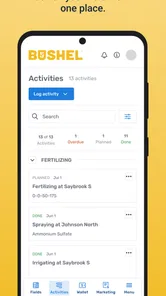
Analysis by Reviewed
Managing a farm is rarely just a matter of watching crops grow. There are purchases to track, payments to remember, records to organize, and decisions that often have to be made while you are away from a desk. Bushel, developed by Bushel, approaches that problem as a business app for agricultural work rather than as a general notebook or a simple expense tracker. After spending time with it, I see the appeal: it tries to bring farm operations and finances into one mobile workspace.
The app is free to download and is suitable for Everyone, but that does not mean every part of the experience is free. In-app purchases range from $19.99 to $199.99 per item, so I would treat the free entry point as a way to explore the service rather than an automatic promise that every business function costs nothing. That distinction matters for a working farm, where choosing a tool usually involves more than installing it and opening the first screen.
How Bushel feels in its current form
My first impression is that Bushel makes the most sense when it is used as part of a farm’s regular routine. It is not the sort of app I would install for occasional household budgeting or a casual gardening project. Its purpose is much more focused: helping people keep farm-related activity and financial information closer together, with access from a phone instead of relying entirely on paper folders, memory, or a desktop computer.
The current version is 9.0.1, and the app has been available since July 25, 2012. That long history is useful context. Bushel is not a brand-new experiment trying to prove that farmers might use mobile software. It has had time to develop into a recognizable agricultural business tool, although the experience still depends heavily on whether its workflow matches the way a particular farm already operates.
Bushel has more than 50 thousand installs and an average rating of 2.7 from around 469 ratings, with roughly 150 written reviews. I would not ignore that feedback. A rating in that range suggests that the app can be genuinely useful for some people while still creating enough friction for others. In my view, this is a product to test against your own daily process, not one to choose solely because it belongs to a specialized category.
The strongest idea is the connection between operational work and money. A farm purchase is not just a receipt, and a financial entry is not separate from the work that caused it. When the two sides are kept together, it becomes easier to understand what a transaction relates to and why it matters. That is more useful than maintaining one app for notes, another for expenses, and a third place for farm-related communication.
A realistic day-to-day workflow
Imagine a grower finishing a morning of field work and stopping at a supplier before heading home. The practical challenge is not merely paying for supplies. It is remembering what was bought, connecting it to the right operation, and keeping the financial record available when the purchase needs to be reviewed later. A mobile tool such as Bushel can fit into that moment better than a paper receipt tucked into a truck compartment.
More From Our News Desk

Weather by Xiaomi Review: Clear at a Glance, Less Clear Up Close

X Under Pressure: Can It Recover When Posting Goes Wrong?

Clash of Clans Is Won Between the Battles

Android Auto Makes the Case for Quieter Car Software

MobiOffice: Transforming Mobile Productivity with Seamless Integration

EA SPORTS FC™ Mobile Soccer: Redefining Mobile Sports Gaming
Later, the same person may need to look back at the transaction while discussing cash flow with a family member or preparing information for a financial conversation. The value is not in making the purchase disappear into an app. The value is in reducing the number of places where the details can be lost. I found that this kind of continuity is the most convincing reason to use Bushel.
There is also a useful habit hidden in the workflow: entering information close to the moment it happens. Farm records become harder to trust when several days of purchases and decisions are reconstructed from memory. Using the phone as the first capture point can make records more complete, even if the deeper review still happens later on a larger screen or with professional help.
Where the financial side helps most
For a small or family-run operation, financial organization can become fragmented quickly. Receipts may live in a vehicle, invoices in an office, and notes in a messaging app. Bushel’s value comes from giving those business details a more deliberate home. I would especially consider it for someone who wants a clearer routine for checking farm finances without waiting until the end of the week to sort everything out.
That does not mean it replaces every financial system. A farm with established accounting software, a bookkeeper, or a carefully maintained spreadsheet may already have a strong process. In that situation, Bushel needs to offer a practical improvement rather than simply another place to enter the same information. Duplicate entry is one of the quickest ways for a business app to become a burden.
My advice is to define the handoff before committing. Decide which information begins in Bushel, who reviews it, and where the final accounting record lives. If that answer is unclear, the app may create more administrative work instead of less. If the answer is clear, it can serve as a convenient mobile layer for work that otherwise happens later and less consistently.
What the long development history tells me
The move to version 9.0.1 suggests a product that has gone through substantial iteration rather than remaining frozen since its early release. I would read that as evidence of continued development, not as proof that every part of the app is now polished. A version number can show that the product has evolved, but it cannot tell me whether a specific screen, workflow, or device behaves perfectly for every user.
For existing users, a newer version can be valuable when it makes familiar tasks more dependable or reduces steps in a routine that is repeated throughout the season. It can also introduce adjustment costs. People who have built habits around an older interface may need time to find the same actions again, especially when farm work leaves little patience for experimenting with menus.
This is why I would update with a practical plan. Before changing the app on a busy day, make sure important records are already accounted for and give yourself time to check the workflows you use most. The sensible test is not whether the app looks different. It is whether you can still complete a common task quickly, understand what was recorded, and find the information again when it matters.
Who should use it, and who should skip it
Bushel is a good candidate for farmers who want mobile access to business information and who are willing to establish a consistent recording habit. It may also suit operations where more than one person needs a shared view of financial or farm-related activity. The app has a clear audience, and that focus is a strength when your work fits inside it.
I would be more cautious if you only need a basic expense list. A general budgeting app may be easier for simple personal spending, while a dedicated accounting package may be better for a business that requires detailed bookkeeping, reporting, payroll, or tax preparation. Bushel should be judged as a farm-centered tool, not as a universal replacement for every financial application.
It is also not the right choice for someone who dislikes entering information on a phone or who expects an app to organize years of records without changing their routine. No agricultural software can compensate for incomplete entries. If your process depends on a bookkeeper handling everything from a central office, adding another mobile system may complicate responsibility unless everyone agrees on its role.
Three practical lessons I would use
First, I would start with one repeatable workflow instead of trying to move every farm record into the app immediately. Choose a category of activity that happens often, use Bushel for that task consistently, and review the result after a full work cycle. This exposes whether the app saves time in practice rather than merely looking useful during setup.
Second, I would separate capture from review. A phone is convenient when you are standing beside equipment or leaving a supplier, but it is not always the best place for a detailed financial check. Record the necessary information promptly, then schedule a calmer review when you can catch mistakes. That two-stage habit is more reliable than expecting every entry to be perfect in the middle of a busy day.
Third, I would agree on naming and responsibility before multiple people use the same farm process. Decide who records a purchase, who checks it, and how corrections are handled. Without that agreement, shared access can create uncertainty: two people may enter the same item, or each may assume the other handled it. The app can support a workflow, but the farm still needs clear ownership of the record.
Where the experience can become frustrating
The rating tells me that the experience is not universally smooth, and I can understand why a business app might divide opinion. Agricultural work is time-sensitive, and even a small amount of friction feels large when someone is outdoors, moving between tasks, or working with limited time. A workflow that seems reasonable in an office may feel slow in a vehicle or at the edge of a field.
Another concern is the paid structure. Because the app is free to download but includes purchases from $19.99 to $199.99 per item, a farm should examine the cost of the functions it actually needs before building its process around Bushel. The right question is not simply whether the download is free. It is whether the paid capability produces enough value compared with existing accounting tools, supplier systems, or manual methods.
I would also avoid assuming that one app can become the single source of truth immediately. Farm finances often involve external records and people with different responsibilities. Bushel may be most effective as a focused part of that system, especially during the early stage, rather than as a forced replacement for every established tool.
Compatibility and setup considerations
The minimum operating-system requirement is version 9, which gives the app a broad starting point for supported devices. Even so, I would check the phone used for actual farm work rather than relying on the age of a secondary device. A tool that is technically installable is not automatically comfortable to use on a phone with limited storage, a worn battery, or a screen that is difficult to read outdoors.
Setup should begin with the people who will use the records most often. If the person entering information does not understand how the farm wants it organized, the resulting data may be complete but difficult to interpret. I would establish a small set of rules, test them with a few real transactions, and only then expand the workflow.
The Everyone content rating is reassuring from an accessibility standpoint, but it does not answer the business questions that matter most. A family may be comfortable letting several people use the app, yet still need to decide who can make changes, who reviews financial details, and how the information fits with professional accounting. Those decisions belong to the farm’s process, not to the age label.
What I would watch as the product evolves
For future updates, I would pay attention to improvements that reduce the time between a real-world farm event and a trustworthy record. Faster entry, clearer correction steps, and easier review would matter more to me than cosmetic changes. The best evolution for this kind of app is the kind that respects interrupted work and makes accurate records easier to maintain.
I would also watch how the paid features fit different farm sizes. A small operation needs a clear path to useful value without paying for complexity it will never use. A larger business may care more about consistency across people and processes. The balance between those needs will influence whether Bushel feels like a practical tool or an additional layer of administration.
Finally, I would look for signs that the app continues to connect farm activity with financial understanding rather than drifting toward a collection of disconnected screens. That relationship is what makes Bushel distinct from a plain notes app or a generic expense tracker. If future changes strengthen that connection, the product will remain relevant to the work it is meant to support.
My recommendation after using it
I would recommend Bushel to a farmer who wants to bring more discipline to mobile recordkeeping and who is prepared to define a clear workflow around it. Its agricultural focus gives it a more relevant starting point than a general finance app, and the combination of farm activity with money management can reduce the scattered feeling that comes from relying on receipts, notebooks, and separate tools.
My recommendation is more cautious for anyone expecting a complete accounting replacement or a completely effortless experience. The modest average rating, the possibility of paid purchases, and the need for consistent human input all point to the same conclusion: this app works best when it is adopted deliberately. Try it with a specific recurring task, compare the result with your current method, and expand only if it genuinely improves the way your farm operates.
In the end, I see Bushel as a useful specialist option rather than an automatic choice for every agricultural business. Its strongest contribution is helping farm work and financial awareness meet in the same mobile routine. If that is the gap in your current process, Bushel is worth testing; if your accounting system already handles that connection well, another app may be the simpler answer.
Bushel Frequently Asked Questions
What devices can run Bushel?
Bushel is a business app for mobile devices, with a minimum operating-system requirement of version 9. Before downloading, check that your device meets that requirement and has enough available storage. Keeping your operating system current can also help with compatibility and app performance. Bushel is free to download, so you can install it and see whether it works well on your device.
Who develops Bushel, and who is it intended for?
Bushel is developed by Bushel and is aimed at people who want to manage farm-related business information from a mobile device. Its usefulness depends in part on whether your cooperative, grain facility, or other agricultural organization works with the platform. If you are considering it for a farm or business, confirm that the organization you deal with supports Bushel before relying on it for day-to-day tasks.
What is Bushel, and what can I use it for?
Bushel is a digital platform designed to help users manage and organize agricultural information, depending on the services available in their region and account. After reviewing the app, its main value is convenience: users can access relevant farm, grain, or business details from a mobile device instead of relying entirely on paperwork or separate communication channels. The exact tools may vary by provider and subscription.
Is Bushel free to download and use?
The Bushel app may be free to download, but access to specific features is not necessarily completely free. Some functions depend on the agricultural company, cooperative, grain facility, or service provider connected to your account. In other words, downloading the app does not automatically guarantee access to every tool. Before registering, check whether your organization supports Bushel and whether any fees or account requirements apply.
Do I need an account or an invitation to use Bushel?
In most cases, you need to create an account and connect it with a participating business or organization before you can use the app fully. Depending on the service, registration may require your email address, phone number, customer information, or an invitation from a cooperative or grain provider. If your organization is not supported, some features may be unavailable even after installing the application.
Pros
- Simple interface makes managing tasks and schedules quick to learn.
- Useful reminders help users stay aware of upcoming activities.
- Supports better organization by keeping related information in one place.
- Lightweight design should work smoothly on many modern devices.
- Convenient mobile access lets users check information while away from home.
Cons
- Some features may require a paid plan or additional in-app purchases.
- Advanced customization options may feel limited for experienced users.
- The app may depend on an internet connection for certain functions.
- Notifications can become distracting if too many reminders are enabled.
- Compatibility and available features may vary between Android and iOS versions.











