

Burn Guide - dust
- 48.00
- 4.9
- Installs
- 10.00K
- Price
- Free

Screenshots
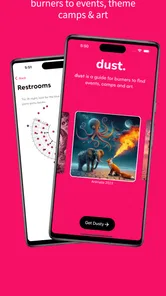
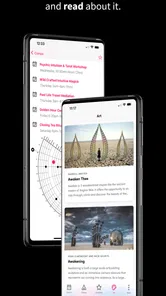
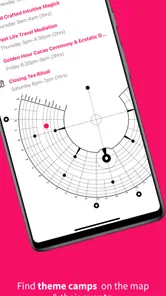
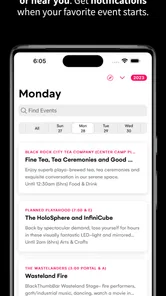
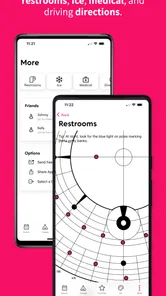
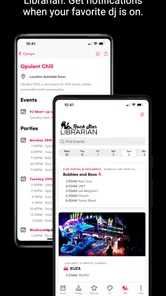
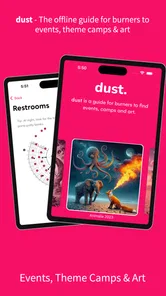
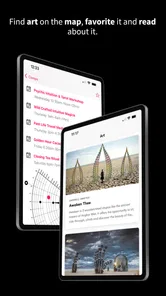
Analysis by Reviewed
Burn Guide - dust is the kind of event app I would keep close when preparing for a Burning Man gathering or a regional burn, especially if I want practical information in one place rather than scattered across messages, browser tabs, and printed notes. It is presented as an unofficial guide, so I approach it as a companion to my own planning, not as an official authority. That distinction matters in a setting where schedules, locations, and plans can change quickly.
What makes it interesting is its focus. This is not a general social network, travel planner, or broad events calendar. It is built around the burn experience and the information people commonly need before and during it. The app is free, belongs to the Events category, and comes from WebNative LLC. Its Teen content rating also makes sense for an event guide aimed at a mature audience without presenting itself as an adults-only product.
I found the most useful way to think about it is as a field reference. I would use it to orient myself, review event-related information, and reduce the amount of searching I need to do on a phone. I would not treat it as a replacement for preparation, judgment, or direct communication with organizers and campmates.
How the app fits into burn planning
The first strength of Burn Guide - dust is that it speaks to a very specific situation. A conventional events app may show concerts, conferences, or local activities, but it usually does not reflect the unusual rhythm of a burn: long days, changing plans, unfamiliar surroundings, and the need to make decisions while carrying limited supplies and using a phone in less comfortable conditions.
That focus gives the app a practical advantage over a generic calendar. Instead of starting with a blank search box, I can approach it with the expectations of someone looking for burn-related guidance. That saves mental effort. The value is not just the amount of information available; it is the fact that the information is organized around a particular kind of event.
At the same time, the unofficial nature of the guide should shape how I use it. I would check important details against the latest communication from the event, camp, or organizer before relying on them. A guide can help me discover possibilities and build a rough plan, but it should not be my only source for safety instructions, access details, schedule changes, or urgent announcements.
That is an important trade-off. The app is more focused than a normal event platform, but a focused guide can still become outdated when real-world plans move faster than an app update. I see it as a planning layer rather than a live command center.
More From Our News Desk

 Gmail
GmailGmail in a Busy Inbox: Who Benefits Most?
From first account to crowded workday, Gmail earns its place through dependable search and flexible sorting—but its best fit depends on how much inbox maintenance you can tolerate.

 Prime Video
Switching to Prime Video: What Changes in Your Viewing Routine
Prime Video can make a compelling second home for streaming, but switching means learning a different catalog, rental layer, and route from browsing to playback.

 Universal TV Remote Control
Universal TV Remote Control Works Best as a Reliable Backup
A phone remote earns its place through quick setup and reliable habits. Here is how to get more from Universal TV Remote Control—and where its limits show.

 Weather - By Xiaomi
Weather by Xiaomi Review: Clear at a Glance, Less Clear Up Close
Xiaomi’s weather app makes everyday forecasts quick to scan, but its calm surface can leave useful details and recovery paths harder to find than they should be.

 X
XX Under Pressure: Can It Recover When Posting Goes Wrong?
A resilience-focused review of X, examining setup, mistaken posts, interruptions, weak connections, and the gaps that matter when recovery needs to be dependable.

 Clash of Clans
Clash of Clans Is Won Between the Battles
Its raids are quick; its community is a long-term project of coordination, teaching, rivalry, and shared responsibility—with all the friction that entails.
Latest News



When connectivity becomes part of the experience
Connectivity changes how useful any event guide feels. Before leaving home, I can comfortably browse, compare options, and make notes about what I might want to see. In that setting, the app fits naturally into preparation because I have time, a reliable connection, and access to other sources if something needs checking.
During an event, the situation is different. A crowded gathering, a remote location, heavy network traffic, or a weak signal can make ordinary browsing frustrating. Even when the app itself opens normally, information that depends on fresh network access may be less convenient to retrieve. I would therefore avoid waiting until I am already moving between camps or activities to discover how much of the guide is available in the exact conditions I face.
My practical advice is to explore the app before departure and identify the parts I expect to use most. I would also keep essential details in a separate form that does not depend on opening the app at the right moment. That might mean personal notes, a written meeting point, or information shared directly by the people I am attending with. This is not a criticism unique to dust; it is a sensible habit for any event app used away from dependable connectivity.
The key point is to distinguish between discovering information and depending on information. The first can happen during relaxed preparation. The second needs a backup plan.
Using it in real mobile situations
This app makes the most sense on a phone because burn planning rarely happens at a desk for long. I might check something while waiting for friends, review an option before heading out, or use a quiet moment to decide what deserves attention next. A mobile guide is more useful when it supports short visits instead of demanding a long, uninterrupted session.
I would use a simple workflow: first explore broadly before the event, then narrow my attention to a small set of activities or areas, and finally keep my expectations flexible. Trying to create a perfect schedule can work against the nature of a burn. The guide is better for giving me direction than for controlling every hour.
There is also a physical side to mobile use. Outdoor events can involve glare, dust, movement, gloves, low battery, and limited patience. A guide that is excellent in a comfortable room may feel less convenient when I am standing outside and trying to find one specific detail. For that reason, I would open the app with a question in mind rather than browse aimlessly while on the move.
A useful habit is to divide information into three groups: things I must know, things I would like to do, and things I can happily discover by chance. The app is most valuable for the second group. It can help turn a large event into a set of possibilities without making the experience feel like a rigid checklist.
I would not recommend it as the sole tool for someone who needs highly precise turn-by-turn navigation, guaranteed real-time alerts, or a complete personal itinerary. A dedicated mapping tool, direct organizer messages, or a shared plan with friends may be better for those needs. dust is more convincing as a specialized guide than as an all-purpose mobile command system.
What to do when information or access fails
Any app used in a demanding event environment deserves a recovery plan. If the guide does not load when I need it, I do not want my entire day to depend on solving the problem immediately. Before going, I would review the information most relevant to my plans and make sure I know how to contact the people I am meeting.
I would also avoid assuming that reopening the app will fix every problem. A weak connection, a busy network, a phone running low on power, or information that has changed since I last checked can each require a different response. The best recovery is often to step back from the screen and use another source rather than repeatedly refreshing.
That approach is especially important because the app is unofficial. If a detail affects safety, access, timing, or a meeting arrangement, I would verify it through the responsible people or the latest event communication. The guide can help me notice an opportunity, but it should not override a direct update from someone managing that activity.
For a realistic example, imagine that I am heading toward a planned gathering and the app is not giving me the information I expected. I would first check whether I already saved the key location or time, then ask a campmate or organizer, and only afterward try again when the connection improves. This sequence prevents a minor technical problem from turning into a larger logistical one.
The same principle applies after returning home. If I notice that a detail seems inconsistent, I would treat that as a reason to cross-check rather than immediately blame the phone or assume the event itself is wrong. Event information is fluid, and a guide is only one part of the communication chain.
Making sensible use of mobile data
Because connectivity can be unpredictable, I would use the app in a data-conscious way. The easiest step is to do the heavy exploration before leaving. I can take time to understand the guide, decide what matters to me, and avoid repeatedly searching for the same information in a busy environment.
I would also keep my phone from becoming the center of the experience. A quick check is usually more useful than constant browsing, particularly when I am trying to stay present with friends or respond to what is happening around me. Limiting unnecessary screen time has two benefits: it reduces dependence on the network and helps preserve the phone for communication when that matters.
Battery planning belongs in the same conversation. Even a free app can contribute to phone use if I keep reopening it, switching between screens, and checking details without a clear purpose. I would charge before heading out, carry whatever power solution I normally trust, and avoid treating the app as a substitute for remembering basic arrangements.
One non-obvious benefit of this approach is that it encourages better planning. If I know I may not want to browse continuously, I naturally choose a few priorities in advance. That can make the event feel less like an endless list of options and more like a flexible set of invitations.
There is a limit, however. I would not promise myself that preparation automatically solves every connectivity issue. The useful question is not whether I can eliminate uncertainty, but whether I have reduced the number of moments in which I need a live connection. That is the realistic standard I would apply to dust.
Who will get the most from dust
I think the app is best suited to newcomers who want a focused starting point, returning participants who prefer a compact reference, and curious attendees who do not want to build their entire plan through scattered conversations. It can also help someone who is joining a regional burn and needs to become familiar with the event culture and possible activities without navigating a general-purpose platform.
It is particularly useful for people who enjoy choosing from a broad range of possibilities but still want some structure. I can browse, identify what sounds appealing, and then leave room for spontaneous changes. That balance is more realistic than trying to schedule every moment in advance.
Groups can benefit as well, but I would use it alongside a shared communication method. The app may help everyone discover the same possibilities, while a group chat or direct conversation handles meeting points and last-minute decisions. Keeping those roles separate makes the overall plan easier to manage.
I would recommend skipping it if I only need a standard city-events calendar, a conventional ticket wallet, or precise navigation. Those jobs are better handled by apps designed specifically for them. I would also hesitate if I am unwilling to verify unofficial information or prepare for moments when my phone is not useful. The app cannot remove those responsibilities.
How it compares with familiar alternatives
Compared with a general events app, dust has the advantage of relevance. A broad platform may offer more categories and a familiar interface, but it can make me do the work of translating ordinary event listings into the context of a burn. A specialized guide starts closer to the questions I actually have.
Compared with a browser search, the app offers a more deliberate destination. Searching the web can uncover current posts, discussions, and updates, but it can also produce mixed-quality results and require more filtering. dust is more convenient when I want a burn-centered reference rather than a wide sweep of the internet.
Compared with direct messages from organizers or campmates, the app is less personal and may not reflect the newest private change. Direct communication wins for urgent or specific arrangements. The app wins earlier in the process, when I am discovering options and forming a sense of what I want to do.
Compared with paper notes, a phone guide is easier to revise during preparation and can keep related information together. Paper still has a valuable role when the phone is inconvenient, unavailable, or being saved for emergencies. I would use both rather than forcing one to replace the other.
This comparison leads to a clear conclusion: dust is strongest in the middle ground between open-ended searching and private coordination. It helps me orient myself, but it does not replace the tools that handle live communication, navigation, or personal backup.
What the current app profile suggests
The app was released in August 2023 and is currently at version 2.137, which tells me that it is an actively versioned product rather than a one-off static page. I still would not assume that every update changes the way I use it. The sensible routine is to open the current version before an event, become familiar with its presentation, and avoid learning it for the first time in the field.
Its minimum requirement is Android 8.0, so it is accessible to many users with older Android phones. That is helpful for people who keep a secondary device or do not upgrade frequently. Still, compatibility does not guarantee a comfortable experience on every handset, especially when screen size, battery condition, and outdoor visibility vary widely.
The app is free, which lowers the barrier to trying it before committing to a trip or event. I can explore its usefulness without adding a purchase decision to the preparation process. Free access does not remove the need for practical preparation, but it makes the app easy to evaluate on my own phone.
Its average rating is 4.9 from roughly three hundred ratings, with dozens of written reviews, and it has passed ten thousand installs. Those figures suggest that the app has found a receptive audience, although I would still judge it against my own needs. A high rating can confirm that many people enjoy the experience; it cannot guarantee that it will replace a map, a group chat, or official event communication for me.
My connectivity verdict
My overall view is positive, with a specific qualification: I would install dust as a preparation and reference tool, not as my only lifeline during a burn. Its focused event category, free access, and unofficial guide format make it approachable for people who want to understand what a Burning Man or regional burn may offer. The strongest experience comes when I use it before the event, decide what information matters, and keep a separate plan for communication and essential details.
The app is less convincing when I expect certainty in a changing environment. Network conditions, updated plans, battery limits, and unofficial information all create reasons to stay flexible. None of those issues make the app pointless; they simply define the correct role for it.
If I were recommending it to a friend, I would say: try it early, explore it with a real event in mind, and make a short personal backup before you leave. Use it to discover and organize possibilities, then rely on direct sources for anything urgent or safety-related. The best way to use this guide is to let it reduce preparation friction without making your whole experience dependent on a phone signal.
For that audience, dust is a useful, specialized companion. It does not need to do everything to earn a place on my phone. It only needs to make burn planning clearer and more manageable, and in that focused role, it has a strong case.
Burn Guide - dust Frequently Asked Questions
Is Burn Guide - dust free to download, and who publishes it?
Burn Guide - dust is a free app from WebNative LLC. Its store summary describes it as an offline, unofficial guide for Burning Man and regional burns, so it is intended as an event companion rather than an official event resource. If you are looking for practical information before attending a burn, check that the guide suits your plans and remember to follow the event’s official guidance as well.
What is Burn Guide - dust and what does it do?
Burn Guide - dust is a companion app designed to help users understand and manage dust-related burning or combustion processes. It may provide guidance, reference information, calculations, or practical recommendations depending on the selected material and operating conditions. Before relying on its results, review the app’s instructions carefully and confirm that its content applies to your equipment, location, and intended use.
Is Burn Guide - dust suitable for beginners?
The app can be useful for beginners because it organizes technical information in a more accessible format, but it should not be treated as a replacement for professional training. Dust combustion and burning processes can involve serious fire, explosion, and health risks. New users should read every warning, avoid experimenting with unfamiliar materials, and consult a qualified professional before applying the app’s recommendations in real-world conditions.
Does Burn Guide - dust work without an internet connection?
Offline availability may depend on which sections or tools the application needs to load. Some basic reference content may remain accessible after installation, while updates, external resources, or certain calculations could require an internet connection. For the most reliable experience, open the app once while online, check whether the relevant guides are available offline, and keep the application updated through the official store.
Is the information in Burn Guide - dust accurate and safe to follow?
The app can be a helpful reference, but users should verify important information before making safety-critical decisions. Results may depend on the accuracy of the values entered, the type of dust, moisture content, equipment, ventilation, and local regulations. Never use the application as the only basis for operating combustion equipment or handling combustible dust, and always follow official safety procedures.
Pros
- Simple interface makes burn-care information easy to find quickly.
- Useful for checking recommended first-aid steps during stressful situations.
- Helpful reference for recognizing burn severity and deciding what to do next.
- Lightweight design should work well on older Android and iOS devices.
- Can support basic first-aid learning before an emergency occurs.
Cons
- It cannot replace professional medical advice or emergency treatment.
- Information may not cover every burn type
- injury
- or medical condition.
- Users must verify that guidance matches current local health recommendations.
- Limited value for users who need detailed treatment or follow-up instructions.
- The app’s usefulness depends on having a phone available during an emergency.











