

Broken Screen 4K Funny Pranks
- 131.00
- 3.9
- Installs
- 5.00M
- Price
- Free

Screenshots
Analysis by Reviewed
I tend to get more out of a prank app when I decide on the moment before opening it, rather than scrolling through effects while someone waits. With Broken Screen 4K Funny Pranks, I’d first think about who’s playing along, what they’ll be looking at, and how quickly I can reveal the joke. That small bit of planning makes the gag feel more natural—and keeps a silly effect from turning into an awkward misunderstanding.
A simple routine works best
My baseline workflow is straightforward: choose a crack or shattered-glass effect, check that the sound suits the situation, then hand over the phone only when I’m ready to follow through. A quiet setting calls for a visual gag; a noisy room is where sound can help sell it. I’d keep the reveal close at hand, too, so nobody has time to worry that an actual screen has broken.
For example, when a friend asks to see a photo, I can have the effect ready beforehand, let them focus on the display, and then reveal the joke as soon as they react. I wouldn’t spring it on someone who is rushing, using a phone for something important, or already anxious about damaging devices. The best target is a friend who enjoys harmless surprises and can laugh at the reveal.
What to check before handing over the phone
I’d test the chosen effect and sound myself before involving anyone else. That lets me judge whether the visual is clear on my display and whether the audio is appropriate for the room. It also avoids fumbling through selections in front of the person I’m trying to surprise. If the scene is too serious for a convincing fake, I’d choose a lighter moment instead of trying to make the prank more alarming.
It’s also worth considering what the other person might do instinctively. Someone may grab the phone, set it down quickly, or start asking how to repair it. I keep the device secure and make the joke brief; I wouldn’t use the effect around a drop-prone surface or with anyone likely to panic. A convincing screen illusion is only funny when the person feels safe once they understand it.
Shortcuts that come from preparation
The most useful shortcut is deciding on one effect before the handoff, rather than treating the app like a menu to explore mid-prank. I’d also avoid repeating the same gag on the same person: once a friend recognizes the setup, the surprise is gone. Saving a different style of crack for another occasion can keep the joke from feeling stale without needing a complicated routine.
Timing matters more than elaborate planning. A natural pause—when someone has asked to see the screen, for instance—is easier to use than interrupting a conversation or creating a staged emergency. I’d keep the reveal immediate and friendly, and I’d stop if the person looks genuinely distressed. The app is a prop for a quick laugh, not a reason to prolong someone’s worry.
More From Our News Desk

 Gmail
GmailGmail in a Busy Inbox: Who Benefits Most?
From first account to crowded workday, Gmail earns its place through dependable search and flexible sorting—but its best fit depends on how much inbox maintenance you can tolerate.

 Prime Video
Switching to Prime Video: What Changes in Your Viewing Routine
Prime Video can make a compelling second home for streaming, but switching means learning a different catalog, rental layer, and route from browsing to playback.

 Universal TV Remote Control
Universal TV Remote Control Works Best as a Reliable Backup
A phone remote earns its place through quick setup and reliable habits. Here is how to get more from Universal TV Remote Control—and where its limits show.

 Weather - By Xiaomi
Weather by Xiaomi Review: Clear at a Glance, Less Clear Up Close
Xiaomi’s weather app makes everyday forecasts quick to scan, but its calm surface can leave useful details and recovery paths harder to find than they should be.

 X
XX Under Pressure: Can It Recover When Posting Goes Wrong?
A resilience-focused review of X, examining setup, mistaken posts, interruptions, weak connections, and the gaps that matter when recovery needs to be dependable.

 Clash of Clans
Clash of Clans Is Won Between the Battles
Its raids are quick; its community is a long-term project of coordination, teaching, rivalry, and shared responsibility—with all the friction that entails.
Latest News



Where this kind of prank falls short
This is an entertainment app built around a visual illusion and accompanying sounds, so it won’t suit someone looking for a practical screen test, repair guide, or ongoing game. Compared with telling a joke or sharing a funny clip, it asks the other person to believe a device is damaged for a moment. That can make the reaction more immediate, but it also makes the prank more sensitive to trust and context.
I wouldn’t use it with strangers, in a workplace where a damaged phone could cause real concern, or when someone needs their device for navigation, communication, or an urgent task. Nor is a fake broken screen a good substitute for a real cracked-screen warning or a safety demonstration. If the group dislikes practical jokes, a harmless video is the better choice.
That context-first approach is how I’d get repeatable fun from Broken Screen 4K Funny Pranks: pick an effect, check the sound, choose a willing audience, and reveal the gag promptly. It’s best for casual hangouts and friends who already enjoy playful teasing, not for people who want lasting entertainment or useful phone tools. I’d rather use it sparingly and leave everyone laughing than chase a bigger reaction at someone else’s expense.
How the app feels in everyday use
Hey there! I recently got my hands on this app called Broken Screen 4K Funny Pranks, and let me tell you, it’s been quite the adventure. If you’re someone who loves to pull pranks on your friends and family, this app is definitely worth checking out. It’s all about creating realistic broken screen effects on your device, and it does a pretty convincing job. Let’s dive into the nitty-gritty details, shall we?
The Prankster’s Dream
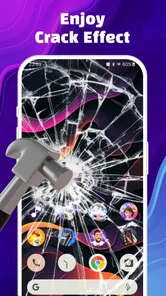
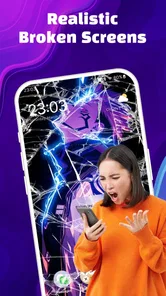
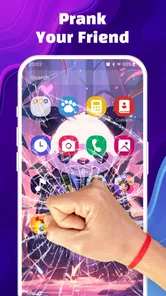
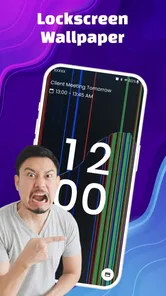
So, what’s the deal with the app? Well, it’s designed to give you a variety of screen-breaking effects that look incredibly real. You can choose from different types of cracks, shattered glass, and even some cool animations that make it seem like your screen is literally falling apart. It’s like carrying a portable prank machine in your pocket!
Setting up the prank is super easy. You just launch the app, select the effect you want, and hand your phone to your unsuspecting victim. The reactions are priceless! I tried it on my friend the other day, and the look on their face was absolutely hilarious. They genuinely thought my phone was toast! The app’s sound effects add an extra layer of realism, making the prank even more believable.
Features That Stand Out
One of the things I really appreciate about this app is the attention to detail. The graphics are top-notch, and the 4K resolution makes the cracks look incredibly sharp and realistic. Plus, there’s a variety of effects to choose from, so you can keep the pranks fresh and exciting. Whether you want a subtle crack or a full-on shattered screen disaster, this app has got you covered.
Another cool feature is the ability to schedule pranks. Yep, you heard that right! You can set a timer for when the effect should kick in. Imagine the possibilities: you’re showing a friend a video or photo, and suddenly—crack! It’s a fantastic way to catch people off guard.
Is It All Fun and Games?
Now, I know what you might be thinking: is it all just fun and games? Well, mostly. While the app is a blast to use, it’s important to remember to prank responsibly. Some people might not find it as funny, especially if they’re not in on the joke. So, my advice is to know your audience and make sure everyone’s in a good mood before you unleash the prank.
On a technical note, the app runs smoothly on most devices, but make sure your phone is compatible before downloading. It’s a lightweight app, so it won’t take up much space, which is always a plus.
Who will get the most from it?
This free entertainment app is from Braly JSC and is rated for Everyone. Its audience includes people who enjoy quick visual jokes more than games with levels or challenges. It has a 3.9 average from around three thousand ratings, with over five million installs, so it has found a broad audience, though that doesn’t mean every friend will enjoy being fooled.
The app was released on March 30, 2023, and its current version is 1.4.30, with Android 7.0 as the minimum operating system. If you’re checking whether it suits your device, the OS requirement is the practical starting point. For someone who wants a prank to share face-to-face, the simple premise is appealing; for someone seeking a tool they’ll use daily, this is naturally a more occasional download.
Useful limits to keep in mind
The experience depends on the person believing the illusion long enough to react, so it can lose its punch when everyone knows the trick. I’d treat the effects as a short setup rather than something to leave running or use repeatedly in the same gathering. And because people may respond by trying to protect the phone, I’d keep it in my own hands or make sure it is safely placed before revealing anything that looks like damage.
There’s also a difference between a playful fake and a convincing claim that someone’s device is broken. I’d avoid using it to make someone think they’ll face a repair bill or lose important photos. If the person’s first reaction is concern rather than amusement, I’d end the prank immediately. That boundary is more important than getting a dramatic response.
Choosing the right moment in an ordinary day
A useful setting is a relaxed visit with a friend who has already shown they enjoy silly surprises. I might use the effect during a casual photo-sharing moment, but not while they are depending on my phone to check a message or complete a task. The difference is practical: a person who thinks a borrowed device has broken may reach for it quickly, while someone who is simply looking at a photo can understand the reveal without losing time or access to something important.
I’d also keep the joke out of situations where a broken phone could have real consequences, such as a busy commute or a family member waiting for an urgent call. For younger users, the Everyone age rating is useful context, but it does not make every prank appropriate for every child. I’d still explain the joke promptly and supervise the interaction if I thought someone might take the illusion literally.
Small habits that make repeat use smoother
Because this is a quick gag rather than a game with a continuing goal, I wouldn’t plan a long sequence of pranks. I’d choose one effect for one moment, then put the app away and let the group move on. That keeps the joke from becoming the whole activity and makes it less likely that friends will start anticipating the same screen change every time someone asks to borrow a phone.
If I’m deciding between a visual effect and a sound-led one, I’d base the choice on the room rather than trying to use both for maximum impact. In a quiet setting, extra audio may feel startling; in a lively room, a visual-only gag may be easy to miss. Trying the setup privately first helps me make that call without turning the handoff into a visible process. The best shortcut is a simple one: prepare once, keep the device secure, and reveal quickly.
How it compares with other quick laughs
Compared with a prank video, a broken-screen illusion is more interactive: the other person is looking at a phone they believe is in trouble, rather than watching a joke unfold on their own terms. That can make the reaction immediate, but it also raises the stakes slightly. A funny clip is the safer pick for a mixed group or for people I don’t know well; this app is more suited to a trusted friend who is comfortable with playful misdirection.
It also differs from a conventional mobile game. There’s no reason to open it for progress, competition, or a story; its value comes from setting up a brief shared moment. If I want entertainment that works without choosing a target or managing a reveal, a comedy video or a party game is a better fit. I’d choose this app only when the face-to-face format is part of the appeal.
What to expect before installing
The app is free, which makes it easy to try for a one-off joke, and its Everyone rating describes a broad age suitability rather than a promise that every person will enjoy being pranked. I’d check the Android requirement before installing: it calls for version 7.0 or later. The app is currently at version 1.4.30, so anyone checking compatibility can compare that minimum with the software on their own device before making room for it.
One question people often have is whether the effect is meant to repair or diagnose a display. It isn’t: I see it as an entertainment prop, not a tool for checking actual damage. If my screen were genuinely cracked or behaving strangely, I’d use a proper diagnostic or repair route instead. Keeping those purposes separate avoids confusing a staged visual with a real device problem.
My final take on the routine
In conclusion, if you’re looking to add some humor and surprise to your interactions, the app is a fun, easy option, with a range of effects that can get a laugh in the right company. I’d use it for a brief, low-stakes joke, choose the effect and sound in advance, and make the reveal clear. Its best quality is the quick visual payoff; its main limitation is that the joke depends entirely on timing and a willing audience.
I’d recommend it to friends who like harmless practical jokes and understand when to stop, while anyone uncomfortable with staged damage should skip it. Used thoughtfully, it can add a playful moment to a casual get-together. Used carelessly, it can create needless worry—so I’d make the laugh, then let everyone in on it.
Broken Screen 4K Funny Pranks Frequently Asked Questions
Is Broken Screen 4K Funny Pranks free to download?
Yes. Broken Screen 4K Funny Pranks is a free entertainment app, so you can try its screen-prank idea without paying to download it. Before installing, check that your device meets the minimum operating-system requirement and that you are comfortable using a prank app designed to make a screen appear damaged. The app is intended for playful use, not for repairing a real cracked screen.
Will the prank work on my device?
The app is made for Android devices running Android 7.0 or later. If your phone uses an older Android version, it may not meet the listed minimum requirement. The app’s basic idea is to show a broken-screen effect, so consider whether that kind of visual prank suits your device and the situation in which you plan to use it. It is an entertainment app, not a screen diagnostic or repair tool.
What is Broken Screen 4K Funny Pranks?
Broken Screen 4K Funny Pranks is a mobile application designed to simulate a cracked or broken screen on your device. It is primarily used for entertainment purposes, allowing users to prank their friends or family by making them believe their phone screen is damaged. The app features high-resolution graphics to make the effect look realistic. Its short description is “Broken Screen,” and its premise is a visual prank rather than a practical phone utility.
How does Broken Screen 4K Funny Pranks work?
Once installed, Broken Screen 4K Funny Pranks creates a realistic broken screen effect on your phone. You can activate the prank by touching the screen or shaking the phone, depending on the settings you choose. The app does not actually damage your screen, but merely overlays a convincing image to mimic the appearance of a cracked screen. Use it with someone who will understand the joke afterward, since the effect is meant to look like real damage.
Is Broken Screen 4K Funny Pranks safe to use?
Yes, Broken Screen 4K Funny Pranks is safe to use. It does not cause any real damage to your phone's hardware or software. The app is designed purely for fun and does not affect device performance. However, it is always recommended to download apps from trusted sources like the Google Play Store or Apple App Store to avoid any security risks. Keep the prank light-hearted and reveal it promptly if someone becomes genuinely worried about their phone.
Pros
- Realistic graphics enhance prank effect
- User-friendly interface for easy navigation
- Wide variety of prank options available
- Lightweight app doesn't strain device
- Free to download and use
Cons
- Ads can be intrusive and frequent
- Limited customization for pranks
- Some pranks are repetitive
- Requires internet for some features
- Not suitable for all age groups













