

Brightside Health
- 917.00
- 4.0
- Installs
- 50.00K
- Price
- Free

Screenshots
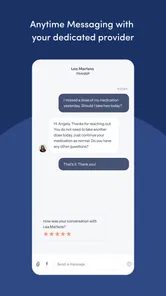
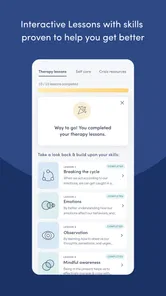

Analysis by Reviewed
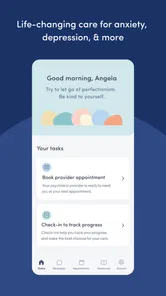
Brightside Health is a medical app from Brightside Health Inc that brings virtual mental health care to a phone. I approached it as someone deciding whether an app can fit into real routines rather than as a replacement for every kind of care. The most important part of the experience is not simply having a mental health service on a mobile screen; it is being able to reach that service at a moment when opening a browser, making a call, or arranging an in-person visit feels like too much effort.
The app is free to install and is rated for Everyone, which makes the first step feel approachable. Its overall rating sits at 4.0 from around 2.6 thousand ratings, and it has passed 50 thousand installs. Those figures suggest that it has found a meaningful audience, while also reminding me that a virtual-care app should be judged by fit and reliability rather than popularity alone. Mental health needs vary widely, so the right question is whether Brightside Health matches the kind of support you are actually looking for.
What using Brightside Health feels like in everyday life
In my experience, the strongest idea behind this app is access. A person can keep a mental health service close at hand instead of treating support as something that only happens during a scheduled visit in a particular building. That difference matters on a difficult workday, during a move, while traveling, or whenever leaving home feels unnecessarily demanding.
There is also a practical trade-off. Virtual care depends on a working phone and a usable connection at the moments when you need it. The app may make access more convenient, but it cannot remove the need for enough signal or Wi-Fi to load the service and communicate. I would think of it as a doorway to care, not as a self-contained offline tool that can carry on independently when the network disappears.
That distinction is easy to overlook when an app is described in a few words. A mental health app is more sensitive to interruptions than a casual game or a notes app. If you are trying to explain how you feel, answer an important question, or take part in a remote interaction, a stalled screen can be frustrating and emotionally tiring. I recommend treating connectivity as part of the setup rather than as a technical detail to worry about later.
Where a connection becomes part of the experience
The network matters whenever Brightside Health needs to retrieve current information or send your responses onward. On a strong home connection, that dependency may fade into the background. On a crowded public network, in a basement office, or in a moving vehicle, it becomes much more noticeable. I would avoid starting an important interaction while switching between weak mobile signal and unreliable Wi-Fi.
A simple routine helps. Before using the app for something that requires concentration, I would move to a quiet place with a stable connection, close unnecessary network-heavy activity, and make sure the phone has enough battery. None of this is glamorous, but it reduces the chance that a personal conversation is interrupted by avoidable phone problems.
More From Our News Desk

 Gmail
GmailGmail in a Busy Inbox: Who Benefits Most?
From first account to crowded workday, Gmail earns its place through dependable search and flexible sorting—but its best fit depends on how much inbox maintenance you can tolerate.

 Prime Video
Switching to Prime Video: What Changes in Your Viewing Routine
Prime Video can make a compelling second home for streaming, but switching means learning a different catalog, rental layer, and route from browsing to playback.

 Universal TV Remote Control
Universal TV Remote Control Works Best as a Reliable Backup
A phone remote earns its place through quick setup and reliable habits. Here is how to get more from Universal TV Remote Control—and where its limits show.

 Weather - By Xiaomi
Weather by Xiaomi Review: Clear at a Glance, Less Clear Up Close
Xiaomi’s weather app makes everyday forecasts quick to scan, but its calm surface can leave useful details and recovery paths harder to find than they should be.

 X
XX Under Pressure: Can It Recover When Posting Goes Wrong?
A resilience-focused review of X, examining setup, mistaken posts, interruptions, weak connections, and the gaps that matter when recovery needs to be dependable.

 Clash of Clans
Clash of Clans Is Won Between the Battles
Its raids are quick; its community is a long-term project of coordination, teaching, rivalry, and shared responsibility—with all the friction that entails.
Latest News



This is one of the less obvious considerations with virtual mental health care: privacy and connectivity often overlap. A fast public connection may be less useful than a slower, dependable private one if you cannot speak comfortably there. I would choose a room where I can focus and talk without being overheard, then confirm that the signal is steady before beginning.
Useful mobile situations, and situations I would avoid
Brightside Health makes the most sense for people who want mental health care to fit around ordinary responsibilities. Someone working irregular hours may appreciate not having to build every step around travel. A parent may find a phone-based option easier to approach during a narrow window of free time. A student away from home may prefer a familiar device and a remote format when local arrangements feel complicated.
Here is a realistic example. Imagine finishing a demanding shift and noticing that your mood has been declining for several days. You are not in a position to spend an evening traveling across town, but you do have a quiet room and dependable Wi-Fi at home. In that situation, opening Brightside Health can feel like a manageable first action. The value is not that the phone solves everything; it lowers the practical barrier between noticing a problem and seeking support.
I would be more cautious about using it in a café, on public transport, or in a shared workplace. Those settings create two problems at once: the connection may be unstable, and the conversation may not be private. A mobile format is flexible, but flexibility is not the same as suitability in every location.
The app is also not the right choice for someone who needs immediate emergency help. If there is an urgent danger or a crisis requiring immediate intervention, I would contact local emergency services or an appropriate crisis resource instead of waiting for an app to load or a remote care process to respond. A virtual-care app can support ongoing care, but it should not be treated as the only option during an emergency.
What happens when the connection fails
Connectivity problems are especially uncomfortable in health-related apps because the user may already feel anxious before opening them. If a page takes too long to load or an interaction breaks, my first response would be to avoid repeatedly tapping buttons. I would check whether the phone has a stable connection, switch between Wi-Fi and mobile data only when appropriate, and reopen the app carefully rather than assuming that every action went through.
I would also keep a brief private note of what I was trying to do and when the interruption happened. That is useful when returning to the app, because it prevents me from having to reconstruct the situation while already stressed. I would not store sensitive details in a place that other people can casually access, but a minimal reminder can make recovery less confusing.
The important limitation is that a connection failure can affect timing. If you are waiting for an important response or trying to complete a time-sensitive step, do not assume that a frozen screen confirms submission or delivery. Look for clear confirmation inside the app before repeating an action. If the service does not clearly show the result, use the app’s available support route or another appropriate contact method rather than sending the same information several times.
This is also where Brightside Health differs from a traditional in-person appointment. At a clinic, the staff and physical setting provide a visible fallback when something goes wrong. With a phone-based service, the user has more responsibility for noticing whether the connection, device, and app are all behaving normally. That convenience is real, but it comes with a small amount of technical self-management.
Using it carefully on mobile data
I would not assume that every part of a virtual mental health service uses the same amount of data. Text-based activity is generally easier to handle on a limited plan than extended audio or video, but the practical impact depends on what you are doing and how your phone manages the connection. If your data allowance is tight, I would use a trusted Wi-Fi network for substantial sessions and reserve mobile data for situations where it is genuinely useful.
There is a privacy angle as well. A personal mobile connection may be preferable to an open public network, even if the latter is free. I would avoid signing in or discussing sensitive matters on shared devices, and I would pay attention to who can see the screen or hear the phone. The app’s medical purpose makes ordinary phone habits more important than they might be with a shopping or entertainment app.
Battery planning is another small but worthwhile habit. A low battery can turn a manageable connection problem into a rushed interruption. Before an important use, I would charge the phone, silence unrelated notifications, and choose a place where I can remain settled. These steps do not add new care features, but they make the mobile setting less distracting and give the conversation a better chance of feeling deliberate.
I would also avoid relying on a weak signal simply because the app opens successfully. Opening a screen is not the same as maintaining a dependable interaction. If the connection is inconsistent, postpone non-urgent activity until you can use a more reliable network. For anything urgent, use the appropriate immediate-care option rather than trying to force a fragile mobile session.
How it compares with familiar alternatives
Compared with an in-person mental health appointment, Brightside Health can remove travel and make the first step feel less intimidating. That is a meaningful advantage for people with mobility challenges, crowded schedules, or discomfort with waiting rooms. The compromise is that the quality of the experience depends more heavily on your device, your surroundings, and your connection.
Compared with a general video-calling app, a dedicated medical app feels more purpose-built for seeking mental health care. A regular communication tool may be familiar, but familiarity alone does not make it a suitable care pathway. Brightside Health is designed around virtual mental health care rather than asking the user to assemble a solution from ordinary messaging or video tools.
Compared with self-guided wellness apps, this is a different kind of proposition. A meditation timer, mood journal, or breathing exercise can be useful for personal routines, but those tools place most of the work on the individual. Brightside Health is more relevant when you are looking for access to virtual care rather than only a collection of independent exercises. If your goal is simply to track habits offline or practice short relaxation techniques by yourself, a lighter wellness app may be a better fit.
I would also choose in-person care over Brightside Health when physical presence is important, when privacy at home is impossible, or when technology repeatedly gets in the way. The app’s convenience is strongest for people who can create a reasonably private, connected setting. It is less convincing for someone whose living situation makes every remote interaction exposed or interrupted.
Who should try it, and who should pause first
I would recommend giving Brightside Health a serious look if you want a straightforward route into virtual mental health care, prefer using a phone, and can usually access a dependable private connection. It is particularly appealing when travel, scheduling, or the emotional effort of arranging traditional care is the main barrier.
I would pause before relying on it if you expect a completely offline experience, have very limited connectivity, share a phone with other people, or need emergency assistance. I would also pause if you are specifically seeking a self-help toolkit rather than contact with a virtual care service. The free installation makes trying the app less financially demanding at the download stage, but the real decision is whether its care format suits your needs and circumstances.
The age rating of Everyone makes the app broadly approachable from a store perspective, but that should not be confused with every care option being appropriate for every person. Mental health support is personal. I would consider the kind of help I need, the privacy available to me, and what I would do if technology failed before making Brightside Health my main route to care.
Current app details in context
Brightside Health arrived on May 25, 2023, and the current version is 17.89.1, with Android support from version 7.0 onward. Those details are useful when deciding whether an older phone can run it, especially if the device is kept for privacy or has limited storage. I would check the phone’s operating system before planning around the app, rather than discovering compatibility issues during a difficult moment.
Its medical category and virtual mental health focus set expectations more clearly than a broad lifestyle label would. The developer is Brightside Health Inc, and the store summary presents it as virtual mental health care. I see that as a reminder to judge the app on access, communication, and practical dependability, not on whether it offers the distractions or quick exercises found in general wellness products.
The rating gives a useful snapshot of public opinion, but it cannot predict whether the app will feel right for your situation. A person who values remote access may consider the same format a major benefit that another person experiences as impersonal. I would treat the store rating as a reason to investigate, not as a substitute for thinking through privacy, connection quality, and the level of support required.
My final view on connected care
After looking at Brightside Health through the lens of everyday use, I think its best quality is the way a phone can reduce friction around seeking mental health care. It is free to install, focused on virtual care, and practical for people who can create a quiet, connected setting. The app feels most useful when the alternative is postponing support because travel, timing, or the first phone call feels too difficult.
Its main weakness is inseparable from its main strength: remote access depends on technology. A weak network, a private-space problem, or a low battery can become part of the care experience. I would prepare for those issues instead of assuming that mobile access means access anywhere, at any time, under every condition.
My recommendation is to use Brightside Health as a convenient entry point to virtual mental health care, not as a universal replacement for emergency services, in-person support, or simple offline wellness tools. If your daily life already works well with a phone and reliable connectivity, it is worth considering. If your connection or privacy is unpredictable, choose a care option with a more dependable fallback. That honest distinction is what makes the app useful: it can bring support closer, but it still needs the right environment to work well.
Brightside Health Frequently Asked Questions
Is Brightside Health available on my device?
Brightside Health is a medical app for virtual mental healthcare. Before downloading, check that your phone or tablet meets the app’s operating system requirements and that you can access the app in your location. The app is free to download, but treatment services may have separate costs. Availability of care can also vary by location, so review the options shown during setup before deciding whether they suit you.
Is Brightside Health free to use, or are there costs after downloading?
The app is free to download, but that does not necessarily mean appointments or treatment are free. Costs can depend on your location, insurance, provider, and chosen service. Before enrolling, look over the displayed pricing and any appointment, subscription, cancellation, or pharmacy terms that apply to your plan. This helps you understand potential expenses before you begin care.
What is Brightside Health, and what services does it provide?
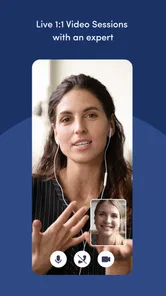
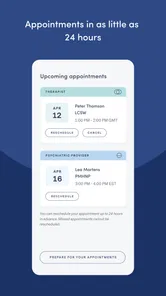
Brightside Health is an online mental healthcare platform that connects users with licensed providers through remote appointments and digital communication. Depending on the plan and availability in your location, it may offer therapy, psychiatric evaluation, medication management, or combined care for concerns such as anxiety and depression. The app is designed for ongoing support rather than emergency treatment, so users should review the available services before enrolling.
How does treatment through Brightside Health work?
After creating an account, you generally complete an assessment describing your symptoms, goals, medical background, and preferences. Brightside then uses this information to help match you with an appropriate licensed provider. Therapy sessions and psychiatric appointments are conducted online, while follow-up communication and treatment recommendations may be managed through the platform. The exact process can vary according to your state, plan, provider, and selected service.
Can Brightside Health prescribe medication?
Brightside Health may provide psychiatric evaluations and medication management through qualified medical professionals, where these services are legally available. A provider decides whether medication is appropriate after reviewing your symptoms, history, current medicines, and overall needs; a prescription is not guaranteed. Users should also confirm whether their preferred pharmacy, insurance plan, location, and medication type are supported before beginning treatment.
Pros
- Licensed clinicians provide therapy and psychiatric care online.
- Treatment plans can combine therapy and medication management.
- Appointments are available without visiting a physical clinic.
- The platform supports ongoing communication with your care team.
- Insurance may help reduce the cost for eligible members.
Cons
- Availability and services vary depending on your state.
- It is not designed for emergency or crisis mental-health support.
- Medication may not be suitable or prescribed for every patient.
- Some plans can involve recurring costs or insurance limitations.
- A stable internet connection and private space are needed for sessions.











