

Breeze Airways
- 1.64K
- 4.8
- Installs
- 500.00K
- Price
- Free

Screenshots


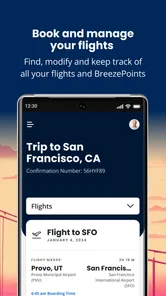

Analysis by Reviewed
When I’m choosing how to book a flight, I try to separate two jobs: comparing the whole market and managing a trip with a particular airline. Breeze Airways is designed for the second job. It is a free Travel & Local app from Breeze Aviation Group, Inc., and its airline-specific focus can save time once I’m already considering Breeze. I wouldn’t use it as my only tool for deciding which carrier to fly, but I would keep it handy if a Breeze itinerary is in the running.
Where booking can feel less straightforward
The basic search is simple, but choosing a flight is only part of planning a trip. I’d compare the full itinerary and the options that matter to me before committing, rather than treating the first displayed fare as the whole cost of travel. If I need a checked bag or a particular seat, I would factor those choices in while reviewing the booking, since the app presents extras as part of the process. That makes it convenient, but it also means the headline price alone may not reflect the setup I want.
Another practical trade-off is that this is an airline-specific tool, not a broad comparison service. It is handy when I’m ready to look at Breeze flights, but I’d use a travel search site or another airline’s app when I’m still comparing carriers, routes, or different ways to reach a destination. Keeping those jobs separate helps avoid expecting one app to answer every travel question.
Before you begin and how to recover
If a search or booking step feels stuck, I’d first check the basics: confirm the places and dates I entered, make sure the phone has a usable connection, and give the screen a moment to finish loading before tapping repeatedly. I’d also check that the app is up to date; its current version is 2.76.0, and it supports Android 7.0 and later. These are sensible first checks, not a promise that every hiccup comes from the phone.
If a screen does not respond as expected, I’d return to the previous step and carefully review the trip details before trying again. That is especially important around a purchase: I wouldn’t repeat a payment action simply because the confirmation is taking time. I’d look for a booking confirmation or other clear sign that the first attempt completed, then use Breeze’s appropriate support route if the status remains unclear. The app can make booking more convenient, but it cannot remove the need to verify an important transaction.
Who will get the most from it
I’d recommend the app to travelers who have already chosen Breeze and want one place to search, book, and keep up with their trip. It can be particularly useful when plans are being made on the move: for example, I can check options during a work break, decide whether a seat selection or bag matters for that journey, and return to the airline’s app rather than starting the search over elsewhere. The practical benefit is less app-hopping once Breeze is the chosen carrier.
It is less suited to someone whose first priority is surveying every airline or finding the broadest possible set of route combinations. In that situation, I’d compare options elsewhere first, then move to Breeze’s app if its flights fit. It has a 4.7 average, around 10,000 ratings, and over 500,000 installs. Those figures suggest that many travelers use it, but they don’t tell me whether it covers the needs of a particular trip; the route and booking details still deserve a careful look.
More From Our News Desk

 Weather - By Xiaomi
Weather by Xiaomi Review: Clear at a Glance, Less Clear Up Close
Xiaomi’s weather app makes everyday forecasts quick to scan, but its calm surface can leave useful details and recovery paths harder to find than they should be.

 X
XX Under Pressure: Can It Recover When Posting Goes Wrong?
A resilience-focused review of X, examining setup, mistaken posts, interruptions, weak connections, and the gaps that matter when recovery needs to be dependable.

 Clash of Clans
Clash of Clans Is Won Between the Battles
Its raids are quick; its community is a long-term project of coordination, teaching, rivalry, and shared responsibility—with all the friction that entails.

 Android Auto
Android Auto Makes the Case for Quieter Car Software
The car interface is no longer judged by how much it can do, but by how quietly it helps. Android Auto shows what drivers now expect—and what still gets in the way.

 MobiOffice: Word, Sheets, PDF
MobiOffice: Transforming Mobile Productivity with Seamless Integration
MobiOffice: Word, Sheets, PDF is redefining mobile productivity with a surprising blend of functionality and innovation.

 EA SPORTS FC Soccer Mobile 26
EA SPORTS FC™ Mobile Soccer: Redefining Mobile Sports Gaming
Dive into EA SPORTS FC™ Mobile Soccer, where immersive gameplay and strategic depth transform mobile sports gaming.
Latest News



For an everyday example, imagine I’m arranging a short trip and already know I want to consider Breeze. I can search for my dates, compare the available itineraries, and decide whether to add a bag or select a seat before finishing the booking. If I’m not sure which airline has the best schedule, I’d do that comparison first in a broader service, then use this app for the Breeze-specific steps. That small change in workflow makes the app more useful and keeps its limits clear.
The app is rated for Everyone and has been available since May 21, 2021. I see it as a practical companion for a Breeze booking, rather than a complete travel planner or a guarantee that every travel disruption can be handled from a phone. For Breeze customers, its focused approach is a real convenience; for travelers still weighing carriers, a broader comparison tool is the better starting point.
Simple and User-Friendly Interface
One of the first things that caught my eye was the app's clean and intuitive design. You don't need to be a tech wizard to navigate through Breeze Airways. The layout is straightforward, making it super easy to search for flights, check schedules, and even manage bookings. I found the color scheme to be quite calming, which is a nice touch, especially when you're trying to sort out travel plans amidst a busy schedule.
Booking Flights Made Easy
Booking a flight through the app is as easy as pie. You start by entering your departure and arrival destinations, select your dates, and voilà – a list of available flights appears. What I appreciated most is how the app provides clear details about each flight, including the duration, stops, and of course, the pricing. And let me tell you, the prices are pretty competitive!
When I’m comparing the options shown, I try to look beyond a convenient departure time. A connection, total journey length, or an inconvenient arrival can matter more to my plans than a small difference in the displayed fare. I also pause to consider which add-ons I genuinely need before moving forward. That makes the comparison more useful: I’m judging the trip I would actually take, not just the first price that catches my eye.
Features That Stand Out
Beyond just booking flights, the app has a few nifty features tucked away. For instance, you can easily add on extras like checked baggage or seat selection without jumping through hoops. The app also sends timely notifications about flight status, gate changes, and boarding times. It's like having a personal travel assistant right in your pocket!
Notifications are most useful when I treat them as prompts to check, rather than as a reason to stop paying attention to the airport or my booking details. Before leaving home, I’d make sure I can access the trip information I need and that notifications are enabled if I want updates on the phone. Once I’m at the airport, I’d still check the screens and listen for announcements. That little bit of redundancy is worthwhile when a change affects where I need to go or when I need to board.
Making the booking easier to manage
One practical habit I’d use is to keep the itinerary details I entered consistent from the start. If I’m booking for someone else, I’d double-check the passenger and trip information before moving on, rather than relying on memory after several screens. A quick review before confirming can prevent a small typing mistake from becoming a frustrating follow-up task. I also avoid beginning a booking while distracted or with only a moment to spare; even a straightforward process deserves enough attention to review the choices carefully.
If the app seems slow, I’d resist tapping a button repeatedly, especially near a payment or confirmation step. First I’d wait, check the connection, and see whether the screen changes. If I need to back out, I’d do so deliberately and check the booking status before starting the same action again. This is a modest precaution, but it is more reassuring than guessing whether a delayed screen means the transaction failed.
Why I Keep Coming Back
I've used quite a few airline apps in my time, but there's something about Breeze Airways that keeps me coming back. Maybe it's the seamless experience or the fact that the app rarely has any bugs or crashes. Whatever it is, it definitely makes flying a breeze, pun intended.
I’d be careful not to treat any airline app as a substitute for every part of travel planning. For a trip where I care most about comparing carriers, flexible routing, or weighing several ways to reach the same place, a general travel search tool is the better first stop. Once I’ve settled on Breeze, this app has a clearer role: it brings the airline’s booking steps and trip-related information into one place, without asking me to sort through unrelated providers.
When a problem may be outside the app
A stalled search does not automatically mean the app itself is at fault. I’d check whether the connection is working and whether the trip details are entered as intended, then try again after the screen has had time to respond. If other apps or pages are also struggling, that points me toward a broader connection issue rather than a Breeze-specific one. If the problem is limited to a particular booking step, I’d note what I was doing and avoid repeating any action that may already have completed.
For time-sensitive changes, I would not assume that closing and reopening the app resolves the underlying travel issue. The app is useful for handling Breeze-related tasks, but an airline’s operational situation and a phone’s display are separate things. I’d use the appropriate Breeze contact channel when a booking status remains unclear or when I need help beyond what the app can show. That distinction matters most when a flight is approaching and I need a reliable answer, not another round of guesses.
Travelers may also wonder whether they need the app if they only fly Breeze occasionally. I think it can still be worth using for a one-off trip if you want to book directly with the airline and keep the related steps in a single place. If you prefer to manage all your travel through one general service, or you are still deciding among carriers, that service may fit your habits better. The choice depends less on how often you fly and more on whether you want an airline-specific workflow.
Another useful question is whether the app replaces checking the details of a fare. I would still review the itinerary and any extras before completing a purchase, because the options that suit one traveler may not suit another. A seat choice or bag can be useful for one journey and unnecessary for the next. I’d make those decisions based on the trip rather than adding extras automatically, and I’d keep the confirmation available afterward so I can refer to the booking without reconstructing what I selected.
In a world where travel can sometimes feel like a chore, finding an app that simplifies the process is a godsend. Whether you're a frequent flyer or just planning a one-off trip, I reckon Breeze Airways is worth a download. It's not just about getting from point A to point B; it's about enjoying the journey with a little less stress.
My practical verdict
For me, the app is at its best when Breeze is already a serious option and I want to move from flight search to booking without switching between airline-specific pages. The free price makes it easy to try, and its Everyone content rating makes its intended audience broad. I’d still take my time over the itinerary, fare choices, and confirmation, because convenience does not make those decisions automatic.
I’d skip it as my main planning tool if I need to compare the whole airline market or want a single service to organize travel across different carriers. I’d also avoid relying on an app alone when a booking or travel issue needs a definite answer; careful checking and the appropriate support route are more important than repeated taps. But for someone who has chosen Breeze and wants a direct way to handle the airline’s booking workflow, I find the focused approach sensible and useful.
Breeze Airways Frequently Asked Questions
Is Breeze Airways free to download, and which devices can use it?
Breeze Airways is a free Travel & Local app from Breeze Aviation Group, Inc. It is intended for booking and managing Breeze travel, so it is most useful to people considering or already holding a Breeze flight. The app is rated for everyone and supports devices running Android 7.0 or later. Its current version is 2.76.0.
Can I use the app to check my Breeze trip after booking?
Yes. The app is described as a mobile booking app, and it offers itinerary management alongside flight updates. That makes it a handy place to review your travel plans after making a reservation, rather than keeping booking and trip details in separate places. Travelers who prefer handling arrangements on a phone can use it to keep their Breeze itinerary accessible.
What is Breeze Airways and what does the app offer?
Breeze Airways is a low-cost airline app designed to make booking flights simple and affordable. The app offers features such as flight booking, itinerary management, and real-time flight updates. Users can access exclusive deals, manage their bookings, and view their travel itineraries all within the app, ensuring a seamless travel experience.
How user-friendly is the Breeze Airways app for first-time users?
The Breeze Airways app is designed with user-friendliness in mind, featuring an intuitive interface that guides users through the booking process. First-time users will find it easy to navigate with clear instructions and helpful prompts. The app's layout allows for quick access to essential features, making it a convenient tool for booking and managing flights.
Are there any exclusive features or benefits of using the Breeze Airways app?
Yes, the Breeze Airways app offers exclusive features such as access to special promotions and discounts available only to app users. Additionally, the app provides real-time notifications for flight updates, gate changes, and luggage tracking. Users can also customize their travel preferences and receive personalized travel recommendations based on their profile.
Pros
- User-friendly interface for easy bookings
- Affordable flight options available
- Loyalty program with rewards
- In-flight entertainment options
- Multiple destinations covered
Cons
- Limited international flights
- No Wi-Fi on some flights
- Baggage fees may apply
- Limited customer service hours
- No first-class seating options











