Break Speed
- 62.00
- 3.9
- Installs
- 10.00K
- Price
- $4.99
Screenshots
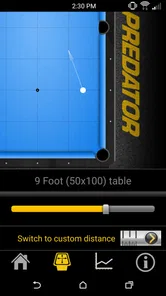
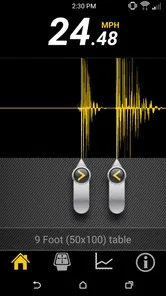
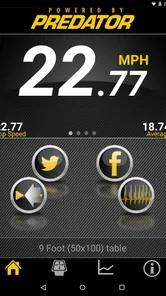
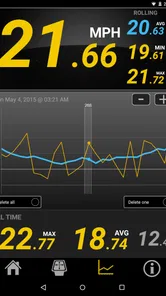
Analysis by Reviewed
If you’re a pool enthusiast like me, you know the thrill of nailing that perfect shot. Well, with Break Speed, you can carry that excitement right in your pocket! This app is a game-changer for anyone serious about improving their pool skills, or even just showing off a bit at the local bar. Let’s dive into what makes this app a must-have for billiards buffs.
Unleashing the Power of Precision
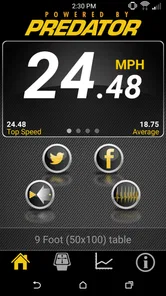
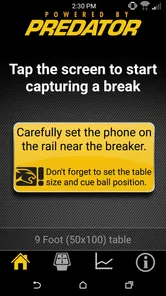
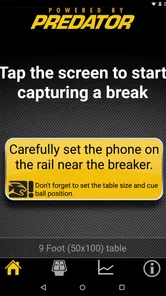
At its core, Break Speed is all about enhancing your precision. The app uses your smartphone’s camera to measure the speed of your break shot—how cool is that? You simply set your phone near your break line, hit the record button, and give it a go. The app does the rest, calculating the speed based on the time it takes for the balls to hit the table’s end. This feature alone makes it a unique tool for anyone serious about their game.
A repeatable baseline at the table
I get the most value from a speed reading when I treat it as a comparison, not a verdict on whether a break is good. Set the phone in a consistent place, keep the table and break routine as similar as you can, and take a few readings rather than judging your progress from one attempt. A changed camera angle or a different setup can affect how useful a comparison feels, so repeatability matters more than chasing a dramatic number.
That makes the app handy for a realistic practice session: I might check a few breaks before a casual game, then try again after focusing on a smoother, more controlled motion. If the reading changes, I still look at where the balls finish and whether I can reproduce the shot. Speed is one piece of feedback, not a substitute for observing the result on the table.
User-Friendly Interface
One thing I love about Break Speed is its intuitive interface. It's straightforward enough that even those who aren’t tech-savvy can navigate it effortlessly. The app guides you through the setup process with simple instructions, ensuring you get the most accurate readings possible. Plus, the sleek design makes it a joy to use.
Settings worth checking before you break
Before relying on a reading, I would check the recording setup and follow the app’s on-screen guidance rather than placing the phone wherever it happens to fit. A stable, unobstructed view is a sensible starting point, and keeping the camera position consistent from session to session makes your comparisons more meaningful. Because the measurement depends on capturing the balls’ travel, a crowded area or someone moving through the camera’s view can make a practice attempt less useful.
There is a practical trade-off here: the phone needs a position that can see the action, but it should not get in the way of play or become exposed to a stray ball. I would set it safely before the rack, check the view, and only then start practicing. If the table layout or available space forces a very different position, I would treat the result as a fresh baseline rather than directly comparing it with earlier sessions.
More From Our News Desk

 Gmail
Gmail in a Busy Inbox: Who Benefits Most?
From first account to crowded workday, Gmail earns its place through dependable search and flexible sorting—but its best fit depends on how much inbox maintenance you can tolerate.

 Prime Video
Switching to Prime Video: What Changes in Your Viewing Routine
Prime Video can make a compelling second home for streaming, but switching means learning a different catalog, rental layer, and route from browsing to playback.

 Universal TV Remote Control
 Works Best as a Reliable Backup
A phone remote earns its place through quick setup and reliable habits. Here is how to get more from Universal TV Remote Control—and where its limits show.

 Weather - By Xiaomi
Weather by Xiaomi Review: Clear at a Glance, Less Clear Up Close
Xiaomi’s weather app makes everyday forecasts quick to scan, but its calm surface can leave useful details and recovery paths harder to find than they should be.

 X
X Under Pressure: Can It Recover When Posting Goes Wrong?
A resilience-focused review of X, examining setup, mistaken posts, interruptions, weak connections, and the gaps that matter when recovery needs to be dependable.

 Clash of Clans
 Is Won Between the Battles
Its raids are quick; its community is a long-term project of coordination, teaching, rivalry, and shared responsibility—with all the friction that entails.
Latest News



Faster practice without turning it into a chore
For a more efficient routine, I would decide what I want to learn before recording: whether a more controlled break feels repeatable, or whether a small change in stance affects the result. Keep one part of the routine steady while testing another, and avoid changing several things at once. That simple habit makes the readings easier to interpret and keeps the session focused instead of turning every break into an isolated attempt.
The app is most appealing to players who already spend time at a pool table and want a concrete way to compare breaks. A beginner can use it as an extra point of reference, but should not feel that a faster result automatically means better technique. Someone who only wants rules, tutorials, or a digital pool game should look elsewhere; this is a focused sports tool, not a general billiards guide or a substitute for coaching.
Beyond Just Numbers
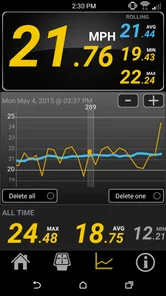
But this app isn’t just about numbers—it’s about helping you improve. By tracking your break speeds over time, you can see tangible progress. It's like having a personal coach in your pocket, encouraging you to push a little harder with each game. And for those who love a bit of competition, you can share your scores and challenge friends, adding a fun social element to your practice sessions.
What a speed reading can—and cannot—tell you
I would use the result to support a practice habit, not to settle an argument about who has the best break. Pool conditions, phone placement, and how consistently you repeat the shot all matter when comparing attempts. If the number seems surprising, I would first repeat the setup and try again before drawing a conclusion. That is a useful safeguard for friendly challenges, where the fun is in comparing like with like rather than treating a single reading as an official measurement.
Compared with simply guessing by feel, a recorded reading gives you a more concrete reference. Compared with a coach watching your mechanics, though, it has a narrower job: it focuses on break speed and cannot explain every reason a shot succeeds or fails. I see that as a fair trade if you want quick feedback during open practice, but not if you expect detailed technical instruction.
Perfect for All Skill Levels
Whether you’re a seasoned pro or a newbie, Break Speed has something for everyone. Beginners can start by understanding the basics of speed and improve their skills gradually, while seasoned players can fine-tune their game. It’s an inclusive app that caters to all levels, making it a versatile addition to your training regimen.
Who should make room for it?
CY Mobile Software’s sports app is a paid download at $4.99, so I would choose it when measuring breaks is something I expect to do more than once. It has a 3.9 average from 208 ratings, with 61 written reviews and over 10K installs. It is rated for Everyone, first released on June 25, 2010, and its current version is 6.5, with OS 12 as the minimum. Those details make it easy to judge whether it fits your device and whether a dedicated break-speed tool is worth the cost to you.
Its strongest fit is a player who practices at a regular table, likes comparing repeatable attempts, and is comfortable setting up a phone before shooting. If you rarely break, do not have a safe place for your phone, or mainly want broad instruction, the price may be better spent on something that addresses those needs. For a casual player who is simply curious about one break, borrowing a friend’s setup or relying on ordinary observation may be enough.
Mastery is about consistency, not a single reading
In everyday use, I would keep the workflow simple: place the phone safely, follow the recording guidance, take a small set of comparable attempts, and note what changed in my own technique. That gives the app a clear role without letting the measurement dominate the session. The most useful question is not just “How fast was that break?” but “Can I repeat it, and did the balls spread the way I wanted?”
In conclusion, Break Speed isn’t just an app; it’s a revolution for pool players. It bridges the gap between casual play and professional practice, offering insights that can genuinely enhance your gameplay. So why not give it a try? You might just find your break shot getting stronger and more consistent with each use. And who knows, you might even become the envy of your local pool hall!
Break Speed Frequently Asked Questions
Who is Break Speed intended for?
Break Speed is aimed at people who play or follow billiards and want a quick way to put a number on their break shot. It may appeal to casual players comparing shots with friends as well as more serious players interested in tracking their power. The app’s focus is specific: measuring a break, rather than offering a broad collection of billiards lessons or games.
What is Break Speed and what does it do?
Break Speed is a mobile application designed to measure the speed of a break shot in billiards. Utilizing your device's microphone, it captures the sound of the cue ball hitting the rack and calculates the speed of the break. This app is particularly useful for billiards enthusiasts and professionals who want to analyze and improve their game by understanding how powerful their break shots are.
How accurate is the Break Speed app in measuring break shots?
The Break Speed app is highly regarded for its accuracy in measuring break shots. It uses advanced algorithms to analyze the sound of the break and calculate the speed. While external factors like background noise can affect accuracy, the app generally provides a reliable measurement. Users are encouraged to use it in a quiet environment for the best results.
Is Break Speed compatible with all devices?
Break Speed is compatible with most modern Android and iOS devices. However, it requires a device with a functioning microphone to capture the sound of the break. It's always a good idea to check the app's requirements on the Google Play Store or Apple App Store to ensure compatibility with your specific device before downloading. The current version is 6.5, and the minimum operating system requirement is 12.
Does Break Speed require an internet connection to work?
No, Break Speed does not require an internet connection for its core functionality. The app operates offline, allowing users to measure break speed anytime and anywhere. However, an internet connection may be needed for initial app installation, updates, or accessing additional features or support.
Pros
- Easy-to-use interface for all ages
- Accurate speed measurement
- Customizable settings
- Supports multiplayer mode
- No internet connection needed
Cons
- Limited cue options
- Ads can be intrusive
- No offline progress tracking
- Requires frequent updates
- Limited game modes