Bradenton Herald News: Florida
- 59.00
- 3.1
- Installs
- 10.00K
- Price
- Free

Screenshots
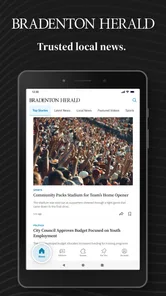
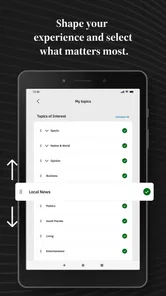
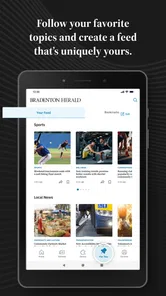
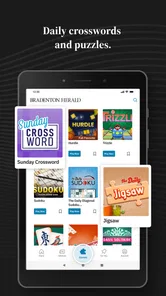
Analysis by Reviewed
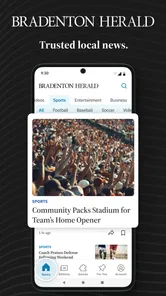
I spent time with Bradenton Herald News: Florida as a local news reader rather than treating it like a general national headlines app. That distinction matters. The app comes from McClatchy and is aimed at people who want Florida coverage with a strong local focus, including politics, crime, business, weather, and sports. I found its main value in bringing those subjects together in one place, especially when I wanted to understand what was happening around the Bradenton area without sorting through a much broader news feed.
It is a free News & Magazines app for Android, rated for Everyone 10+, and it has been available since early 2012. The current version is 11.1.16, and it works on Android 8.0 or later. The audience is established but not enormous: it has passed ten thousand installs, with an average rating of 3.1 from 145 ratings and 59 written reviews. Those figures suggest a useful but uneven experience, which matches my impression: the app can be valuable when local relevance is your priority, but it is not as polished or universally convenient as the biggest national news platforms.
Reading local news without fighting the interface
The first thing I noticed is that the app makes more sense when I approach it with a specific purpose. I would open it looking for local developments, a regional weather update, a sports story, or a Florida political report. That is a better fit than opening it simply to “see what is happening,” because the app’s strength is its location and subject focus rather than endless variety.
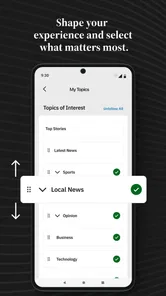
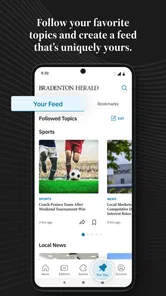
For readability, the most helpful habit is to scan the section structure before opening individual stories. Local breaking news can sit beside longer reports, opinion-related coverage, business updates, and sports items, so a quick visual pass helps me avoid reading everything in chronological order. If I am checking the app during a short break, I can concentrate on one topic instead of getting pulled into unrelated headlines.
I also appreciate that a focused local publication can reduce the noise found in broad news aggregators. A national app may offer more sources, more personalization, and a larger stream of headlines, but it can make regional stories difficult to find. Here, the editorial purpose is clearer. The trade-off is that the selection is naturally narrower, so someone who expects international reporting, technology coverage, entertainment, or a wide range of viewpoints may find the experience limited.
The most practical reading strategy is to use the app as a local briefing tool, not as your only source of news. I would check the main feed for what has changed, open the stories that affect my day, and use a broader publication when I need national or international context. That workflow keeps the app useful without asking it to do a job it was not designed to do.
How the content works for different reading abilities
People with different reading needs may experience the same article very differently. Short headline scanning is generally easier than working through a long report, especially for someone with limited concentration or a small amount of time. I found the app most comfortable when I treated headlines as a way to choose rather than attempting to consume every item presented.
More From Our News Desk

Weather by Xiaomi Review: Clear at a Glance, Less Clear Up Close

X Under Pressure: Can It Recover When Posting Goes Wrong?

Clash of Clans Is Won Between the Battles

Android Auto Makes the Case for Quieter Car Software

MobiOffice: Transforming Mobile Productivity with Seamless Integration

EA SPORTS FC™ Mobile Soccer: Redefining Mobile Sports Gaming
Users who benefit from larger text should also consider the Android display and font settings available on their device. Those system-level adjustments can help with legibility, although increasing text size may change how much of a headline or article fits on screen. That creates a real trade-off: larger type can make reading more comfortable, while tighter layouts may require more scrolling or repeated movement through a page.
For readers with dyslexia, visual fatigue, or attention-related needs, the app’s local focus can be an advantage because it reduces the need to search across many unrelated sources. At the same time, dense news pages can still feel demanding. I would recommend opening one story at a time, pausing between sections, and avoiding the temptation to treat the home screen as a checklist.
People who rely on screen readers should judge the current Android experience on their own device before committing to it as a primary news source. I cannot treat the app as having a particular accessibility certification or promise that every control and article element will be announced perfectly. The sensible approach is to install it, test the main feed and an article, and see whether the navigation order and text presentation work with the assistive technology you already use.
Navigation choices that make a difference
Navigation is easiest when I decide what I am looking for before I start tapping. For example, checking weather and checking a crime report are different tasks, even though both belong to the same local news routine. A deliberate path reduces unnecessary movement and makes the app less tiring for users who have difficulty with repeated gestures.
That matters for older readers, people with hand tremors, and anyone using a phone one-handed while commuting or waiting in line. A news app can become frustrating when a user has to make many precise taps just to reach a relevant article. I found that browsing slowly and allowing pages to settle is more dependable than rapidly swiping through the feed.
There is also a useful distinction between discovery and verification. The app is convenient for discovering a local story, but I would not assume that the first headline gives me the whole picture. Opening the full article, checking its date and context, and comparing major developments with another trusted source is a better routine, particularly for emergencies or politically sensitive subjects.
Using it with motor, sensory, and everyday access needs
Motor access is not only about whether a person can tap a button. It is also about how much repeated scrolling, precise selection, and back-and-forth movement a task requires. Bradenton Herald News: Florida works best for readers who can navigate a conventional Android news layout and who are comfortable making ordinary taps and swipes. It is less appealing for someone who needs every interaction to be extremely simple or who tires quickly from hand movement.
One practical workaround is to read in short sessions. Instead of trying to clear the entire feed, I would choose one or two stories and stop. This reduces the amount of scrolling and makes it easier to remember what I have already read. It also suits people with chronic pain or limited stamina, for whom a long browsing session can be more difficult than the content itself.
Voice control may help some Android users with opening the app, selecting visible controls, or moving through basic actions, but the exact experience depends on the phone and accessibility setup. I would not recommend assuming that voice input turns the app into a hands-free news reader. Article layouts and changing headlines can make voice navigation less predictable than ordinary touch interaction.
For sensory considerations, news about crime, disasters, politics, or severe weather can be emotionally intense even when the interface is easy to use. A reader with anxiety, post-traumatic stress, or sensitivity to alarming imagery may want to approach the app at a chosen time rather than leaving it open throughout the day. I found that using it intentionally, instead of checking every few minutes, creates a calmer experience.
People who are sensitive to motion or visual clutter should pay attention to how the feed behaves on their particular handset. I would keep system animation settings comfortable, avoid rapid scrolling, and use the device’s display controls if bright screens cause discomfort. These are not special features of the app; they are practical ways to make a standard mobile news experience more manageable.
Audio access is another important question for users who prefer listening to reading. I would not choose this app on the assumption that every article is available in a dedicated audio format. If listening is essential because of low vision, fatigue, or a learning preference, a browser’s text-to-speech tools or a news service built around audio may be a better primary option. The app can still serve as a source for selecting stories, but it may not be the complete solution.
A realistic daily routine
Imagine I am leaving home and want to know whether a local issue could affect my plans. I open the app, scan the Florida and local headlines, check the weather coverage, and read one relevant report. If the story concerns a developing event, I then compare it with another reliable source before changing my route or making a decision. This takes less effort than searching the web from scratch, while still avoiding the mistake of treating one headline as a complete update.
For a caregiver or family member supporting someone who finds national news overwhelming, the local focus can also be useful. I could help create a small routine: check the app at a comfortable time, choose only the sections that matter, and stop once the important information has been collected. That is more inclusive than leaving a constantly updating feed running in the background.
For a sports follower, the app may be a convenient way to keep local and regional coverage alongside weather and community news. For a small-business owner, business and political reporting may be more relevant than a general headline service. For someone who has moved away from Florida but still follows the area, the app can provide a more direct connection to local developments than a national publication usually offers.
On the other hand, I would not recommend making it the only information source for a person who needs rapid emergency instructions, detailed national reporting, or accessible audio throughout the day. A dedicated weather service, government alert channel, or audio-first news product may be more appropriate for those needs. This app fits best as one part of a personal information setup.
Subscriptions and the cost decision
The download is free, but the app includes in-app purchases ranging from $7.99 to $159.99 per item. That makes it important to distinguish between trying the app and deciding whether to pay for continued access or additional content. I would install it first, explore the local coverage, and decide whether the reporting is valuable enough for my routine before spending anything.
This pricing range also changes who should use it. A reader who checks local news occasionally may prefer the free experience if it meets their needs. Someone who depends on Bradenton-area reporting for work, family, or community involvement may see more value in paying, but should still examine the purchase screen carefully and consider how frequently they will actually read the content.
For accessibility, cost is part of access. A paid news product may be worthwhile only if its reading experience works with the user’s preferred font size, assistive technology, and daily schedule. I would not commit based solely on the publication’s reputation or the importance of local coverage. First confirm that the app is comfortable to operate, because a subscription does not solve a navigation barrier.
Where the experience still creates friction
The average rating of 3.1 indicates that the app has not satisfied everyone, and I think that is useful context rather than something to ignore. A local news app can be valuable even with a modest rating, but readers should expect possible rough edges in presentation, performance, or the balance between free reading and paid content. My recommendation is to test it during the exact situations in which you plan to use it, rather than judging it only from a quick launch.
The biggest limitation is scope. The app is built around Florida and Bradenton Herald coverage, so it cannot replace a broad aggregator for readers who want many regions and subjects in one place. It may also feel less rewarding to people who prefer highly personalized feeds, extensive multimedia, or a single app that combines local, national, international, and specialist reporting.
Another barrier is the difference between knowing that a story exists and being able to read it comfortably. A headline may be easy to spot, while the full article requires more scrolling, concentration, or visual effort. Readers with limited energy should plan around that difference. Saving the app for a quiet moment may work better than trying to read detailed coverage while walking, driving, or handling another task.
Users who need strong accessibility guarantees should be especially careful. The app can be tested with Android’s built-in tools, larger display settings, voice controls, and screen-reading support, but individual results will depend on the device and the person’s needs. I would treat that hands-on check as essential for anyone with low vision, motor limitations, cognitive disabilities, or a strong preference for audio.
My inclusive verdict
I recommend Bradenton Herald News: Florida to readers who want a focused way to follow local Florida news and who are comfortable with a conventional Android news app. Its strongest quality is relevance: weather, politics, crime, business, sports, and breaking developments are closer to the communities the reader actually cares about than they would be in a general national feed.
I also think it can support different contexts when used thoughtfully. Short reading sessions help users with limited stamina, system text settings can improve legibility, and a deliberate section-by-section routine reduces unnecessary navigation. Those are practical benefits, but they do not remove the need to test the app with personal accessibility tools.
I would skip it as a primary news source if I needed guaranteed audio access, a very broad international selection, unusually simple controls, or a fully confirmed assistive-technology experience. In those cases, a dedicated accessible news service, a browser-based reading workflow, or a specialist weather and alert app may be a better match.
For everyone else, the free download makes trying it straightforward, while the in-app purchase range means I would make the payment decision slowly. My final view is positive but measured: this is a useful local companion for Bradenton and Florida coverage, especially when I want nearby stories without national-news clutter, but its value depends on whether the reading layout, navigation effort, and payment model fit the way I personally access news.
Bradenton Herald News: Florida Frequently Asked Questions
Who publishes Bradenton Herald News: Florida, and is it an official news app?
Bradenton Herald News: Florida is published by McClatchy and is the mobile app associated with the Bradenton Herald. It brings the publication’s Florida-focused reporting into an app format, so readers can browse news on a phone or tablet. The app is listed in News & Magazines, and its short description identifies it as Bradenton Herald.
What is Bradenton Herald News: Florida?
Bradenton Herald News: Florida is a mobile news application focused on local coverage from Bradenton, Manatee County, and surrounding areas. Users can browse breaking news, community stories, local politics, sports, weather-related updates, entertainment, and other regional topics. It is designed for readers who want Florida news in a convenient format rather than relying only on the newspaper’s website.
What type of news and content can I find in the app?
The app generally brings together the Bradenton Herald’s main coverage areas, including local and regional news, crime reports, government and education updates, sports, business, lifestyle, opinion articles, and community information. Available sections and headlines may change throughout the day as new stories are published. Coverage is especially useful for people living in or following Bradenton and the wider Manatee County area.
Is Bradenton Herald News: Florida free to download and use?
Downloading the application is free, but access to all articles may depend on the Bradenton Herald’s subscription and digital-access rules. Some stories may be available without signing in, while other content can require a subscription, account, or login. The app includes in-app purchases, so check the current subscription and purchase terms before committing to paid access.
Does the app send breaking-news notifications?
Bradenton Herald News: Florida may offer push notifications for breaking news, important local developments, weather-related information, sports updates, or other selected topics. During setup, the app can request permission to send alerts, and users can usually manage notification preferences through the application or their device settings. If you prefer a quieter experience, notifications can be disabled, although doing so may delay awareness of urgent local stories.
Pros
- Local Bradenton and Manatee County coverage is easy to find.
- Breaking news alerts help users stay informed throughout the day.
- Includes sports
- weather
- politics
- and community reporting.
- Clean layout makes articles comfortable to read on mobile devices.
- Digital access is convenient for readers away from the printed newspaper.
Cons
- Some articles or features may require a paid subscription.
- Advertising can take up space and affect the reading experience.
- News coverage is primarily regional
- limiting broader national content.
- Push notifications may feel frequent unless carefully customized.
- App performance and content availability can vary with internet quality.













