Bookedin for Business
- 122.00
- 4.0
- Installs
- 10.00K
- Price
- Free

Screenshots

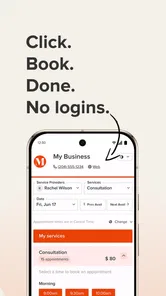


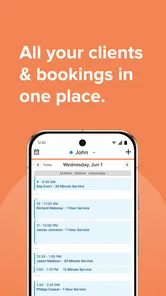
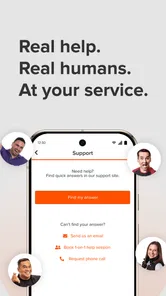
Analysis by Reviewed
I approached Bookedin for Business as a practical scheduling tool rather than a flashy business platform. It is aimed at small businesses that need to organize classes and appointments, and my overall impression is that its value depends heavily on how reliably you and your customers can stay connected while using it. When the connection is available, the idea is straightforward: replace scattered messages, phone calls, and handwritten appointment notes with one place for booking activity.
That focus makes it easier to understand who should consider it. A solo instructor, beauty professional, therapist, tutor, or small service provider may appreciate a booking-centered app more than a large business suite filled with tools they never touch. On the other hand, a company that needs deep accounting, inventory, customer relationship management, or extensive team administration may quickly outgrow this narrower approach.
How Bookedin fits into a small business day
Bookedin is a free business app from Bookedin, with optional in-app purchases ranging from $24 to $159 per item. It is suitable for Everyone, runs on Android starting with version 7.0, and its current version is 1.95.6. The app has been available since April 25, 2016, and its average rating is 4.0 from around 240 ratings. That gives me the impression of an established, focused product rather than a brand-new experiment.
The most useful way to think about it is as a front door for appointments and classes. Instead of asking every customer to contact you before a time can be agreed, a booking system lets them interact with your availability more directly. That can reduce interruptions during a lesson, treatment, consultation, or busy service period.
In an everyday scenario, imagine running a small yoga class while also handling private sessions. A customer sends a message asking which times are open, but you are already with someone else. With a booking workflow, the customer can check the available options and make a choice without waiting for a reply. You can then spend less time acting as a human calendar and more time delivering the service.
That convenience is not automatic, though. The experience is only as clear as the schedule you maintain. If availability is outdated, if a class is not adjusted after a change, or if you forget to review incoming bookings, the app cannot solve the underlying organization problem. I would treat it as a scheduling discipline tool: it helps most when the owner commits to keeping the timetable accurate.
Where the internet becomes part of the experience
Connectivity matters at several points. A customer needs a dependable connection to browse or submit a booking, and the business needs access when checking the calendar or responding to changes. This is especially important for mobile users who may be moving between a studio, a client location, a shop floor, and home.
More From Our News Desk

Weather by Xiaomi Review: Clear at a Glance, Less Clear Up Close

X Under Pressure: Can It Recover When Posting Goes Wrong?

Clash of Clans Is Won Between the Battles

Android Auto Makes the Case for Quieter Car Software

MobiOffice: Transforming Mobile Productivity with Seamless Integration

EA SPORTS FC™ Mobile Soccer: Redefining Mobile Sports Gaming
I would not plan a busy day around the assumption that every scheduling task will be available without a network connection. The safer habit is to review the day’s appointments before entering an area with unreliable reception and to make important changes while connected. That is not a criticism of the app alone; any booking service that depends on current availability has to exchange information with its service.
The connection requirement also affects customer expectations. If someone is trying to reserve a last-minute slot from a train station, basement studio, or crowded event venue, a slow or interrupted connection can turn a simple booking into uncertainty. For that reason, I would keep a clear backup habit for urgent changes, such as a direct contact method customers already know. The app can organize normal booking traffic, but a small business still benefits from a human fallback when timing is critical.
Using it from a phone instead of a desk
The mobile setting is where a tool like this has the most obvious appeal. Small business owners are rarely seated at a computer all day. They may be preparing a room, traveling to an appointment, teaching a class, or speaking with a customer in person. Being able to handle scheduling from a phone can be much more realistic than waiting until the evening to update a desktop calendar.
That said, mobile convenience should not be confused with effortless administration. Small screens make it easier to overlook details, especially when several appointments are close together or when a timetable changes repeatedly. I would use short, deliberate checks rather than trying to rebuild an entire schedule while distracted. A quick review before opening the business and another after the busiest period can catch problems earlier than a single rushed update at night.
Bookedin is a better fit for owners who want booking to remain central and manageable from everyday devices. It is less convincing for teams that expect a mobile app to act as a complete operations center. If your business requires complex staff coordination, detailed reporting, or a broad set of connected business functions, you should compare this focused approach with a more comprehensive platform before committing.
Small-screen workflows that deserve attention
One practical insight is to separate customer-facing availability from your personal assumptions about free time. A gap in your day is not necessarily a slot that should be offered. You may need travel time, preparation time, cleanup, or a short buffer after a demanding appointment. A booking app can expose openings, but the quality of those openings comes from the rules you apply around your work.
Another useful habit is to review the schedule from the same kind of device your customers are likely to use. A timetable that looks obvious to you as the owner may feel less clear to someone booking quickly on a phone. Check whether class names, times, and spacing communicate what a first-time customer needs to know. This is not about adding more information everywhere; it is about removing the questions that normally trigger a message or phone call.
I would also avoid making the app the only place where your team discusses exceptional arrangements. If a customer needs a special time, a change outside normal availability, or an unusual service condition, record the final arrangement consistently rather than relying on a private conversation. The more a business deviates from its normal booking pattern, the more important it becomes to verify the actual calendar afterward.
What happens when a booking goes wrong?
The real test of a scheduling app is not the easy booking. It is the awkward moment when a customer changes plans, a class needs adjustment, or a connection fails during an update. My advice is to build a recovery routine before you need it. Check the schedule after making a significant change, keep customer communication clear, and do not assume that closing the app means a change was successfully recorded.
For a small business, a missed appointment can cost more than the time spent maintaining a calendar. The app therefore works best when it becomes part of a repeatable process: review new activity, confirm unusual changes, and reconcile the digital schedule with what you actually promised. This is a more reliable approach than opening the app only when a customer says something looks wrong.
Connectivity failures deserve special care. If the network drops while you are checking availability, pause before telling a customer that a slot is open. If the service is slow, verify the result instead of tapping repeatedly and risking confusion. When a customer reports a problem, compare the conversation with the current schedule and communicate one clear next step. Those habits are simple, but they protect a small business from turning a technical interruption into a trust problem.
I also see a trade-off in centralizing bookings. A single schedule is easier to manage than several notebooks and message threads, but it becomes more important to keep that schedule current. If you continue accepting appointments through social messages, calls, and walk-ins without updating the main calendar, the app may create a false sense of control. The strongest workflow is to choose one primary booking record and update it immediately whenever an exception happens elsewhere.
Using less data without making the system less useful
Connectivity is not only about speed. It is also about being thoughtful with mobile data and battery when you are away from a stable connection. I would avoid repeatedly refreshing the schedule out of habit, especially during a long day away from Wi-Fi. Open the app when there is a reason to check or change something, then close the loop by confirming the important result.
For business owners who work in areas with inconsistent reception, preparation matters more than constant checking. Before leaving a reliable connection, review the day’s commitments and identify which decisions may require immediate attention. That reduces the temptation to make a rushed booking while the signal is unstable. It also gives you a clearer sense of when a direct message or phone call is genuinely necessary.
Customers benefit from the same kind of consideration. A booking page should not be treated as a replacement for understandable business communication. If a service has specific timing requirements, cancellation expectations, or preparation steps, make those clear through the normal customer journey. A person on a limited connection should not have to reload repeatedly just to discover what they need before arriving.
There is also a privacy-minded reason to keep your workflow tidy. Avoid duplicating customer details across personal notes, chat threads, and unrelated calendar entries unless you truly need those copies. The fewer places you use for appointment information, the easier it is to correct a change and the less likely you are to consult an outdated version. Bookedin’s usefulness comes from having a dependable scheduling reference, not from creating more records than your business can maintain.
Who will appreciate it, and who should look elsewhere?
I think Bookedin is most appealing to a small operation with a fairly understandable schedule. If you offer appointments or classes, have a limited team, and want customers to find available times without constant back-and-forth, it is worth considering. The free entry point also makes it easier to evaluate the basic fit before deciding whether the optional purchases are justified for your workflow.
It may be particularly helpful for owners who are currently juggling a paper diary, direct messages, and a personal calendar. Moving toward a dedicated booking system can reduce duplication and make availability easier to present. The benefit is not that every task disappears; it is that the booking part of the business has a clearer home.
I would be more cautious if your work involves complicated resource planning. For example, a business that must coordinate several rooms, equipment, rotating staff, deposits, detailed customer histories, and financial reporting may need a broader platform. A general calendar can also be the better choice for a private professional who only needs to block personal time and does not want customer-facing booking administration.
Likewise, businesses that operate almost entirely through phone calls may not gain much from changing their habits. The app is most valuable when customers are willing to use an online booking route and when the owner is prepared to keep availability current. If your clients prefer personal scheduling or frequently request custom arrangements, the time saved may be smaller than expected.
How it compares with familiar alternatives
The obvious alternative is a normal calendar. A calendar is often faster for personal planning and may be enough for a very small service with a handful of recurring appointments. It becomes less convenient when customers need to see availability themselves or when the owner wants to reduce scheduling conversations. Bookedin’s role is more specialized: it is designed around the booking relationship rather than simply marking events on a private timetable.
Another alternative is managing appointments through email, text messages, or social media. That approach feels personal, but it scatters decisions across conversations and makes it difficult to know which time is truly confirmed. A dedicated booking workflow can be cleaner, provided everyone uses it consistently. The trade-off is that some customers may need encouragement to change from a familiar message-based habit.
Large business suites offer the opposite trade-off. They may provide broader tools, but they can require more setup, more training, and more ongoing administration. Bookedin’s focused identity is its strength for a small provider who wants to get scheduling under control without turning the project into a full software migration. It is not automatically the best option; it is the better option when simplicity around appointments matters more than an all-in-one system.
My connectivity verdict
After looking at the app through the realities of mobile work, I see Bookedin as a useful scheduling choice for small businesses that want a clearer booking process and can maintain a dependable connection when making changes. Its strongest quality is focus. It addresses a common problem without asking a small operator to think like an enterprise administrator.
The main caution is operational rather than cosmetic: the app cannot replace good calendar habits, reliable communication, or a backup plan for moments when the network is poor. I would prepare schedules before entering low-signal environments, verify important changes, and keep an agreed direct contact route for urgent exceptions. Those steps make the connected experience much safer.
With around 10 thousand installs, Bookedin has a modest footprint, and its 4.0 average suggests a generally positive but not flawless reception. I would recommend trying the free version for a real working week, not merely opening it once. Test it during your busiest booking period, from your usual phone, and with the kind of connectivity your customers actually have. If it reduces interruptions without creating extra administration, the optional purchases may make sense. If your business needs deep operations management or works mostly through custom arrangements, a calendar or broader business platform may serve you better.
My final view is that Bookedin is at its best when treated as a dependable booking counter, not as the entire business. For a focused appointment or class schedule, that can be exactly enough. The best result comes from combining its online booking workflow with careful availability management and a simple recovery plan for connection problems.
Bookedin for Business Frequently Asked Questions
Is Bookedin for Business suitable for a small business just starting out?
Bookedin for Business is aimed at small businesses that need a straightforward way to handle classes or appointments. It can bring scheduling and customer bookings into one app, which may be helpful when you are trying to keep daily operations organized. Before adopting it as your main system, consider whether its available tools and subscription options fit the way your business works.
What devices and operating systems can run Bookedin for Business?
Bookedin for Business is available for mobile devices, and its listed minimum operating-system requirement is version 7.0. Check your device’s software version before downloading so you can confirm compatibility. Keeping your operating system current can also help with app performance and security, while making sure you have enough available storage is a sensible step before installing any business app.
What is Bookedin for Business used for?
Bookedin for Business is an appointment scheduling and client management app designed for service-based businesses. It lets you organize your calendar, accept online bookings, manage customer information, send appointment reminders, and keep daily operations in one place. It can be useful for salons, wellness professionals, tutors, consultants, fitness instructors, and other businesses that work with scheduled appointments.
Can customers book appointments online with Bookedin for Business?
Yes, the app is built to help businesses receive online bookings. After setting up your services, availability, staff members, and booking preferences, customers can generally choose an available time without calling or exchanging messages. Before relying on it as your only booking channel, review the available booking page options, notification settings, and any restrictions associated with your Bookedin subscription or business location.
Does Bookedin for Business send appointment reminders?
Bookedin for Business includes appointment communication features intended to reduce missed appointments and keep customers informed. Depending on your account configuration and plan, reminders or confirmations may be available through supported communication channels. You should check the notification settings carefully after installation, because timing, message customization, delivery methods, and possible usage limits can vary according to the current service terms.
Pros
- Online booking is available 24/7
- even when staff are unavailable.
- Automated reminders can help reduce missed appointments.
- Client details and appointment history are kept in one place.
- Staff calendars make it easier to coordinate multiple providers.
- The interface is accessible from mobile devices for on-the-go management.
Cons
- Advanced features may require a higher-priced subscription plan.
- Customization options can feel limited for highly specialized businesses.
- Internet access is needed for reliable real-time schedule updates.
- Transaction and payment features may vary by location or setup.
- Busy businesses may need time to configure services and staff calendars.











