Blue Yonder Workforce
- 2.96K
- 4.6
- Installs
- 500.00K
- Price
- Free

Screenshots
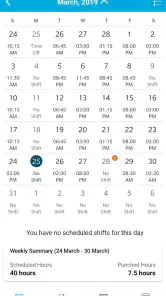
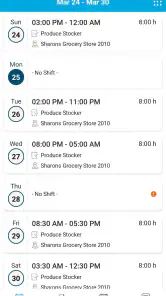
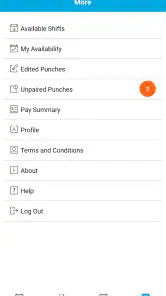
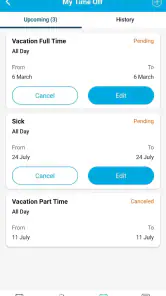
Analysis by Reviewed
For shift workers, the small uncertainties can add up: checking whether a schedule changed, remembering to submit time off, or trying to find the right place to handle a work request. I find Blue Yonder Workforce most useful as a direct route to those everyday tasks. It is a free business app from Blue Yonder Inc., and its focus is practical: giving employees a way to check schedules and send time-off requests without relying on a paper rota or a chain of messages.
Where this app fits into a workday
The main question I would ask before installing it is whether my workplace uses Blue Yonder for workforce management. This is not a general calendar that can organize any job or import any schedule; its value depends on being part of the system your employer uses. If that is the case, having work information in one dedicated place can make a quick check before leaving home much simpler.
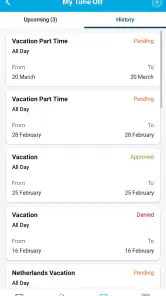
A realistic example is a worker checking an upcoming shift while planning a ride or arranging childcare. If the schedule is available in the app, that glance can help avoid relying on an old screenshot or asking a coworker to confirm the time. For a time-off request, the app gives employees a work-focused path to submit it rather than starting with an informal text. I would still treat a submitted request as a request, not assume it has been approved until the workplace confirms its status.
A useful tool, not a complete work organizer
Compared with a personal calendar, a printed rota, or a group chat, a workforce app is useful because the schedule and time-off process belong to the work system rather than being scattered across personal tools. The trade-off is that it is not a replacement for a calendar you control: it is best for viewing the work information your organization makes available, while a personal calendar remains better for combining shifts with appointments, school runs, and other commitments.
One practical habit is to check the schedule when making plans, then put the confirmed shift into your own calendar if you need reminders alongside personal events. That keeps the work app focused and reduces the risk of treating a snapshot as a permanent plan. If a shift or request looks wrong, I would use the workplace’s normal contact route rather than assume the app itself can resolve a staffing or approval issue.
First Impressions and User Interface
Right off the bat, the Blue Yonder Workforce app scores some serious points for its clean and intuitive user interface. You don't need to be a tech wizard to navigate through it, which is a huge plus. The layout is straightforward, and the color scheme is easy on the eyes. I found myself quickly getting accustomed to where everything is, which is crucial when you're trying to manage your time efficiently.
Features That Stand Out
This app is packed with features aimed at making workforce management a breeze. From scheduling shifts to tracking attendance, it covers all bases. One feature I particularly loved is the real-time updates. Imagine being able to see who’s clocked in and who’s running late at a glance. That’s some next-level convenience!
More From Our News Desk

Clash of Clans Is Won Between the Battles

Android Auto Makes the Case for Quieter Car Software

MobiOffice: Transforming Mobile Productivity with Seamless Integration

EA SPORTS FC™ Mobile Soccer: Redefining Mobile Sports Gaming

How Microsoft OneDrive Became a Mobile Productivity Giant

How Google Translate Breaks Language Barriers Effortlessly
An interesting addition is the ability to swap shifts with colleagues directly through the app. No more endless email chains or frantic text messages. Just a few taps, and you’re good to go. It’s all about making life easier, right?
What to expect from everyday use
For an employee, the most useful routine is likely a brief schedule check before making a commitment, followed by a time-off request when a conflict comes up. Those are focused actions, so the app is likely to matter more in short visits than in long sessions. I would not choose it as a broad planning tool for a whole household, but it can make the work part of that planning easier to verify.
Is it meant for managers or employees? Its schedule and time-off focus makes it relevant to workers who need access to those details, while the exact tasks available can depend on how an employer has set up its workforce system. If you only need a personal calendar, or your workplace does not use Blue Yonder, a standard calendar or the employer’s existing communication channel may suit you better.
Performance and Reliability
In terms of performance, the app runs smoothly with minimal lag. I didn’t experience any crashes, which is always a relief. Reliability is key, especially when you’re dealing with something as critical as workforce management. The app seems well-built and robust, handling large amounts of data without breaking a sweat.
For schedule checks, the useful test is not just whether a screen opens quickly, but whether the information is current enough to make a decision. I would make a habit of reopening the schedule before acting on a change rather than relying on a remembered view. This is especially sensible when shifts affect transport or care arrangements. The app can reduce the effort of checking, but it cannot remove the need to follow workplace procedures when something is unclear.
My Personal Take
Overall, I think the Blue Yonder Workforce app is a solid tool for anyone looking to streamline their work-related tasks. It’s efficient, user-friendly, and packed with features that genuinely make a difference in day-to-day operations. Of course, like any app, it’s not perfect, but the pros definitely outweigh the cons here.
The audience fit is quite specific, and that is both its strength and its main limitation. A shift-based employee whose organization uses the platform has a clear reason to keep it installed; someone looking for job listings, payroll advice, or a flexible planner should not expect this app to replace those services. Blue Yonder Inc. has built a business utility rather than a general-purpose productivity app, so its usefulness depends on access to the relevant workplace setup.
It is rated for Everyone, has an average rating of 4.6 from around 39,000 ratings, and has been installed over 500,000 times. It is free, with version 2025.2.0 listed for devices running Android 10 or later. Those details make it easy to consider, but they do not change the key question: does your employer use it, and does it show the information you need?
If you're still on the fence about giving it a try, I'd say go for it. It’s always better to have a tool that can save you time and make your work life a bit smoother. And who knows? You might just find it becomes an indispensable part of your routine like it did for me!
Blue Yonder Workforce Frequently Asked Questions
What devices and operating systems can I use with Blue Yonder Workforce?
Blue Yonder Workforce is available for Android and iOS, making it accessible on a range of phones and tablets. If you use an Android device, it requires Android 10 or later. Before downloading, check that your device’s operating system meets that requirement and that your workplace supports access through the app.
What can employees check or manage in Blue Yonder Workforce?
The app gives employees real-time access to their work schedules and time-off requests. It is intended to support workplace scheduling rather than serve as a general-purpose calendar, so the information and actions available depend on how an employer uses it. If you need it for a particular job, confirm with your workplace that employees are expected to use Blue Yonder Workforce.
Does Blue Yonder Workforce require an employer account or setup before it can be used?
Blue Yonder Workforce is intended for workplace use, so downloading it alone may not be enough to access schedules or submit time-off requests. Employees generally need their organization to provide the appropriate access and account setup. Check with your employer or workplace administrator about availability and sign-in instructions before installing, especially if you are expecting to use it for a particular job.
What is Blue Yonder Workforce and what does it do?
Blue Yonder Workforce is a workforce app for employees to get real-time access to schedules and time-off requests. It is designed to help users check work schedules and manage requests through their organization. The app’s usefulness depends on whether an employer has enabled it for its workforce, so employees should confirm access with their workplace before relying on it for scheduling.
How does Blue Yonder Workforce ensure data security?
Data security is a top priority for Blue Yonder Workforce. The app employs advanced encryption methods to protect sensitive information and complies with industry standards and regulations such as GDPR. Additionally, it offers role-based access controls to ensure that only authorized personnel can access specific data, providing a secure environment for business and employee information.
Pros
- User-friendly interface
- Real-time schedule updates
- Efficient task management
- Seamless shift swapping
- Supports multiple languages
Cons
- Limited offline functionality
- Occasional sync issues
- Complex initial setup
- Requires constant updates
- High data usage
- Category
- Business
- Version
- 2025.2.0











