Blue Shield of California
- 1.07K
- 3.0
- Installs
- 100.00K
- Price
- Free

Screenshots
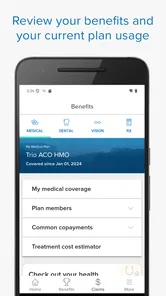
Analysis by Reviewed
I find the most useful idea behind Blue Shield of California straightforward: it puts health-plan information within reach when a practical question comes up. Instead of treating insurance as paperwork to deal with only when something goes wrong, the app gives members a place to check the details that can shape an everyday decision. That is a worthwhile role for a medical app, although its usefulness depends on being enrolled in a Blue Shield of California plan.
Why having plan details close at hand matters
Health coverage questions often arrive at inconvenient times: while arranging an appointment, sorting out a bill, or trying to understand what a claim means. In those moments, having a phone-based way to review plan information can be more convenient than searching through old documents or signing in through a browser. I would think of this app less as a replacement for understanding your policy and more as a practical reference for checking it when you need to make a next move.
The distinction matters. An insurance app can help you look up information, but a screen cannot make every coverage decision simple or remove the need to confirm confusing details. I would use it to get oriented, then contact support when a cost or coverage question could affect a treatment decision. That combination—quick self-service for routine checks and a person for the unclear cases—is more realistic than expecting any app to resolve every insurance concern on its own.
Getting Started with Blue Shield of California
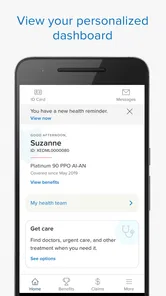
First things first, let’s talk about the user-friendly interface. As soon as you open the app, you’re welcomed with a clean and intuitive design that doesn’t leave you scratching your head. Whether you’re tech-savvy or not, navigating through Blue Shield of California is a breeze. Signing up is straightforward, and you’ll be up and running in no time, accessing all your insurance details in one place.
Features Worth Noting
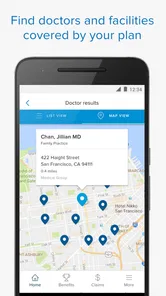
Now, let’s get into the juicy bits. What exactly can you do with this app? For starters, you can easily view your plan details, which is super handy when you need to quickly check your coverage. Need to find a doctor or hospital? No problem, the app’s got you covered with its provider search feature, which helps you find in-network healthcare professionals and facilities near you.
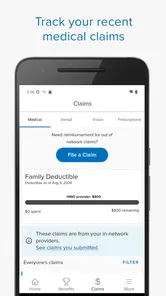
But wait, there’s more! Ever experienced the hassle of tracking your claims? With the app, you can effortlessly view your claims history and see exactly what’s been processed. No more guessing games or surprise bills coming your way. Plus, if you’re someone who likes to keep tabs on your spending, the app allows you to view your deductible and out-of-pocket maximums, helping you manage your healthcare budget efficiently.
A useful routine before appointments
For a realistic example, imagine you are choosing between scheduling with a familiar clinic and looking for another option nearby. I would check the provider search first, then review the plan details before booking. After care, I would revisit the claims history and cost information when they become available, rather than assuming a claim has been settled just because an appointment is over. This simple sequence can help you ask more focused questions and keep the insurer’s view of the visit in one place.
More From Our News Desk

 Gmail
Gmail in a Busy Inbox: Who Benefits Most?
From first account to crowded workday, Gmail earns its place through dependable search and flexible sorting—but its best fit depends on how much inbox maintenance you can tolerate.

 Prime Video
Switching to Prime Video: What Changes in Your Viewing Routine
Prime Video can make a compelling second home for streaming, but switching means learning a different catalog, rental layer, and route from browsing to playback.

 Universal TV Remote Control
 Works Best as a Reliable Backup
A phone remote earns its place through quick setup and reliable habits. Here is how to get more from Universal TV Remote Control—and where its limits show.

 Weather - By Xiaomi
Weather by Xiaomi Review: Clear at a Glance, Less Clear Up Close
Xiaomi’s weather app makes everyday forecasts quick to scan, but its calm surface can leave useful details and recovery paths harder to find than they should be.

 X
X Under Pressure: Can It Recover When Posting Goes Wrong?
A resilience-focused review of X, examining setup, mistaken posts, interruptions, weak connections, and the gaps that matter when recovery needs to be dependable.

 Clash of Clans
 Is Won Between the Battles
Its raids are quick; its community is a long-term project of coordination, teaching, rivalry, and shared responsibility—with all the friction that entails.
Latest News



A small but useful habit is to check the plan information before calling a provider, so you can explain what you are trying to verify instead of making a vague coverage inquiry. For a medication, checking the pharmacy options and price information before requesting a refill can also help you compare the available route with your usual routine. These checks are most valuable as preparation; for an urgent medical concern, I would prioritize care rather than spend time navigating insurance screens.
Prescription Management Made Easy
For those of us who rely on prescriptions, the app offers a neat pharmacy feature. You can manage your prescriptions, order refills, and even check the price of medications—all from the palm of your hand. It’s like having a personal pharmacy assistant right in your pocket!
That convenience is especially helpful when you want to check a medication cost before acting, or when a refill is part of a busy week and you would rather handle it from your phone. I would still treat displayed pricing as a planning aid and confirm any unexpected difference with the pharmacy or insurer before making a change to a prescription. The app can make the insurance side easier to handle, but medication decisions should remain grounded in advice from a qualified health professional.
Customer Support at Your Fingertips
We all know how frustrating it can be when you need help and can’t find it. Thankfully, the app includes a customer support feature that connects you with representatives who can assist with any questions or issues you might encounter. Whether it’s a query about your plan or assistance with the app itself, help is just a tap away.
Making the information work for you
The most useful way to approach the app is to arrive with a specific question rather than browse through every section without a purpose. Before a call, for example, I would note the service, provider, or claim I am asking about and check the relevant plan information first. That gives the conversation a clear starting point and can make it easier to distinguish a general benefits question from a question about one particular visit.
For household planning, the spending information can also be useful as a checkpoint, not a precise forecast. A deductible or out-of-pocket figure helps me understand where I stand within the plan, but I would not use it alone to predict the final cost of a treatment. The service, provider, claim processing, and coverage terms all matter. Keeping that distinction in mind makes the app more useful without giving a displayed number more certainty than it deserves.
If you help a family member manage appointments or paperwork, the app may help you prepare questions and keep track of the insurance side, provided you have the appropriate access to their account. I would avoid assuming that one person can view another member’s information automatically. For shared care, it is better to agree on who handles the account and have the member confirm access and privacy arrangements through the appropriate support channel.
Where it fits among insurance tools
Compared with a general health or hospital app, this one is focused on the insurance relationship: plan details, provider lookup, claims, spending limits, pharmacy tasks, and member support. That focus is a strength when your question is about your Blue Shield coverage. A provider’s own portal may be better for appointment-specific records or office logistics, while a general health app may suit someone looking for broader tracking tools. I would not install this as a substitute for those services; its value is having insurer-related tasks together.
There are trade-offs. The app is useful only to people whose plan is served by Blue Shield of California, and insurance terms can still be hard to interpret even when displayed clearly. A provider search is a starting point, not a reason to skip confirming that a particular clinician and service fit your coverage. Likewise, claims history can clarify what has been processed, but it is not the same as a final explanation of every amount you may owe.
It also helps to decide which source should answer which question. I would use the insurer app to orient myself on benefits, network options, and claims, then check with the provider for appointment availability and office-specific details. If the question concerns a bill, comparing the provider’s statement with the claim information can reveal what needs explaining, but the app should not be treated as a replacement for the formal bill or a direct conversation when the figures do not line up.
Who is likely to get the most from it?
I would recommend it most to current members who regularly check coverage, compare providers, keep an eye on claims or deductibles, or manage prescriptions. It is also a sensible option for someone who wants to prepare before calling customer support, rather than gathering plan details while on the phone. If you are not a Blue Shield of California member, or you mainly need a provider’s appointment tools, another app or the provider’s own service will be a better fit.
Blue Shield of California developed this free medical app, which is rated for everyone and has been available since October 30, 2013. Its current version is 11.10.1.1523, and it requires at least iOS 8.1. On Google Play, it has a 3.0 average from around 2,900 ratings, with about 1,100 written reviews and over 100,000 installs. I would treat those figures as context rather than a verdict: the more important question is whether you have a plan it supports and will use its insurance tools often enough to justify keeping it.
One practical question is whether this should be the only place you keep track of health expenses. I would not rely on it as a personal archive: save important bills and explanations through whatever record-keeping method you normally use, and use the app as a convenient way to review the insurer’s view. That is particularly sensible when a claim is still being processed or when you are comparing what the plan shows with paperwork from a provider.
Another decision is whether to install it if you only contact your insurer once in a while. If you rarely need to check benefits, claims, or prescriptions, the browser or a phone call may be enough for your habits. If you find yourself repeatedly searching for the same plan information, having those member tasks grouped in an app is more compelling. I would choose based on how often those questions arise, rather than assuming that every member needs a dedicated app.
For anyone deciding whether to keep it, I would try it around a real task: look up a provider before scheduling, review a claim after care, or check a prescription cost before a refill. If those steps make it easier to prepare and follow through, the app has earned a place on your phone. If you mainly need clinical records, appointment changes, or broad health tracking, a provider portal or another focused service will likely serve you better.
In conclusion, the Blue Shield of California app is a game-changer for anyone looking to simplify their health insurance management. With its user-friendly interface, comprehensive features, and convenient support options, it truly makes handling your health insurance as easy as pie. So, if you’re ready to take control of your healthcare journey, give this app a go!
Blue Shield of California Frequently Asked Questions
Is Blue Shield of California free to download, and who can use it?
Blue Shield of California is a free medical app developed by Blue Shield of California. It is intended for people who want easy access to their health plan information, with account-based features designed for members. The app is rated for Everyone, but using it to manage plan details requires signing in with the appropriate member credentials.
What is Blue Shield of California and how does it work?
Blue Shield of California is a health insurance provider offering a range of plans and services to meet the diverse needs of its members. The app allows users to manage their health plans, access policy information, view claims, and find in-network healthcare providers. It provides a convenient platform for members to handle their healthcare needs, including scheduling appointments and accessing virtual care options.
How do I access my insurance information on the Blue Shield of California app?
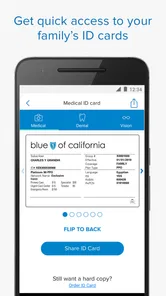
To access your insurance information, you need to download the Blue Shield of California app from the App Store or Google Play and log in using your member ID and password. Once logged in, you can view your policy details, insurance card, and claims history. The app offers a user-friendly interface to easily navigate and manage your healthcare information securely.
Can I use the Blue Shield of California app to find doctors and hospitals?
Yes, the Blue Shield of California app includes a feature to help you find doctors, hospitals, and other healthcare providers within your network. You can search by location, specialty, or name, and the app provides detailed information about each provider, including their contact information and patient reviews. This makes it easier to choose the right healthcare provider for your needs.
Does the Blue Shield of California app offer any virtual care options?
Absolutely, the app provides access to various virtual care services, allowing users to consult with healthcare professionals remotely. You can schedule video visits, chat with doctors, and get prescriptions refilled without needing to visit a physical office. This feature is particularly useful for managing non-emergency health issues and maintaining continuity of care conveniently from home.
Pros
- Easy access to healthcare providers.
- User-friendly interface.
- Quick appointment scheduling.
- Integration with health records.
- Comprehensive coverage options.
Cons
- Limited availability in some areas.
- Occasional app crashes.
- Customer support response time.
- Complex navigation for new users.
- Limited in-app payment options.