Blinq: Digital Business Card
- 1.37K
- 4.8
- Installs
- 1.00M
- Price
- Free

Screenshots
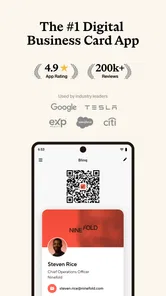
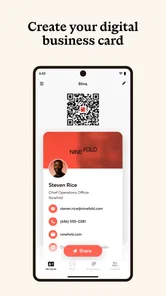
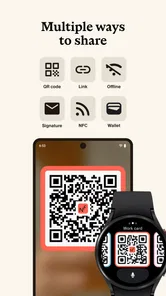
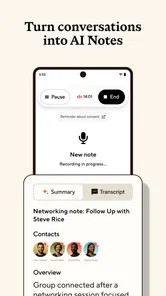
Analysis by Reviewed
When I judge a digital business card, I care less about novelty and more about what happens in a real conversation: can I share my details quickly, will they make sense to the recipient, and can I keep using the card without changing how I work? Blinq: Digital Business Card is aimed at people who want a phone-based alternative to carrying paper cards, especially when they meet new contacts regularly. It is a free business app from Blinq Technologies, with optional in-app purchases ranging from $9.99 to $87.99 per item. The app is rated for Everyone, so its intended audience is broad, though its value depends on whether digital sharing suits your work and the people you meet.
Choose by the way you actually network
Before switching, think about the settings where you exchange details. If you mostly meet people at events, conferences, or casual introductions, having your card ready on your phone can remove the small but awkward pause of searching a wallet. If your clients expect a printed card, or you work in places where phones are inconvenient, paper may remain the more dependable choice. I would treat a digital card as a practical format, not an automatic replacement for every situation.
A useful test is to ask what you want the other person to do after receiving your details. A digital card is most helpful when you want to make it easy for someone to save or revisit your contact information. It is less compelling if you only exchange details occasionally and already have a simple, reliable way to follow up. That distinction matters more than the appeal of going paperless.
Revolutionizing Networking
So, here's the deal. We all know the hassle of keeping track of countless business cards collected from networking events. Enter Blinq: Digital Business Card. This app is a game-changer for anyone looking to streamline their networking process. No more fumbling through your wallet to find that one card you need. With Blinq, all your contacts are just a tap away on your smartphone.
Easy to Use, Easy to Share
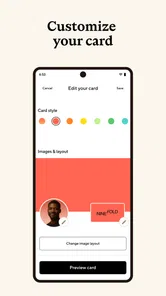
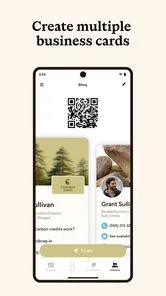
The first thing I noticed about Blinq is how user-friendly it is. Setting up your digital business card is a breeze. You can personalize it with your name, job title, company, and even add a profile picture. Sharing your card is just as simple. Whether you're at a conference or a casual meetup, you can share your card via QR code, email, or even text message. It's quick, efficient, and eco-friendly.
For a realistic example, imagine meeting a potential client in a busy café. Instead of writing your number on a napkin or hoping they keep a paper card, you can share the digital version while you are talking, then return to the conversation. A small but useful habit is to check your card before an event: make sure the details you want people to use are current, and decide whether a QR code, email, or text suits the moment. That preparation makes the handoff feel natural rather than turning the introduction into a phone-settings exercise.
There is also a social trade-off. A QR code is quick when both people are comfortable using their phones, while email or text can feel more familiar to someone who does not want to scan anything. I would keep the sharing method flexible instead of assuming every contact prefers the same one. And because a digital exchange can be easy to forget in a crowded event, I would still make a brief note of who I met and why; exchanging details is not the same as building a useful follow-up list.
More From Our News Desk

Weather by Xiaomi Review: Clear at a Glance, Less Clear Up Close

X Under Pressure: Can It Recover When Posting Goes Wrong?

Clash of Clans Is Won Between the Battles

Android Auto Makes the Case for Quieter Car Software

MobiOffice: Transforming Mobile Productivity with Seamless Integration

EA SPORTS FC™ Mobile Soccer: Redefining Mobile Sports Gaming
Integrations and Customizations
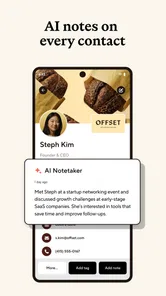
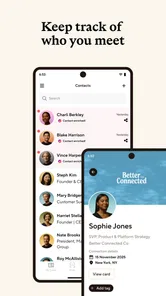
One of the standout features of Blinq is its seamless integration with other apps. Whether you're a Google Contacts fan or prefer using your CRM system, Blinq has got you covered. This app ensures that your contacts are always up-to-date and organized. Plus, you can customize your card to reflect your personal brand. Want to add your social media links? Go ahead! Blinq lets you tailor your card to suit your unique style.
For freelancers and people whose work identity changes between projects, the ability to shape a card around a professional profile can be more useful than a rigid paper template. I would keep the card focused, though: a clear name, role, and the contact routes you genuinely want people to use are easier to act on than an overloaded collection of links. Before sharing, consider whether every social profile belongs in a business introduction. A little editing can make the card feel deliberate and help the recipient spot the next step.
Compared with a basic contact entry or a photo of a paper card, Blinq puts the exchange in a shareable card format and offers several ways to pass it along. A standard address book is still better for people who mainly need to store details they already have, while paper can be easier when a recipient prefers something tangible. I would not assume that any contact or CRM connection removes the need to check your own workflow; if your business relies on a particular system, test how the app fits your routine before making it the central place for networking.
Why Go Digital?
Now, you might be wondering, "Why should I switch to digital business cards?" Well, let me tell you, it's all about convenience and sustainability. With Blinq, you’re not just saving trees; you're also ensuring that your contact information is never lost or forgotten. Plus, let's be honest, pulling out your phone to share your details is way cooler than handing over a paper card.
The main friction is that a phone-based exchange depends on the other person being willing and able to use a digital method. Battery concerns, poor signal, a formal setting, or simply a preference for paper can all make the old-fashioned card more convenient. I would carry a few paper cards if I often meet people in those circumstances, rather than expecting one format to work everywhere. Digital sharing is strongest when it makes a normal interaction easier, not when it becomes a point of resistance.
The app is free to start, but the presence of paid items means I would look at the available purchase options before relying on any paid capability for work. You do not need to treat a purchase as part of the basic decision: first see whether the free experience handles the way you share and maintain your card. Blinq has an average rating of 4.9 from around 24,000 ratings, and it has been installed over 500,000 times. Those figures suggest it has attracted a substantial audience, but they cannot tell you whether its sharing style suits your clients.
It has been available since July 1, 2019, and the practical question for a new user is less about how long it has existed than whether it fits today’s routine. If you switch, update the contact details you use most often, choose a simple card layout, and try sharing it with a colleague before using it at an important meeting. That small rehearsal can reveal whether your information is easy to read and whether the exchange feels comfortable. If you prefer a physical handout or rarely network, there may be little reason to change your habit.
Make the handoff work in a real conversation
One practical detail I would plan for is the order of the exchange. Introduce yourself and explain why you are sharing your details before bringing out the phone; otherwise, the screen can interrupt the conversation and make a simple introduction feel transactional. If the other person is in a hurry, offer the quickest method that feels comfortable to them rather than walking them through several choices. The card should support the conversation, not become its main event.
For someone who attends several kinds of meetings, it is worth deciding which details belong on a broadly shared card and which are better provided only when relevant. A freelancer might want a professional email and portfolio link up front, while a recruiter may prefer a direct work contact route. I would avoid treating a digital card as a miniature website: too many destinations can make it harder for a new contact to know what to do next. A focused profile is easier to scan and less likely to send someone down an unrelated path.
Another useful habit is to check the card whenever your role, preferred contact method, or public-facing profile changes. That is especially relevant if you work across projects and have different ways of presenting yourself in different settings. A card that looks polished but points to an old address or an inactive profile can undermine the convenience it is meant to provide. Before a meeting where introductions matter, I would open the card once and make sure the information still reflects how I want people to reach me.
Where a different format is the smarter choice
Blinq is a poor fit for people who mainly collect contacts from others rather than share their own details. A phone’s ordinary contacts app is more direct for storing a number someone has already given you, and a spreadsheet or dedicated relationship workflow may be preferable when the important task is tracking conversations and follow-up dates. A shareable card can help people receive your details, but it should not be mistaken for a complete contact-management practice.
Paper also retains an advantage in settings where handing something over is part of the expected etiquette, or where the recipient does not want to use a phone during the conversation. If your work depends on that familiar exchange, keeping printed cards may be simpler than asking every contact to adapt. I see the strongest case for Blinq as a complement to those options: use it when a fast digital handoff is natural, and keep another route ready when it is not.
There is a small switching cost even when the app itself is free. You need to prepare accurate details, decide how much of your professional identity to show, and get comfortable sharing the card without slowing down an introduction. If you already have a paper card people recognize, you may also need to explain the new method to regular contacts. I would test the change with colleagues or friendly clients first, then use it more widely only if the exchange feels easier for both sides.
Questions about paying are best handled by separating the core decision from optional extras. You can begin without treating an in-app purchase as necessary, then consider an item only if you have identified a specific need it addresses. The listed purchase range runs from $9.99 to $87.99 per item, so I would review what is included before committing rather than assuming every paid option is relevant. For an individual who only needs a straightforward way to present contact details, the sensible first step is to see how the free experience fits their routine.
Who will get the most from it?
I would recommend trying Blinq if you regularly introduce yourself to clients, collaborators, or people at professional events and want to share contact details without carrying a stack of cards. Its business focus, flexible handoff methods, and customizable profile make it a practical option for people whose work involves frequent introductions. Blinq Technologies has built an app that has been available since July 1, 2019, and its average rating is 4.9 from around 24,000 ratings, with over 500,000 installs. That reach is encouraging context, but personal fit still depends on the people you meet and how they prefer to exchange information.
I would skip it if networking is rare in your week, your contacts expect physical cards, or you need a system whose main job is to organize long-term relationships rather than share a profile. The app is in the business category and has an Everyone age rating, but those broad labels do not make it useful for every working style. If you mostly exchange details in formal, low-tech, or phone-free situations, paper or a simple written contact exchange may be more dependable.
In conclusion, Blinq: Digital Business Card is a must-have app for modern professionals. It simplifies the way we network and keeps us connected in an ever-evolving digital world. So, if you're ready to upgrade your networking game and leave a lasting impression, give Blinq a try. Trust me, your future self will thank you!
My recommendation is strongest for freelancers, consultants, recruiters, and event-goers who regularly introduce themselves and want a card they can share from their phone. I would skip it if you rarely exchange details, need a paper-first approach, or expect a digital card alone to manage your relationships and follow-ups. For everyone else, start with the free option, set up a concise profile, and use it alongside paper when the room calls for that. That gives you a low-pressure way to see whether digital business cards genuinely make networking easier for you.
Blinq: Digital Business Card Frequently Asked Questions
What is Blinq, and who might find it useful?
Blinq is a business app built around smart digital business cards. It may suit people who want a convenient way to present and share professional contact details while networking, rather than relying only on printed cards. The app is free to download, and its content rating is Everyone, making it accessible to a broad range of users.
Can I share a Blinq card with someone who does not use the app?
Blinq cards can be shared through options such as QR codes and email, as well as directly through the app. These methods can make it easier to pass along your professional details without requiring the other person to start by creating a card of their own. As with any digital contact exchange, choose the details you are comfortable sharing.
Can I use Blinq for more than one professional role or purpose?
A digital business card can be useful in different professional settings, such as introducing yourself at a networking event or sharing contact details with a prospective client. Blinq is focused on creating and sharing cards, so it may be worth considering whether that purpose matches how you expect to use it. The information you place on a card can help reflect the role or professional identity you want to present.
Is Blinq: Digital Business Card free to download, and are there in-app purchases?
Blinq is free to download, so you can get started without paying an upfront purchase price. The app also offers in-app purchases, with listed items ranging from $9.99 to $87.99 each. Consider whether its available features fit your needs before choosing any paid option; downloading the app does not mean you have to make an in-app purchase.
Who is Blinq designed for, and is it suitable for a first-time user?
Blinq is a business app for people who want to share their professional contact details digitally. Its focus on creating a card and sharing it through familiar options such as QR codes, email, or the app makes the basic purpose easy to understand. It is rated for Everyone, so the content rating does not restrict it to adults.
Pros
- Easy to create and share digital business cards.
- Customizable design options available.
- Environmentally friendly
- no paper needed.
- Syncs with contact management systems.
- User-friendly interface for all ages.
Cons
- Limited free features
- premium upgrade needed.
- Offline access to cards not available.
- Occasional sync issues reported.
- Limited design templates in free version.
- Some features require stable internet.











