Bleacher Report: Sports News
- 37.71K
- 1.4
- Installs
- 10.00M
- Price
- Free

Screenshots

Analysis by Reviewed
I tend to judge a sports app by one simple question: does it help me find the updates I care about without making me sift through everything else? Bleacher Report: Sports News is built around that challenge. Its main appeal is bringing team-focused news, scores, video, and alerts into one place, which can be useful when my sports interests span more than one league. It is less convincing if I want a bare-bones scoreboard or coverage devoted to just one club.
A personalized feed is the central idea
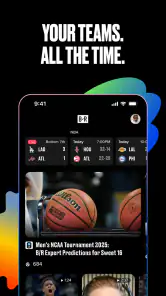
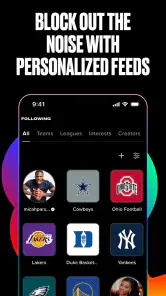
The most useful idea here is personalization: rather than opening a general sports site and searching through every headline, I can shape the feed around teams and sports I care about. The practical benefit is less sorting when I only have a few minutes. It also means the app makes the most sense when I follow several teams or leagues and want one place to check in, instead of moving between separate team pages.
Bleacher Report is a free sports app from Bleacher Report Inc., and it has been around since May 23, 2011. It covers a broad mix of sport, with its focus including NFL news, college football scores, NBA stats, NHL alerts, and MLB highlights. The breadth is handy, but it is also a trade-off: a fan who follows only one club may prefer that team’s official app for club-specific information, while a fan following several competitions may value having the wider selection together.
Using the feed for everyday sports updates
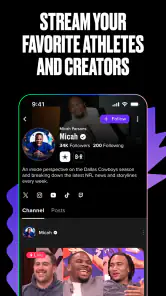
One of the standout features of the Bleacher Report: Sports News app is its ability to tailor content just for you. When you first launch the app, it asks for your favorite teams and sports. This means you get a personalized feed filled with articles, scores, and videos that are relevant to your interests. It's like having a sports concierge right in your pocket!
Making the feed useful in a busy day
In practice, I’d use that setup as a quick briefing rather than treating it like a complete record of every game. For example, on a workday when I can’t watch a match, I can check the feed during a break for a story or score connected to the teams I selected. A useful habit is to choose the teams I genuinely follow first, then add broader sports only if I want more headlines; otherwise, a personalized feed can still feel crowded simply because I asked it to cover too much.
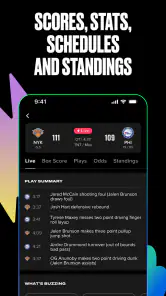
That distinction also helps answer whether it replaces a dedicated live-score tracker. I see it as a better fit for mixing news, video, and scores than for someone who wants nothing but a compact scoreboard. A specialist scores app may be quicker for checking several fixtures at once, while this one’s appeal is the combination of team-focused updates and editorial coverage. If I want context around a result as well as the result itself, that broader approach is more useful.
Keeping alerts helpful rather than noisy
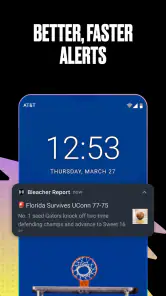
Let's face it, life gets busy, and sometimes it's hard to keep track of when your team is playing. With this app, you can set up real-time alerts for your favorite teams. It'll notify you of game start times, score updates, and even breaking news. No more FOMO (fear of missing out) when it comes to your beloved sports teams!
More From Our News Desk

Weather by Xiaomi Review: Clear at a Glance, Less Clear Up Close

X Under Pressure: Can It Recover When Posting Goes Wrong?

Clash of Clans Is Won Between the Battles

Android Auto Makes the Case for Quieter Car Software

MobiOffice: Transforming Mobile Productivity with Seamless Integration

EA SPORTS FC™ Mobile Soccer: Redefining Mobile Sports Gaming
Alerts are most valuable when I’m following a game but can’t keep the app open. I’d keep notifications focused on a small set of teams, since updates for every sport I casually browse could turn a helpful nudge into background noise. If I’m watching live, I may not need every score notification; if I’m away from a screen, they can make it easier to catch the important moments without repeatedly checking manually.
Choosing a useful routine
A practical way to get value without letting sports updates take over the day is to separate the quick check from the deeper read. I’d open the feed once during a break, scan for developments involving the teams I selected, and save longer reading for when I have time. That makes the app a convenient front door to coverage rather than an endless scroll I feel obliged to keep refreshing.
For a busy evening with several games underway, the same approach helps me decide what deserves attention. I can use team-focused updates to spot a result or story, then open a fuller article when the headline raises a question. If the only thing I need is the current score for many simultaneous games, a dedicated scoreboard remains the more direct tool; the advantage here is the chance to move from a score into related coverage.
Navigation and the mix of formats
The app also features a slick and intuitive design, making it easy to navigate through the sea of sports content. You can quickly swipe through different sections like "Top Stories," "Scores," and "Videos." The user experience is smooth, and the design is easy on the eyes, which is a huge plus in my book.
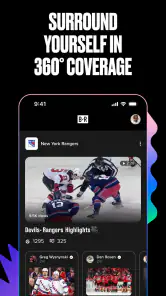
Having several kinds of coverage together changes how I use it: a headline can lead to a video or a score check without making me switch to a separate sports destination. That is convenient when I’m catching up casually, but it also means the experience is broader than a utility designed only to report numbers. I’d treat the sections as different ways to follow a story, not as a promise that every fan will want every format.
Fan discussion is an optional layer
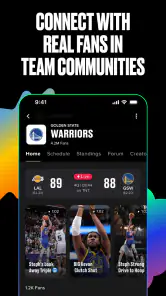
What I love about the Bleacher Report app is the sense of community it fosters among sports enthusiasts. You can comment on articles, share your thoughts, and engage in discussions with fellow fans. It's like having a digital sports bar where you can debate the latest trade rumors or celebrate a big win together!
That social side is a bonus rather than the main reason I’d choose it. I’d read comments when I want fan reactions after a close game, but I wouldn’t treat discussion as a substitute for reporting or a calm source of analysis. If I prefer to follow scores quietly and avoid fan debate, I can simply focus on the news and video portions instead.
It also helps to decide what I’m looking for before opening a comment thread. Reactions can add a sense of how a result is landing with other fans, while a factual question about a lineup or a game situation is better answered by the article or a specialist source. That small distinction keeps discussion entertaining without asking it to do a job it is not meant to do.
Editorial coverage for fans who want context
If you're looking for in-depth analysis and exclusive content, the app has you covered. From expert opinions to player interviews, there's always something new to dive into. I found myself scrolling through articles late into the night, getting lost in the world of sports.
There is a large audience around the app: it has over ten million installs, though its average rating is 1.4 from around 177,000 ratings. I wouldn’t use that score alone to decide whether it suits me, but it is a sensible reason to approach it with realistic expectations and judge the experience on my own device. The current version is 10.18.0.67, and it runs on Android 8.0 or later. It is rated Everyone 10+, and while the app is free to download, it offers in-app purchases ranging from $0.99 to $49.99 per item.
What the rating and purchase model mean for a new user
The low average rating is worth weighing before I make this my only source for sports coverage. A rating cannot tell me whether the issues behind it would affect my own routine, but it does make a cautious trial more sensible than assuming the app will be a perfect fit. I’d start by following a few teams and checking whether the feed is relevant and the alerts are useful, rather than building my entire sports habit around it on day one.
The app is free to download, so trying that focused setup does not require an upfront purchase. The listed in-app purchases range from $0.99 to $49.99 per item, which is a broad span; I would check what an individual purchase offers and whether I actually need it before spending. A fan who only wants everyday headlines and scores can first see how the free experience fits, rather than treating a purchase as a necessary part of getting started.
Who gets the most from a multi-sport feed
I’d recommend it most to fans who follow more than one team and want a regular blend of headlines, scores, videos, and alerts without opening several separate apps. It is also a reasonable choice if you enjoy reading reactions and analysis alongside game updates. Someone who wants a minimal, distraction-free scoreboard, follows a single team closely, or dislikes notifications and comment threads may be happier with a more focused alternative.
The strongest use case is a fan whose attention shifts between leagues over the week: perhaps following an NFL team, checking NBA developments, and keeping an eye on baseball highlights. A single personalized destination can reduce the small friction of remembering which app or site to open for each interest. The trade-off is that a broad feed may never feel as tailored as a club’s own channel for local news, roster details, or other team-specific priorities.
When another sports app is the better fit
If I care most about a fast glance at live fixtures, scores, and standings, a specialist scoreboard is likely the cleaner choice. If I follow one team above all others and want information centered tightly on that club, its official app may be more appropriate. Bleacher Report’s niche is the middle ground: a mix of selected-team updates and wider sports coverage, with articles and video alongside score information.
It is also not the right choice for someone who wants sports to stay entirely quiet in the background. Alerts can be useful when I’m away from a game, but they only help if I’m selective about what I follow. Likewise, a reader who finds comment sections distracting can ignore that part of the experience; there is no need to make social discussion the reason to install it.
A balanced way to try it
I’d begin with the teams I care about most, then use the app through an ordinary week rather than judging it from a single headline. That shows whether its mix of stories, scores, video, and alerts matches my habits. If the feed feels too busy, narrowing the teams and sports is a practical first adjustment; if I keep needing a more detailed scoreboard, that is a sign to pair it with a specialist tool or choose one instead.
For someone asking whether it can replace every other sports app, my answer is no—not for every kind of fan. It can reduce app-hopping for a multi-team follower who likes editorial context, but it does not make a focused live-score tool or a team’s own source irrelevant. I’d choose it for the combination, and keep another option only if a specific need, such as rapid fixture checking or one-club depth, matters more.
My verdict on Bleacher Report
In conclusion, the Bleacher Report: Sports News app is a must-have for any sports aficionado. It's packed with features that keep you informed, entertained, and connected with the sports world. So, if you haven't already, give it a download and elevate your sports news experience. Trust me, you won't regret it!
Bleacher Report: Sports News Frequently Asked Questions
How much space should I have available before installing Bleacher Report: Sports News?
Before installing Bleacher Report: Sports News, it’s sensible to check that your device has enough free storage for the download and installation. The space an app needs can vary with its version and device, so leave some room rather than relying on an exact figure. Keeping your operating system up to date can also help you avoid compatibility issues.
Can I personalize the app around the teams and leagues I care about?
Bleacher Report is designed to let users choose teams and sports to follow, so the experience can focus on the coverage they find most relevant. That can be useful if you want updates centered on a particular league or a handful of favorite teams instead of browsing every headline. You can adjust your selections as your interests change.
Does Bleacher Report: Sports News cover scores and highlights as well as articles?
Yes. Bleacher Report’s coverage includes sports news alongside scores, stats, alerts, and highlights. Its store summary calls out NFL news, college football scores, NBA stats, NHL alerts, and MLB highlights, giving fans several kinds of updates to explore. What appears most relevant to you can depend on the sports and teams you choose to follow.
Which devices can run Bleacher Report: Sports News?
Bleacher Report: Sports News is an Android app for devices running Android 8.0 or later. Before downloading, check your device’s operating system version and make sure you have enough storage for the app. If you use an iPhone or iPad, look for the app in the iOS App Store to confirm its availability and compatibility with your device.
Is Bleacher Report: Sports News suitable for younger sports fans?
The app has an Everyone 10+ content rating, so it is intended for users aged ten and older. Its sports coverage may include news, commentary, and other material related to current events in sports. Parents and guardians may want to consider whether that kind of content is appropriate for a younger user and review the app’s settings together.
Pros
- Real-time sports updates
- Customizable team alerts
- In-depth sports analysis
- Wide range of sports covered
- User-friendly interface
Cons
- Frequent ads disrupt experience
- Occasional app crashes
- Limited coverage of niche sports
- Slow load times on older devices
- Requires constant internet connection
- Category
- Sports
- Version
- 10.18.0.67





