

Birdfy
- 818.00
- 4.3
- Installs
- 100.00K
- Price
- Free

Screenshots
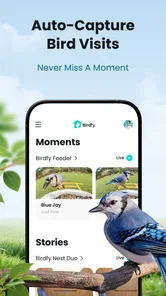
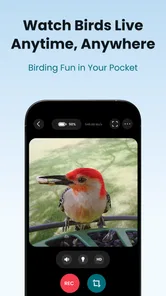
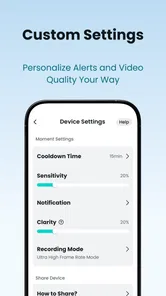
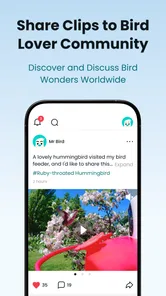
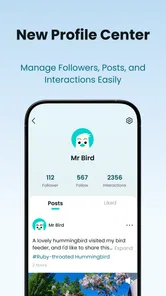
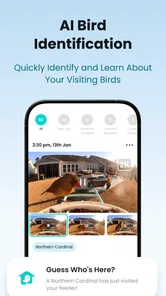
Analysis by Reviewed
Birdfy caught my attention because it turns a familiar backyard activity into something I can check from my phone. Developed by Netvue, Inc., this free app belongs to the video players and editors category, but its appeal is more specific than that label suggests: it is built around watching bird-related camera footage and making that experience easier to follow. The store summary, “The Bird Side of Life,” captures the mood, although my interest in it quickly moved beyond the novelty of seeing a bird appear on a screen.
After using it, I see Birdfy as an app for people who already enjoy observing birds, own compatible equipment, or want a more convenient way to keep an eye on activity outside. It is less convincing as a general-purpose video tool. That distinction matters, because someone looking for editing controls, filters, or a broad media library will probably feel more at home with a conventional video app. Birdfy has a narrower purpose, and its value depends on whether that purpose fits naturally into your daily routine.
What Birdfy feels like during the first week
The first few days are the easiest time to appreciate the app. Opening it to check whether anything is happening creates a small sense of anticipation: instead of waiting beside a window, I can use my phone to see whether the bird-feeding area has become active. That immediacy is the strongest part of the experience. It makes a quiet corner of the home feel connected to the outside world, even when I am busy elsewhere.
I also like that the app gives bird watching a more flexible rhythm. I do not have to plan a long observation session. A quick check while having coffee, during a break, or before leaving home can be enough. This is a useful difference from traditional bird watching, where the reward often depends on patience and being in the right place at the right moment.
The app’s free entry point makes that first experiment straightforward. Birdfy is rated for Everyone, so it is easy to imagine using it as a shared household activity rather than treating it as a specialist tool. Children can enjoy the surprise of spotting movement, while adults may appreciate the calmer, more observational side of the experience. I would still supervise younger users around any connected hardware, but the app itself feels approachable rather than intimidating.
One practical tip made a noticeable difference to my routine: I found it better to decide in advance when I would check the app instead of opening it every few minutes. Constant checking sounds harmless, but it quickly turns a relaxing activity into a loop of refreshing and waiting. Short, deliberate visits make the interesting moments feel more rewarding and reduce the sense that the app is demanding attention.
Birdfy’s current version is 1.20.10, and it requires Android 7.0 or later. That keeps it accessible to many Android users, although compatibility alone does not guarantee a smooth experience on every phone. Video-heavy apps can feel more comfortable on a recent device with a stable connection, especially if you are checking live activity rather than simply browsing static information.
More From Our News Desk

 Instagram
Instagram’s Power Comes From Its Place in Your Phone
A close look at how Instagram turns Meta’s reach, recommendation systems and everyday camera habits into durable platform power—and what that costs users.

 Gmail
GmailGmail in a Busy Inbox: Who Benefits Most?
From first account to crowded workday, Gmail earns its place through dependable search and flexible sorting—but its best fit depends on how much inbox maintenance you can tolerate.

 Prime Video
Switching to Prime Video: What Changes in Your Viewing Routine
Prime Video can make a compelling second home for streaming, but switching means learning a different catalog, rental layer, and route from browsing to playback.

 Universal TV Remote Control
Universal TV Remote Control Works Best as a Reliable Backup
A phone remote earns its place through quick setup and reliable habits. Here is how to get more from Universal TV Remote Control—and where its limits show.

 Weather - By Xiaomi
Weather by Xiaomi Review: Clear at a Glance, Less Clear Up Close
Xiaomi’s weather app makes everyday forecasts quick to scan, but its calm surface can leave useful details and recovery paths harder to find than they should be.

 X
XX Under Pressure: Can It Recover When Posting Goes Wrong?
A resilience-focused review of X, examining setup, mistaken posts, interruptions, weak connections, and the gaps that matter when recovery needs to be dependable.
Latest News



The first-week appeal also comes from the emotional quality of the content. Watching a bird investigate a feeder feels different from scrolling through ordinary entertainment clips. The subject is slower and less predictable, which can be refreshing. I found myself paying more attention to small changes in behavior instead of consuming one clip after another.
A realistic everyday routine
Imagine working from home on a rainy morning. You have no time for a walk, but you open Birdfy during a short break and notice activity outside. You watch for a moment, return to work, and later check again while preparing lunch. That is where the app makes sense: it fits around an existing day without requiring a full hobby session.
For a family, the same routine can become a small shared ritual. One person notices activity and tells everyone else to look. For someone who lives in an apartment or has limited mobility, remote viewing can also make nature observation more accessible. Those are meaningful use cases, but they depend on having something worthwhile to watch. Without regular activity, the app’s charm can fade quickly.
Where the value holds up from month to month
The bigger question is what remains after the initial excitement. In my experience, Birdfy has lasting value when it becomes part of a predictable observation habit rather than a novelty app. The useful pattern is not “open it whenever I am bored,” but “check it at a few natural points in the day and notice what has changed.” That turns brief visits into an ongoing record of local activity, even if the app is not being used as a formal scientific journal.
Its month-to-month appeal is strongest for people who enjoy noticing patterns. You may begin to recognize which times are more active, which weather conditions make the area quieter, or how often the feeder needs attention. The app encourages this kind of observation because the footage is connected to a real place rather than an endless catalogue of unrelated videos.
That connection is also its main limitation. A general video platform offers constant variety, recommendations, and immediate entertainment. Birdfy offers relevance instead of volume. If your surroundings are quiet, the app cannot manufacture interesting activity without losing the very quality that makes it appealing. I would not choose it as my primary video app, and I would not recommend keeping it installed solely for occasional random viewing.
The free price helps with that decision because trying it does not require an upfront purchase. However, in-app purchases range from $2.49 to $104.99 per item, so I would approach optional spending carefully. The sensible way to judge the app is to use its basic experience long enough to see whether it genuinely fits your routine before paying for anything. A feature can sound attractive during the first enthusiastic week but feel unnecessary once the novelty settles.
Birdfy has reached over 100K installs and holds an average rating of 4.3 from around 1.4K ratings, with 817 reviews. Those figures suggest a real audience and generally positive reception, but they should not replace personal testing. The app’s usefulness is unusually dependent on your environment, your interest in birds, and whether you have compatible equipment or a reliable source of footage.
One non-obvious benefit is that the app can encourage better attention rather than simply more screen time. I noticed that short viewing sessions led me to look away from the phone and observe the actual surroundings afterward. That makes Birdfy work best as a bridge to outdoor awareness, not as a substitute for it. If you use it only as another feed to scroll through, you miss much of what makes the concept distinctive.
What makes continued use worthwhile
I would keep Birdfy installed for three reasons. First, it provides a convenient way to check activity when I cannot be near the viewing spot. Second, it supports a gentle routine that can be shared with other people. Third, it gives ordinary moments outside a sense of continuity. The value is cumulative: one visit may be forgettable, but repeated observations can make the space feel familiar and alive.
That continuity is especially useful for someone who is learning to identify birds or simply becoming more observant. I would not treat the app as a complete birding education tool, but it can provide repeated exposure to real behavior. The best approach is to pair viewing with your own notes or a separate identification reference when you want to learn more. Birdfy supplies the moment; your curiosity supplies the deeper study.
Another practical insight is to use the app as a prompt for maintenance rather than ignoring the physical setup. If activity drops, I would not immediately assume the app is at fault. The feeder area may need attention, the surroundings may have changed, or the birds may simply be elsewhere. This mindset prevents a common mistake: expecting the software to solve a problem that actually belongs to the outdoor equipment or environment.
The maintenance burden behind the relaxing experience
Birdfy feels simple when I am only watching, but the wider experience still depends on care outside the app. A camera or feeder-based setup needs to remain usable, positioned sensibly, and worth visiting. Dust, weather, food levels, insects, and changes in the surrounding area can all affect what appears on screen. The app may make observation easier, but it does not remove the responsibilities of maintaining the place being observed.
This is important for anyone attracted by the idea of passive monitoring. Birdfy is not a “set it and forget it” solution in the broad sense. The software can be checked from indoors, yet the physical environment still needs occasional attention. I would build a quick inspection into an existing household routine instead of treating it as a separate chore. That keeps the effort manageable and makes it easier to notice when the viewing experience is changing for a practical reason.
Connectivity is another part of the maintenance equation. Live or camera-based viewing is naturally more sensitive to network conditions than an ordinary offline video player. If a feed takes too long to load or becomes unreliable, the frustration can quickly outweigh the pleasure of checking it. I would test the app from the rooms where I actually plan to use it, not only beside the router or during an ideal setup session.
The phone itself matters too. Video viewing can consume attention and may be less comfortable on a small or older display. For quick checks, that is not a serious problem. For longer observation, a larger screen is more pleasant, especially when several people want to watch together. Birdfy is therefore best treated as a convenient window, not automatically as the perfect viewing device for every situation.
I also recommend setting expectations about missed moments. Bird activity is unpredictable, and no app can guarantee that the exact event you hoped to see will be available when you open it. If you need complete recording coverage or a carefully organized archive for serious documentation, a more specialized camera system may suit you better. Birdfy’s strength is casual access and ongoing interest, not necessarily rigorous evidence collection.
Small habits that reduce friction
I found three habits particularly useful. I check at planned times, I keep visits short unless something genuinely interesting is happening, and I inspect the physical setup when the feed becomes unusually quiet. These habits prevent the app from becoming either a distraction or a source of unnecessary troubleshooting.
I would also avoid judging the app after a single inactive day. A quiet period is part of the subject, not automatically a failure. The better test is whether Birdfy remains pleasant across changing conditions. If you enjoy the slower stretches as much as the surprising appearances, it has a chance of becoming a lasting hobby companion.
For households sharing one device, it helps to agree on how the app will be used. Otherwise, everyone may check independently and turn a calm activity into repeated interruptions. A shared routine, such as looking together after dinner, creates more value than several disconnected glances. This is a small but important trade-off: the app can encourage connection, but only if people use it intentionally.
Where fatigue begins after the novelty
The first source of fatigue is repetition. The same viewing angle and the same general activity can lose its impact if I expect constant surprises. Birdfy does not have the endless novelty of social media, and that is both a virtue and a limitation. It avoids the exhausting flood of content, but it also means the app cannot always refresh my interest on demand.
The second is the gap between curiosity and commitment. Someone may download Birdfy because the idea sounds charming, then realize that they do not actually want to maintain a feeder area or check footage regularly. In that case, the app is not doing anything wrong; it simply reveals that the hobby requires more involvement than the initial concept suggests.
Optional purchases can create another point of hesitation. Because the app is free to install but includes paid items, I would be cautious about spending based on the excitement of the first few sessions. The right question is not whether an extra feature looks appealing in isolation, but whether it solves a recurring problem in your own routine. If you rarely open the app, even a modest purchase may add little value.
Compared with ordinary video players and editors, Birdfy is more focused but less versatile. A standard player is better for watching your own films, downloaded clips, or a broad selection of content. An editor is better when your goal is trimming, combining, captioning, or exporting videos. Birdfy makes more sense when the subject itself is the reason you are opening the app. Choosing it over a general alternative is therefore a lifestyle decision, not a technical upgrade for every kind of video task.
Compared with simply looking through a window, Birdfy offers convenience and remote access, but the direct experience remains richer. Real-world observation gives you sound, weather, distance, and a stronger sense of place. I would use the app when I cannot be outside, then step away from the screen when possible. Treating it as a replacement for nature would make the experience flatter.
People who should skip Birdfy include users seeking a full video-editing suite, viewers who want a constant stream of entertainment, and anyone unwilling to maintain the physical environment connected to the viewing experience. It may also disappoint someone expecting every visit to produce a memorable sighting. The app rewards patience and repeated attention more than instant gratification.
My long-term verdict on Birdfy
After the novelty fades, Birdfy earns space on my phone when it supports a real habit. Its best quality is not that it makes birds available on demand; it is that it lowers the barrier to noticing them at all. A quick remote check can fit into a busy day, and repeated use can turn a feeder or outdoor camera into a small source of continuity.
My recommendation is strongest for bird enthusiasts, families, people with compatible viewing equipment, and anyone who enjoys quiet observation. I would suggest starting with the free experience, using it at planned times, and paying attention to how often it genuinely adds something to the day. If you find yourself checking out of curiosity and then looking more closely at the world around you, the app is doing its job well.
My recommendation is weaker for users who want a conventional video tool. Birdfy is not a replacement for a broad player or an editing app, and its narrow focus means that inactive periods are unavoidable. The physical setup also needs care, while connectivity and optional purchases can add friction. Those are not reasons to dismiss it, but they should be part of the decision before the first-week excitement turns into disappointment.
Overall, I see Birdfy as a focused companion rather than an essential utility. Its free access, Everyone rating, and approachable design make it easy to try, while the backing of Netvue, Inc. and its established user base give it a credible place in its niche. Its lasting value comes from turning occasional curiosity into a sustainable observation habit. If that sounds like something you would genuinely keep doing, Birdfy is worth a place in your routine; if you only want quick entertainment, a regular video app will serve you better.
Birdfy Frequently Asked Questions
Is Birdfy free to download, and are there purchases inside the app?
Birdfy is free to download, so you can install the app without an upfront purchase. Some features or services may involve in-app purchases, with options ranging from $2.49 to $104.99 per item. Costs can depend on the product or plan you choose, so review the purchase details in the app before confirming anything. You can also use the app alongside compatible Birdfy hardware.
What phones and operating systems can run Birdfy?
Birdfy is available for Android and iOS users, and the Android version requires Android 7.0 or later. Before downloading, check your device’s operating system version and make sure you have enough space and a reliable internet connection for setup and video features. The app is developed by Netvue, Inc. and is categorized among video players and editors, reflecting its camera and footage features.
What is Birdfy, and what can I use it for?
Birdfy is a smart bird-feeder and bird-watching platform designed to help you observe birds more conveniently. When paired with a compatible Birdfy feeder or camera, the app lets you watch live footage, review recorded visits, receive notifications, and organize bird sightings. It is especially useful for people who enjoy nature, backyard wildlife, and identifying visiting birds without constantly monitoring the feeder.
Do I need a Birdfy device to use the app?
The Birdfy app is primarily designed to work with Birdfy smart bird feeders and compatible cameras, so its main features generally require supported hardware. Without a connected device, you may be able to explore parts of the application, but you will not get the full experience, including live streaming, motion alerts, cloud recordings, and automatic bird recognition. Check device compatibility before downloading or purchasing equipment.
Does Birdfy identify birds automatically?
Birdfy can provide automatic bird identification when the connected feeder or camera and your subscription or account plan support this feature. Recognition results are helpful for learning about common visitors, but they should not always be treated as scientifically certain, particularly when images are blurry, lighting is poor, or several similar species look alike. You can still use the captured photos and videos for manual identification.
Pros
- Live bird identification makes backyard watching more interactive.
- Two-way audio lets you communicate with visitors near the feeder.
- Cloud storage helps review and share recorded bird activity.
- Motion alerts can notify you when birds arrive while you are away.
- The camera design blends naturally into many garden settings.
Cons
- Some advanced features require a paid subscription.
- Bird identification may be inaccurate in poor light or unusual conditions.
- Outdoor placement requires reliable Wi-Fi coverage.
- Frequent motion alerts can become distracting in busy areas.
- Battery-powered models may need regular charging in active locations.











