Bingel Video: HD Player Hub
- 6.00
- 4.0
- Installs
- 100.00K
- Price
- Free

Screenshots


Analysis by Reviewed
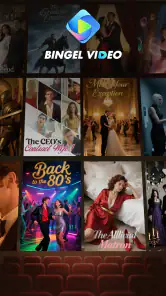
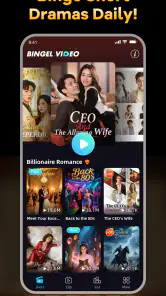
I opened Bingel Video: HD Player Hub expecting a straightforward place to watch short-form entertainment, and that is exactly the role it seems designed to fill. It sits in the video players and editors category, but my experience with it is closer to browsing a compact stream of short dramas and trending clips than using a traditional editing suite. The appeal is immediate: pick up your phone, find something brief, and start watching without turning the moment into a project.
That focus matters because many video apps try to do too much at once. They mix long-form viewing, creator tools, live broadcasts, social interaction, downloads, editing, and recommendations into one busy experience. Bingel Video: HD Player Hub takes a narrower path. Its store summary points to short dramas and trending clips in HD, and the app’s identity is easiest to understand when you treat it as a quick entertainment stop rather than a complete replacement for every video service.
I would recommend it most readily to someone who enjoys short episodes, wants something easy to sample, or often has only a few spare minutes. I would be more cautious with it for viewers who need a carefully organized personal library, advanced playback controls, or a dependable home for long films and full television seasons. The distinction between those two groups becomes clearer when following a normal viewing session from the first tap to the point where the app either satisfies the need or sends you back to another service.
From a spare moment to a finished viewing session
Starting with the right expectation
The first useful decision is deciding what you want from the app before opening it. If I have ten minutes while waiting for an appointment, short dramas and trending clips make sense. I can browse by interest, test a title, and stop when the time is up. If I am looking for a specific movie, a familiar television series, or a permanent media library, I would begin somewhere else instead.
This sounds obvious, but it prevents the most common disappointment. A short-video hub is judged unfairly when it is treated like a full streaming catalog. Bingel Video is better understood as a discovery-and-playback destination. The store short description calls it Bingel Video, while the fuller summary emphasizes short dramas and clips, so I approached it as a place for quick, visual browsing rather than a replacement for a specialist cinema app.
The app is free, which lowers the barrier to trying it. It is also marked for Everyone, making the basic audience broad rather than aimed at a narrowly defined age group. That does not mean every individual clip will suit every viewer, so I would still use ordinary judgment when handing the phone to a child or watching in a shared space.
Step one: browse before committing
My preferred workflow begins with sampling rather than choosing the first item that appears. Short-form catalogs can make several clips look equally attractive, and a few seconds of context can save the frustration of starting something that does not match my mood. I look for a clear premise, check whether the opening feels complete enough to hold my attention, and then decide whether to continue.
More From Our News Desk

Clash of Clans Is Won Between the Battles

Android Auto Makes the Case for Quieter Car Software

MobiOffice: Transforming Mobile Productivity with Seamless Integration

EA SPORTS FC™ Mobile Soccer: Redefining Mobile Sports Gaming

How Microsoft OneDrive Became a Mobile Productivity Giant

How Google Translate Breaks Language Barriers Effortlessly
This is one of the app’s practical strengths. Short dramas are easier to test than long programs because the commitment is smaller. A viewer who is unsure about a genre can explore without planning an entire evening around it. Trending clips serve a different purpose: they are useful when I want something topical or immediately watchable, but they may be less satisfying when I want a story with a strong beginning and ending.
A good habit is to separate discovery time from viewing time. I might spend a minute scanning, choose one promising item, and then stop browsing while it plays. Without that small boundary, the endless choice can become the activity itself. The app works best when browsing leads to a deliberate selection instead of replacing it.
Step two: watch in a situation that suits short video
For a realistic everyday example, imagine that I am waiting for a train with my headphones ready and only a short window before boarding. I open the app, browse the available dramas or clips, and choose something that can be enjoyed in a single sitting. If the train arrives during playback, the short format makes it easier to leave without feeling that I have abandoned a long story at its most important moment.
The same workflow fits a lunch break, a few minutes before bed, or a quick reset between household tasks. In each case, the value is not simply HD presentation. It is the combination of low commitment and fast access to something visual. That is a more specific benefit than saying the app is convenient: it changes the kind of viewing session I can realistically start.
On the other hand, I would not choose it for a family movie night where everyone expects a stable, substantial program. I would also avoid relying on it when I need precise continuity across several episodes. Short-form viewing rewards flexibility, while long-form viewing rewards structure, and those are different needs.
Step three: treat playback quality as part of the experience
The HD emphasis gives the app a clear presentation goal. For short dramas, image clarity helps facial expressions, subtitles, clothing details, and quick visual transitions remain readable on a phone. That is especially useful when a story depends on a reaction or a small clue rather than broad action.
Still, HD is not the same as a guarantee of a perfect viewing session in every situation. The final experience depends on the screen, connection, and surroundings. I would avoid judging the whole app from one crowded public network, just as I would not assume that a strong connection fixes every weakness in a catalog. The sensible approach is to use it where quick playback and clear presentation are more important than elaborate controls.
I also keep screen brightness and sound in mind. Short clips often rely on dialogue, so a noisy environment can make them less enjoyable than expected. Headphones help, but they also make the app less suitable for casual shared viewing unless I am comfortable passing the phone around. This is a small workflow detail, yet it affects whether the app feels effortless in real life.
Step four: decide what to do after a clip ends
The end of a short video is a useful handoff point. I can continue browsing, choose another clip, or close the app without a large unfinished commitment. That clean stopping point is one reason I find the format easier to fit around a busy day than a conventional episode that demands a longer block of attention.
My advice is to decide in advance whether the next action is “watch one more” or “stop now.” Short-video services are naturally good at encouraging another selection, and the low time cost can make several selections feel harmless. If I am using the app during a break, setting a personal limit keeps the tool aligned with the original purpose instead of quietly consuming the entire break.
The handoff between discovery and another service
Bingel Video does not need to win every part of my media routine to be useful. Sometimes it is the first step: I discover a style of short drama, decide that I want a longer version of that kind of story, and move to a more specialized streaming service. Other times it is the final step, giving me a complete little viewing experience when I do not want to search anywhere else.
This handoff is where the app compares most clearly with usual alternatives. A traditional streaming platform is generally better when I want seasons, recognizable franchises, profiles, and a planned watchlist. A social video network is often stronger for creator interaction and highly personalized community content. A dedicated media player is the better choice for files already stored on my device. Bingel Video’s place is narrower: it is for discovering and watching short entertainment inside its own viewing context.
That narrower role can actually be an advantage. I do not need to organize a personal collection before watching a clip, and I do not need to commit to a long program simply because I opened the app. The trade-off is that I should not expect the same depth of library management or the same sense of ownership that comes with a local player or a mature subscription service.
What the numbers suggest about trying it
The app has reached over one hundred thousand installs and holds a 4.0 average from around sixty ratings, with six written reviews. Those figures suggest that it has attracted a meaningful audience while still being a relatively focused product rather than a universally established video destination. I read that as a reason to try it directly, not as proof that it will match every viewer’s habits.
International News is listed as the developer, and the current release is version 1.0.6. The app was released on June 20, 2025, and it supports devices running Android 7.0 or later. For someone using an older Android phone, that minimum requirement is worth checking before planning a viewing routine. For most people with a compatible device, the more important question is whether short dramas and trending clips fit the way they already consume video.
Where the workflow feels smooth
The smoothest path is simple: open the app, scan for a short drama or clip, watch it in HD-oriented presentation, and leave when the moment is over. There is little need to prepare a library or make a long-term commitment. That makes the app approachable for casual viewers who do not want to spend time learning a complicated interface before seeing anything useful.
Another strength is the low-risk nature of experimentation. Because the content format is short, I can try an unfamiliar theme without sacrificing an evening. This is a non-obvious benefit for people who are tired of choosing between long programs. The app can function as a pressure-release valve: instead of asking “What series should I start?”, I can ask “What can I enjoy right now?”
It is also a reasonable option for shared discovery between friends. One person can suggest a clip, another can watch the opening, and the group can quickly decide whether it is worth continuing. That is more practical with short content than with a long film, although the experience is still better when everyone is comfortable viewing on one phone or sharing the same screen.
Where the workflow breaks
The flow becomes less satisfying when I need control rather than immediacy. Someone organizing a large personal collection, comparing multiple versions of a file, or depending on detailed playback behavior should look toward a dedicated player or a more established media platform. Bingel Video’s central promise is quick access to short viewing, not deep management of every possible video situation.
It can also fall short for viewers who dislike recommendation-led browsing. If I already know exactly what I want to watch, a focused search-and-library service may get me there faster. A stream of trending clips is useful for discovery, but discovery is not always the same as precision. People who prefer to plan their viewing in advance may find the format less comfortable than a catalog built around collections and watchlists.
Short dramas bring their own limitation: the compressed format can make a story feel abrupt. A viewer who values slow character development, carefully paced scenes, or long stretches of atmosphere may find the clips too quick even when the picture is clear. That is not a technical defect; it is a creative trade-off built into the type of content the app highlights.
I would also be careful about using it as the only video app on a device. Its role is complementary for me. I can use it for quick entertainment, then switch to another service when I want a full-length program, locally stored videos, or a more deliberate viewing archive. Treating it as one tool in a wider routine produces a more accurate and satisfying result than expecting it to cover every category.
Who should install it
I think Bingel Video is worth trying if you regularly watch on a phone, enjoy short dramas, like discovering clips without a long commitment, or need entertainment that can fit into unpredictable gaps. The free price makes that experiment easy, and the Everyone content rating gives it a broad starting audience, although personal supervision and common sense still matter for younger viewers.
It is particularly suitable for someone who wants a quick answer to the question, “What can I watch for a few minutes?” It is less suitable for someone asking, “Where can I manage my complete video collection?” That distinction is the clearest practical filter I can offer.
My recommendation after following the complete flow
After using the app as a start-to-finish short-video workflow, I see a focused and accessible tool rather than an all-purpose entertainment platform. Its strongest moment is the handoff from an empty few minutes to a watchable short drama or trending clip. The low commitment, HD-oriented presentation, free access, and support for older Android versions make it easy to test.
Its weaker moment comes when the viewing goal changes. Once I want a long story, a carefully managed library, or a player built around my own files, another option becomes more appropriate. I would not install Bingel Video expecting it to replace those services. I would install it as a lightweight companion for spontaneous viewing.
My bottom line is simple: choose Bingel Video when the outcome you want is a quick, clear short-video session, not a complete home for everything you watch. For that specific job, it has a sensible identity and a low barrier to entry. Just keep the workflow honest: browse with a purpose, watch what fits the moment, and switch to a more specialized alternative when your viewing needs become longer, more organized, or more demanding.
Bingel Video: HD Player Hub Frequently Asked Questions
Is Bingel Video: HD Player Hub suitable for all ages?
The app has an Everyone content rating, so it is intended for a broad audience. Its focus is short dramas and trending clips, but parents should still consider whether particular videos are appropriate for their children. The rating applies to the app, not necessarily to every video a user may choose to play or access elsewhere.
What should I know about the app’s availability and device requirements before downloading?
Bingel Video: HD Player Hub is a video player and editor app developed by International News. It was released on June 20, 2025, and its current version is 1.0.6. It requires Android 7.0 or later. The app is free and has over 100,000 installs, so check your device’s operating system before downloading.
What is Bingel Video: HD Player Hub used for?
Bingel Video: HD Player Hub is designed as a media playback hub for watching locally stored video content on a mobile device. Depending on the version and device, it may support common video formats, playback controls, subtitles, playlists, and basic library organization. It is best viewed as a convenient player rather than a guaranteed source of movies, television shows, or other copyrighted streaming content.
Is Bingel Video: HD Player Hub free to download and use?
Bingel Video: HD Player Hub is free to download. The exact pricing model and available features can vary by platform, region, and app version. Some features may be supported by advertising, optional purchases, or subscription offers. Before installing, check the Google Play Store or Apple App Store listing carefully for in-app purchase details, recurring billing information, and any limitations placed on the free version.
Which video formats and devices are supported?
Compatibility depends on the operating system, device hardware, and the specific release installed. The player is generally intended for popular video formats, but not every codec, resolution, audio track, or subtitle type is guaranteed to work smoothly. Older phones may struggle with high-resolution files. Checking the store description and testing a nonessential sample video is advisable before moving a large media library.
Pros
- Supports a wide range of common video formats.
- Simple interface makes playback easy for most users.
- Useful playlist management for organizing local videos.
- Provides smooth HD playback on compatible devices.
- Convenient hub for accessing videos from one place.
Cons
- Some advanced playback tools may be missing.
- HD performance can vary on older or budget phones.
- The app may require considerable storage for cached media.
- Subtitle compatibility may differ between video files.
- Privacy details should be checked before granting media access.
- Category
- Video Players & Editors
- Version
- 1.0.6