Big Keyboard: Easy Launcher
- 2.59K
- 4.5
- Installs
- 1.00M
- Price
- Free

Screenshots
Analysis by Reviewed
When one phone gets passed around the kitchen table, typing can become a small but regular source of friction: a quick reply takes longer, and someone may hit the wrong key while trying to send it. Big Keyboard: Easy Launcher is a personalization app built around making the screen easier to use, particularly through a larger keyboard. I see its strongest household use as a practical adjustment for whoever finds standard phone keys cramped, rather than a tool for managing several people or their accounts.
A shared phone, one simple adjustment
Picture a family member borrowing your phone to answer a message or look something up. A larger keyboard can make that brief task less fiddly, and an easy launcher may make moving between apps feel more straightforward. That can help with occasional shared use, but it does not replace separate user profiles or a dedicated family-management tool. I would treat it as an interface choice for the person holding the phone, not as a way to coordinate everyone’s access.
That distinction matters if a device contains personal chats, saved accounts, or work apps. Before handing over a phone, I would still check which app is open and whether the right account is active. A keyboard changes how typing feels; it does not establish account boundaries or decide what another person can see.
What it changes during everyday use
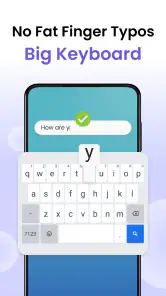
The most useful way to judge a larger keyboard is not by how it looks on its own, but by whether it reduces little errors in the tasks you actually do. I would try it with a short message, a search query, and a name that is easy to mistype. If those feel more comfortable, the extra screen space the keys occupy may be a worthwhile exchange. If you often compose long messages while referring to what is above the keyboard, that same size could feel restrictive.
There is also a practical distinction between easier targeting and faster typing. Bigger keys may help someone who often taps neighboring letters, but they do not automatically make every person type faster. A careful trial is better than assuming the change suits everyone in the household. Let the person who will use it choose whether the larger layout feels reassuring or simply takes up too much room.
For a relative who borrows the phone to send a brief update, I would set it up and let them practice correcting a typo before they write anything important. The correction step matters: a keyboard that is easier to tap is only helpful if the person can also edit the message comfortably. This is a small, concrete test that tells you more than a quick glance at the home screen.
Keeping the phone and accounts separate
The app can make a phone’s interface more approachable, but it should not be mistaken for a shared-device control system. If several people use one handset, each person’s access still depends on the phone’s existing accounts, open apps, and settings. I would close sensitive screens and check the active account before passing the device along, especially if a child is borrowing it or someone needs to use a work app nearby.
More From Our News Desk

Clash of Clans Is Won Between the Battles

Android Auto Makes the Case for Quieter Car Software

MobiOffice: Transforming Mobile Productivity with Seamless Integration

EA SPORTS FC™ Mobile Soccer: Redefining Mobile Sports Gaming

How Microsoft OneDrive Became a Mobile Productivity Giant

How Google Translate Breaks Language Barriers Effortlessly
That boundary is easy to overlook because a simpler launcher can make a device feel more welcoming. A clean route to apps is not the same as a restricted route. If your household needs individual profiles, separate histories, or rules about what each person can open, look to the phone’s built-in user or family settings where available rather than expecting a keyboard-focused personalization app to supply them.
Why Bigger is Better
If you've ever fumbled trying to hit that tiny ‘a’, you’ll appreciate what Big Keyboard: Easy Launcher brings to the table. Designed especially for those who might need a little more room to maneuver their fingers, this app offers a keyboard that’s, well, big. I mean, really big. It’s like your phone suddenly got a jumbo-sized makeover.
Features That Stand Out
What makes this app a game-changer is its simplicity and effectiveness. Once you install it, you’re greeted with a straightforward setup process. No need to dive into the depths of settings to get it working – a couple of taps, and you’re ready to go.
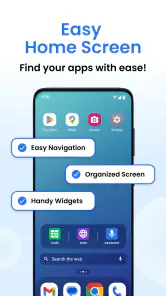
There’s an easy launcher integrated within, so switching between apps is a cinch. And for those late-night texting sessions, the app includes a nifty night mode to give your eyes some much-needed relief. It’s these little thoughtful features that make using your phone more enjoyable and less of a chore.
When setting it up for someone else, I would let them try a few ordinary tasks before relying on it: type a short message, correct a mistake, and move to the app they use most. That quick trial is useful because a larger layout can make keys easier to target, but it also changes how much of the screen the keyboard occupies. If the person prefers seeing more of a conversation while typing, the default keyboard may still feel more comfortable.
Making the switch work for a household
One useful approach is to treat the first day as a trial rather than a permanent makeover. Ask the regular user to try the keyboard during a low-pressure task, such as looking up a shop or writing a quick family message. Then ask what felt easier and what got in the way. This avoids turning a helpful adjustment into a frustrating surprise when someone is trying to send an urgent reply.
If a phone is used by more than one person, agree on who is changing the interface and why. A larger keyboard may help one family member while feeling oversized to another. Since the app affects the phone’s overall interaction rather than creating a separate experience for each borrower, it is worth considering whether the person who needs it is also the person who uses the device most. For occasional borrowers with different preferences, the standard keyboard may be a more neutral default.
For coordination, I would keep expectations modest and practical: tell other household members that the keyboard has changed, show them where the usual apps are, and make sure they know how to return to familiar typing if they prefer it. That simple handover prevents someone from assuming the phone is broken or that a message app itself has changed. It also keeps the adjustment focused on accessibility and ease, rather than implying that the app can coordinate people’s use.
Who Will Love It?
This app is a godsend for anyone who struggles with small screens and tiny keys. Whether it's the elderly who might not be as tech-savvy or simply those of us with larger fingers, the Big Keyboard: Easy Launcher has something for everyone. It doesn’t hurt that the app is super lightweight, ensuring it won’t bog down your device.
I can also see it suiting someone who types short, practical messages throughout the day and values easier key targeting over a long list of keyboard extras. The smart-search idea in its store summary points toward a simpler route to finding things, while the launcher is relevant for people who want app navigation to feel less cluttered. If your priority is advanced text prediction, elaborate themes, or highly tuned typing tools, a feature-rich keyboard may be a better fit than this straightforward approach.
For a shared household device, the age rating is Everyone, which makes the app suitable for a broad audience in that basic sense. That should not be confused with parental controls or a privacy safeguard. I would still guide a child or an older relative through the phone’s normal account and screen settings, and explain which account they are using before they send messages or search.
Age, confidence, and trust
For an older adult who finds small targets tiring, I would introduce the change without making the phone feel like a test. Start with a familiar contact or a search they already know how to perform, and let them decide whether the keys feel easier. If the layout makes them more confident, that is a real benefit; if it makes the screen feel crowded, there is no reason to insist on it just because the keys are larger.
For a child, the same distinction applies. An Everyone age rating is a broad content classification, not a promise that the app supervises messages, blocks purchases, or keeps a child inside approved apps. I would rely on the device’s own safety and account settings for those needs. The app may make basic interaction more comfortable, but household rules and supervision remain separate responsibilities.
Trust also means being clear about what changes and what does not. A person may welcome a simpler keyboard but still want their own account or private conversations. Before sharing a phone, I would explain that the interface has been adjusted while making sure the device is on the intended account. That is especially useful when someone is helping a relative with a message: a larger key does not prevent sending from the wrong profile.
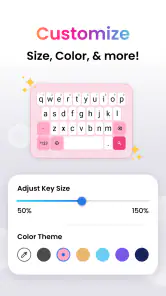
In my personal experience, using it felt like a breath of fresh air. Gone were the days of sending embarrassing typos in important messages. Plus, the customization options, although minimal, were just enough to give me a personalized feel without overwhelming me with choices.
That limited customization is a genuine trade-off: it keeps the experience approachable, but it may not satisfy someone who wants to fine-tune every part of a keyboard. I would also make one small habit part of setup: test typing in the apps used most often, rather than assuming a layout that feels good in one message will suit every task. Search fields, longer notes, and quick replies can each reveal different preferences.
Choosing between this and other keyboard approaches
The usual alternatives are to keep the phone’s built-in keyboard, adjust its available settings, or install a more feature-rich keyboard. The built-in option is sensible if the user already types comfortably or wants the screen to stay less crowded. A more configurable keyboard is a better match for people who value extensive personalization or specialized typing tools. This app’s appeal is narrower: it puts a larger, more approachable layout and simpler navigation ahead of a long menu of refinements.
That focus can be a strength for someone who does not want to spend time tuning a keyboard. It can also be a limitation if two people sharing a device have very different preferences, or if one person needs detailed control over the layout. I would choose it when the main problem is hitting small keys, not when the goal is to build a highly customized typing setup.
A practical tip is to test it in both a familiar messaging app and a search field before deciding. Messaging shows whether the key size helps with names and short replies; search reveals whether the larger keyboard makes it harder to see suggestions or the content around it. If one task improves and another becomes awkward, weigh the tasks the person performs most often rather than expecting one layout to suit every situation.
The Final Word
So, is it worth a download? In my book, absolutely. While it might not boast all the bells and whistles of some other keyboard apps out there, what it does, it does exceptionally well. If you’re tired of battling with your phone’s keyboard, do yourself a favor and give it a try. It’s like having your cake and eating it too, minus the crumbs.
SwipeTap Apps is the developer, and the app is free. It has a 4.5 average from around 25,000 ratings, with more than a million installs. Version 1.1.33 supports Android 12 and later, and the release date is December 21, 2023. Those details make it easy to judge whether it suits your device, but the deciding factor for me would still be the hands-on feel of the enlarged keys.
It is designed for Everyone, so it can be considered by households with users across age groups, but I would not use that rating as a substitute for checking a child’s device settings. The app is best viewed as an interface adjustment: the person using the phone still needs the right account, and whoever owns the device remains responsible for deciding what is accessible.
In a house where one phone is sometimes passed from person to person, I would recommend it when the main need is easier typing and uncomplicated navigation. I would skip it if you need separate household accounts, extensive keyboard controls, or a compact layout that leaves more screen visible. It is a focused personalization choice, not a complete shared-device system, and knowing that boundary makes it much easier to decide whether it belongs on your phone.
In conclusion, this app is a delightful mix of functionality and simplicity. It’s perfect for those who value ease of use over flashy features, and it’ll make typing on your phone a whole lot less frustrating. Give it a whirl; your thumbs will thank you!
Big Keyboard: Easy Launcher Frequently Asked Questions
Can Big Keyboard: Easy Launcher help me find apps more easily?
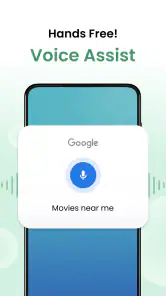
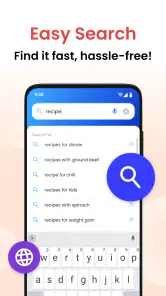
The app’s smart search is part of its simplified phone experience, alongside an easy home screen and a big keyboard. It may be useful if you want a straightforward way to look for things on your phone rather than navigating a more crowded layout. The search feature is one of the reasons to consider whether this app’s simpler approach matches how you use your device.
Is Big Keyboard: Easy Launcher suitable for someone who finds small text or keys difficult to use?
Its large keyboard and simplified home screen are intended to make common phone interactions easier to see and use. That approach may suit people who find standard-sized keys or a busy layout uncomfortable, including some users with visual impairments. Whether it feels comfortable will depend on personal preference, so consider the app’s focus on larger, clearer controls when deciding if it fits your needs.
What should I check before installing Big Keyboard: Easy Launcher?
Big Keyboard: Easy Launcher is a personalization app for Android, so check that your device runs Android 12 or later before downloading. It is intended to simplify the home screen and make typing more comfortable with a big keyboard and smart search. The app is rated for Everyone, which may also help you decide whether it is suitable for your household.
Who develops Big Keyboard: Easy Launcher, and is it widely used?
The app is developed by SwipeTap Apps. It has over one million installs and an average rating of 4.5 from around 25,000 ratings, with about 2,600 written reviews. Those figures suggest that many Android users have tried it, though individual experiences can differ depending on their devices and preferences. Reading recent reviews can help you judge whether its simplified layout suits the way you use your phone.
What is Big Keyboard: Easy Launcher?
Big Keyboard: Easy Launcher is an application designed to enhance accessibility on Android devices by providing larger, easier-to-read keys and a simplified interface. It's particularly useful for individuals with visual impairments or those who prefer a more straightforward user experience. The app combines a large keyboard with an easy launcher, making it simple to navigate and type without straining your eyes.
Pros
- Large keys improve typing accuracy.
- Simple interface for easy navigation.
- Customizable themes for personalization.
- Supports multiple languages.
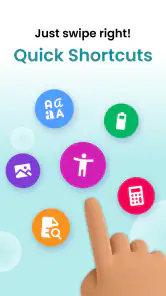
- Quick access to favorite apps.
Cons
- Limited advanced features.
- Not optimized for tablets.
- Occasional lag on older devices.
- Ads present in free version.
- No gesture support.
- Category
- Personalization
- Version
- 1.1.33











