

Big Bus Tours: Hop On, Hop Off
- 347.00
- 4.3
- Installs
- 1.00M
- Price
- Free

Screenshots
Analysis by Reviewed
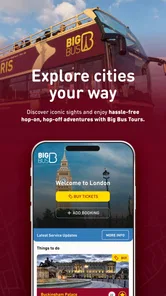
When I’m visiting a city, I want to spend less time guessing where a bus is and more time deciding what to see next. That’s the practical appeal of Big Bus Tours: it brings tour information, ticket options, maps, bus tracking, alerts, and nearby attractions into one travel app. It is aimed at people using Big Bus Tours, rather than anyone looking for a general-purpose transport planner, and that focus shapes both its strengths and its limits.
Start with the route, then shape the day
My baseline workflow is simple: choose the city and tour, look over the stops, and identify a small number of places I actually want to visit. I’d rather make two or three deliberate stops than treat the route as a checklist. That leaves time for an unplanned lunch or a longer visit when somewhere catches my attention, while the bus remains a convenient way to connect sightseeing areas.
Before boarding, I’d confirm that I’m looking at the right city and tour, then check how the stops fit together. This matters most when a group is traveling together: agreeing on one or two priorities before setting off avoids spending the ride debating every possible stop. The app can help keep the plan visible, but it works best when the travelers make the choices rather than expecting the route to decide what matters.
It’s also worth treating the tour as an orientation tool, not just transportation. On a first visit, the ride and commentary can help me understand where the main sights sit in relation to one another. I can then decide which area deserves a closer look on foot. If I already know the city well, that introductory value is smaller, and a direct transit or walking plan may get me where I need to go more efficiently.
Discovering the Features
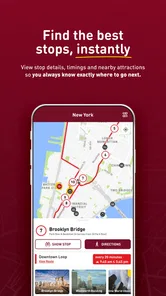
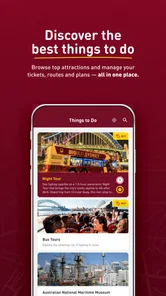
First off, the Big Bus Tours app is like having a personal guide right in your pocket. With its user-friendly interface, you can easily choose your desired city and get a comprehensive list of available tours. The app provides detailed information about each stop, so you can plan your day with ease. And guess what? You can even book your tickets directly through the app. Talk about convenience!
A Tour Guide in Your Pocket
One of the coolest features is the audio commentary available in multiple languages. Whether you're an English speaker or prefer French, Spanish, or Mandarin, the app has got you covered. The commentary is filled with fun facts and historical insights that make each stop more engaging. It's like having a local friend sharing their city secrets with you.
I’d use the commentary to add context during the ride, then pause it mentally when I’m ready to talk with my companions or simply take in the view. It is a useful middle ground between a silent transfer and arranging a separate guided visit. For travelers who want deep, specialist history at every landmark, though, a dedicated tour or museum guide may offer more depth than an overview designed to accompany a bus route.
More From Our News Desk

 Weather - By Xiaomi
Weather by Xiaomi Review: Clear at a Glance, Less Clear Up Close
Xiaomi’s weather app makes everyday forecasts quick to scan, but its calm surface can leave useful details and recovery paths harder to find than they should be.

 X
XX Under Pressure: Can It Recover When Posting Goes Wrong?
A resilience-focused review of X, examining setup, mistaken posts, interruptions, weak connections, and the gaps that matter when recovery needs to be dependable.

 Clash of Clans
Clash of Clans Is Won Between the Battles
Its raids are quick; its community is a long-term project of coordination, teaching, rivalry, and shared responsibility—with all the friction that entails.

 Android Auto
Android Auto Makes the Case for Quieter Car Software
The car interface is no longer judged by how much it can do, but by how quietly it helps. Android Auto shows what drivers now expect—and what still gets in the way.

 MobiOffice: Word, Sheets, PDF
MobiOffice: Transforming Mobile Productivity with Seamless Integration
MobiOffice: Word, Sheets, PDF is redefining mobile productivity with a surprising blend of functionality and innovation.

 EA SPORTS FC Soccer Mobile 26
EA SPORTS FC™ Mobile Soccer: Redefining Mobile Sports Gaming
Dive into EA SPORTS FC™ Mobile Soccer, where immersive gameplay and strategic depth transform mobile sports gaming.
Latest News



Language choice can also affect how relaxed the ride feels. If several people are traveling together, I’d settle on a shared language before setting off rather than repeatedly changing what each person listens to. The practical benefit is not just understanding facts; it’s keeping the group’s experience coherent while leaving everyone free to explore independently once they get off.
Real-Time Bus Tracking
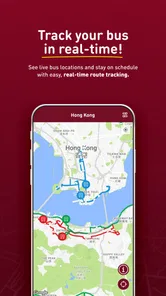
Gone are the days of anxiously waiting at the bus stop. The app offers real-time bus tracking, so you know exactly when your ride will arrive. This feature is a lifesaver, especially during peak tourist seasons when the streets are buzzing with activity. Just whip out your phone, check the app, and you'll know if you have time to grab that extra coffee before your bus arrives.
In practice, I’d check the map before walking away from a stop rather than relying on a quick glance from across the street. If the bus is not close, I can use that gap for a nearby attraction or a proper break; if it is approaching, I can stay put. Tracking is helpful for timing, but city traffic can still make any arrival estimate a moving target, so I wouldn’t plan a tight appointment around it.
That distinction is important if I’m traveling with children, someone who walks slowly, or a group that tends to get separated. I’d use the location view to make a calm decision about whether to wait, not to send one person rushing across a street because the bus seems close. A map is useful context, but it does not replace checking the actual stop and paying attention to local conditions.
Personalized Experience
Customization is key, and this app gets it right. You can create your own itinerary based on your interests. Whether you're a history buff, a foodie, or someone who loves a bit of everything, the app lets you set your preferences. Plus, with its offline maps feature, you can explore the city without worrying about data charges. Perfect for the savvy traveler!
I’d be cautious about interpreting offline access too broadly. Having map information available can be helpful when coverage is patchy or I want to avoid relying on mobile data, but live bus positions and current alerts depend on up-to-date information reaching the phone. My habit would be to review the route and stops while connected, then use the live features when a connection is available. That gives me a fallback without assuming every part of the app behaves the same way offline.
A smoother day starts before boarding
My best routine would be to choose a tour and review its stops before leaving the hotel, then save the few places I most want to see as priorities. That prevents a common sightseeing mistake: getting on simply because a bus has arrived, without knowing whether the next stop suits the day’s plan. I’d also check the app’s alerts and map before heading out, so a change or useful notice is less likely to catch me while I’m already on the move.
For a realistic day, imagine arriving in a city for the first time with only the morning free. I’d use the tour to get an overview, listen to the commentary between stops, and choose one place to explore on foot rather than trying to cram in every attraction. After lunch, tracking can help me decide whether to wait for another bus or walk to the next stop. The app is most useful when it supports those choices, not when I expect it to make every decision for me.
For a family or a small group, I’d add one more repeatable habit: agree on a meeting point before anyone wanders off to browse. A tour stop gives the day a shared structure, but different people may want different amounts of time at an attraction. Knowing which stop comes next makes it easier to set a sensible plan for rejoining without turning every break into a group negotiation.
It can also work well for a short layover or an arrival day when I’m not ready to commit to a packed itinerary. I’d use the route to get a feel for the city, then decide whether to stay aboard for an overview or get off at one appealing stop. That flexibility is more valuable than trying to squeeze in as many landmarks as possible, particularly when the day’s energy or timing is uncertain.
Settings and practical trade-offs
Before relying on it away from home, I’d check that the selected city and tour are the ones I intend to use, and make sure I understand which map information is available offline. Offline access can be reassuring when mobile data is limited, but I would not assume that every live element works without a connection; bus positions and alerts are most valuable when the phone can receive current information. I’d also keep the route or stop details I need easy to reopen, instead of counting on memory while navigating a busy street.
Another useful habit is to check the app before leaving a café or attraction, rather than only after reaching the stop. That gives me time to see whether I should head back, take a short walk, or adjust the next part of the plan. I’d avoid repeatedly refreshing the map when I’m not making a decision: a quick check at a meaningful moment is less distracting and keeps the phone from taking over a sightseeing day.
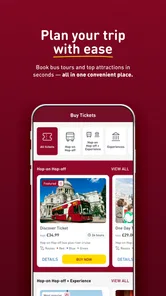
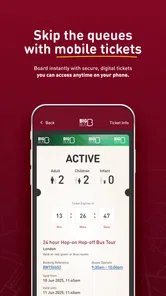
Ticket handling is one reason to plan the app into the day, but I’d still make sure I know where to find the relevant ticket information after booking. Keeping that step separate from route browsing reduces fumbling when it’s time to board. If I’m buying for several people, I’d confirm the group’s plans before completing the purchase, since changing a day’s direction after everyone has committed can be more awkward than agreeing on priorities first.
Compared with a standard map app, Big Bus Tours is more focused on sightseeing stops, tour details, and the operator’s buses; a general map is usually the better choice for comparing walking routes, local transit, and places beyond the tour network. Compared with buying a ticket in person, booking in the app can keep planning and ticket access together, but it makes less sense if you prefer to decide everything spontaneously at the stop. The central trade-off is convenience within the Big Bus Tours experience, not complete coverage of a city’s transport options.
I’d use both kinds of tool when the day calls for it. The tour app can help me decide where to board and which sightseeing stop fits the plan, while a general map is better for finding a restaurant tucked away from the route or comparing a walk with local transit. That split is more practical than expecting one app to be equally good at the operator’s tour and every ordinary city journey.
The app is also not the obvious pick when the aim is simply to reach a specific address quickly. A local transit planner may be more useful for comparing bus, train, or walking options, and walking directions can make more sense for nearby destinations. I’d choose the tour when the ride and sightseeing experience are part of the point, not just because a bus happens to be available.
Who will get the most from it
I’d recommend it to visitors who want an easy first look at a city, families or groups who benefit from agreeing on a simple route, and travelers who like combining guided commentary with independent stops. It is less compelling for residents, people who already know the city’s transit system, or anyone whose main aim is the cheapest and fastest way from one address to another. If you need detailed door-to-door directions or a broad comparison of public transport, a general navigation or transit app is the more suitable companion.
It suits travelers who prefer a little structure without signing up for a full day of fixed activities. Someone arriving with a loose list of sights can use the stops to organize that list, while a visitor who wants to wander without a route may find the app’s operator-specific focus unnecessary. I’d also skip relying on it as the only plan for a time-sensitive commitment: the bus is affected by traffic, and a live map cannot make the journey predictable enough for a tight schedule.
For people deciding whether to install it before traveling, the practical question is whether they expect to take a Big Bus tour. If yes, having tour details, maps, ticket booking, commentary, and tracking together is a clear convenience. If not, a regular map or local transit app is likely to be more useful throughout the trip. The app’s value comes from serving that particular outing well, rather than replacing every travel tool on the phone.
Big Bus Tours is a free travel app from BIG BUS TOURS LTD, and its 4.5 average rating from around 6,200 ratings suggests that many users find the focused approach worthwhile. It has over 1 million installs, is rated for Everyone, and version 5.11.1 supports devices running Android 7.0 or later. It has been available since February 18, 2013, so it is an established option rather than a new experiment; still, I’d check that the city and tour I need are represented before building a whole day around it.
So, if you're planning your next city adventure, give the Big Bus Tours app a whirl. With its plethora of features and easy-to-use interface, you're bound to have an unforgettable experience. It's more than just a bus ride; it's a journey filled with stories, sights, and memories waiting to be made!
In conclusion, the Big Bus Tours app is a must-have for anyone looking to explore a new city seamlessly. From booking tickets to learning about local history, it's your one-stop-shop for all things travel. So, pack your bags, download the app, and let the adventure begin!
My verdict after weighing the trade-offs
I like the app best as a companion to a planned sightseeing day: it puts tour choices, stops, ticket booking, commentary, and bus location in one place, while still leaving me free to explore at my own pace. I would not use it as my only navigation tool or expect live tracking to remove the uncertainty of city traffic. If that distinction suits your trip, it can make a Big Bus outing easier to organize; if you mainly need everyday transit directions, I’d choose a broader travel app instead.
My recommendation is to install it when the tour is already part of your plans, check the route and ticket details before setting out, and use tracking as a prompt for decisions rather than a promise of exact timing. That approach gets the most from its focused design while leaving room for the parts of city travel it cannot replace: local transit choices, independent directions, and the freedom to change plans when a better idea appears.
Big Bus Tours: Hop On, Hop Off Frequently Asked Questions
Is the Big Bus Tours app free to download, and is it suitable for all ages?
The Big Bus Tours app is free to download and is designed for a general audience, with an Everyone content rating. It may be useful to install before your trip so you can explore its travel tools and get familiar with the information it offers. Keep in mind that downloading the app is separate from purchasing a tour ticket through it.
What features does the Big Bus Tours app offer to enhance my sightseeing experience?
The Big Bus Tours app offers a range of features designed to enhance your sightseeing adventures. With real-time bus tracking, you can easily find the nearest bus stop and see estimated arrival times. The app also provides a selection of audio guides and maps, helping you to explore the city at your own pace. Additionally, the app offers exclusive deals and discounts for various attractions and restaurants, making your trip both enjoyable and affordable.
Is the Big Bus Tours app available for both Android and iOS devices?
Yes, the Big Bus Tours app is available for download on both Android and iOS devices. You can find it on the Google Play Store for Android devices and the Apple App Store for iOS devices. The app is free to download and is regularly updated to ensure compatibility and performance on a wide range of devices.
How can I purchase tickets using the Big Bus Tours app?
Purchasing tickets through the Big Bus Tours app is a straightforward process. Once you have downloaded the app, you can browse through the available tours in different cities. Select your desired tour and follow the on-screen instructions to purchase your tickets securely. The app accepts various payment methods, ensuring a hassle-free ticket buying experience. Your tickets will be stored in the app, making it convenient to access them when needed.
Does the Big Bus Tours app offer offline functionality for travelers without internet access?
The Big Bus Tours app provides some offline functionality to assist travelers who may not have consistent internet access. While features like real-time bus tracking require an internet connection, the app allows you to download maps and audio guides in advance. This means you can still enjoy guided tours and navigate the city without needing to be online constantly, ensuring a smooth sightseeing experience.
Pros
- Comprehensive city tours available.
- User-friendly app interface.
- Access to real-time bus tracking.
- Includes audio guides in multiple languages.
- Frequent updates on tour schedules.
Cons
- Limited coverage in smaller cities.
- App requires stable internet connection.
- Some features behind a paywall.
- Occasional glitches in bus tracking.
- May drain battery due to GPS usage.











